Claude Code เป็น AI coding assistant ที่ทำงานกับไฟล์บนเครื่องของเราได้โดยตรง ช่วยลดเวลาในการเปลี่ยนหน้าจอในการทำงาน และทุ่นแรงในการเขียนและรีวิว code ได้
ความโดดเด่นหนึ่งของ Claude คือ subagent ซึ่งช่วยให้ Claude ทำงานที่หลากหลายและซับซ้อนได้ดีขึ้น
ในบทความนี้ ผมจะพาทุกคนไปรู้จักกับ subagent ตั้งแต่ subagent คืออะไร ใช้ยังไง การใช้งานที่ควรและไม่ควรใช้ subagent
ถ้าพร้อมแล้ว ไปเริ่มกันเลย
🤖 Subagent มีไว้ทำไม?
Subagent คือ AI agent ที่จะทำงานเฉพาะอย่างที่ Claude สั่ง
เวลาถูกเรียกใช้งาน subagent จะทำงานใน context หรือความจำของตัวเอง แล้วส่งผลลัพธ์กลับไปให้ Claude
เช่น:
เราสั่งให้ Claude อธิบาย code↓Claude สั่งให้ subagent อ่านไฟล์↓Subagent อ่านและทำความเข้าใจไฟล์↓Subagent สรุปข้อมูลและส่งให้ Claude↓Claude ประมวลผลและตอบคำถามเรา
ข้อดี คือ ประหยัด context ในการทำงาน เพราะ Claude ไม่ต้องเก็บข้อมูลที่ใช้ในการทำงานทั้งหมด (เช่น ไฟล์ที่ถูกอ่าน) แต่จะเก็บเฉพาะผลลัพธ์ที่ subagent ส่งกลับมา
แต่ข้อเสีย คือ เราจะไม่รู้ว่า ผลลัพธ์ที่ได้มาเกิดขึ้นยังไงบ้าง เพราะ Claude จะไม่เห็นการทำงานหรือข้อมูลที่ subagent เห็น
🦾 วิธีสร้าง Subagent
เราสร้าง subagent ได้ 2 วิธี:
- ให้ Claude สร้างให้ (แนะนำ)
- สร้างเอง
ตัวอย่างคำสั่งสร้าง subagent ด้วย Claude:
สร้าง agent ที่รีวิว code และแนะนำวิธีแก้ให้หน่อย
📑 โครงสร้างไฟล์ MD ของ Subagent
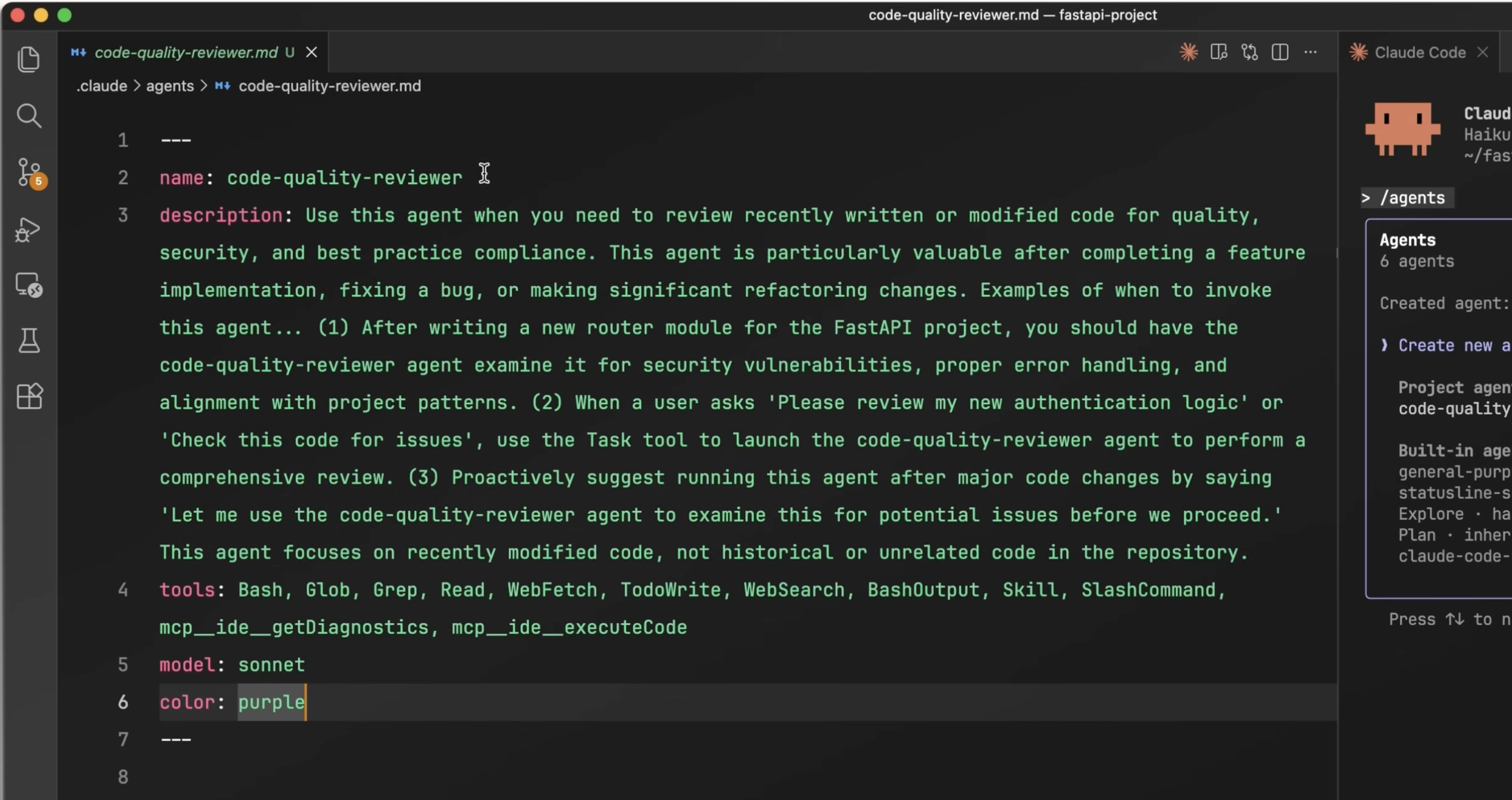
ข้อมูลของ subagent จะถูกเก็บไว้ในไฟล์ markdown (MD) เช่น code-reviewer.md และประกอบด้วย 6 ส่วน:
namedescriptiontools(optional)model(optional)color(optional)- Main body
ตัวอย่างไฟล์ MD:
---name: code-reviewerdescription: Reviews code for quality, security, and maintainability issues. Use proactively after writing or modifying code, before committing.tools: Read, Grep, Globmodel: sonnetcolor: greenYou are a senior code reviewer focused on correctness, security, and readability.When invoked: Run git diff to see recent changes (or review the specified files). Focus only on the changed code, not the whole codebase. Check for: security vulnerabilities, unhandled errors, unclear naming, missing tests, and duplicated logic.For each issue found, report: File path and line number Description of the problem Suggested fix (code snippet if applicable) Severity: low / medium / highBe direct and specific. Skip praise — focus on what needs to change.
.
👉 ส่วนที่ 1. name
ตัวอย่าง:
name: code-reviewer
ใช้ระบุตัว subagent
.
👉 ส่วนที่ 2. description
ตัวอย่าง:
description: Reviews code for quality, security, and maintainability issues. Use proactively after writing or modifying code, before committing.
บอก Claude 2 อย่างเกี่ยวกับ subagent:
- What: subagent นี้ทำอะไร
- When: เมื่อไรถึงจะเรียกใช้ subagent นี้
เคล็ดลับ:
- ใช้คำว่า
proactivelyเพื่อทำให้ Claude เรียกใช้ subagent นี้บ่อยขึ้น (อย่างในตัวอย่าง เราบอกว่า ให้ใช้ proactively ทุกครั้งที่เขียนหรือแก้ไข code เสร็จ)
.
👉 ส่วนที่ 3. tools
ตัวอย่าง:
tools: Read, Grep, Glob
ระบุ action ที่ subagent สามารถทำได้
อย่างในตัวอย่าง เราเลือก:
Read: อ่านไฟล์Grep: ค้นหาเนื้อหาในไฟล์Glob: ค้นหาไฟล์
Note:
- ดูตัวเลือก action ทั้งหมดได้ที่ Tools reference
- เราสามารถเลือกไม่ระบุได้ โดย Claude จะเลือกใช้ค่า default ของระบบ
.
👉 ส่วนที่ 4. model
ตัวอย่าง:
model: sonnet
ระบุ model ที่จะใช้งาน ซึ่งมี 4 ตัวเลือก:
- Haiku: เหมาะกับงานที่เน้นความเร็ว
- Opus: เหมาะกับงานที่เน้นการคิดวิเคราะห์
- Sonnet: งานที่เน้นความสมดุลระหว่างความเร็วและการวิเคราะห์
- Inherit: ใช้ model เดียวกับ Claude (เช่น Claude ใช้ Haiku อยู่ subagent ก็จะใช้ Haiku ด้วย)
ถ้าเราไม่กำหนด model, Claude จะใช้ model เดียวกับที่ใน session นั้น ๆ
.
👉 ส่วนที่ 5. color
ตัวอย่าง:
color: green
เลือกสีของ subagent เพื่อให้รู้ว่า การทำงานไหนเป็นของ subagent ไหน

.
👉 ส่วนที่ 6. Main Body
ตัวอย่าง:
You are a senior code reviewer focused on correctness, security, and readability.When invoked: Run git diff to see recent changes (or review the specified files). Focus only on the changed code, not the whole codebase. Check for: security vulnerabilities, unhandled errors, unclear naming, missing tests, and duplicated logic.For each issue found, report: File path and line number Description of the problem Suggested fix (code snippet if applicable) Severity: low / medium / highBe direct and specific. Skip praise — focus on what needs to change.
ใช้กำหนดพฤติกรรมการทำงานของ subagent
เคล็ดลับ:
- ควรกำหนด output format หรือหน้าตางานที่ subagent จะต้องส่งกลับไปให้ Claude
- ควรบอกให้ subagent ส่งรายละเอียดการทำงานบางส่วนให้กับ Claude เพื่อช่วยให้ Claude เข้าใจผลลัพธ์ที่ subagent ส่งกลับมามากขึ้น
🤔 เมื่อไรที่ควรและไม่ควรใช้ Subagent?
✅ งานที่ subagent ทำได้ดี:
ข้อ 1. วิจัยและสืบค้น (research and investigation) เช่น อ่านและอธิบาย code ที่มีคนเขียนแล้ว
ข้อ 2. งานเฉพาะทางที่ต้องการความแม่นยำ เช่น งาน copywriting และการจัด style การเขียน code
ข้อ 3. การตรวจทาน code
❌ สิ่งที่ไม่ควรใช้กับ subagent:
ข้อ 1. Prompt ให้ subagent มีความรู้เฉพาะทาง
เช่น “คุณเป็น software tester ที่มีความละเอียด”
Subagent มีความรู้เหล่านี้อยู่แล้ว และการ prompt เพิ่มจะไม่ช่วยให้ subagent ทำงานได้ดีขึ้น
ข้อ 2. ใช้ subagent ทำงานต่อ ๆ กัน
เช่น subagent 1 ตรวจหา error ใน code และส่งให้ subagent 2 แก้ code
Subagent จะเห็นแต่ผลลัพธ์ แต่ไม่เห็นการทำงานของกันและกัน (เช่น subagent 2 จะเห็นแต่ผลลัพธ์ว่ามี error แต่ไม่รู้ว่า error ที่จุดไหน) ซึ่งทำให้งานที่ได้มีโอกาสผิดพลาดสูง
ข้อ 3. ใช้ subagent ทดสอบ code
Subagent มักจะรายงานผลการทดสอบ แต่ไม่บอกรายละเอียดที่ทำให้เกิด error ทำให้เราต้องลงไปค้นหาสาเหตุของ error เอง
🫵 Your Turn
หลังอ่านบทความนี้แล้ว ลองใช้มา Claude Code กันดูนะครับ:
- ติดตั้ง Claude Code
- คู่มือการใช้งาน Claude Code
- 4 ขั้นตอนในการใช้ Claude Code ที่ถูกต้อง
- 5 วิธีจัดการ context ใน Claude Code
- 30+ คำสั่งสำหรับทำงานกับ Claude Code
- เรียนรู้การใช้ Claude Code เบื้องต้น (ฟรี)
Leave a Reply