
ใครที่ติดตามงานเขียนของผม จะสังเกตว่าบทความของผมมีชื่อ (meta title) ยาวหลาย 10 บรรทัด จนกระทั่งเมื่อไม่นานมานี้:

นั่นเป็นเพราะว่า ผมเข้าใจคำว่า long-tail keyword ผิดมาตลอด 😅
ผมเข้าใจว่า long-tail keyword คือ การเขียนชื่อบทความให้ยาวและมีความแตกต่าง ❌
แต่จริง ๆ long-tail keyword ไม่ต้องยาว แค่ต้องมีความเจาะจงเพื่อให้เข้าถึงผู้อ่านได้ง่าย ✅
เช่น:
❌ Python (กว้างเกินไป)
❌ วิธีเขียนโปรแกรม Python สำหรับวิเคราะห์ข้อมูลและพัฒนาเว็บไซต์แบบมืออาชีพ พร้อมตัวอย่างโค้ดที่ใช้งานได้จริงทุกระดับตั้งแต่เริ่มต้นจนถึงขั้นสูง (ยาวเกินไป)
✅ เช็กความยาวของ Meta Title ด้วย Pillow ใน Python (เจาะจง ตรงประเด็น และยาวพอดี)
ชื่อบทความควรมีความยาว 50–60 ตัวอักษร หรือ 580–600 pixels เพื่อให้แสดงผลบน Google ได้โดยไม่ถูกตัดคำเป็น “…” แบบนี้:

เราสามารถนับตัวอักษรได้ง่าย ๆ แต่ถ้าจะดี เราควรจะนับความยาว pixel ซึ่งไม่ตรงไปตรงมาเหมือนกับการนับตัวอักษร
หลังจาก Google ดู ผมก็เจอการคำนวณ pixel ใน Python ด้วย package ชื่อ Pillow ซึ่งใช้ง่ายใน 2 ขั้นตอนดังนี้
1️⃣ ขั้นที่ 1. สร้าง Font Object
ในขั้นแรก เราต้องสร้าง Font object ที่ Pillow ใช้คำนวณความยาว
ก่อนจะสร้าง font object เราจะต้องโหลด font ที่ต้องการ เช่น Arial Bold ซึ่งเป็น font เดียวกันกับหน้า Google Search:
# Import the packagefrom pathlib import Path# Set the font pathfont_path = Path("/System/Library/Fonts/Supplemental/Arial Bold.ttf
จากนั้น สร้าง Font object โดยใส่ font และ font size (18) ลงไป:
# Import the packagefrom PIL import ImageFont# Set the default fontdefault_font = ImageFont.truetype( str(font_path), 18)
2️⃣ ขั้นที่ 2. คำนวณความยาว
ในขั้นที่ 2 เราจะคำนวณความยาว ด้วย .getlength() และชื่อบทความที่ต้องการ:
# Set the titlemy_title = "เช็กความยาวของ Meta Title ด้วย Pillow ใน Python"# Estimate the title length in pixeltitle_length = default_font.getlength(my_title)
จากนั้น แสดงผลการคำนวณ:
# Set the recommended lengthrecommended_length = 580# Print the title lengthif title_length <= recommended_length: print(f"🟢 Title is within the recommended length ({title_length} pixels).")else: print(f"🔴 Title is too long ({title_length} pixels).")
ผลลัพธ์:
🟢 Title is within the recommended length (501.0 pixels).
🍩 Bonus: เขียน Function เปรียบเทียบความยาว
ในกรณีที่เรามีหลายชื่อ และไม่รู้จะเลือกชื่อไหน เราสามารถเขียน function ไว้เปรียบเทียบความยาวได้แบบนี้:
# Import the packageimport polars as pl# Convert to a functiondef estimate_title_length(titles): # Instantiate a collector results = [] # Loop through the titles for title in titles: # Estimate the length title_length = default_font.getlength(title) # Append to the results results.append({ "Title": title, "Length (px)": title_length, "Is Within Range": ( "🟢" if title_length <= recommended_length else "🔴" ) }) # Return the results as a Polars DataFrame return pl.DataFrame(results)
ทดสอบ function:
# Test the functiontitles = [ "เช็กความยาวของ Meta Title ด้วย Pillow ใน Python", "วิธีวิเคราะห์ Meta Title Length ด้วย Pillow ใน Python", "คู่มือฉบับสมบูรณ์สำหรับการคำนวณความยาวของ Meta Title ด้วย Pillow ใน Python พร้อมตัวอย่างการวิเคราะห์",]# Call the functiondf = estimate_title_length(titles)# Display the resultsdf
ผลลัพธ์:
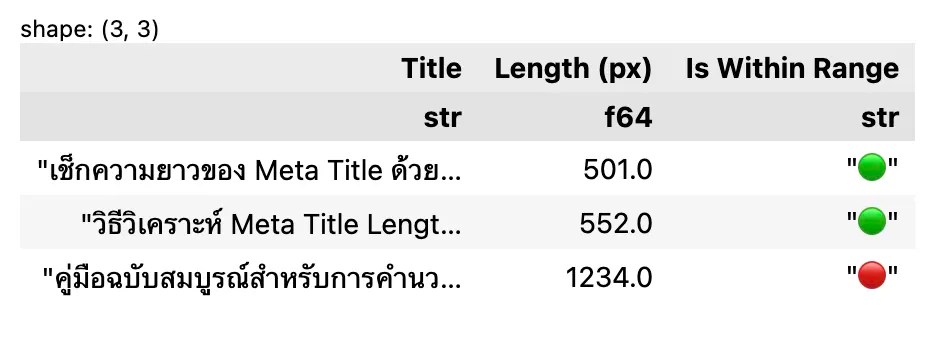
จะเห็นได้ว่า การเช็กความยาวของ meta title ใน Python ง่ายนิดเดียว
🫵 Your Turn
หลังจบบทความนี้แล้ว ลองมาคำนวณความยาวชื่อบทความใน Python กันครับ
 Shi no Shigoto
Leave a comment