<SQL>
SELECT
  `AlbumId`,
  COUNT(*) AS `tracks`,
  AVG(`Milliseconds`) AS `mean_millisec`,
  SUM(`Bytes`) AS `total_bytes`
FROM `Track`
GROUP BY `AlbumId`
ORDER BY `mean_millisec` DESC
💪 ผมขอแนะนำ R Book for Psychologists หนังสือสอนใช้ภาษา R เพื่อการวิเคราะห์ข้อมูลทางจิตวิทยา ที่เขียนมาเพื่อนักจิตวิทยาที่ไม่เคยมีประสบการณ์เขียน code มาก่อน
ในหนังสือ เราจะปูพื้นฐานภาษา R และพาไปดูวิธีวิเคราะห์สถิติที่ใช้บ่อยกัน เช่น:
Correlation
t-tests
ANOVA
Reliability
Factor analysis
🚀 เมื่ออ่านและทำตามตัวอย่างใน R Book for Psychologists ทุกคนจะไม่ต้องพึง SPSS และ Excel ในการทำงานอีกต่อไป และสามารถวิเคราะห์ข้อมูลด้วยตัวเองได้ด้วยความมั่นใจ
ถ้าเราใส่ค่าไม่ถูกต้องลงใน function เราจะได้ผลลัพธ์ที่ผิดกลับมา เช่น ใส่ height เป็น cm:
# Using incorrect input
wrong_bmi = calculate_bmi(weight=80, height=180)

# Print the result
print(wrong_bmi)
ผลลัพธ์:
0.0
.
🥸 What Is Docstring?
เราสามารถแก้ปัญหานี้ได้ 2 วิธี:
ตั้งชื่อ arguments ให้เรารู้ว่า ต้องใส่อะไรใน function (เช่น height_in_m, weight_in_kg)
ใส่ docstring หรือ string ที่เก็บวิธีใช้ function ไว้
เราสามารถเพิ่ม docstring ใน function ได้แบบนี้:
# Adding docstring to the function
def calculate_bmi(height, weight):

    # Docstring
    """
    Calculate BMI using weight and height:
    - Weight: kg
    - Height: m

    Return BMI rounded to 2 decimals.
    """

    # Calculate BMI
    bmi = weight / (height ** 2)

    # Round to 2 decimals
    bmi_rounded = round(bmi, 2)

    # Return BMI
    return bmi_rounded
Pro tip: เราควรใส่ docstring ไว้ใน function โดยเฉพาะใน code ที่ใช้งานร่วมกับคนอื่น เพื่อให้คนอื่นเข้าใจการทำงาน function ของเรา
.
😎 Reading Docstring
เราสามารถอ่าน docstring ได้ 2 วิธี:
วิธีที่ 1. ใช้ help():
# Read docstring with help()
help(calculate_bmi)
ผลลัพธ์:
Help on function calculate_bmi in module __main__:

calculate_bmi(height, weight)
    Calculate BMI using weight and height:
    - Weight: kg
    - Height: m

    Return BMI rounded to 2 decimals.
วิธีที่ 2. ใช้ .__doc__:
# Read docstring with .__doc__:
print(calculate_bmi.__doc__)
ผลลัพธ์:
Calculate BMI using weight and height:
    - Weight: kg
    - Height: m

    Return BMI rounded to 2 decimals.
Default arguments เป็นค่าที่ function จะเรียกใช้ถ้าเราไม่กำหนด arguments เอง
ยกตัวอย่างเช่น สร้าง function สำหรับคิดเลขยกกำลัง ซึ่งจะยกกำลัง 2 โดย default:
# Create a function with default arguments
def calculate_power(number, power=2):

    # Calculate number to the power of power
    result = number ** power

    # Return result
    return result

# Call the function without power
print(calculate_power(10))
ผลลัพธ์:
100
แต่ถ้าเรากำหนด power เอง:
# Call the function with power
print(calculate_power(10, 3))
# List columns in a table
dbGetQuery(con,
           "PRAGMA table_info(Artist)")
ผลลัพธ์:
  cid     name          type notnull dflt_value pk
1   0 ArtistId       INTEGER       1         NA  1
2   1     Name NVARCHAR(120)       0         NA  0
ในกรณีที่เราต้องการดู columns ในทุก table เราสามารถใช้ for loop ช่วยได้แบบนี้:
# Get the table list
tables <- dbListTables(con)

# Get all columns
for (table_name in tables) {

  # Print the table name
  message(paste0("\\n👉 Table: ", table_name))

  # Get the columns
  column_info <- dbGetQuery(con,
                            paste0("PRAGMA table_info(",
                                   table_name,
                                   ")"))

  # Print the columns
  print(column_info)
}
ผลลัพธ์:
👉 Table: Album
  cid     name          type notnull dflt_value pk
1   0  AlbumId       INTEGER       1         NA  1
2   1    Title NVARCHAR(160)       1         NA  0
3   2 ArtistId       INTEGER       1         NA  0
👉 Table: Artist
  cid     name          type notnull dflt_value pk
1   0 ArtistId       INTEGER       1         NA  1
2   1     Name NVARCHAR(120)       0         NA  0
👉 Table: Customer
   cid         name         type notnull dflt_value pk
1    0   CustomerId      INTEGER       1         NA  1
2    1    FirstName NVARCHAR(40)       1         NA  0
3    2     LastName NVARCHAR(20)       1         NA  0
4    3      Company NVARCHAR(80)       0         NA  0
5    4      Address NVARCHAR(70)       0         NA  0
6    5         City NVARCHAR(40)       0         NA  0
7    6        State NVARCHAR(40)       0         NA  0
8    7      Country NVARCHAR(40)       0         NA  0
9    8   PostalCode NVARCHAR(10)       0         NA  0
10   9        Phone NVARCHAR(24)       0         NA  0
11  10          Fax NVARCHAR(24)       0         NA  0
12  11        Email NVARCHAR(60)       1         NA  0
13  12 SupportRepId      INTEGER       0         NA  0
👉 Table: Employee
   cid       name         type notnull dflt_value pk
1    0 EmployeeId      INTEGER       1         NA  1
2    1   LastName NVARCHAR(20)       1         NA  0
3    2  FirstName NVARCHAR(20)       1         NA  0
4    3      Title NVARCHAR(30)       0         NA  0
5    4  ReportsTo      INTEGER       0         NA  0
6    5  BirthDate     DATETIME       0         NA  0
7    6   HireDate     DATETIME       0         NA  0
8    7    Address NVARCHAR(70)       0         NA  0
9    8       City NVARCHAR(40)       0         NA  0
10   9      State NVARCHAR(40)       0         NA  0
11  10    Country NVARCHAR(40)       0         NA  0
12  11 PostalCode NVARCHAR(10)       0         NA  0
13  12      Phone NVARCHAR(24)       0         NA  0
14  13        Fax NVARCHAR(24)       0         NA  0
15  14      Email NVARCHAR(60)       0         NA  0
👉 Table: Genre
  cid    name          type notnull dflt_value pk
1   0 GenreId       INTEGER       1         NA  1
2   1    Name NVARCHAR(120)       0         NA  0
👉 Table: Invoice
  cid              name          type notnull dflt_value pk
1   0         InvoiceId       INTEGER       1         NA  1
2   1        CustomerId       INTEGER       1         NA  0
3   2       InvoiceDate      DATETIME       1         NA  0
4   3    BillingAddress  NVARCHAR(70)       0         NA  0
5   4       BillingCity  NVARCHAR(40)       0         NA  0
6   5      BillingState  NVARCHAR(40)       0         NA  0
7   6    BillingCountry  NVARCHAR(40)       0         NA  0
8   7 BillingPostalCode  NVARCHAR(10)       0         NA  0
9   8             Total NUMERIC(10,2)       1         NA  0
👉 Table: InvoiceLine
  cid          name          type notnull dflt_value pk
1   0 InvoiceLineId       INTEGER       1         NA  1
2   1     InvoiceId       INTEGER       1         NA  0
3   2       TrackId       INTEGER       1         NA  0
4   3     UnitPrice NUMERIC(10,2)       1         NA  0
5   4      Quantity       INTEGER       1         NA  0
👉 Table: MediaType
  cid        name          type notnull dflt_value pk
1   0 MediaTypeId       INTEGER       1         NA  1
2   1        Name NVARCHAR(120)       0         NA  0
👉 Table: Playlist
  cid       name          type notnull dflt_value pk
1   0 PlaylistId       INTEGER       1         NA  1
2   1       Name NVARCHAR(120)       0         NA  0
👉 Table: PlaylistTrack
  cid       name    type notnull dflt_value pk
1   0 PlaylistId INTEGER       1         NA  1
2   1    TrackId INTEGER       1         NA  2
👉 Table: Track
  cid         name          type notnull dflt_value pk
1   0      TrackId       INTEGER       1         NA  1
2   1         Name NVARCHAR(200)       1         NA  0
3   2      AlbumId       INTEGER       0         NA  0
4   3  MediaTypeId       INTEGER       1         NA  0
5   4      GenreId       INTEGER       0         NA  0
6   5     Composer NVARCHAR(220)       0         NA  0
7   6 Milliseconds       INTEGER       1         NA  0
8   7        Bytes       INTEGER       0         NA  0
9   8    UnitPrice NUMERIC(10,2)       1         NA  0
# Query with dbReadTable()
dbReadTable(con,
            "Genre")
ผลลัพธ์:
   GenreId               Name
1        1               Rock
2        2               Jazz
3        3              Metal
4        4 Alternative & Punk
5        5      Rock And Roll
6        6              Blues
7        7              Latin
8        8             Reggae
9        9                Pop
10      10         Soundtrack
11      11         Bossa Nova
12      12     Easy Listening
13      13        Heavy Metal
14      14           R&B/Soul
15      15  Electronica/Dance
16      16              World
17      17        Hip Hop/Rap
18      18    Science Fiction
19      19           TV Shows
20      20   Sci Fi & Fantasy
21      21              Drama
22      22             Comedy
23      23        Alternative
24      24          Classical
25      25              Opera
# Query with dbGetQuery() - example 2
dbGetQuery(con,
           "SELECT
              BillingCountry,
              SUM(Total) AS TotalSales
            FROM
              Invoice
            GROUP BY
              BillingCountry
            ORDER BY
              TotalSales DESC;")
ผลลัพธ์:
   BillingCountry TotalSales
1             USA     523.06
2          Canada     303.96
3          France     195.10
4          Brazil     190.10
5         Germany     156.48
6  United Kingdom     112.86
7  Czech Republic      90.24
8        Portugal      77.24
9           India      75.26
10          Chile      46.62
11        Ireland      45.62
12        Hungary      45.62
13        Austria      42.62
14        Finland      41.62
15    Netherlands      40.62
16         Norway      39.62
17         Sweden      38.62
18          Spain      37.62
19         Poland      37.62
20          Italy      37.62
21        Denmark      37.62
22        Belgium      37.62
23      Australia      37.62
24      Argentina      37.62
# Query with dbGetQuery() - example 3
dbGetQuery(con,
           "SELECT
              T.Name AS TrackName,
              A.Title AS AlbumTitle
            FROM
              Track AS T
            JOIN
              Album AS A ON T.AlbumID = A.AlbumID
            LIMIT 10;")
ผลลัพธ์:
                                 TrackName                            AlbumTitle
1  For Those About To Rock (We Salute You) For Those About To Rock We Salute You
2                        Balls to the Wall                     Balls to the Wall
3                          Fast As a Shark                     Restless and Wild
4                        Restless and Wild                     Restless and Wild
5                     Princess of the Dawn                     Restless and Wild
6                    Put The Finger On You For Those About To Rock We Salute You
7                          Let's Get It Up For Those About To Rock We Salute You
8                         Inject The Venom For Those About To Rock We Salute You
9                               Snowballed For Those About To Rock We Salute You
10                              Evil Walks For Those About To Rock We Salute You
# Send query
res <- dbSendQuery(con,
                   "SELECT
                      CustomerId,
                      LastName,
                      FirstName,
                      Email
                    FROM
                      Customer
                    ORDER BY
                      LastName
                    LIMIT 10;")

# Fetch five, twice
dbFetch(res, n = 5)
dbFetch(res, n = 5)
dbFetch(res, n = 5)
ผลลัพธ์:
> dbFetch(res, n = 5)
  CustomerId LastName FirstName                         Email
1         12  Almeida   Roberto roberto.almeida@riotur.gov.br
2         28  Barnett     Julia           jubarnett@gmail.com
3         39  Bernard   Camille      camille.bernard@yahoo.fr
4         18   Brooks  Michelle             michelleb@aol.com
5         29    Brown    Robert              robbrown@shaw.ca
> dbFetch(res, n = 5)
  CustomerId   LastName FirstName                    Email
1         21      Chase     Kathy      kachase@hotmail.com
2         26 Cunningham   Richard ricunningham@hotmail.com
3         41     Dubois      Marc  marc.dubois@hotmail.com
4         34  Fernandes      João      jfernandes@yahoo.pt
5         30    Francis    Edward      edfrancis@yachoo.ca
> dbFetch(res, n = 5)
[1] CustomerId LastName   FirstName  Email
<0 rows> (or 0-length row.names)
💪 ผมขอแนะนำ R Book for Psychologists หนังสือสอนใช้ภาษา R เพื่อการวิเคราะห์ข้อมูลทางจิตวิทยา ที่เขียนมาเพื่อนักจิตวิทยาที่ไม่เคยมีประสบการณ์เขียน code มาก่อน
ในหนังสือ เราจะปูพื้นฐานภาษา R และพาไปดูวิธีวิเคราะห์สถิติที่ใช้บ่อยกัน เช่น:
Correlation
t-tests
ANOVA
Reliability
Factor analysis
🚀 เมื่ออ่านและทำตามตัวอย่างใน R Book for Psychologists ทุกคนจะไม่ต้องพึง SPSS และ Excel ในการทำงานอีกต่อไป และสามารถวิเคราะห์ข้อมูลด้วยตัวเองได้ด้วยความมั่นใจ
# Set query
where_result <- "
SELECT
  Manufacturer,
  Model,
  `Min.Price`,
  `Max.Price`
FROM
  Cars93
WHERE
  Manufacturer LIKE 'M%'
"

# Filter df
where_result <- sqldf(where_result)

# View the result
where_result
# Set query
aggregate_query <- "
SELECT
  Manufacturer,
  AVG(Price) AS Avg_Price
FROM
  Cars93
GROUP BY
  Manufacturer
ORDER BY
  Avg_Price DESC
LIMIT
  10;
"

# Aggregate df
aggregate_result <- sqldf(aggregate_query)

# View the result
aggregate_result
ผลลัพธ์:
    Manufacturer Avg_Price
1       Infiniti      47.9
2  Mercedes-Benz      46.9
3       Cadillac      37.4
4        Lincoln      35.2
5           Audi      33.4
6          Lexus      31.6
7            BMW      30.0
8           Saab      28.7
9          Acura      24.9
10         Volvo      24.7
💪 ผมขอแนะนำ R Book for Psychologists หนังสือสอนใช้ภาษา R เพื่อการวิเคราะห์ข้อมูลทางจิตวิทยา ที่เขียนมาเพื่อนักจิตวิทยาที่ไม่เคยมีประสบการณ์เขียน code มาก่อน
ในหนังสือ เราจะปูพื้นฐานภาษา R และพาไปดูวิธีวิเคราะห์สถิติที่ใช้บ่อยกัน เช่น:
Correlation
t-tests
ANOVA
Reliability
Factor analysis
🚀 เมื่ออ่านและทำตามตัวอย่างใน R Book for Psychologists ทุกคนจะไม่ต้องพึง SPSS และ Excel ในการทำงานอีกต่อไป และสามารถวิเคราะห์ข้อมูลด้วยตัวเองได้ด้วยความมั่นใจ
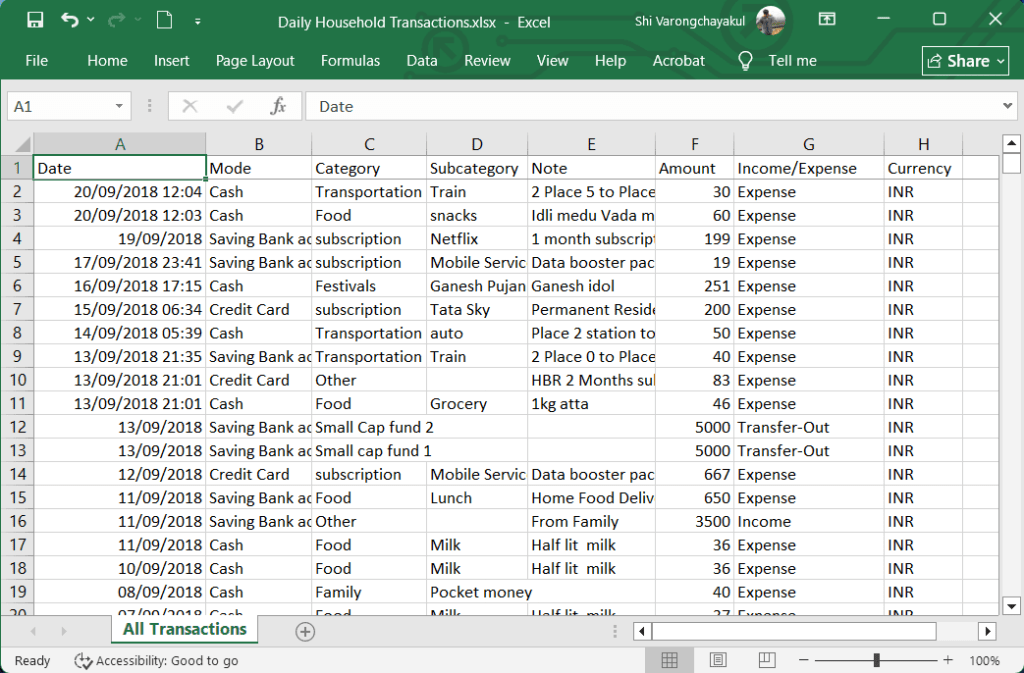
# Import Excel data with read_excel()
all_transactions <- read_excel("Daily Household Transactions.xlsx",
                               sheet = 1)

# View the first few rows
head(all_transactions)
# A tibble: 27 × 2
   Category                  Sum
   <chr>                   <dbl>
 1 Money transfer        606529.
 2 Investment            271858
 3 Transportation        169054.
 4 Household             161646.
 5 subscription          114588.
 6 Food                   96403.
 7 Public Provident Fund  90000
 8 Other                  87025.
 9 Family                 78582.
10 Health                 66253.
# ℹ 17 more rows
# ℹ Use `print(n = ...)` to see more rows
# Create a new sheet
createSheet(workbook,
            name = "Expense by Category")

# Add data to "Expense by Catogory" sheet
writeWorksheet(workbook,
               data = expense_by_cat,
               sheet = "Expense by Category")
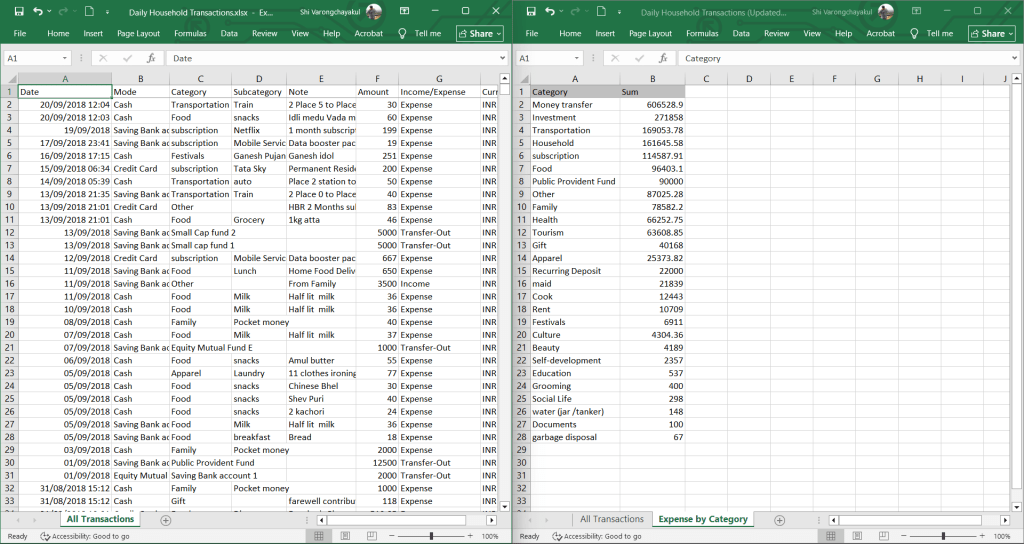
เมื่อเราเรียกดูข้อมูลจาก “Expense by Catogory” เราจะเห็นข้อมูลแบบนี้:
# Read the sheet
readWorksheet(workbook,
              sheet = "Expense by Category")
ผลลัพธ์:
                Category       Sum
1         Money transfer 606528.90
2             Investment 271858.00
3         Transportation 169053.78
4              Household 161645.58
5           subscription 114587.91
6                   Food  96403.10
7  Public Provident Fund  90000.00
8                  Other  87025.28
9                 Family  78582.20
10                Health  66252.75
11               Tourism  63608.85
12                  Gift  40168.00
13               Apparel  25373.82
14     Recurring Deposit  22000.00
15                  maid  21839.00
16                  Cook  12443.00
17                  Rent  10709.00
18             Festivals   6911.00
19               Culture   4304.36
20                Beauty   4189.00
21      Self-development   2357.00
22             Education    537.00
23              Grooming    400.00
24           Social Life    298.00
25   water (jar /tanker)    148.00
26             Documents    100.00
27      garbage disposal     67.00
💪 ผมขอแนะนำ R Book for Psychologists หนังสือสอนใช้ภาษา R เพื่อการวิเคราะห์ข้อมูลทางจิตวิทยา ที่เขียนมาเพื่อนักจิตวิทยาที่ไม่เคยมีประสบการณ์เขียน code มาก่อน
ในหนังสือ เราจะปูพื้นฐานภาษา R และพาไปดูวิธีวิเคราะห์สถิติที่ใช้บ่อยกัน เช่น:
Correlation
t-tests
ANOVA
Reliability
Factor analysis
🚀 เมื่ออ่านและทำตามตัวอย่างใน R Book for Psychologists ทุกคนจะไม่ต้องพึง SPSS และ Excel ในการทำงานอีกต่อไป และสามารถวิเคราะห์ข้อมูลด้วยตัวเองได้ด้วยความมั่นใจ
# Print when sunny
if weather == "sunny":
    print("It's a sunny day. Don't forget your sunscreen!")

# Print when rainy
elif weather == "rainy":
    print("It's raining. Remember to bring an umbrella!")

# Print when other conditions
else:
    print("Likely chilly. Wear a jacket!")
ผลลัพธ์:
Likely chilly. Wear a jacket!
อธิบาย code:
if block: ประเมินว่า weather เป็น "sunny" ไหม ถ้าใช่ จะ print "It's a sunny day. Don't forget your sunscreen!"
elif block: weather เป็น "rainy" ไหม ถ้าใช่ จะ print "It's raining. Remember to bring an umbrella!"
# A shopping list program
shopping_list = ["milk", "bread", "chips", "apple", "toothpaste", "chocolate"]

# Loop through the list
for item in shopping_list:

    # Skip item if chip
    if item == "chips":
        print("Chips are unhealthy. Skipping ...")
        continue

    # Stop the loop if toothpaste
    if item == "toothpaste":
        print("Found toothpaste, done shopping early!")
        break

    # Do nothing if milk
    if item == "milk" or item == "bread":
        pass

    # Print item
    print("Putting", item, "into the cart.")
ผลลัพธ์:
Putting milk into the cart.
Putting bread into the cart.
Chips are unhealthy. Skipping ...
Putting apple into the cart.
Found toothpaste, done shopping early!
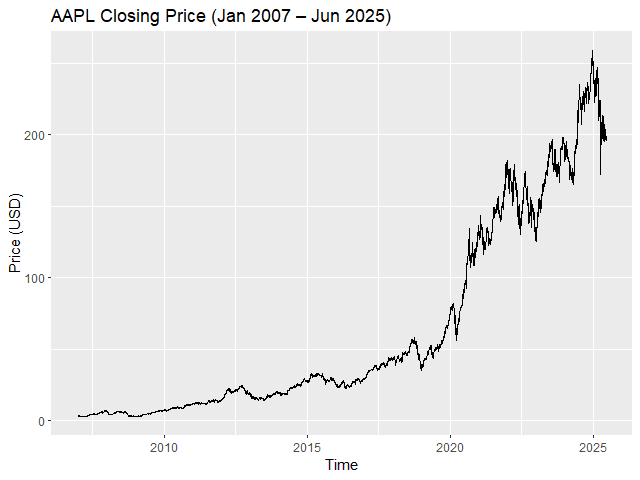
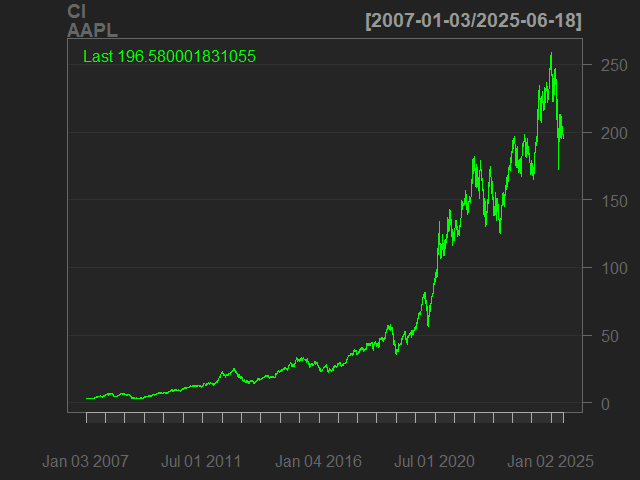
from ใช้กำหนดวันแรกของข้อมูล และ to กำหนดวันสุดท้ายของข้อมูล
ยกตัวอย่างเช่น เราต้องการโหลดข้อมูล Apple ในเดือนพฤษภาคม 2025:
# Load data for May 2025
apple_data_2025_05 = getSymbols("AAPL",
                                auto.assign = FALSE,
                                from = "2025-05-01",
                                to = "2025-05-31")

# Print results
print("First three records:")
head(apple_data_2025_05, n = 3)
print("------------------------------------------------------------------------------")
print("Last three records:")
tail(apple_data_2025_05, n = 3)
💪 ผมขอแนะนำ R Book for Psychologists หนังสือสอนใช้ภาษา R เพื่อการวิเคราะห์ข้อมูลทางจิตวิทยา ที่เขียนมาเพื่อนักจิตวิทยาที่ไม่เคยมีประสบการณ์เขียน code มาก่อน
ในหนังสือ เราจะปูพื้นฐานภาษา R และพาไปดูวิธีวิเคราะห์สถิติที่ใช้บ่อยกัน เช่น:
Correlation
t-tests
ANOVA
Reliability
Factor analysis
🚀 เมื่ออ่านและทำตามตัวอย่างใน R Book for Psychologists ทุกคนจะไม่ต้องพึง SPSS และ Excel ในการทำงานอีกต่อไป และสามารถวิเคราะห์ข้อมูลด้วยตัวเองได้ด้วยความมั่นใจ
ในบทความนี้ เราจะมาเรียนรู้ 7 วิธีการทำงานกับ time series data หรือข้อมูลที่จัดเรียงด้วยเวลา ในภาษา R ผ่านการทำงานกับ Bitcoin Historical Data ซึ่งมีข้อมูล Bitcoin ในช่วงปี ค.ศ. 2010–2024 กัน:
Converting: การแปลงข้อมูลเป็น datetime และ time series
Missing values: การจัดการ missing values ใน time series data
Plotting: การสร้างกราฟ time series data
Subsetting: การเลือกข้อมูลจาก time series data
Aggregating: การสรุป time series data
Rolling window: การทำ rolling window
Expanding window: การทำ expanding window
ถ้าพร้อมแล้วไปเริ่มกันเลย
🏁 Getting Started
ในการเริ่มทำงานกับ time series ในภาษา R เราจะเริ่มต้นจาก 2 อย่าง ได้แก่:
Install and load packages
Load dataset
.
1️⃣ Install & Load Packages
ในภาษา R เรามี 3 packages ที่ใช้ทำงานกับ time series data บ่อย ๆ ได้แก่:
Base R packages ที่มาพร้อมกับภาษา R
lubridate: ใช้แปลงข้อมูลและจัด format ของ date-time data
เรามาดูวิธีแรกในการทำงานกับ time series data กัน นั่นคือ:
การแปลงข้อมูลให้เป็น datetime
การแปลงข้อมูลให้เป็น time series
.
1️⃣ การแปลงข้อมูลให้เป็น Datetime
ในการทำงานกับ time series data เราจะต้องแปลงข้อมูลประเภทอื่น ๆ เช่น character และ numeric ให้เป็น datetime ก่อน เช่น date (เช่น “Feb 09, 2024”) ใน Bitcoin dataset
เราสามารถแปลงข้อมูลจาก character เป็น Date ได้ 2 วิธี ดังนี้:
.
วิธีที่ 1. ใช้ as.Date() ซึ่งเป็น base R function และต้องการ input 2 อย่าง ได้แก่:
x: ข้อมูลที่ต้องการแปลงเป็น Date
format: format ของวันเวลาของข้อมูลต้นทาง (เช่น วัน-เดือน-ปี, ปี-เดือน-วัน, เดือน-วัน-ปี)
# Convert `date` to Date
btc_cleaned$date <- as.Date(btc_cleaned$date,
                            format = "%b %d, %Y")
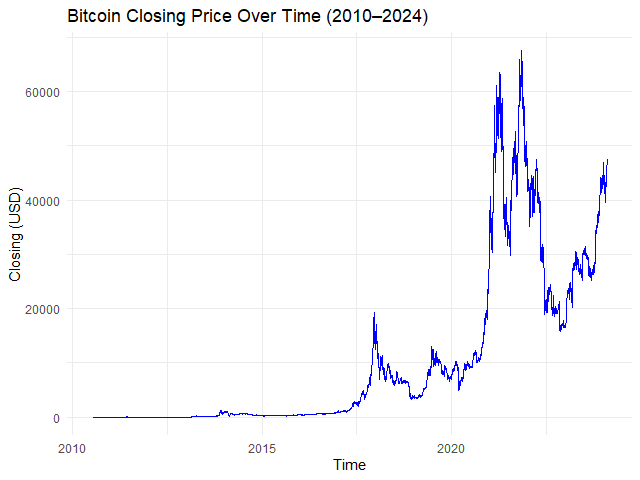
# Plot the time series
autoplot.zoo(btc_zoo[, "close"]) +

  ## Adjust line colour
  geom_line(color = "blue") +

  ## Add title and labels
  labs(title = "Bitcoin Closing Price Over Time (2010–2024)",
       x = "Time",
       y = "Closing Price (USD)") +

  ## Use minimal theme
  theme_minimal()
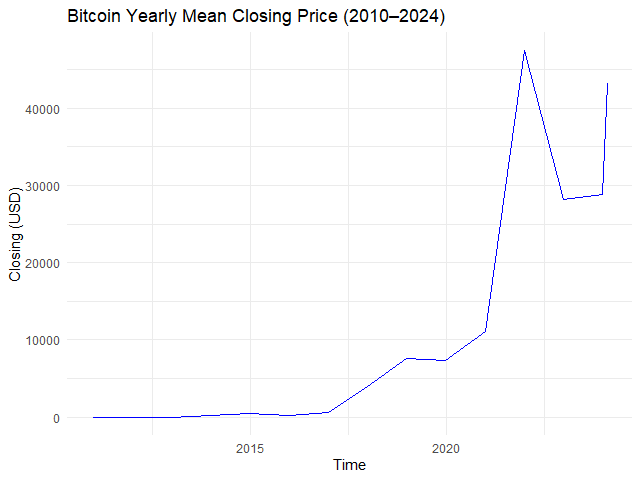
# Example 1. View yearly mean closing price
btc_yr_mean <- apply.yearly(btc_zoo[, "close"],
                            FUN = mean)

# Plot the results
autoplot.zoo(btc_yr_mean) +

  ## Adjust line colour
  geom_line(color = "blue") +

  ## Add title and labels
  labs(title = "Bitcoin Yearly Mean Closing Price (2010–2024)",
       x = "Time",
       y = "Closing (USD)") +

  ## Use minimal theme
  theme_minimal()
ผลลัพธ์:
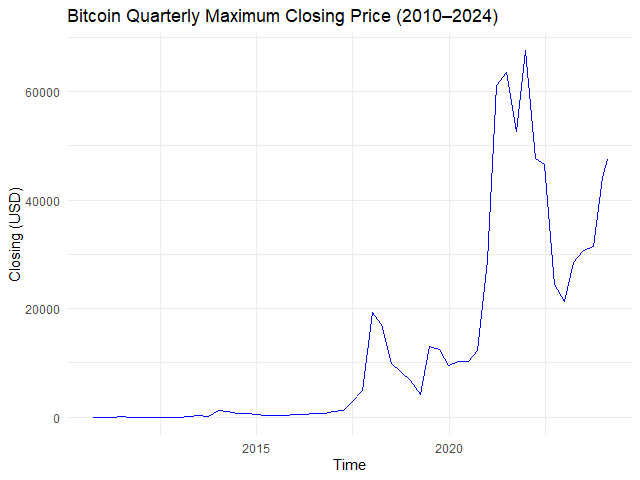
หรือหาราคาปิดสูงสุดในแต่ละไตรมาส:
# Example 2. View quarterly max closing price
btc_qtr_max <- apply.quarterly(btc_zoo[, "close"],
                               FUN = max)

# Plot the results
autoplot.zoo(btc_qtr_max) +

  ## Adjust line colour
  geom_line(color = "blue") +

  ## Add title and labels
  labs(title = "Bitcoin Quarterly Maximum Closing Price (2010–2024)",
       x = "Time",
       y = "Closing (USD)") +

  ## Use minimal theme
  theme_minimal()
# Create the window for mean price
btc_30_days_roll_mean <- rollmean(x = btc_zoo,
                                  k = 30,
                                  align = "right",
                                  fill = NA)

# Plot the results
autoplot.zoo(btc_30_days_roll_mean[, "close"]) +

  ## Adjust line colour
  geom_line(color = "blue") +

  ## Add title and labels
  labs(title = "Bitcoin 30-Day Rolling Mean Price (2010–2024)",
       x = "Time",
       y = "Closing (USD)") +

  ## Use minimal theme
  theme_minimal()
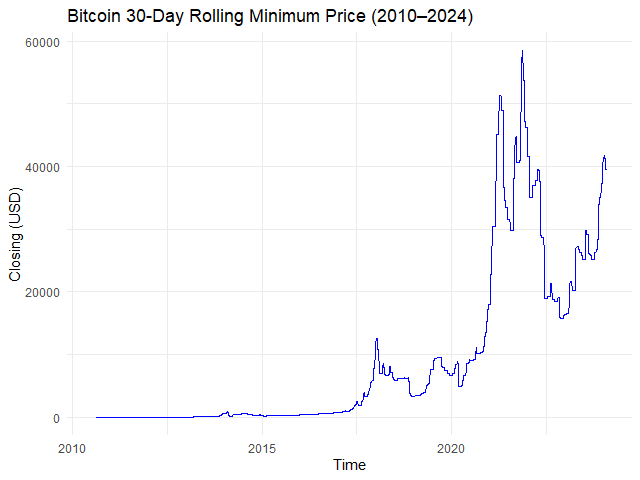
# Creating a rolling window with min() function
btc_30_days_roll_min <- rollapply(data = btc_zoo,
                                  width = 30,
                                  FUN = min,
                                  align = "right",
                                  fill = NA)

# Plot the results
autoplot.zoo(btc_30_days_roll_min[, "close"]) +

  ## Adjust line colour
  geom_line(color = "blue") +

  ## Add title and labels
  labs(title = "Bitcoin 30-Day Rolling Minimum Price (2010–2024)",
       x = "Time",
       y = "Closing (USD)") +

  ## Use minimal theme
  theme_minimal()
ผลลัพธ์:
➡️ Expanding Window
Expanding window เป็นการสรุปข้อมูลแบบสะสม เช่น:
Date
Average
2024-01-01
หาค่าเฉลี่ยของวันที่ 1
2024-01-02
หาค่าเฉลี่ยของวันที่ 1 + 2
2024-01-03
หาค่าเฉลี่ยของวันที่ 1 + 2 + 3
2024-01-04
หาค่าเฉลี่ยของวันที่ 1 + 2 + 3 + 4
2024-01-05
หาค่าเฉลี่ยของวันที่ 1 + 2 + 3 + 4 + 5
ในภาษา R เราสามารถสร้าง expanding window ได้ด้วย rollapply() โดยเราต้องกำหนดให้:
# Subset for Jan 2024 data
btc_jan_2024 <- window(x = btc_zoo,
                       start = as.Date("2024-01-01"),
                       end = as.Date("2024-01-31"))

# Create a sequence of widths
btc_jan_2024_width <- seq_along(btc_jan_2024)

# Create an expanding window for mean price
btc_exp_mean <- rollapply(data = btc_2024,
                          width = btc_jan_2024_width,
                          FUN = mean,
                          align = "right",
                          fill = NA)

# Plot the results
autoplot.zoo(btc_exp_mean[, "close"]) +

  ## Adjust line colour
  geom_line(color = "blue") +

  ## Add title and labels
  labs(title = "Bitcoin Expanding Mean Price (Jan 2024)",
       x = "Time",
       y = "Closing (USD)") +

  ## Use minimal theme
  theme_minimal()
ผลลัพธ์:
😎 Summary
ในบทความนี้ เราได้ทำความรู้จักกับ 7 วิธีการทำงานกับ time series ในภาษา R โดยใช้ base R, lubridate, และ zoo package กัน:
💪 ผมขอแนะนำ R Book for Psychologists หนังสือสอนใช้ภาษา R เพื่อการวิเคราะห์ข้อมูลทางจิตวิทยา ที่เขียนมาเพื่อนักจิตวิทยาที่ไม่เคยมีประสบการณ์เขียน code มาก่อน
ในหนังสือ เราจะปูพื้นฐานภาษา R และพาไปดูวิธีวิเคราะห์สถิติที่ใช้บ่อยกัน เช่น:
Correlation
t-tests
ANOVA
Reliability
Factor analysis
🚀 เมื่ออ่านและทำตามตัวอย่างใน R Book for Psychologists ทุกคนจะไม่ต้องพึง SPSS และ Excel ในการทำงานอีกต่อไป และสามารถวิเคราะห์ข้อมูลด้วยตัวเองได้ด้วยความมั่นใจ
XGBoost เป็น machine learning model ที่จัดอยู่ในกลุ่ม tree-based models หรือ models ที่ทำนายข้อมูลด้วย decision tree อย่าง single decision tree และ random forest
ใน XGBoost, decision trees จะถูกสร้างขึ้นมาเป็นรอบ ๆ โดยในแต่ละรอบ decision trees ใหม่จะเรียนรู้จากความผิดพลาดของรอบก่อน ซึ่งจะทำให้ decision trees ใหม่มีความสามารถที่ดีขึ้นเรื่อย ๆ
เมื่อสิ้นสุดการสร้าง XGBoost ใช้ผลรวมของ decision trees ทุกต้นในการทำนายข้อมูล ดังนี้:
# A tibble: 6 × 11
  manufacturer model displ  year   cyl trans      drv     cty   hwy fl    class
  <chr>        <chr> <dbl> <int> <int> <chr>      <chr> <int> <int> <chr> <chr>
1 audi         a4      1.8  1999     4 auto(l5)   f        18    29 p     compact
2 audi         a4      1.8  1999     4 manual(m5) f        21    29 p     compact
3 audi         a4      2    2008     4 manual(m6) f        20    31 p     compact
4 audi         a4      2    2008     4 auto(av)   f        21    30 p     compact
5 audi         a4      2.8  1999     6 auto(l5)   f        16    26 p     compact
6 audi         a4      2.8  1999     6 manual(m5) f        18    26 p     compact
จากผลลัพธ์ เราจะเห็นได้ว่า mpg มี columns ที่เราต้องปรับจาก character เป็น factor อยู่ เช่น manufacturer, model ซึ่งเราสามารถปรับได้ดังนี้:
# Convert character columns to factor

## Get character columns
chr_cols <- c("manufacturer",
              "model",
              "trans",
              "drv",
              "fl",
              "class")

## For-loop through the character columns
for (col in chr_cols) {
  mpg[[col]] <- as.factor(mpg[[col]])
}

## Check the results
str(mpg)
# Separate the features from the outcome

## Get the features
x <- mpg[, !names(mpg) %in% "hwy"]

## One-hot encode the features
x <- model.matrix(~ . - 1,
                  data = x)

## Get the outcome
y <- mpg$hwy
ข้อที่ 2. จากนั้น เราจะแบ่ง dataset เป็น training (80%) และ test sets (20%) ดังนี้:
# Split the data

## Set seed for reproducibility
set.seed(360)

## Get training index
train_index <- sample(1:nrow(x),
                      nrow(x) * 0.8)

## Create x, y train
x_train <- x[train_index, ]
y_train <- y[train_index]

## Create x, y test
x_test <- x[-train_index, ]
y_test <- y[-train_index]

## Check the results
cat("TRAIN SET", "\\n")
cat("1. Data in x_train:", nrow(x_train), "\\n")
cat("2. Data in y_train:", length(y_train), "\\n")
cat("---", "\\n", "TEST SET", "\\n")
cat("1. Data in x_test:", nrow(x_test), "\\n")
cat("2. Data in y_test:", length(y_test), "\\n")
ผลลัพธ์:
TRAIN SET
1. Data in x_train: 187
2. Data in y_train: 187
---
TEST SET
1. Data in x_test: 47
2. Data in y_test: 47
.
ข้อที่ 3. สุดท้าย เราจะแปลง x, y เป็น DMatrix ซึ่งเป็น object ที่ xgboost ใช้ในการสร้าง XGboost model ดังนี้:
# Convert to DMatrix

## Training set
train_set <- xgb.DMatrix(data = x_train,
                         label = y_train)

## Test set
test_set <- xgb.DMatrix(data = x_test,
                        label = y_test)

## Check the results
train_set
test_set
ผลลัพธ์:
TRAIN SET
xgb.DMatrix  dim: 187 x 77  info: label  colnames: yes
---
TEST SET
xgb.DMatrix  dim: 47 x 77  info: label  colnames: yes
4️⃣ Train the Model
ในขั้นที่สี่ เราจะสร้าง XGBoost model ด้วย xgb.train() ซึ่งต้องการ 5 arguments ดังนี้:
💪 ผมขอแนะนำ R Book for Psychologists หนังสือสอนใช้ภาษา R เพื่อการวิเคราะห์ข้อมูลทางจิตวิทยา ที่เขียนมาเพื่อนักจิตวิทยาที่ไม่เคยมีประสบการณ์เขียน code มาก่อน
ในหนังสือ เราจะปูพื้นฐานภาษา R และพาไปดูวิธีวิเคราะห์สถิติที่ใช้บ่อยกัน เช่น:
Correlation
t-tests
ANOVA
Reliability
Factor analysis
🚀 เมื่ออ่านและทำตามตัวอย่างใน R Book for Psychologists ทุกคนจะไม่ต้องพึง SPSS และ Excel ในการทำงานอีกต่อไป และสามารถวิเคราะห์ข้อมูลด้วยตัวเองได้ด้วยความมั่นใจ
💪 ผมขอแนะนำ R Book for Psychologists หนังสือสอนใช้ภาษา R เพื่อการวิเคราะห์ข้อมูลทางจิตวิทยา ที่เขียนมาเพื่อนักจิตวิทยาที่ไม่เคยมีประสบการณ์เขียน code มาก่อน
ในหนังสือ เราจะปูพื้นฐานภาษา R และพาไปดูวิธีวิเคราะห์สถิติที่ใช้บ่อยกัน เช่น:
Correlation
t-tests
ANOVA
Reliability
Factor analysis
🚀 เมื่ออ่านและทำตามตัวอย่างใน R Book for Psychologists ทุกคนจะไม่ต้องพึง SPSS และ Excel ในการทำงานอีกต่อไป และสามารถวิเคราะห์ข้อมูลด้วยตัวเองได้ด้วยความมั่นใจ
ในการทำ machine learning (ML) ในภาษา R เรามี packages และ functions ที่หลากหลายให้เลือกใช้งาน ซึ่งแต่ละ package และ function มีวิธีใช้งานที่แตกต่างกันไป
ยกตัวอย่างเช่น:
glm() จาก base R สำหรับสร้าง regression models ต้องการ input 3 อย่าง คือ formula, data, และ family:
glm(formula, data, family)
knn() จาก class package สำหรับสร้าง KNN model ต้องการ input 4 อย่าง คือ ตัวแปรต้นของ training set, ตัวแปรต้นของ test set, ตัวแปรตามของ training set, และค่า k:
knn(train_x, test_x, train_y, k)
rpart() จาก rpart package สำหรับสร้าง decision tree model ต้องการ input 2 อย่าง คือ formula และ data:
rpart(formula, data)
…
การใช้งาน function ที่แตกต่างกันทำให้การสร้าง ML models เกิดความซับซ้อนโดยไม่จำเป็น และทำให้เกิดความผิดพลาดในการทำงานได้ง่าย
# Set seed for reproducibility
set.seed(2025)
# Define the training set index
bt_split <- initial_split(data = bt,
prop = 0.8,
strata = medv)
# Create the training set
bt_train <- training(bt_split)
# Create the test set
bt_test <- testing(bt_split)
# Prepare the recipe
rec_prep <- prep(rec,
data = bt_train)
# Bake the training set
bt_train_baked <- bake(rec_prep,
new_data = NULL)
# Bake the test set
bt_test_baked <- bake(rec_prep,
new_data = bt_test)
.
4️⃣ Instantiate a Model
ในขั้นที่ 4 เราจะเรียกใช้ algorithm สำหรับ model ของเรา โดยในตัวอย่าง เราจะลองสร้าง decision tree กัน
ในขั้นนี้ เรามี 3 functions จะเรียกใช้งาน ได้แก่:
No.
Function
For
1
decision_tree()
สร้าง decision tree *
2
set_engine()
กำหนด engine หรือ package ที่ใช้สร้าง model
3
set_mode()
กำหนดประเภท model (classification หรือ regression)
ในขั้นแรก เราจะแบ่ง dataset ออกเป็น 2 ชุด (เหมือนกับ standard flow):
# Set seed for reproducibility
set.seed(2025)
# Define the training set index
bt_split <- initial_split(data = bt,
prop = 0.8,
strata = medv)
# Create the training set
bt_train <- training(bt_split)
จะสังเกตว่า เราจะไม่ได้สร้าง test set ในครั้งนี้
.
2️⃣ Create a Recipe
ในขั้นที่ 2 เราจะสร้าง recipe (เหมือนกับ standard flow):
# Set seed for reproducibility
set.seed(2025)
# Define the training set index
bt_split <- initial_split(data = bt,
prop = 0.8,
strata = medv)
# Create the training set
bt_train <- training(bt_split)
💪 ผมขอแนะนำ R Book for Psychologists หนังสือสอนใช้ภาษา R เพื่อการวิเคราะห์ข้อมูลทางจิตวิทยา ที่เขียนมาเพื่อนักจิตวิทยาที่ไม่เคยมีประสบการณ์เขียน code มาก่อน
ในหนังสือ เราจะปูพื้นฐานภาษา R และพาไปดูวิธีวิเคราะห์สถิติที่ใช้บ่อยกัน เช่น:
Correlation
t-tests
ANOVA
Reliability
Factor analysis
🚀 เมื่ออ่านและทำตามตัวอย่างใน R Book for Psychologists ทุกคนจะไม่ต้องพึง SPSS และ Excel ในการทำงานอีกต่อไป และสามารถวิเคราะห์ข้อมูลด้วยตัวเองได้ด้วยความมั่นใจ





















 Shi no Shigoto