Author: Shinin Varongchayakul

  • สรุป 10 วิธีในการทำงานกับ data frame ในภาษา R: creating, indexing, subsetting, filtering, sorting, และอื่น ๆ — ตัวอย่างการทำงานกับ Jujutsu Kaisen data frame

    สรุป 10 วิธีในการทำงานกับ data frame ในภาษา R: creating, indexing, subsetting, filtering, sorting, และอื่น ๆ — ตัวอย่างการทำงานกับ Jujutsu Kaisen data frame

    Data frame เป็นหนึ่งใน data structure ที่พบบ่อยที่สุดในการทำงานกับข้อมูล

    Data frame เก็บข้อมูลในรูปแบบตาราง โดย:

    • 1 row = 1 รายการ (เช่น ข้อมูลของ John)
    • 1 column = 1 ประเภทข้อมูล (เช่น อายุ)

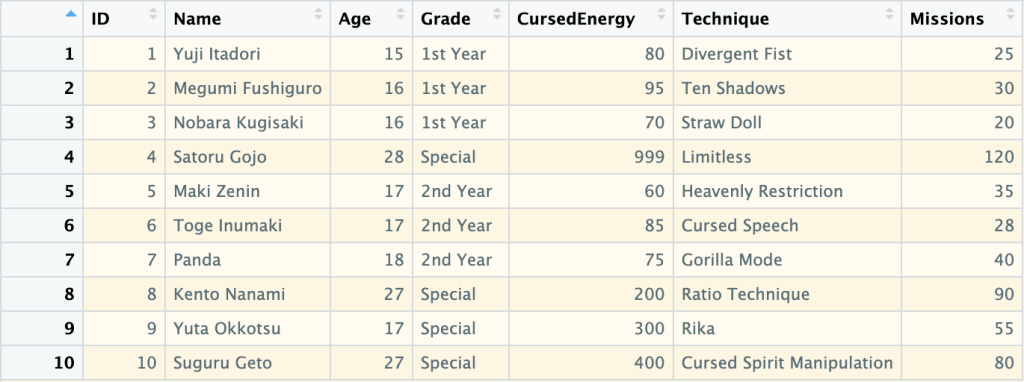
    ตัวอย่าง data frame:

    ในบทความนี้ เราจะมาสรุป 10 วิธีในการทำงานกับ data frame กัน:

    1. Creating: การสร้าง data frame
    2. Previewing: การดูข้อมูล data frame
    3. Indexing: การเลือก columns ที่ต้องการ
    4. Subsetting: การเลือก rows และ columns ที่ต้องการ
    5. Filtering: การกรองข้อมูล
    6. Sorting: การจัดลำดับข้อมูล
    7. Aggregating: การสรุปข้อมูล
    8. Adding columns: การเพิ่ม columns ใหม่
    9. Removing columns: การลบ columns
    10. Binding: การเชื่อมข้อมูลใหม่เข้ากับ data frame

    ถ้าพร้อมแล้ว ไปเริ่มกันเลย


    1. 1️⃣ Creating
    2. 2️⃣ Previewing
      1. 👀 View()
      2. 🙊 head()
      3. 🐒 tail()
      4. 🏗️ str()
      5. 🧮 summary()
      6. 💠 dim()
      7. 🚣 nrow()
      8. 🏦 ncol()
    3. 3️⃣ Indexing
      1. 💰 Using $
      2. 🔳 Using [[]]
    4. 4️⃣ Subsetting
      1. 🍽️ df[rows, cols]
      2. 🔪 subset()
    5. 5️⃣ Filtering
      1. 🍽️ df[rows, cols]
      2. 🔪 subset()
    6. 6️⃣ Sorting
      1. ⬇️ Ascending
      2. ⬆️ Descending
      3. ↔️ Sort by Multiple Columns
    7. 7️⃣ Aggregating
    8. 8️⃣ Adding Columns
    9. 9️⃣ Removing Columns
    10. 🔟 Binding
      1. 🤝 rbind()
      2. 🤲 cbind()
    11. 😺 GitHub
    12. 📃 References
    13. ✅ R Book for Psychologists: หนังสือภาษา R สำหรับนักจิตวิทยา

    1️⃣ Creating

    เราสามารถสร้าง data frame ด้วย data.frame() ซึ่งต้องการ ชื่อ column และ vector ที่เก็บข้อมูลของ column นั้น ๆ:

    # Create a data frame
    jjk_df <- data.frame(
      ID = 1:10,
      Name = c("Yuji Itadori", "Megumi Fushiguro", "Nobara Kugisaki", "Satoru Gojo",
               "Maki Zenin", "Toge Inumaki", "Panda", "Kento Nanami", "Yuta Okkotsu", "Suguru Geto"),
      Age = c(15, 16, 16, 28, 17, 17, 18, 27, 17, 27),
      Grade = c("1st Year", "1st Year", "1st Year", "Special", "2nd Year",
                "2nd Year", "2nd Year", "Special", "Special", "Special"),
      CursedEnergy = c(80, 95, 70, 999, 60, 85, 75, 200, 300, 400),
      Technique = c("Divergent Fist", "Ten Shadows", "Straw Doll", "Limitless",
                    "Heavenly Restriction", "Cursed Speech", "Gorilla Mode",
                    "Ratio Technique", "Rika", "Cursed Spirit Manipulation"),
      Missions = c(25, 30, 20, 120, 35, 28, 40, 90, 55, 80)
    )
    
    # View the result
    jjk_df
    

    ผลลัพธ์:

       ID             Name Age    Grade CursedEnergy                  Technique Missions
    1   1     Yuji Itadori  15 1st Year           80             Divergent Fist       25
    2   2 Megumi Fushiguro  16 1st Year           95                Ten Shadows       30
    3   3  Nobara Kugisaki  16 1st Year           70                 Straw Doll       20
    4   4      Satoru Gojo  28  Special          999                  Limitless      120
    5   5       Maki Zenin  17 2nd Year           60       Heavenly Restriction       35
    6   6     Toge Inumaki  17 2nd Year           85              Cursed Speech       28
    7   7            Panda  18 2nd Year           75               Gorilla Mode       40
    8   8     Kento Nanami  27  Special          200            Ratio Technique       90
    9   9     Yuta Okkotsu  17  Special          300                       Rika       55
    10 10      Suguru Geto  27  Special          400 Cursed Spirit Manipulation       80
    

    2️⃣ Previewing

    เรามี 8 functions สำหรับดูข้อมูล data frame:

    No.FunctionFor
    1View()ดูข้อมูลทั้งหมด
    2head()ดูข้อมูล 6 rows แรก
    3tail()ดูข้อมูล 6 rows สุดท้าย
    4str()ดูโครงสร้างข้อมูล
    5summary()ดูสถิติข้อมูล
    6dim()ดูจำนวน rows และ columns
    7nrow()ดูจำนวน rows
    8ncol()ดูจำนวน columns

    เราไปดูตัวอย่างทั้ง 8 functions กัน

    .

    👀 View()

    View() ใช้ดูข้อมูลทั้งหมดใน data frame:

    # View the whole data frame
    View(jjk_df)
    

    เราจะเห็นผลลัพธ์ในหน้าต่างใหม่:

    Note: เนื่องจาก View() แสดงข้อมูลทั้งหมด จึงเหมาะกับการใช้งานกับ data frame ขนาดเล็ก

    .

    head() ใช้ดูข้อมูล 6 rows แรกใน data frame:

    # View the first 6 rows
    head(jjk_df)
    

    ผลลัพธ์:

      ID             Name Age    Grade CursedEnergy            Technique Missions
    1  1     Yuji Itadori  15 1st Year           80       Divergent Fist       25
    2  2 Megumi Fushiguro  16 1st Year           95          Ten Shadows       30
    3  3  Nobara Kugisaki  16 1st Year           70           Straw Doll       20
    4  4      Satoru Gojo  28  Special          999            Limitless      120
    5  5       Maki Zenin  17 2nd Year           60 Heavenly Restriction       35
    6  6     Toge Inumaki  17 2nd Year           85        Cursed Speech       28
    

    .

    🐒 tail()

    tail() ใช้ดูข้อมูล 6 rows สุดท้ายใน data frame:

    # View the last 6 rows
    tail(jjk_df)
    

    ผลลัพธ์:

       ID         Name Age    Grade CursedEnergy                  Technique Missions
    5   5   Maki Zenin  17 2nd Year           60       Heavenly Restriction       35
    6   6 Toge Inumaki  17 2nd Year           85              Cursed Speech       28
    7   7        Panda  18 2nd Year           75               Gorilla Mode       40
    8   8 Kento Nanami  27  Special          200            Ratio Technique       90
    9   9 Yuta Okkotsu  17  Special          300                       Rika       55
    10 10  Suguru Geto  27  Special          400 Cursed Spirit Manipulation       80
    

    .

    🏗️ str()

    str() ใช้ดูโครงสร้างข้อมูลของ data frame:

    # View the data frame structure
    str(jjk_df)
    

    ผลลัพธ์:

    'data.frame':	10 obs. of  7 variables:
     $ ID          : int  1 2 3 4 5 6 7 8 9 10
     $ Name        : chr  "Yuji Itadori" "Megumi Fushiguro" "Nobara Kugisaki" "Satoru Gojo" ...
     $ Age         : num  15 16 16 28 17 17 18 27 17 27
     $ Grade       : chr  "1st Year" "1st Year" "1st Year" "Special" ...
     $ CursedEnergy: num  80 95 70 999 60 85 75 200 300 400
     $ Technique   : chr  "Divergent Fist" "Ten Shadows" "Straw Doll" "Limitless" ...
     $ Missions    : num  25 30 20 120 35 28 40 90 55 80
    

    จากผลลัพธ์ เราจะเห็นข้อมูล 5 อย่าง ได้แก่:

    1. จำนวน rows (obs.)
    2. จำนวน columns (variables)
    3. ชื่อ columns (เช่น ID)
    4. ประเภทข้อมูลของแต่ละ column (เช่น int)
    5. ตัวอย่างข้อมูลของแต่ละ column (เช่น 1 2 3 4 5 6 7 8 9 10)

    .

    🧮 summary()

    summary() ใช้สรุปข้อมูลใน data frame เช่น:

    • ค่าเฉลี่ย (Mean)
    • จำนวนข้อมูล (Length)
    # View the summary
    summary(jjk_df)
    

    ผลลัพธ์:

           ID            Name                Age           Grade            CursedEnergy     Technique            Missions     
     Min.   : 1.00   Length:10          Min.   :15.00   Length:10          Min.   : 60.00   Length:10          Min.   : 20.00  
     1st Qu.: 3.25   Class :character   1st Qu.:16.25   Class :character   1st Qu.: 76.25   Class :character   1st Qu.: 28.50  
     Median : 5.50   Mode  :character   Median :17.00   Mode  :character   Median : 90.00   Mode  :character   Median : 37.50  
     Mean   : 5.50                      Mean   :19.80                      Mean   :236.40                      Mean   : 52.30  
     3rd Qu.: 7.75                      3rd Qu.:24.75                      3rd Qu.:275.00                      3rd Qu.: 73.75  
     Max.   :10.00                      Max.   :28.00                      Max.   :999.00                      Max.   :120.00 
    

    .

    💠 dim()

    dim() ใช้แสดงจำนวน rows และ columns ใน data frame:

    # View the dimensions
    dim(jjk_df)
    

    ผลลัพธ์:

    [1] 10  7
    

    .

    🚣 nrow()

    nrow() ใช้แสดงจำนวน rows ใน data frame:

    # Get the number of rows
    nrow(jjk_df)
    

    ผลลัพธ์:

    [1] 10
    

    .

    🏦 ncol()

    ncol() ใช้แสดงจำนวน columns ใน data frame:

    # Get the number of columns
    ncol(jjk_df)
    

    ผลลัพธ์:

    [1] 7
    

    3️⃣ Indexing

    Indexing หมายถึง การเลือก columns ที่ต้องการ ซึ่งเราทำได้ 2 วิธี:

    1. ใช้ $ (นิยมใช้)
    2. ใช้ [[]]

    💰 Using $

    เราสามารถใช้ $ ได้แบบนี้:

    df$col
    

    ยกตัวอย่างเช่น เลือก column Name:

    # Index with $
    jjk_df$Name
    

    ผลลัพธ์:

     [1] "Yuji Itadori"     "Megumi Fushiguro" "Nobara Kugisaki"  "Satoru Gojo"      "Maki Zenin"      
     [6] "Toge Inumaki"     "Panda"            "Kento Nanami"     "Yuta Okkotsu"     "Suguru Geto"   
    

    .

    🔳 Using [[]]

    เราสามารถใช้ [[]] ได้แบบนี้:

    df[["col"]]
    

    ยกตัวอย่างเช่น เลือก column Name:

    # Index with [[]]
    jjk_df[["Name"]]
    

    ผลลัพธ์:

     [1] "Yuji Itadori"     "Megumi Fushiguro" "Nobara Kugisaki"  "Satoru Gojo"      "Maki Zenin"      
     [6] "Toge Inumaki"     "Panda"            "Kento Nanami"     "Yuta Okkotsu"     "Suguru Geto"   
    

    4️⃣ Subsetting

    Subsetting คือ การเลือก rows และ columns จาก data frame ซึ่งเราทำได้ 2 วิธี:

    1. ใช้ df[rows, cols] syntax
    2. ใช้ subset()

    .

    🍽️ df[rows, cols]

    เราสามารถใช้ df[rows, cols] ได้ 3 แบบ:

    1. เลือก rows
    2. เลือก columns
    3. เลือก rows และ columns

    แบบที่ 1. เลือก rows อย่างเดียว:

    # Subset rows only
    jjk_df[1:5, ]
    

    ผลลัพธ์:

      ID             Name Age    Grade CursedEnergy            Technique Missions
    1  1     Yuji Itadori  15 1st Year           80       Divergent Fist       25
    2  2 Megumi Fushiguro  16 1st Year           95          Ten Shadows       30
    3  3  Nobara Kugisaki  16 1st Year           70           Straw Doll       20
    4  4      Satoru Gojo  28  Special          999            Limitless      120
    5  5       Maki Zenin  17 2nd Year           60 Heavenly Restriction       35


    แบบที่ 2. เลือก columns อย่างเดียว:

    # Subset columns only
    jjk_df[, "Name"]
    

    ผลลัพธ์:

     [1] "Yuji Itadori"     "Megumi Fushiguro" "Nobara Kugisaki"  "Satoru Gojo"      "Maki Zenin"      
     [6] "Toge Inumaki"     "Panda"            "Kento Nanami"     "Yuta Okkotsu"     "Suguru Geto" 


    แบบที่ 3. เลือก rows และ columns:

    # Subset rows and columns
    jjk_df[1:5, c("Name", "Technique")]


    ผลลัพธ์:

                  Name            Technique
    1     Yuji Itadori       Divergent Fist
    2 Megumi Fushiguro          Ten Shadows
    3  Nobara Kugisaki           Straw Doll
    4      Satoru Gojo            Limitless
    5       Maki Zenin Heavenly Restriction
    

    .

    🔪 subset()

    เราสามารถ subset ข้อมูลได้ด้วย subset() ซึ่งต้องการ 2 arguments:

    subset(x, select)
    
    1. x = data frame
    2. select = columns ที่ต้องการเลือก
    # Subset using susbet() - select conlumns only
    subset(jjk_df, select = c("Name", "Technique"))
    

    ผลลัพธ์:

                   Name                  Technique
    1      Yuji Itadori             Divergent Fist
    2  Megumi Fushiguro                Ten Shadows
    3   Nobara Kugisaki                 Straw Doll
    4       Satoru Gojo                  Limitless
    5        Maki Zenin       Heavenly Restriction
    6      Toge Inumaki              Cursed Speech
    7             Panda               Gorilla Mode
    8      Kento Nanami            Ratio Technique
    9      Yuta Okkotsu                       Rika
    10      Suguru Geto Cursed Spirit Manipulation
    

    ในกรณีที่เราต้องการเลือก rows ด้วย เราจะต้องกำหนด rows ใน x:

    # Subset using susbet() - select both rows and columns
    subset(jjk_df[1:5, ], select = c("Name", "Technique"))
    

    ผลลัพธ์:

                  Name            Technique
    1     Yuji Itadori       Divergent Fist
    2 Megumi Fushiguro          Ten Shadows
    3  Nobara Kugisaki           Straw Doll
    4      Satoru Gojo            Limitless
    5       Maki Zenin Heavenly Restriction
    

    5️⃣ Filtering

    เราสามารถกรองข้อมูลใน data frame ได้ 2 วิธี:

    1. ใช้ df[rows, cols] syntax
    2. ใช้ subset()

    .

    🍽️ df[rows, cols]

    เราสามารถกรองข้อมูลด้วย df[rows, cols] โดยกำหนดเงื่อนไขการกรองใน rows

    เช่น กรองข้อมูลตัวละครที่อยู่ปี 1:

    # Filter using df[rows, cols] - 1 condition
    jjk_df[jjk_df$Grade == "1st Year", ]
    

    ผลลัพธ์:

      ID             Name Age    Grade CursedEnergy      Technique Missions
    1  1     Yuji Itadori  15 1st Year           80 Divergent Fist       25
    2  2 Megumi Fushiguro  16 1st Year           95    Ten Shadows       30
    3  3  Nobara Kugisaki  16 1st Year           70     Straw Doll       20
    

    ในกรณีที่เรามีมากกว่า 1 เงื่อนไข เราสามารถใช้ logical operators ช่วยได้:

    OperatorMeaning
    &AND
    |OR
    !NOT

    ยกตัวอย่างเช่น กรองข้อมูลตัวละครที่อยู่ปี 1 และมีอายุ 15 ปี:

    # Filter using df[rows, cols] - multiple conditions
    jjk_df[jjk_df$Grade == "1st Year" & jjk_df$Age == 15, ]
    

    ผลลัพธ์:

      ID         Name Age    Grade CursedEnergy      Technique Missions
    1  1 Yuji Itadori  15 1st Year           80 Divergent Fist       25
    

    .

    🔪 subset()

    เราสามารถใช้ subset() เพื่อกรองข้อมูลได้แบบนี้:

    # Filter using subset() - 1 condition
    subset(jjk_df, Grade == "1st Year")
    

    ผลลัพธ์:

      ID             Name Age    Grade CursedEnergy      Technique Missions
    1  1     Yuji Itadori  15 1st Year           80 Divergent Fist       25
    2  2 Megumi Fushiguro  16 1st Year           95    Ten Shadows       30
    3  3  Nobara Kugisaki  16 1st Year           70     Straw Doll       20
    

    เราสามารถเพิ่มเงื่อนไขการกรองได้ด้วย logical operator เช่น:

    # Filter using subset() - multiple conditions
    subset(jjk_df, Grade == "1st Year" & Age == 15)
    

    ผลลัพธ์:

      ID         Name Age    Grade CursedEnergy      Technique Missions
    1  1 Yuji Itadori  15 1st Year           80 Divergent Fist       25
    

    6️⃣ Sorting

    สำหรับการเรียงข้อมูล เราจะใช้ order() ซึ่งเพื่อเรียงข้อมูลได้ 3 แบบ:

    1. Ascending (A–Z)
    2. Descending (Z–A)
    3. Sort by multiple columns: จัดเรียงด้วยหลาย columns

    .

    ⬇️ Ascending

    ยกตัวอย่างเช่น เรียงลำดับตามจำนวนภารกิจ (Missions):

    # Sort ascending (default)
    jjk_df[order(jjk_df$Missions), ]
    

    ผลลัพธ์:

       ID             Name Age    Grade CursedEnergy                  Technique Missions
    3   3  Nobara Kugisaki  16 1st Year           70                 Straw Doll       20
    1   1     Yuji Itadori  15 1st Year           80             Divergent Fist       25
    6   6     Toge Inumaki  17 2nd Year           85              Cursed Speech       28
    2   2 Megumi Fushiguro  16 1st Year           95                Ten Shadows       30
    5   5       Maki Zenin  17 2nd Year           60       Heavenly Restriction       35
    7   7            Panda  18 2nd Year           75               Gorilla Mode       40
    9   9     Yuta Okkotsu  17  Special          300                       Rika       55
    10 10      Suguru Geto  27  Special          400 Cursed Spirit Manipulation       80
    8   8     Kento Nanami  27  Special          200            Ratio Technique       90
    4   4      Satoru Gojo  28  Special          999                  Limitless      120
    

    .

    ⬆️ Descending

    เราสามารถเรียงข้อมูลแบบ descending ได้ 2 วิธี:

    1. ใช้ decreasing
    2. ใช้ -

    วิธีที่ 1. ใช้ decreasing:

    # Sort descending with decreasing
    jjk_df[order(jjk_df$Missions, decreasing = TRUE), ]
    

    ผลลัพธ์:

       ID             Name Age    Grade CursedEnergy                  Technique Missions
    4   4      Satoru Gojo  28  Special          999                  Limitless      120
    8   8     Kento Nanami  27  Special          200            Ratio Technique       90
    10 10      Suguru Geto  27  Special          400 Cursed Spirit Manipulation       80
    9   9     Yuta Okkotsu  17  Special          300                       Rika       55
    7   7            Panda  18 2nd Year           75               Gorilla Mode       40
    5   5       Maki Zenin  17 2nd Year           60       Heavenly Restriction       35
    2   2 Megumi Fushiguro  16 1st Year           95                Ten Shadows       30
    6   6     Toge Inumaki  17 2nd Year           85              Cursed Speech       28
    1   1     Yuji Itadori  15 1st Year           80             Divergent Fist       25
    3   3  Nobara Kugisaki  16 1st Year           70                 Straw Doll       20
    

    วิธีที่ 2. ใช้ -:

    # Sort descending with -
    jjk_df[order(-jjk_df$Missions), ]
    

    ผลลัพธ์:

       ID             Name Age    Grade CursedEnergy                  Technique Missions
    4   4      Satoru Gojo  28  Special          999                  Limitless      120
    8   8     Kento Nanami  27  Special          200            Ratio Technique       90
    10 10      Suguru Geto  27  Special          400 Cursed Spirit Manipulation       80
    9   9     Yuta Okkotsu  17  Special          300                       Rika       55
    7   7            Panda  18 2nd Year           75               Gorilla Mode       40
    5   5       Maki Zenin  17 2nd Year           60       Heavenly Restriction       35
    2   2 Megumi Fushiguro  16 1st Year           95                Ten Shadows       30
    6   6     Toge Inumaki  17 2nd Year           85              Cursed Speech       28
    1   1     Yuji Itadori  15 1st Year           80             Divergent Fist       25
    3   3  Nobara Kugisaki  16 1st Year           70                 Straw Doll       20
    

    .

    ↔️ Sort by Multiple Columns

    เราสามารถจัดเรียงข้อมูลได้มากกว่า 1 column ด้วยการเลือก columns ที่ต้องการจัดเรียงเพิ่ม

    เช่น จัดเรียงด้วย:

    • Grade
    • จำนวนภารกิจ (Missions)
    # Sort by multiple columns
    jjk_df[order(jjk_df$Grade, jjk_df$Missions), ]
    

    ผลลัพธ์:

       ID             Name Age    Grade CursedEnergy                  Technique Missions
    3   3  Nobara Kugisaki  16 1st Year           70                 Straw Doll       20
    1   1     Yuji Itadori  15 1st Year           80             Divergent Fist       25
    2   2 Megumi Fushiguro  16 1st Year           95                Ten Shadows       30
    6   6     Toge Inumaki  17 2nd Year           85              Cursed Speech       28
    5   5       Maki Zenin  17 2nd Year           60       Heavenly Restriction       35
    7   7            Panda  18 2nd Year           75               Gorilla Mode       40
    9   9     Yuta Okkotsu  17  Special          300                       Rika       55
    10 10      Suguru Geto  27  Special          400 Cursed Spirit Manipulation       80
    8   8     Kento Nanami  27  Special          200            Ratio Technique       90
    4   4      Satoru Gojo  28  Special          999                  Limitless      120
    

    7️⃣ Aggregating

    เราสามารถสรุปข้อมูลโดยใช้ statistics functions เช่น:

    FunctionFor
    mean()หาค่าเฉลี่ย
    median()หาค่ามัธยฐาน
    min()หาค่าต่ำสุด
    max()หาค่าสูงสุด
    sd()หาค่า standard deviation

    ยกตัวอย่างเช่น หาค่าเฉลี่ย Cursed Energy (CursedEnergy):

    # Find average Cursed Energy
    mean(jjk_df$CursedEnergy)
    

    ผลลัพธ์:

    [1] 236.4
    

    8️⃣ Adding Columns

    เราสามารถเพิ่ม columns ใหม่ได้ด้วยแบบนี้:

    df$new_col <- value
    

    ยกตัวอย่างเช่น เพิ่ม column Ranking:

    # Add a column
    jjk_df$Ranking <- ifelse(jjk_df$CursedEnergy > 100, "High", "Low")
    
    # View the result
    jjk_df
    

    ผลลัพธ์:

       ID             Name Age    Grade CursedEnergy                  Technique Missions Ranking
    1   1     Yuji Itadori  15 1st Year           80             Divergent Fist       25     Low
    2   2 Megumi Fushiguro  16 1st Year           95                Ten Shadows       30     Low
    3   3  Nobara Kugisaki  16 1st Year           70                 Straw Doll       20     Low
    4   4      Satoru Gojo  28  Special          999                  Limitless      120    High
    5   5       Maki Zenin  17 2nd Year           60       Heavenly Restriction       35     Low
    6   6     Toge Inumaki  17 2nd Year           85              Cursed Speech       28     Low
    7   7            Panda  18 2nd Year           75               Gorilla Mode       40     Low
    8   8     Kento Nanami  27  Special          200            Ratio Technique       90    High
    9   9     Yuta Okkotsu  17  Special          300                       Rika       55    High
    10 10      Suguru Geto  27  Special          400 Cursed Spirit Manipulation       80    High
    

    9️⃣ Removing Columns

    เราสามารถลบ columns ได้ด้วยวิธีเดียวกันกับการเพิ่ม columns:

    df$col <- NULL
    

    ยกตัวอย่างเช่น ลบ column Ranking:

    # Remove a column
    jjk_df$Ranking <- NULL
    
    # View the result
    jjk_df
    

    ผลลัพธ์:

       ID             Name Age    Grade CursedEnergy                  Technique Missions
    1   1     Yuji Itadori  15 1st Year           80             Divergent Fist       25
    2   2 Megumi Fushiguro  16 1st Year           95                Ten Shadows       30
    3   3  Nobara Kugisaki  16 1st Year           70                 Straw Doll       20
    4   4      Satoru Gojo  28  Special          999                  Limitless      120
    5   5       Maki Zenin  17 2nd Year           60       Heavenly Restriction       35
    6   6     Toge Inumaki  17 2nd Year           85              Cursed Speech       28
    7   7            Panda  18 2nd Year           75               Gorilla Mode       40
    8   8     Kento Nanami  27  Special          200            Ratio Technique       90
    9   9     Yuta Okkotsu  17  Special          300                       Rika       55
    10 10      Suguru Geto  27  Special          400 Cursed Spirit Manipulation       80
    

    🔟 Binding

    เราสามารถเชื่อม data frame ได้ 2 แบบ:

    1. rbind(): เชื่อม row
    2. cbind(): เชื่อม column

    .

    🤝 rbind()

    rbind() ใช้เชื่อม data frame กับ row ใหม่ และต้องการ 2 arguments:

    rbind(df1, df2)
    
    1. df1 = data frame ที่ 1
    2. df2 = data frame ที่ 2

    ยกตัวอย่างเช่น เพิ่มชื่อตัวละครใหม่ (Hajime Kashimo):

    # Create a new data frame
    new_sorcerer <- data.frame(
      ID = 11,
      Name = "Hajime Kashimo",
      Age = 25,
      Grade = "Special",
      CursedEnergy = 500,
      Technique = "Lightning",
      Missions = 60
    )
    
    # Bind the data frames by rows
    jjk_df <- rbind(jjk_df, new_sorcerer)
    
    # View the result
    jjk_df
    

    ผลลัพธ์:

       ID             Name Age    Grade CursedEnergy                  Technique Missions
    1   1     Yuji Itadori  15 1st Year           80             Divergent Fist       25
    2   2 Megumi Fushiguro  16 1st Year           95                Ten Shadows       30
    3   3  Nobara Kugisaki  16 1st Year           70                 Straw Doll       20
    4   4      Satoru Gojo  28  Special          999                  Limitless      120
    5   5       Maki Zenin  17 2nd Year           60       Heavenly Restriction       35
    6   6     Toge Inumaki  17 2nd Year           85              Cursed Speech       28
    7   7            Panda  18 2nd Year           75               Gorilla Mode       40
    8   8     Kento Nanami  27  Special          200            Ratio Technique       90
    9   9     Yuta Okkotsu  17  Special          300                       Rika       55
    10 10      Suguru Geto  27  Special          400 Cursed Spirit Manipulation       80
    11 11   Hajime Kashimo  25  Special          500                  Lightning       60
    

    .

    🤲 cbind()

    cbind() ใช้เชื่อม data frame กับ column ใหม่ และต้องการ 2 arguments ได้แก่:

    cbind(df, vector)
    
    1. df = data frame
    2. vector = vector ที่เก็บข้อมูลของ column ใหม่

    ยกตัวอย่างเช่น เพิ่ม column ที่บอกว่าตัวละครเป็นครูหรือไม่ (IsTeacher):

    # Bind a column
    jjk_df <- cbind(
      jjk_df,
      IsTeacher = c(FALSE, FALSE, FALSE, TRUE, FALSE,
                    FALSE, FALSE, TRUE, FALSE, TRUE, FALSE)
    )
    
    # View the result
    jjk_df
    

    ผลลัพธ์:

       ID             Name Age    Grade CursedEnergy                  Technique Missions IsTeacher
    1   1     Yuji Itadori  15 1st Year           80             Divergent Fist       25     FALSE
    2   2 Megumi Fushiguro  16 1st Year           95                Ten Shadows       30     FALSE
    3   3  Nobara Kugisaki  16 1st Year           70                 Straw Doll       20     FALSE
    4   4      Satoru Gojo  28  Special          999                  Limitless      120      TRUE
    5   5       Maki Zenin  17 2nd Year           60       Heavenly Restriction       35     FALSE
    6   6     Toge Inumaki  17 2nd Year           85              Cursed Speech       28     FALSE
    7   7            Panda  18 2nd Year           75               Gorilla Mode       40     FALSE
    8   8     Kento Nanami  27  Special          200            Ratio Technique       90      TRUE
    9   9     Yuta Okkotsu  17  Special          300                       Rika       55     FALSE
    10 10      Suguru Geto  27  Special          400 Cursed Spirit Manipulation       80      TRUE
    11 11   Hajime Kashimo  25  Special          500                  Lightning       60     FALSE
    

    😺 GitHub

    ดูตัวอย่าง code ในบทความนี้ได้ที่ GitHub


    📃 References


    ✅ R Book for Psychologists: หนังสือภาษา R สำหรับนักจิตวิทยา

    📕 ขอฝากหนังสือเล่มแรกในชีวิตด้วยนะครับ 😆

    🙋 ใครที่กำลังเรียนจิตวิทยาหรือทำงานสายจิตวิทยา และเบื่อที่ต้องใช้ software ราคาแพงอย่าง SPSS และ Excel เพื่อทำข้อมูล

    💪 ผมขอแนะนำ R Book for Psychologists หนังสือสอนใช้ภาษา R เพื่อการวิเคราะห์ข้อมูลทางจิตวิทยา ที่เขียนมาเพื่อนักจิตวิทยาที่ไม่เคยมีประสบการณ์เขียน code มาก่อน

    ในหนังสือ เราจะปูพื้นฐานภาษา R และพาไปดูวิธีวิเคราะห์สถิติที่ใช้บ่อยกัน เช่น:

    • Correlation
    • t-tests
    • ANOVA
    • Reliability
    • Factor analysis

    🚀 เมื่ออ่านและทำตามตัวอย่างใน R Book for Psychologists ทุกคนจะไม่ต้องพึง SPSS และ Excel ในการทำงานอีกต่อไป และสามารถวิเคราะห์ข้อมูลด้วยตัวเองได้ด้วยความมั่นใจ

    แล้วทุกคนจะแปลกใจว่า ทำไมภาษา R ง่ายขนาดนี้ 🙂‍↕️

    👉 สนใจดูรายละเอียดหนังสือได้ที่ meb:

  • Machine Learning in R: รวบรวม 13 บทความสอนสร้าง Machine Learning ในภาษา R

    Machine Learning in R: รวบรวม 13 บทความสอนสร้าง Machine Learning ในภาษา R

    ภาษา R มี packages จำนวนมาก สำหรับสร้าง machine learning models

    ในบทความนี้ ผมรวบรวม 13 บทความสอนทำ machine learning ซึ่งแบ่งได้เป็น 4 กลุ่ม ดังนี้:

    1. Supervised learning models หรือการ train models แบบมีเฉลย
    2. Tree-based models หรือการสร้าง model ที่ใช้ decision trees
    3. Unsupervised learning models หรือการ train models แบบไม่มีเฉลย
    4. All-in-one packages หรือ packages สำหรับทำ machine learning แบบครบครัน ตั้งแต่การเตรียมข้อมูลไปจนถึงการประเมินประสิทธิภาพ รวมทั้งใช้ model ได้ตามต้องการ

    กลุ่มที่ 1. Supervised learning models (4 บทความ):

    1. KNN
    2. Naïve Bayes
    3. Linear regression
    4. Logistic regression
    5. Generalised linear models

    กลุ่มที่ 2. Tree-based models (3 บทความ):

    1. ภาค 1: Single tree และ random forest 1
    2. ภาค 2: Random forest 2
    3. ภาค 3: Boosted trees

    กลุ่มที่ 3. Unsupervised learning models (3 บทความ):

    1. k-means
    2. Hierarchical clustering analysis (HCA)
    3. Principal component analysis (PCA)

    กลุ่มที่ 4. All-in-one packages (2 บทความ):

    1. caret (เป็น package ที่เก่ากว่า)
    2. tidymodels (เป็น package ที่ใหม่กว่า)
  • สรุป 3-Phase Marketing ที่จะทำให้ลูกค้าซื้อ จาก Webinar ของ Donald Miller: “The 5 Simple Soundbites That Will Grow Your Business”

    สรุป 3-Phase Marketing ที่จะทำให้ลูกค้าซื้อ จาก Webinar ของ Donald Miller: “The 5 Simple Soundbites That Will Grow Your Business”

    ในวันก่อน ผมมีโอกาสได้เข้าร่วม webinar “The 5 Simple Soundbites That Will Grow Your Business” ของ Donald Miller เจ้าของ Business Made Simple ธุรกิจที่คนทั่วไปเข้าถึงความรู้ทางธุรกิจได้มากขึ้น และช่วยให้ธุรกิจอื่นเติบโต

    ในบทความนี้ ผมจะมาสรุปเนื้อหาของ webinar ซึ่งพูดถึงแนวคิดและเครื่องมือ marketing ที่แบ่งเป็น 3 ส่วน ซึ่งจะทำให้ลูกค้าหันมาสนใจและทำธุรกิจกับเรา

    ถ้าพร้อมแล้ว ไปเริ่มกันเลย


    1. 😘 Three Phases of a Relationship
    2. 🏡 House Analogy
      1. 🪜 Front Steps: Curiosity
      2. 🪑 Front Porch: Enlightenment
      3. 🚪 Front Door: Commitment
    3. 💪 Summary
    4. 📄 References

    😘 Three Phases of a Relationship

    Marketing เป็นการสร้างความสัมพันธ์ระหว่างเรา (ธุรกิจ) และลูกค้า

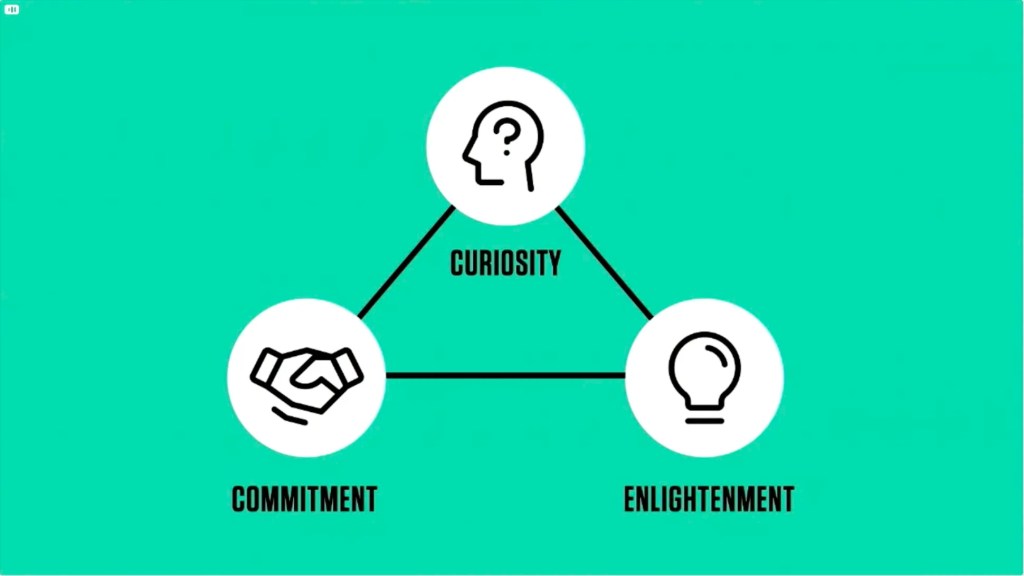
    ความสัมพันธ์ในโลกนี้ประกอบด้วย 3 phases ได้แก่:

    1. Curiosity
    2. Enlightenment
    3. Commitment

    ยกตัวอย่างทั้ง 3 phases ในความสัมพันธ์แบบคู่รักและ marketing:

    PhaseLoveMarketing
    Curiosityสนใจในตัวอีกฝ่ายสนใจในสินค้า/บริการ
    Enlightenmentออกเดททำความรู้จักกันศึกษาเพิ่มเติม (เช่น อ่านรีวิว)
    Commitmentขอแต่งงานกดสั่งสินค้า/บริการ
    Source: The 5 Simple Soundbites That Will Grow Your Business webinar by Donald Miller (2025)

    ทุกความสัมพันธ์จะต้องก้าวข้ามแต่ละ phase ตามลำดับ เช่น ถ้าเราอยากจะแต่งงาน เราจะขอแต่งงาน (commitment) เลยไม่ได้ แต่ต้องทำให้อีกฝ่ายสนใจ (curiosity) และทำความรู้จักกัน (enlightenment) ก่อน

    Marketing ก็เช่นกัน ถ้าเราอยากให้ลูกค้าซื้อ เราจะขอให้ลูกค้าซื้อของเลยไม่ได้ แต่เราจะต้องค่อย ๆ พาลูกค้าผ่านทีละ phase: ทำให้ลูกค้าสนใจเรา, ช่วยให้ลูกค้ารู้จักเรามากขึ้น, และขอให้ลูกค้าทำธุรกิจกับเรา

    ถ้าเราอยากให้ลูกค้าซื้อของกับเรา ในขั้นแรก เราจะต้องทำให้ลูกค้าสนใจเราให้ได้ก่อน


    🏡 House Analogy

    ความสัมพันธ์เปรียบเหมือนบ้านที่เราต้องการชวนให้ลูกค้าเข้ามาอยู่ด้วย

    นั่นคือ ลูกค้าจะเข้าบ้านได้ (เข้ามาอยู่ในความสัมพันธ์กับเรา) จะต้องก้าวผ่าน 3 ส่วนของบ้าน:

    1. บันไดหน้าบ้าน (curiosity)
    2. ระเบียงหน้าบ้าน (enlightenment)
    3. ประตูหน้าบ้าน (commitment)
    Source: The 5 Simple Soundbites That Will Grow Your Business webinar by Donald Miller (2025)

    บ้าน (marketing) ที่ดีควรจะมีทั้ง 3 ส่วน เพื่อทำให้ลูกค้าเข้าถึงบ้านได้ง่าย

    ถ้าขาดส่วนใดส่วนหนึ่งไป ไม่ได้หมายความว่า ลูกค้าจะไม่ซื้อของกับเรา แต่ลูกค้าจะซื้อของกับเราได้ยากขึ้น (ลูกค้าต้องปีนขึ้นระเบียงบ้านโดยไม่มีบันได)

    (Note: การที่เรามี marketing ไม่ครบ 3 ส่วน แต่ยังมีลูกค้า ก็แสดงว่า สินค้า/บริการของเราเป็นที่ต้องการของตลาด จนขนาดลูกค้ายอมก้าวข้ามความยากลำบากในการซื้อสินค้า/บริการได้)

    .

    🪜 Front Steps: Curiosity

    ถ้าเราอยากจะปิดการขาย เราจะต้องเริ่มจากทำให้ลูกค้าหันมาสนใจและก้าวขึ้นบันไดหน้าบ้านให้ได้ก่อน

    Marketing ที่จะทำให้ลูกค้าหันมาสนใจได้ คือ ทำให้ลูกค้ารู้ว่าสินค้า/บริการจะทำให้เขาอยู่รอด (survive) ได้ยังไง

    ในขั้นนี้ ลูกค้ายังไม่ต้องการรู้ว่า สินค้าเรามี features อะไรบ้าง หรือบริการของเราทำอะไรได้บ้าง เขาแค่ต้องการรู้ว่า เราจะช่วยให้มีชีวิตที่ดีขึ้นได้ยังไง เช่น:

    • ช่วยสร้างรายได้เพิ่มไหม?
    • ช่วยลดรายจ่ายหรือเปล่า?
    • ช่วยรักษาสุขภาพไหม?
    • ช่วยให้มีชื่อเสียงมากขึ้นหรือเปล่า?

    ถ้าเราสามารถทำให้ลูกค้าเห็นใจความหลักนี้ได้ เขาก็จะหันมาสนใจเรา

    เราสามารถสื่อสารใจความนี้ผ่าน 5 survival soundbites หรือข้อความสั้น ๆ ที่เราสามารถพูดทวนซ้ำ ๆ เพื่อให้ลูกค้าจำขึ้นใจได้ ซึ่งย่อได้สั้น ๆ ว่า PEACE ดังนี้:

    1. P: problem – ปัญหาที่ลูกค้ามี (และเราสามารถแก้ได้)
    2. E: empathy – ความเข้าใจในความรู้สึกของลูกค้า
    3. A: answer – คำตอบของปัญหา (นั่นคือ สินค้า/บริการของเรา)
    4. C: change – การเปลี่ยนแปลงที่จะเกิดขึ้น
    5. E: end result – ผลลัพธ์ที่ลูกค้าจะได้รับ

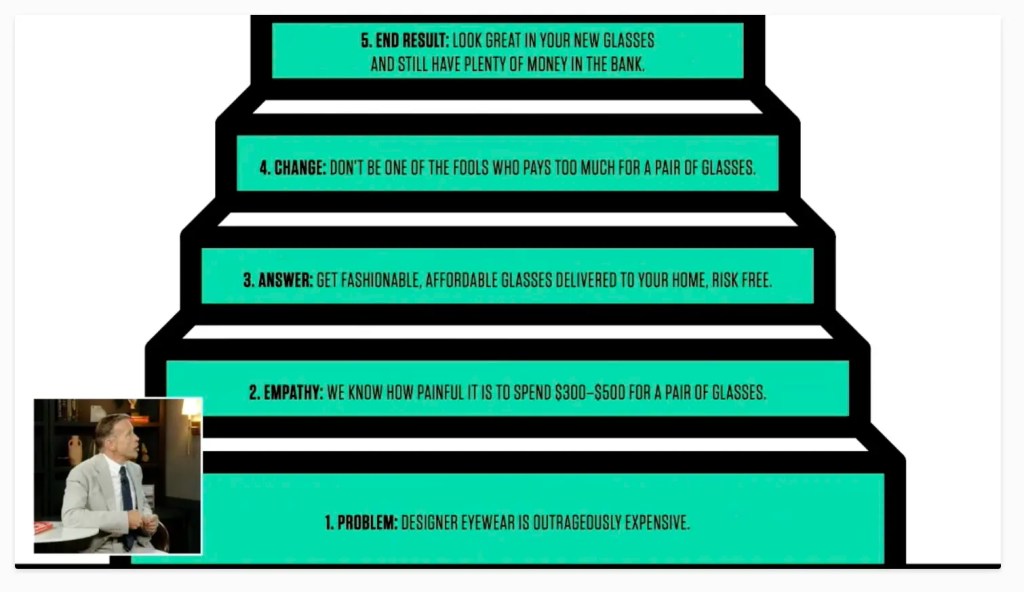
    ยกตัวอย่างบริษัทขายแว่นแฟชั่นราคาถูกเพื่อตอบโจทย์แว่นแฟชั่นราคาแพง:

    Source: The 5 Simple Soundbites That Will Grow Your Business webinar by Donald Miller (2025)
    1. Problem: Designer eyewear is outrageously expensive.
    2. Empathy: We know how painful it is to spend $300-500 for a pair of glasses.
    3. Answer: Get high-quality, affordable glasses delivered to your home, risk-free.
    4. Change: Don’t be one of the fools who pays too much for a pair of glasses.
    5. End result: Look great in your new glasses and still have plenty of money in the bank.

    แปลไทย:

    1. Problem: แว่นแฟชั่นมีราคาแพงเว่อร์
    2. Empathy: เรารู้ว่า มันน่าเจ็บใจขนาดไหนที่ต้องจ่ายเงิน $300-500 เพื่อแว่นอันเดียว
    3. Answer: ซื้อแว่นคุณภาพ ราคาถูก จัดส่งแบบไร้ความเสี่ยงถึงหน้าบ้าน
    4. Change: ไม่ต้องเป็นคนโง่ที่หลงจ่ายเงินซื้อแว่นราคาแพง
    5. End result: เปลี่ยน look ให้ดูดีกับแว่นใหม่ และยังมีเงินเก็บในธนาคารอีกเพียบ

    จะสังเกตว่า ทั้ง 5 soundbites ร้อยเรียงเป็นเรื่องราวที่ชวนให้ลูกค้าหันมาสนใจได้ โดย:

    1. Problem เปิดเรื่องให้ลูกค้าอยากรู้อยากเห็น
    2. Empathy ทำให้ลูกค้ารู้ว่าเราเข้าใจปัญหาของเขา
    3. Answer ชี้ทางสว่างให้กับลูกค้า (เชื่อมโยงสินค้าเข้ากับปัญหาที่ลูกค้าต้องการแก้)
    4. Change ชวนมองสิ่งที่จะเปลี่ยนแปลงไปในทางที่ดีขึ้น
    5. End result วาดภาพชีวิตที่ดีขึ้นให้ลูกค้าเห็น

    เมื่อเราใช้ทั้ง 5 soundbites สำเร็จ ลูกค้าก็เหมือนก้าวขึ้นมาตามขั้นบันไดทั้ง 5 ขึ้นมายืนบนระเบียงหน้าบ้านของเรา

    .

    🪑 Front Porch: Enlightenment

    ถ้าลูกค้ามาอยู่บนระเบียงหน้าบ้านแล้ว แสดงว่า เขาอยากทำความรู้จักสินค้า/บริการของเราเพิ่มเติม

    หน้าที่ของเราใน phase นี้ คือ ให้ข้อมูลที่เพียงพอต่อการตัดสินใจของลูกค้า ซึ่งเราสามารถทำได้ผ่าน due diligence documents หรือเอกสาร marketing ที่เราส่งให้กับลูกค้า เช่น:

    • Lead generator: PDF ให้ความรู้ที่เปิดให้โหลดได้ฟรี
    • Social campaign: campaign ที่ชวนให้ลูกค้าโพสต์รูปสินค้า และติด hashtags ลงใน Instagram
    • Educational content: อีเมลหรือบทความให้ความรู้เกี่ยวกับปัญหาที่ลูกค้ามีและทางแก้ปัญหา

    หลังจากได้รับข้อมูลแล้ว และลูกค้ารู้สึกว่าสินค้า/บริการตอบโจทย์ เขาก็พร้อมที่จะก้าวผ่านประตูหน้าบ้าน

    .

    🚪 Front Door: Commitment

    ในจุดนี้ เราจะไม่ปล่อยให้ลูกค้าเดินเข้าบ้านเอง แต่จะต้องเชิญชวนให้ลูกค้าอยากก้าวเข้าไปด้วย

    การที่เราไม่มีประตูบ้าน ก็เหมือนร้านค้าที่ไม่มี cashier เก็บเงิน ลูกค้าอาจจะหยิบสินค้าใส่ตะกร้าแล้ว แต่ถ้าไม่มี cashier ลูกค้าก็จ่ายเงินซื้อของไม่ได้ และเราจะปิดการขายไม่ได้

    Marketing ที่เราจะต้องทำในจุดนี้ คือ call to action

    เหมือนกับการแต่งงาน เราจะแต่งงานกับคนที่เรารักไม่ได้ถ้าไม่ขอแต่งงานกัน การขายก็เช่นกัน ถ้าเราไม่ขอให้ลูกค้าซื้อ เขาก็อาจจะไม่ซื้อของกับเรา

    ตัวอย่าง call to action ที่เราสามารถทำได้ เช่น:

    • ปุ่มสั่งซื้อบนหน้าเว็บ: “Buy now”, “Get one today”
    • ข้อความตอนหน้าสั่งซื้อ: “ส่งฟรี”, “ไม่พอใจ ยินดีคืนเงิน”
    • Time-sensitive offer: โปรโมชั่นลดเวลาในช่วงเวลาที่กำหนด

    ถ้า call to action ของเราได้ผล ลูกค้าก็จะก้าวเข้ามาในบ้านของเรา ซึ่งหมายถึงเราได้พาลูกค้าผ่านมาทั้ง 3 phases ได้สำเร็จ

    ถ้าเราทำ marketing ได้ครบทั้ง 3 phases เราก็จะเห็นจำนวนลูกค้าและยอดขายที่เพิ่มมากขึ้น เพราะเราทำให้ลูกค้าเข้ามาหาเราได้ง่ายขึ้น



    💪 Summary

    Marketing เป็นการสร้างความสัมพันธ์ระหว่างเรา (ธุรกิจ) และลูกค้า และประกอบด้วย 3 phases ซึ่งเปรียบได้เหมือนหน้าบ้านของเรา:

    1. Curiosity – บันไดหน้าบ้าน
    2. Enlightenment – ระเบียงหน้าบ้าน
    3. Commitment – ประตูหน้า

    ถ้าเราต้องการปิดการขาย เราจะต้องพาลูกค้าผ่านทั้ง 3 phases โดยใช้เครื่องมือเหล่านี้:

    1. Curiosity – 5 survival soundbites หรือ 5 ข้อความสั้น ๆ ที่เชื่อมสินค้า/บริการเข้ากับปัญหาที่ลูกค้าต้องการแก้
    2. Enlightenment – due diligence documents เช่น PDF ให้ความรู้

    3. Commitment – call to action เช่น โปรโมชั่นลดราคาในเวลาจำกัด

    เมื่อเราทำ marketing ตามกรอบแนวคิดนี้แล้ว เราจะเห็นลูกค้าและยอดขายที่เพิ่มขึ้น เพราะลูกค้าสังเกตเห็น ทำความรู้จัก และตอบรับสินค้า/บริการของเราได้ง่ายขึ้น


    📄 References

  • สรุป 7 ประเด็น AI Transformation จาก 7 Speakers ในงาน DigiTech ASEAN Thailand 2025

    สรุป 7 ประเด็น AI Transformation จาก 7 Speakers ในงาน DigiTech ASEAN Thailand 2025

    ในบทความนี้ ผมจะมาสรุป 7 ประเด็น AI transformation จาก 7 speakers บนเวที Global Tech Conference ในงาน DigiTech ASEAN Thailand 2025 เมื่อวันที่ 19 พ.ย. ที่ผ่านมา:

    1. Future trends: แนวโน้ม AI ในโลกอนาคต
    2. How to AI transformation: แนวคิดในการทำ AI transformation ในองค์กร
    3. Factors to consider: ปัจจัยที่ควรพิจารณาในการทำ AI transformation
    4. People management: การบริหารพนักงานในองค์กรในยุคของ AI
    5. Risks to consider: ความเสี่ยงในการทำ AI transformation
    6. AI solution showcases: ตัวอย่าง AI solutions จาก SCBX และ KBTG
    7. Surviving in the age of AI: แนวคิดในการเอาตัวรอดในยุค AI

    ถ้าพร้อมแล้ว ไปเริ่มกันเลย


    1. 🚀 Topic 1. Future Trends
      1. 🤖 AI Is Here to Stay.
      2. 😎 AI, More Agentic
      3. 🤝 Human-AI Collaboration
    2. 👷 Topic 2. How to AI Transformation
      1. 🫨 Pain Points
      2. 💪 Prioritise, Relentlessly
      3. ⛰️ Set Goal & Plan
      4. 👄 Communicate
      5. 📋 Track Success
    3. ☝️ Topic 3. Factors to Consider
    4. 🤠 Topic 4. People Management
      1. ♥️ Mindset
      2. 😈 Building Culture
      3. 👶 Generation Gap
    5. 🚨 Topic 5. Risks to Consider
    6. 👾 Topic 6. AI Solution Showcases: SCBX & KBTG
      1. 🟣 SCBX
    7. 🟢 KBTG
    8. 💡 Topic 7. Surviving in the Age of AI
    9. 🎤 List of Sessions
    10. 🔗 Related Links

    ประเด็นในเรื่อง future trends มีอยู่ 3 เรื่อง ได้แก่:

    1. AI is here to stay
    2. AI, more agentic
    3. Human-AI collaboration

    .

    🤖 AI Is Here to Stay.

    AI ก็เหมือนกับคอมพิวเตอร์ในยุคก่อน เราไม่มีทางที่จะย้อนกลับไปในยุคที่ไม่มี AI อีกแล้ว และเราต้องเรียนรู้ที่จะอยู่ร่วมกับ AI

    .

    😎 AI, More Agentic

    การใช้งาน AI เปลี่ยนจากการใช้ GenAI มาเป็น agentic AI มากขึ้นเรื่อย ๆ (สอดคล้องกับเวทีในปีก่อนที่บอกว่า การใช้ AI ในปี 2025 จะกลายมาเป็น agentic AI)

    .

    🤝 Human-AI Collaboration

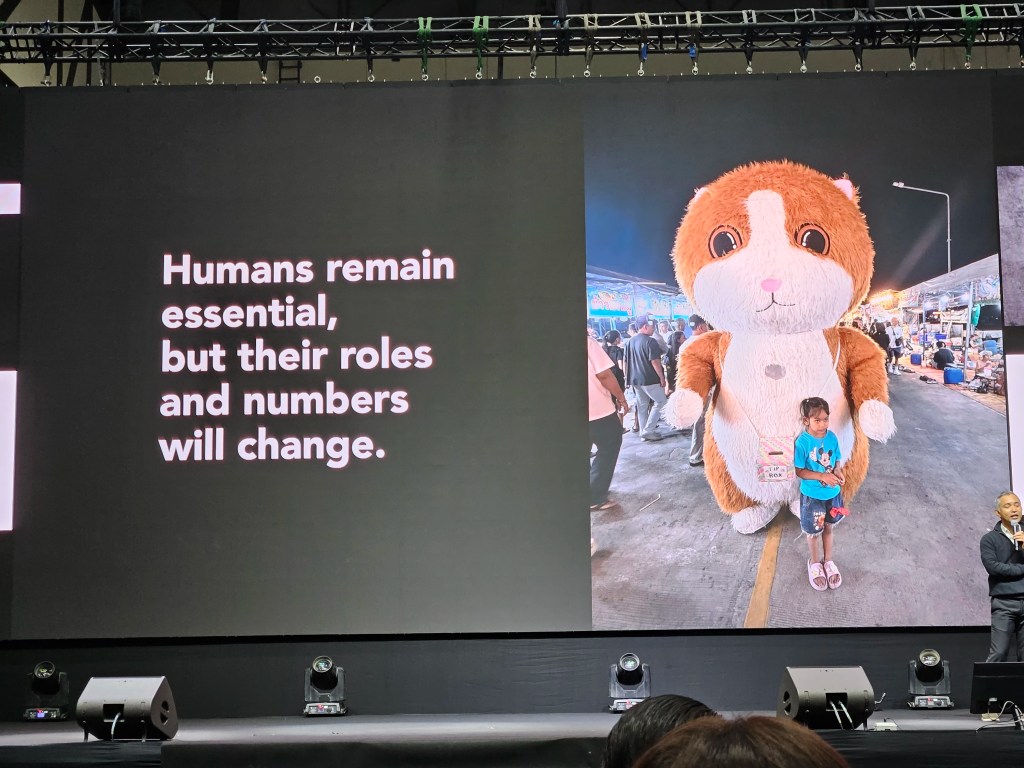
    มนุษย์จะยังคงเป็นส่วนสำคัญในโลก แต่บทบาทของมนุษย์จะเปลี่ยนแปลงไป แต่เปลี่ยนแปลงไปยังไง ยังไม่มีใครรู้แน่ชัด


    👷 Topic 2. How to AI Transformation

    แนวคิดในการทำ AI transformation ในองค์กรมีอยู่ 5 ขั้นตอน ได้แก่:

    1. Pain points
    2. Prioritise, relentlessly
    3. Set goal and plan
    4. Communicate
    5. Track success

    .

    🫨 Pain Points

    เราไม่ควร transform เพียงเพราะองค์กรอื่นทำได้ เพราะแต่ละองค์กรมีบริบทที่แตกต่างกัน การที่ Amazon ทำได้ ไม่ได้หมายความว่า Google หรือเราจะทำได้ด้วยวิธีการเดียวกัน

    AI transformation ไม่มี one-size-fits-all และสิ่งที่เราต้องการหา pain point ให้เจอ: อะไรคือปัญหาที่เราต้องการแก้ในองค์กรของเรา?

    วิธีหนึ่งที่ช่วยให้เรามองเห็นปัญหาได้ คือ การลงไปดูหน้างานจริง

    ยกตัวอย่าง Makro ที่พบว่า พนักงานมีปัญหาในการยกถุงผงซักฟองลงจากชั้นวาง เพราะพนักงานส่วนใหญ่เป็นผู้หญิงและถุงผงซักฟองมีน้ำหนักมาก Makro จะไม่เห็นปัญหานี้เลยถ้าผู้จัดการนั่งอยู่แต่ในออฟฟิศ เพราะบนรายงานการขาย เราจะเห็นแค่ว่าผงซักฟองเป็นสินค้าขายดี

    .

    💪 Prioritise, Relentlessly

    ในองค์กร เราอาจจะมีปัญหามากมายที่เราต้องการแก้ไข:

    • เพิ่ม productivity
    • พัฒนา product ใหม่
    • เพิ่ม engagement กับลูกค้า

    แต่ด้วยเวลาและงบประมาณ เราจะต้องเลือกว่าจะจัดการปัญหาไหนก่อน

    เราจะต้องคอยจัดลำดับความสำคัญอย่างไม่ลดละเพื่อไม่ให้เราหลงทางในยุคที่การเปลี่ยนแปลงและปัญหาเกิดขึ้นอย่างรวดเร็ว

    เรามี 3 frameworks ที่ช่วยเราได้:

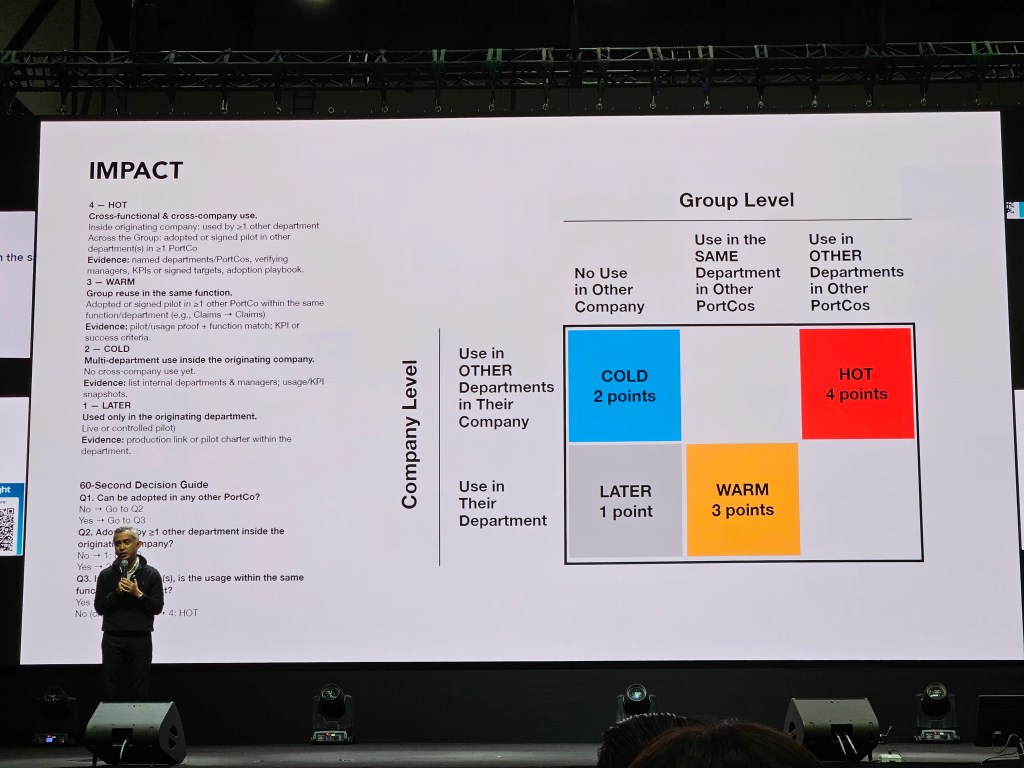
    Framework #1. Impact: ดูว่า AI solution ที่เราจะทำ สามารถใช้ได้ทั้งในระดับกลุ่ม (group level) และบริษัท (company level) ไหม

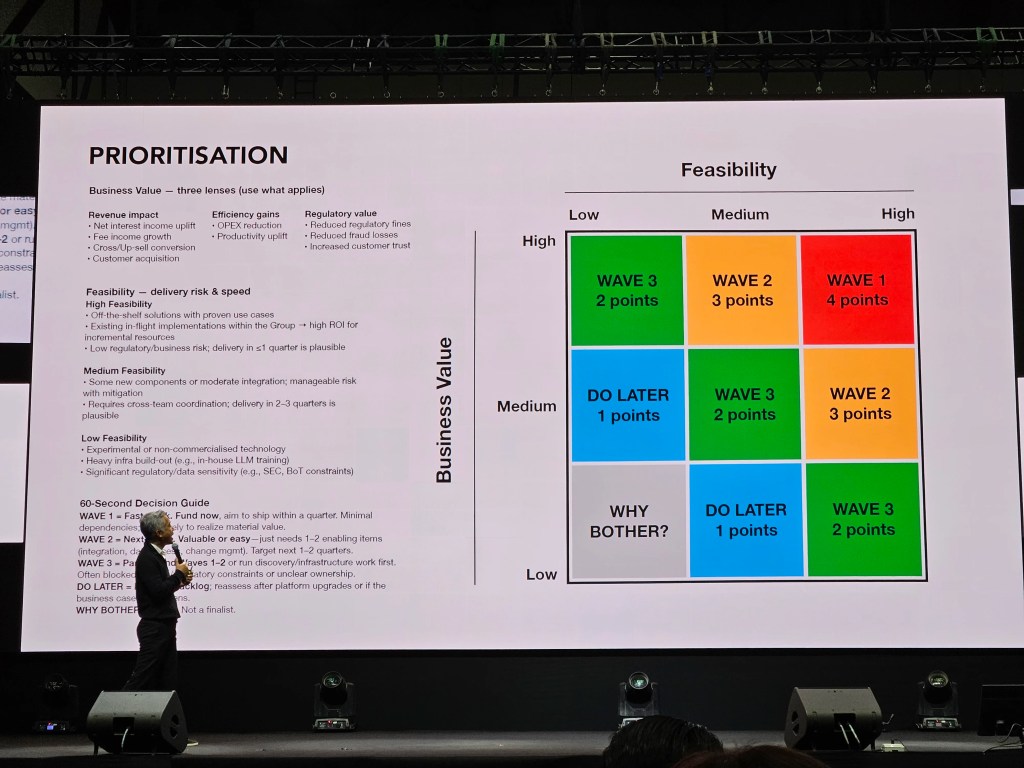
    Framework #2. Priority: ดูความเป็นไปได้ในการประยุกต์ใช้ (feasibility) และคุณค่าทางธุรกิจ (business value) ที่เราจะได้รับ

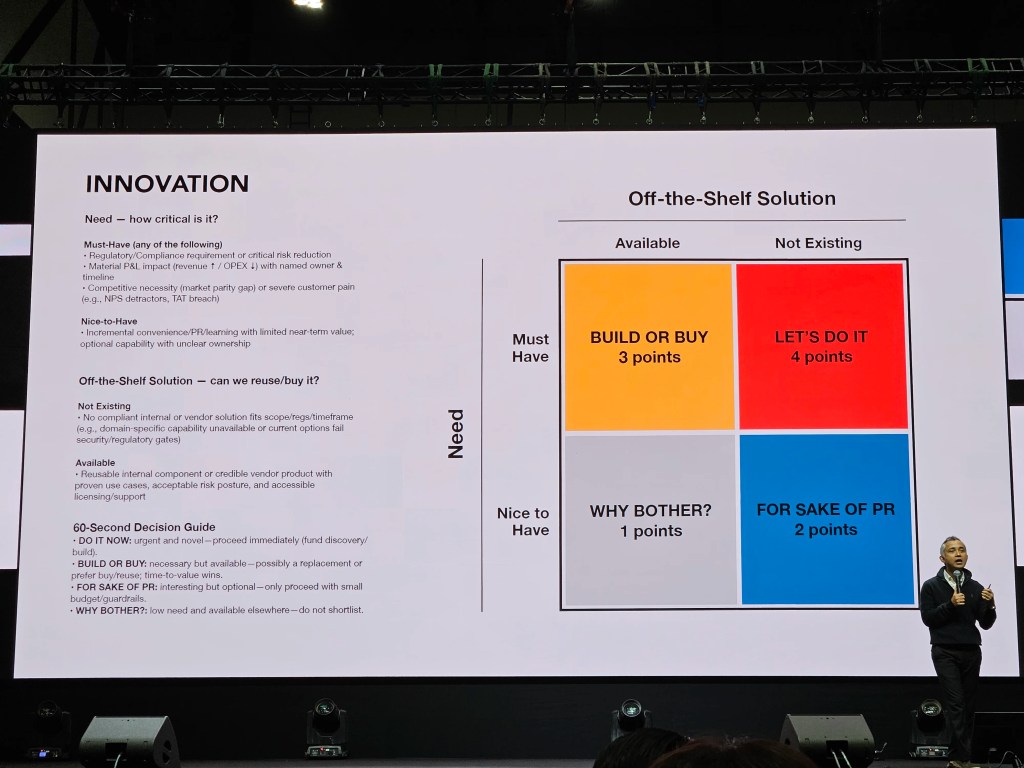
    Framework #3. Innovation: ดูว่า AI solution ที่เราต้องการมีคนทำอยู่แล้วไหม (off-the-shelf solution) และระดับความต้องการของเรา (need)

    .

    ⛰️ Set Goal & Plan

    เมื่อเราได้ปัญหาที่เราต้องการแก้ไขแล้ว สิ่งต่อไปที่เราต้องทำ คือ กำหนดเป้าหมายและวางแผน

    เราอาจจะวางแผน 1 ปี, 3 ปี, 5 ปี ซึ่งยิ่งแผนระยะยาวเท่าไร ก็ยิ่งมีโอกาสจะเปลี่ยนได้ง่าย เพราะเทคโนโลยีมีการเปลี่ยนแปลงอย่างรวดเร็ว อย่างแผน 5 ปีในปีนี้อาจแตกต่างกันอย่างสิ้นเชิงกับแผน 5 ปีในปีหน้า

    แต่มีแผนดีกว่าไม่มีแผน เพราะอย่างน้อย เราจะรู้ว่าเราจะต้องทำอะไร และแม้แผนจะเปลี่ยน แต่เป้าหมายเรายังเหมือนเดิม

    .

    👄 Communicate

    การตั้งเป้าหมายไม่พอ เรายังต้องสื่อสารและทำให้แน่ใจว่า ทุกคนเห็นและเข้าใจเป้าหมายเดียวกัน

    ถ้าเราทำให้ทุกคนเห็นเป้าหมายเดียวกันได้ แม้ต่างคนต่างจะมี job to be done ที่แตกต่างกัน แต่ทุกคนก็จะยังเดินไปในทิศทางเดียวกัน

    .

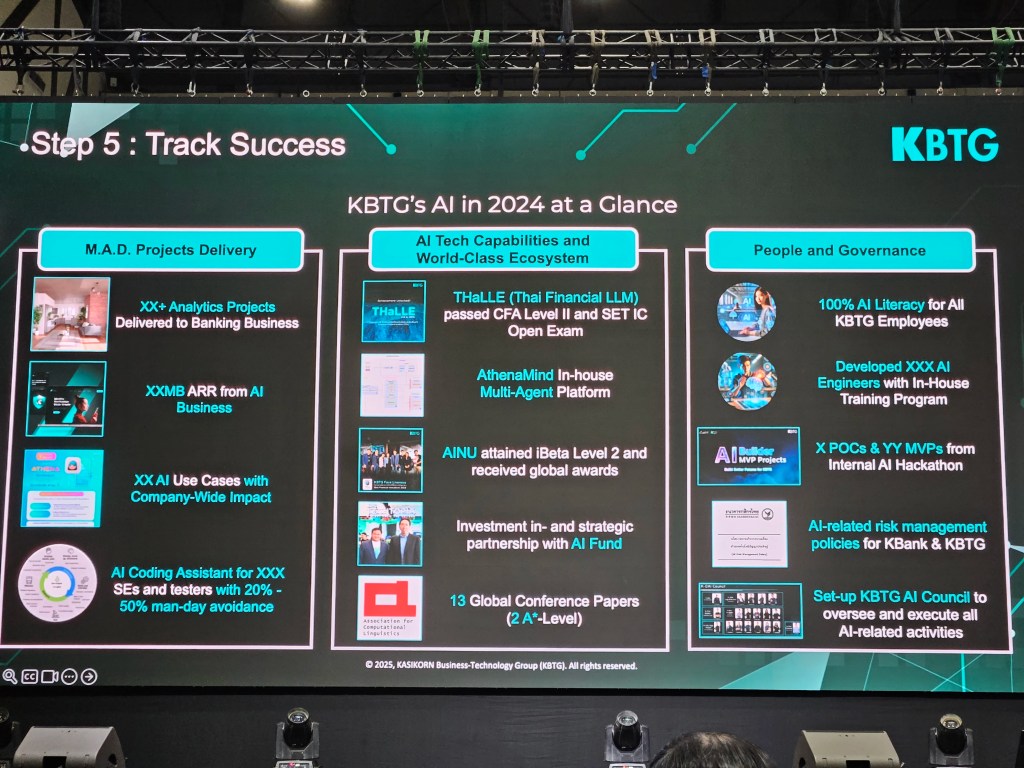
    📋 Track Success

    สุดท้าย เราจะต้องคอยติดตามผลความคืบหน้า เพื่อให้เราปรับเปลี่ยนวิธีการตามหน้างาน และทำให้แน่ใจว่า เรายังมุ่งหน้าไปในทิศที่เราต้องการอยู่


    ☝️ Topic 3. Factors to Consider

    เรามีปัจจัยที่ต้องพิจารณาในการทำ AI transformation มีอยู่ 4 อย่าง ได้แก่:

    1. People: พนักงานและลูกค้าของเรา
    2. Culture: วัฒนธรรมขององค์กร
    3. Systems/tools/tech: ระบบ เครื่องมือ และเทคโนโลยี
    4. Finance: เงิน (เพราะองค์กรอยู่ได้ด้วยเงินทุน)

    People เป็นสิ่งที่เราต้องให้ความสำคัญเป็นอันดับแรก เพราะถ้าเราโฟกัสที่ technology แต่พนักงานหรือลูกค้าไม่พร้อมที่จะใช้เครื่องมือใหม่ เราอาจจะได้ AI solution ที่ไม่มีใครใช้


    🤠 Topic 4. People Management

    การบริหารพนักงานในยุคของ AI มีอยู่ 3 หัวข้อ ได้แก่:

    1. Mindset
    2. Building culture
    3. Generation gap

    .

    ♥️ Mindset

    สิ่งที่เราต้องการในพนักงาน คือ mindset เพราะถ้าขาด mindset ที่เหมาะสม ไม่ว่าเราจะทำ AI transformation ดีขนาดไหน ก็อาจจะไม่สำเร็จ

    Mindset อาจจะเริ่มที่ตัวเราก่อน เช่น ถ้าเราอยากทำ AI transformation แต่เราไม่ชอบ AI เราต้องหันกลับมามองว่า ถ้า AI เป็นสิ่งที่หลีกเลี่ยงไม่ได้ เป็นเราหรือเปล่าที่จะต้องเปลี่ยน

    ถ้าเราไม่เปลี่ยน โลกก็จะเคลื่อนไปข้างหน้าโดยไม่มีเรา

    .

    😈 Building Culture

    สิ่งที่เราต้องการในองค์กร คือ diversity

    เราไม่ต้องการพนักงานที่มีลักษณะนิสัยเหมือนกันหมด เพราะ culture ที่มีคนแบบเดียวกัน คือ culture ที่จะหยุดนิ่ง เปลี่ยนแปลงได้ยาก

    ในการคัดเลือกพนักงาน เราไม่ควรปล่อยให้หัวหน้างานเลือกพนักงานเอง แต่ควรมีกระบวนการที่จะช่วยให้เราคัดเลือกพนักงานอย่างไม่ลำเอียงได้ เช่น มีการสัมภาษณ์หลายครั้งเพื่อให้ได้ความเห็นจากหลายมุมมอง

    นอกจากนี้ เราควรบอกว่า คนที่เป็น “ขบถ” หรือแตกต่าง มากกว่ามองหา “ขนมเปี๊ยะ” หรือคนที่ดูภายนอกหน้าตาเหมือนกันไปหมด

    .

    👶 Generation Gap

    Generation gap เป็นสิ่งที่หลีกเลี่ยงได้ยาก โดยเฉพาะในองค์กรขนาดใหญ่

    แต่ละ generation มีมุมมอง จุดแข็งและจุดอ่อนที่แตกต่างกันไป ซึ่งบางทีก็ทำให้เกิด conflict ระหว่างพนักงานได้

    ถ้าเราอยากทำให้เกิด collaboration แทน เราจะต้องโฟกัสไปที่จุดแข็งของแต่ละ generation เช่น:

    • Generation ที่อายุมากกว่า อาจจะไม่เชี่ยวชาญเทคโนโลยีเท่ากับรุ่นใหม่ แต่มีประสบการณ์และความเชี่ยวชาญมากกว่า
    • Generation ที่อายุน้อยกว่า แม้จะไม่มีประสบการณ์เท่ากับคนรุ่นก่อน แต่ก็มีความเชี่ยวชาญและคุ้นชินกับเทคโนโลยีใหม่ ๆ มากกว่า

    ถ้าเราสามารถดึงจุดแข็งของแต่ละรุ่นขึ้นมา เราก็จะทำให้เกิด collaboration ระหว่างพนักงานในองค์กรได้


    🚨 Topic 5. Risks to Consider

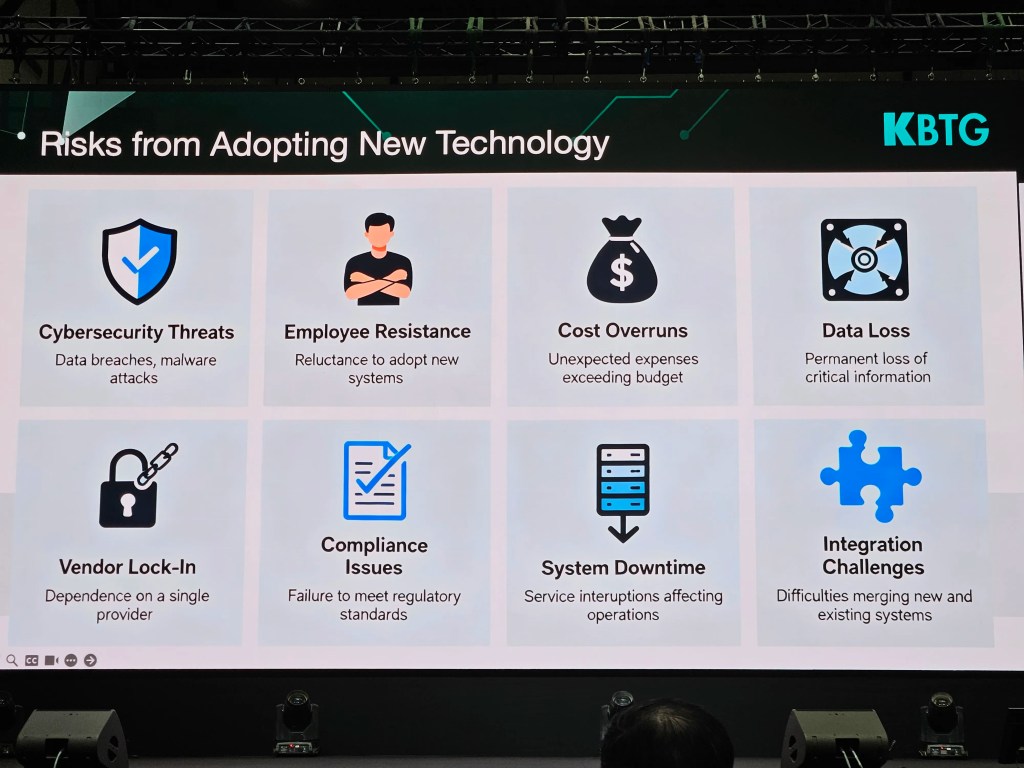
    ความเสี่ยงในการทำ AI transformation มีอยู่ 8 ข้อ ได้แก่:

    1. Cybersecurity threat: ความปลอดภัยของระบบ
    2. Employee resistance: การต่อต้านของพนักงาน
    3. Cost overrun: ใช้งบประมาณเกินกำหนด
    4. Data loss: การสูญเสียข้อมูล โดยเฉพาะข้อมูลที่สำคัญต่อองค์กร
    5. Vendor lock-in: การพึ่งพา vendor แค่เจ้าเดียว
    6. Compliance issues: ปัญหาการปฏิบัติตามกฎ ระเบียบ และข้อบังคับต่าง ๆ
    7. System downtime: ระบบหยุดทำงานและส่งผลต่อการทำงานของพนักงาน
    8. Integration challenges: ความท้าทายในการเชื่อมต่อกับระบบอื่น ๆ

    👾 Topic 6. AI Solution Showcases: SCBX & KBTG

    .

    🟣 SCBX

    SCBX นำเสนอ 2 ตัวอย่างการใช้ AI เพื่อแก้ปัญหาในองค์กร ได้แก่:

    1. ARIS (Advanced Reputation Intelligence System)
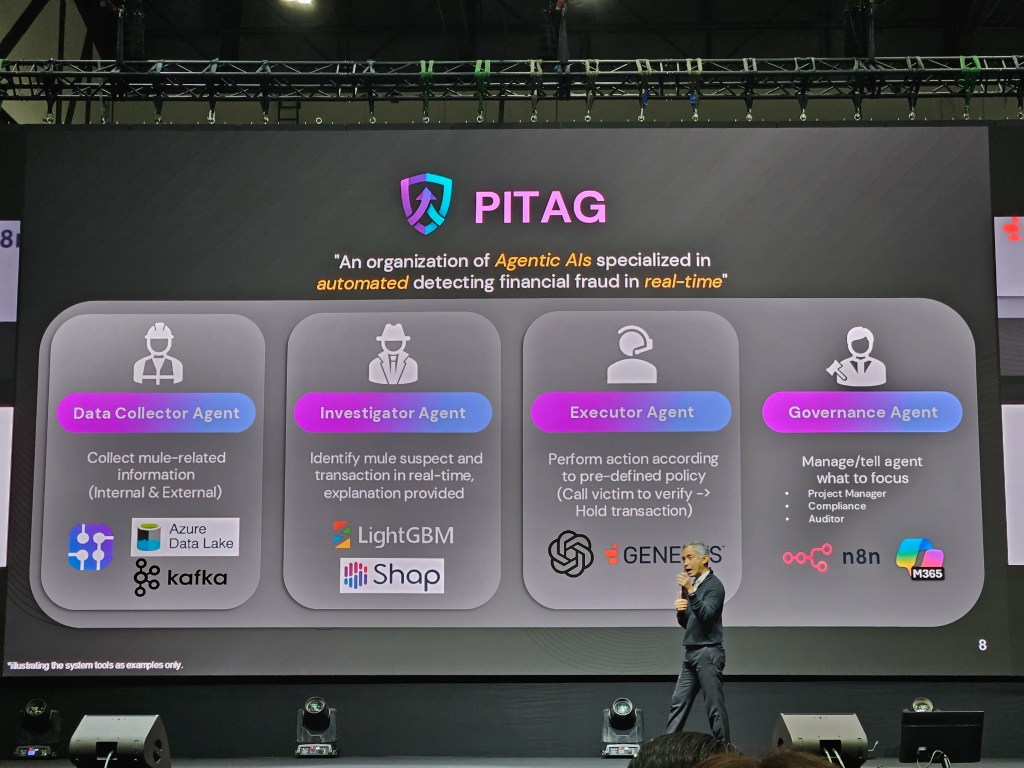
    2. PITAG (Predictive Intelligence for Tactical Anti-fraud Guardian)

    Case 1. ARIS เป็นระบบตรวจจับ incident หรือเหตุการณ์ที่อาจสร้างความเสียหายต่อชื่อเสียงขององค์กร ซึ่งช่วยให้ SCBX สามารถรับรู้และรับมือ incident ต่าง ๆ (เช่น ข่าวว่าแอป SCB ถูกแฮ็ก) ได้อย่างทันท่วงที

    ARIS มีการทำงาน 4 ขั้นตอน:

    1. Data pruning: คัดกรอง content บนอินเทอร์เน็ตที่เกี่ยวข้องกับ SCBX (เช่น แอป SCB)
    2. Sentiment analysis: แยกประเภท content เป็นเขียว เหลือง และแดง พร้อมจับกลุ่ม content ที่อยู่ในหัวข้อเดียวกัน (เช่น แอป SCB ขัดข้อง)
    3. Incident detection: ประเมินว่า แต่ละหัวข้อ (แอป SCB ขัดข้อง) เป็น incident ไหม และถ้าใช่ เป็น incident ระดับไหน
    4. Real-time dashboard: แสดงผลบนหน้าจอ เพื่อให้พนักงานรับรู้ถึง incident ได้แบบ real-time

    Case 2. PITAG เป็น agentic AI สำหรับตรวจจับ fraud และแบ่งการทำงานเป็น 4 ขั้นตอน:

    1. Data collector agent: รวบรวมข้อมูลเกี่ยวกับลูกค้า ทั้งข้อมูลบนระบบ และข้อมูลจากแหล่งอื่น ๆ (เช่น หน่วยงานทางการเงินที่เกี่ยวข้อง)
    2. Investigator agent: ตรวจสอบข้อมูลและประเมินแนวโน้มที่จะเป็น fraud
    3. Executor agent: จัดการกับเคสความเสี่ยง (เช่น โทรขอข้อมูลเพิ่มเติมจากลูกค้า หรือจำกัดวงเงินในการใช้งาน)
    4. Governance agent: กำกับการทำงานของ agents ให้เป็นไปตามกฎระเบียบข้อบังคับ

    .

    🟢 KBTG

    KBTG นำเสนอ 6 AI use cases ในองค์กร ได้แก่:

    1. Increase revenue: เพิ่มรายได้ให้กับองค์กร เช่น เพิ่มยอด sales leads, เพิ่มยอด conversion ผ่าน product และ promotion recommendation
    2. Reduce risk: ลดความเสี่ยงในการทำธุรกรรม เช่น การประเมิน credit score
    3. Streamline operation: ลดเวลาในการทำงาน เช่น ใช้ AI ช่วยประเมินความเสียหายของรถยนต์ และปรับแต่งรูปอสังหาริมทรัพย์เพื่อลงประกาศขาย
    4. Protect customers: รักษาความปลอดภัยให้กับลูกค้า เช่น AINU ระบบยืนยันตัวตนด้วย AI
    5. Improve productivity: เพิ่ม productivity เช่น ใช้ AI ช่วยเขียน code ซึ่งลดเวลาจากหลายชั่วโมงเหลือไม่กี่นาที
    6. New products/services: พัฒนา products ใหม่ ๆ เช่น แอปเหมียวจด และ Future You แอปสำหรับพัฒนาตัวเองผ่านการพูดคุยกับตัวเองในอนาคต

    💡 Topic 7. Surviving in the Age of AI

    ผมขอทิ้งท้ายบทความด้วย 10 ข้อคิดดี ๆ ในการเอาตัวรอดในยุค AI:

    1. Focus on one problem at a time. If you focus on many problems, a year from now you’ll still be where you are now.
    2. Break your goal into smaller ones. Get the small wins first.
    3. Don’t be afraid to fail; if you are, you’ve already failed.
    4. ผิดพลาดได้ แต่สิ่งที่สำคัญ คือ จะทำยังไงให้ไม่ผิดซ้ำ
    5. Be resilient, be persistent.
    6. เราไม่ต้องกลัว AI แทนที่เรา ถ้าเรายังพัฒนาตัวเองอยู่เสมอ
    7. คนที่จะมาแทนที่เราไม่ใช่ AI แค่คือคนที่ใช้ AI เก่งกว่าเรา
    8. สร้าง blue ocean ของตัวเอง ด้วยการทำสิ่งที่ไม่เหมือนใคร
    9. ทำงานเร็วจะต้องตั้งอยู่บนความเป็นจริงและตรงเป้าหมาย ไม่อย่างนั้น ก็จะเป็นความเร็วไร้ทิศทางที่ทำให้เราพังเร็วขึ้น
    10. ความเร็วไม่ใช่ทุกอย่าง แต่ละคนเก่งไม่เหมือนกัน เราจะต้องหาให้เจอว่า ใครทำอะไรได้ดีและหางานนั้นให้เขาทำ

    🎤 List of Sessions

    7 หัวข้อบนเวที Global Tech Conference:

    1. ดิจิทัลไม่ใช่แค่ฝ่าย IT แต่คือภารกิจของ CEO ในการขับเคลื่อนองค์กร โดย คุณสุธีรพันธุ์ สักรวัตร, ประธานเจ้าหน้าที่ฝ่ายการตลาด, SCBX
    2. จากวิสัยทัศน์สู่ความเร็ว: คู่มือทรานส์ฟอร์มองค์กรสู่ยุคเรียลไทม์ โดย ดร.ธีรเดช ดำรงค์พลาสิทธิ์, หัวหน้าคณะผู้บริหารด้านกลุ่มธุรกิจองค์กร, True Corporation
    3. Technology & Talent Transformation โดย คุณ Shaun Wong, Chief Corporate Planning Officer, CP Axtra
    4. พลิกมุมคิด ผู้นำ ธุรกิจยุคใหม่: ทรานส์ฟอร์มองค์กรอย่างไรให้รอดในปี 2030 โดย คุณกานติมา เลอเลิศยุติธรรม, รองประธานเจ้าหน้าที่บริหาร ด้านธุรธิจองค์กร, AIS
    5. Smart CEO in AI Era: ผู้นำองค์กรต้องปรับตัวอย่างไรในโลกที่ AI วิ่งเร็วกว่าเรา โดย ดร.ธรรม์ธีร์ สุกโชติรัตน์, CEO, JIB AI
    6. จากดิจิทัลสู่ความอัจฉริยะ: ก้าวต่อไปของเทคโนโลยีธุรกิจยุคใหม่ โดย ดร.ทัดพงศ์ พงศ์ถาวรกมล, กรรมการผู้จัดการ, KBTG
    7. The New Corporate DNA: สร้างองค์กรไว ปรับง่ายโตได้ทุกจังหวะ โดย คุณเปา พีรดนย์ เหมยากร, ประธานเจ้าหน้าที่บริหารและผู้ก่อตั้ง, iHAVECPU

  • สรุป 2 บทเรียนจาก workshop “Compassionate Leadership in the Age of AI” โดยคุณดามพ์ (มงคล หงษ์ชัย) ในงาน PMAT 60th: Compassion และ DEMO — 2 เครื่องมือเพื่อความสำเร็จในการพัฒนา AI solution ในองค์กร

    สรุป 2 บทเรียนจาก workshop “Compassionate Leadership in the Age of AI” โดยคุณดามพ์ (มงคล หงษ์ชัย) ในงาน PMAT 60th: Compassion และ DEMO — 2 เครื่องมือเพื่อความสำเร็จในการพัฒนา AI solution ในองค์กร

    ในบทความนี้ ผมจะมาสรุปเนื้อหาจาก workshop “Compassionate Leadership in the Age of AI” ของคุณดามพ์ (มงคล หงษ์ชัย) ผู้เชี่ยวชาญ agile leadership และ AI for future skills ในงาน PMAT 60th เมื่อวันที่ 12 พ.ย. ที่ผ่านมา

    โดยเนื้อหาจะแบ่งเป็น 3 ส่วน ได้แก่:

    1. Issues with AI adoption: ปัญหาการพัฒนา AI solution
    2. Compassion: เครื่องมือทำความเข้าใจคน
    3. DEMO: เครื่องมือทำความเข้าใจ process

    ถ้าพร้อมแล้ว ไปเริ่มกันเลย


    1. 😭 The Issue With AI Solutions
    2. 🫂 Compassion: Tool for Understanding the People
      1. ❤️ Empathy
      2. 🫂 Compassion
      3. 🧘 How to Develop Compassion
    3. 🦾 DEMO: Tool for Understanding Process
      1. 📊 Why DEMO?
      2. 👷 What Is DEMO?
      3. 🤖 DEMO & AI Solution
      4. 📋 How to DEMO
    4. 💪 Summary
    5. 📚 Further Reading

    😭 The Issue With AI Solutions

    95% ขององค์กรล้มเหลวในการสร้าง AI solution ที่สร้างกำไรได้จริง (The GenAI Divide: State of AI in Business 2025)

    สาเหตุหลักของความล้มเหลวมีอยู่ 2 ข้อ ได้แก่:

    1. People: ขาดความเข้าใจในผู้ที่เกี่ยวข้องกับการเปลี่ยนแปลง (เช่น พนักงานที่ต้องใช้ AI)
    2. Process: ขาดความเข้าใจใน process งานที่นำ AI มาประยุกต์ใช้

    ซึ่งทำให้ AI solution ที่ออกแบบไม่ตอบโจทย์คนใช้งานและไม่สามารถสร้างรายได้ให้กับองค์กรได้

    เราสามารถแก้ทั้ง 2 สาเหตุนี้ได้ด้วย 2 เครื่องมือนี้:

    1. Compassion: ช่วยทำความเข้าใจคน
    2. DEMO: ช่วยทำความเข้าใจ process

    🫂 Compassion: Tool for Understanding the People

    .

    ❤️ Empathy

    ถ้าเราจะเข้าใจคนอื่นได้ เราจะต้องมี empathy

    Empathy เป็นคำที่มีคนพูดถึงอยู่บ่อย ๆ โดยเฉพาะในองค์กรที่ทำงานกับ design thinking ซึ่งใช้ empathy เป็นเครื่องมือหลักในการทำความเข้าใจปัญหาของ user เพื่อออกแบบ solution ที่ตอบโจทย์ user อย่างแท้จริง

    Empathy ยังเป็น 1 ใน 4 ลักษณะสำคัญของ leader ในยุค VUCA (volatile, uncertain, complex, ambiguous) เคียงข้างกับ problem solving, relationship management, และ motivation อีกด้วย

    Empathy เป็นสิ่งจำเป็น เพราะทำให้เราเข้าใจความรู้สึกและมุมมองของคนอื่นได้ เพราะ leader ที่ไม่มี empathy จะไม่สามารถ engage คนอื่นได้ เพราะไม่สามารถสร้าง motivation ให้กับคนอื่นได้ (Connect with Empathy, But Lead with Compassion)

    แต่ empathy อย่างเดียวอาจไม่พอ และสิ่งที่เราต้องการจริง ๆ คือ compassion

    .

    🫂 Compassion

    ในขณะที่ empathy ช่วยให้เรารับรู้ความรู้สึกและมุมมองของคนอื่น compassion ไม่เพียงแต่ช่วยให้เราเข้าถึงความรู้สึกของคนอื่น แต่ยังรวมไปถึงความต้องการที่จะช่วยคนอื่นอีกด้วย

    Compassion แปลไทยได้ว่า “กรุณา” ซึ่งหมายถึง การช่วยให้คนอื่นพ้นทุกข์ และคำที่มักมาคู่กัน คือ “เมตตา” ซึ่งแปลว่า การทำให้คนอื่นมีความสุข (Buddhist beliefs – Edexcel)

    Empathy เป็นสิ่งจำเป็นที่จะช่วยให้เรา connect กับคนอื่นได้ แต่ถ้าเราจะเป็น leader ที่ดี เราจะต้องมี compassion ด้วย เพราะ empathy อย่างเดียวอาจทำให้เราตัดสินใจผิดพลาดได้ ตามคำของ Paul Polman อดีต CEO ของ Unilever:

    If I led with empathy, I would never be able to make a single decision. Why? Because with empathy, I mirror the emotions of others, which makes it impossible to consider the greater good.”

    แปล:

    ถ้าผมนำด้วย empathy ผมจะตัดสินใจไม่ได้สักอย่าง ทำไมหรอ? เพราะ empathy ทำให้ผมรู้สึกความรู้สึกของคนอื่น ซึ่งทำให้ผมคิดถึงประโยชน์ของส่วนรวมไม่ได้

    มีงานวิจัยที่แสดงให้เห็นถึงข้อเสียของ empathy

    ในงานวิจัย ผู้เข้าร่วมถูกขอให้เลือกว่า จะลัดคิวเด็กที่ป่วยหนักคนหนึ่งเพื่อให้ได้รับการรักษาก่อนคิวไหม โดยกลุ่มหนึ่งถูกขอให้ฟังและมีความรู้สึกร่วมในขณะที่เด็กเล่าถึงความเจ็บปวดจากโรค และอีกกลุ่มถูกขอให้ฟังโดยไม่ตัดสิน

    ผู้เข้าร่วมกลุ่มแรกเลือกที่จะลัดคิวให้เด็กมากกว่าผู้เข้าร่วมในกลุ่มหลัง แม้ว่าผู้เชี่ยวชาญด้านการแพทย์จะคัดค้าน แม้ว่าการตัดสินใจลัดคิวจะเป็นผลดีต่อเด็ก แต่ทำให้ผู้ป่วยอื่น ๆ ที่อาจต้องการการรักษามากกว่าอยู่ในอันตรายได้ (Connect with Empathy, But Lead with Compassion)

    ดังนั้น เราไม่ควรมีแต่ empathy แต่ควรมี compassion ด้วย

    .

    🧘 How to Develop Compassion

    เราสามารถพัฒนา compassion ได้ 2 วิธี:

    วิธีที่ 1. ฝึกอยู่กับปัจจุบันทั้งกายและใจ

    แม้ว่าเวลาคุยกับคนอื่น เราอาจจะคิดว่าเราฟังอยู่ แต่จริง ๆ แล้วใจเราอาจไปอยู่ที่อื่น หรือเสียงในหัวเราอาจจะดังกลบเสียงคนที่กำลังพูด

    เราสามารถฝึก compassion ได้โดยกลับมาอยู่กับสิ่งที่เกิดขึ้นในปัจจุบัน ซึ่งจะช่วยให้เราอยู่กับสิ่งที่คนอื่นกำลังพูดได้มากขึ้น

    เราสามารถฝึกอยู่กับปัจจุบันได้ผ่านการนั่งสมาธิ หรือง่ายกว่านั้น คือ การสังเกตสิ่งที่กำลังเกิดขึ้นรอบตัวเรา เช่น:

    • ลมหายใจเข้าออกของเรา
    • ผิวของเนื้อผ้าที่เราสวมใส่
    • แอร์หรือลมที่ตกกระทบผิวของเรา

    แค่เราฝึกสังเกตสิ่งที่เกิดขึ้นในแต่ละช่วงขณะ เราก็จะค่อย ๆ พัฒนา compassion ของเราขึ้นทีละนิด เพราะเราสามารถอยู่กับคนที่ต้องการความช่วยเหลือจากทั้งกายและใจ

    วิธีที่ 2. ให้ AI ช่วย

    เราสามารถให้ AI ช่วยพัฒนา compassion ได้ เช่น:

    • เล่าสถานการณ์ที่เราพูดคุยกับคนอื่นให้ AI ฟัง เพื่อให้ AI ให้มุมมองใหม่ ๆ กับเรา พร้อมแนะนำวิธีแสดง compassion เพิ่มเติมได้ (Using AI to Make You a More Compassionate Leader)
    • ให้ AI ช่วย role-play กับเรา ให้เราได้ฝึก compassion เหมือนในหน้างานจริง

    🦾 DEMO: Tool for Understanding Process

    .

    📊 Why DEMO?

    ทุกองค์กรมี chart มากมายสำหรับแสดงข้อมูลต่าง ๆ เช่น flow chart สำหรับแสดงขั้นตอนการทำงานในองค์กร และ organisation chart ที่แสดงผังองค์กร

    Chart เหล่านี้ล้วนแสดงข้อมูลเป็นท่อน ๆ นั่นคือ แสดงรายละเอียดภาพย่อย แต่ขาดความเชื่อมโยงระหว่างข้อมูลที่สำคัญต่อการตัดสินใจในระดับบริหาร

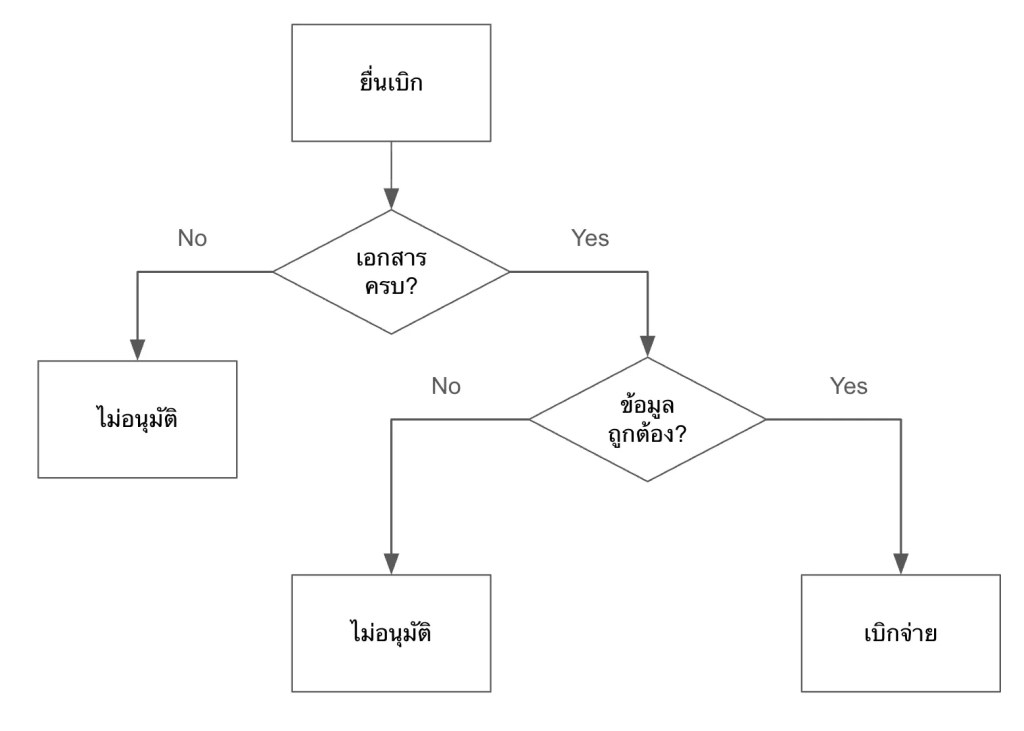
    ยกตัวอย่างเช่น flow chart แสดงการเบิกจ่ายค่าเดินทางให้พนักงาน:

    ในรูป เราจะรู้ว่ามีขั้นตอนอะไรบ้างที่จะเกิดขึ้นก่อนพนักงานจะได้รับเงินค่าเดินทาง แต่เราไม่รู้ว่าขั้นตอนเหล่านี้เกี่ยวข้องกับส่วนอื่น ๆ ขององค์กรยังไงบ้าง เช่น:

    • แต่ละขั้นตอนมีใครเกี่ยวข้องบ้าง
    • มีเอกสารอะไรที่ต้องการใช้บ้าง
    • แต่ละขั้นตอนใช้เวลาเท่าไร

    ถ้าเราต้องการเห็นภาพรวมของการทำงานในองค์กร เราจะใช้ DEMO

    .

    👷 What Is DEMO?

    DEMO (ย่อมาจาก Design & Engineering Methodology for Organisations) เป็นหลักการในการออกแบบองค์กร ซึ่งมีวิธีการเขียน process ในระดับ high level ที่ช่วยให้ทำความเข้าใจและตัดสินใจได้ง่าย

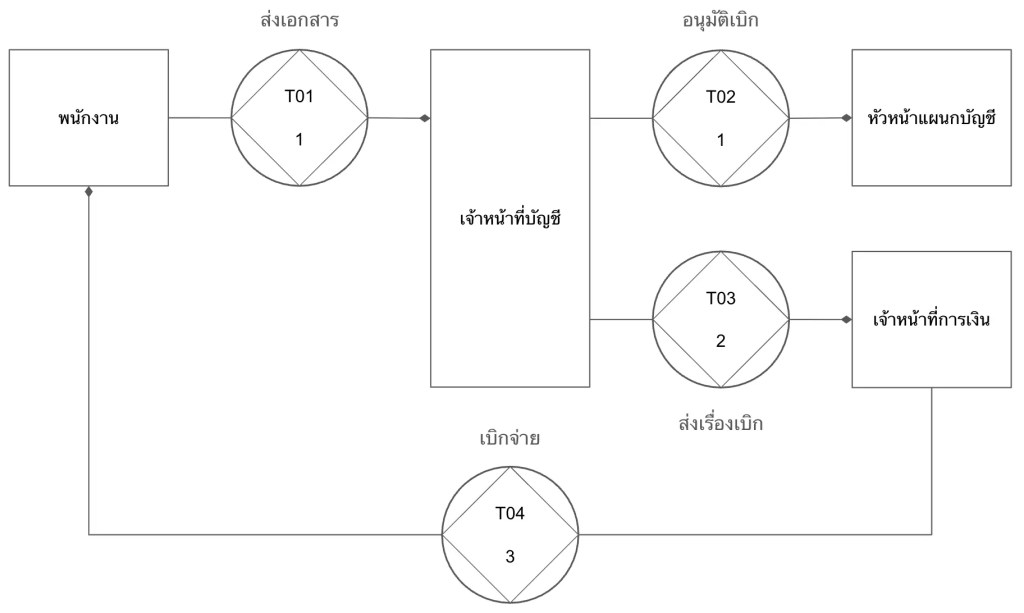
    ยกตัวอย่างการเขียน process การเบิกค่าเดินทางแบบ DEMO:

    DEMO แสดง process ในรูปแบบของ transaction หรือการแลกเปลี่ยนระหว่าง 2 ฝ่าย ได้แก่:

    1. Initiator: คนที่เริ่มการแลกเปลี่ยน (เช่น พนักงานที่ขอเบิกค่าเดินทาง)
    2. Executor: คนที่ทำให้เกิดผลลัพธ์บางอย่างในระบบ (เช่น ฝ่ายบัญชีที่อนุมัติจ่าย)

    ในแผนภาพแบบ DEMO (เรียกว่า OCD หรือ Organisation Construction Diagram) เราจะเห็นว่า:

    1. การเบิกจ่ายเงินมีกี่ transaction (ดูจาก T01, T02, …)
    2. แต่ละ transaction มีใครที่เกี่ยวข้องบ้าง
    3. แต่ละ transaction ใช้เวลาเท่าไร (ตัวเลขใต้ T0x เช่น T01 ใช้เวลา 1 วัน)

    OCD มาพร้อมกับตารางที่ให้ข้อมูลเพิ่มเติมเกี่ยวกับ transaction เช่น:

    TransactionDurationDocuments
    T01. ส่งเอกสาร1 วันฟอร์มเบิกค่าเดินทาง, หลักฐานการเดินทาง, สำเนาบัตรประชาชน
    T02. อนุมัติเบิก1 วันฟอร์มเบิกค่าเดินทาง, หลักฐานการเดินทาง
    T03. ส่งเรื่องเบิก2 วันฟอร์มเบิกค่าเดินทาง, หลักฐานการเดินทาง
    T04. เบิกจ่าย3 วันอีเมลแจ้งการเบิกจ่าย

    เมื่อเราดู OCD และตารางประกอบกัน เราจะสามารถระบุปัญหาและจุดที่ควรแก้ไขได้ในทันที เช่น:

    1. เราตัดขั้นตอน T03 ออกได้ไหม? ให้ฝ่ายบัญชีจ่ายตรงให้พนักงานเลย
    2. ทำไม T03 ใช้เวลานาน? ลดเหลือ 1 วันได้ไหม?
    3. T01 ต้องใช้เอกสาร 3 อย่างเลยหรอ? ตัดสำเนาบัตรประชาชนออกได้หรือเปล่า?

    ถ้าเรามองย้อนกลับไปที่ flow chart ก่อนหน้านี้ เราจะเห็นความแตกต่างอย่างชัดเจนว่า เราไม่สามารถตั้งคำถามเหล่านี้ได้ในทันที เพราะ flow chart ไม่ได้ให้ข้อมูลที่เพียงพอหรือจำเป็นต่อการตัดสินใจในการเปลี่ยนแปลง process งาน

    ในทางตรงกันข้าม OCD สามารถให้ข้อมูลที่ช่วยให้เราทำความเข้าใจ process และระบุปัญหาที่ควรแก้ไขได้ในทันที

    .

    🤖 DEMO & AI Solution

    เราสามารถนำ DEMO มาประยุกต์ใช้ในการออกแบบ AI solution ให้เหมาะกับองค์กรได้

    ยกตัวอย่างเช่น สำหรับการเบิกค่าเดินทาง เราอาจจะอยากพัฒนา AI ขึ้นมาช่วยพนักงานยื่นเอกสารเบิกจ่าย (T01) แต่จะเห็นได้ว่า ถ้าเราทุ่มงบประมาณไปกับการพัฒนา AI ในส่วนนี้ เราจะลดภาระงานไปเพียง 1 วันเท่านั้น

    แต่ถ้าเราพัฒนา AI เพื่อมาช่วยฝ่ายบัญชีส่งต่อเอกสารให้กับฝ่ายการเงิน (T03) หรือช่วยฝ่ายการเงินตั้งจ่ายและส่งอีเมลยืนยันการจ่าย (T04) เราจะสามารถลดเวลาได้มากขึ้น เพราะทั้ง 2 จุดนี้ใช้เวลามากที่สุดในขั้นตอนทั้งหมด ถ้าเราพัฒนา AI เพื่อช่วย T03 และ T04 แล้ว เราจะลดเวลาในการทำงานลงไปกว่าครึ่งของ process ทั้งหมด (5 จาก 7 วัน)

    .

    📋 How to DEMO

    การเขียน OCD มีอยู่ 3 ขั้นตอน ได้แก่:

    1. Gather data: เก็บข้อมูล process งานจากฝ่ายที่เกี่ยวข้อง (เช่น ฝ่ายบัญชี) โดยใช้ empathy และ compassion เพื่อช่วยให้เราเข้าใจและอยากช่วยเหลือ
    2. Categorise data: จัดกลุ่มข้อมูลได้เป็น 3 ส่วน ได้แก่:
      1. Forma: วิธีการสื่อสาร (เช่น อีเมล, แบบฟอร์ม)
      2. Informa: สิ่งที่ต้องการสื่อสาร (เช่น คำขออนุมัติเบิกค่าเดินทาง)
      3. Performa: สิ่งที่ทำให้เกิดผลลัพธ์ (เช่น การอนุมัติเบิก)
    3. Convert to transaction: เปลี่ยนข้อมูลให้เป็น transaction ที่มี 3 องค์ประกอบ ได้แก่:
      1. Actors: initiator และ executor
      2. Documents: เอกสารที่เกี่ยวข้อง (เช่น ฟอร์มเบิกค่าเดินทาง, ใบเสร็จ)
      3. Duration: ระยะเวลาที่ใช้สำหรับ transaction นั้น ๆ (เช่น 1 วัน)

    💪 Summary

    องค์กรส่วนใหญ่ล้มเหลวในการพัฒนา AI solution ให้ตอบโจทย์ เพราะขาดความเข้าใจ 2 อย่าง ได้แก่:

    1. People: ความเข้าใจในคนที่เกี่ยวข้อง
    2. Process: ความเข้าใจในกระบวนการทำงานที่จะเอา AI solution เข้าไปช่วย

    เราสามารถแก้ทั้ง 2 สาเหตุนี้ได้ โดยใช้:

    1. Compassion เพื่อทำความเข้าใจคน
    2. DEMO เพื่อทำความเข้าใจกระบวนการทำงาน

    📚 Further Reading

    สำหรับคนที่สนใจศึกษาเชิงลึกเกี่ยวกับหัวข้อในบทความนี้ สามารถอ่านเพิ่มเติมได้ตามนี้

    Compassion:

    DEMO:

    Bonus — สรุปงาน PMAT 60th:

  • สรุปความรู้จาก 4 Sessions ในงาน Work Life Festival 2025: การเอาตัวรอดในอนาคต, วิธีหาเงินโดยทำงานน้อยลง, เคล็ดลับการสร้างรายได้, และการลงทุน

    สรุปความรู้จาก 4 Sessions ในงาน Work Life Festival 2025: การเอาตัวรอดในอนาคต, วิธีหาเงินโดยทำงานน้อยลง, เคล็ดลับการสร้างรายได้, และการลงทุน

    Work Life Festival 2025 เป็น event ที่จัดขึ้นเมื่อวันที่ 7–8 พฤศจิกายนที่ผ่านมา โดยในงานมีเวทีนำเสนอในหลากหลายหัวข้อที่ตอบโจทย์วัยทำงาน เช่น:

    • การเงินการลงทุน
    • การทำธุรกิจ
    • การพัฒนาทักษะ
    • การใช้ชีวิต

    ในบทความนี้ ผมจะมาสรุปเนื้อหาจาก 4 sessions ที่น่าสนใจที่ผมมีโอกาสได้ไปร่วมฟัง:

    1. The Future of Work (กษิดิศ สตางค์มงคล): วิธีการเอาตัวรอดในโลกอนาคต
    2. Barista FIRE (วิฑูรย์ สูงกิจบูลย์): วิธีการเกษียณก่อนอายุ ทำยังไงให้ทำงานน้อยลงแต่มีรายได้และเวลาเพิ่มขึ้น?
    3. Income Maximisation Strategy (ศิวกร ปล้องใหม): วิธีเพิ่มรายได้ให้ถึงขีดสุด
    4. Purpose First, Market Later (ศรารัญย์ คาน): วิธีการลงทุนให้ตอบโจทย์ชีวิต

    ถ้าพร้อมแล้ว ไปเริ่มกันเลย


    1. 🦾 The Future of Work: Why Now Is the Best Time to Build One-Person Business
      1. 🧘 Mindsets for Survival
      2. 🤔 Future Jobs
      3. 🏦 First-Principles for One-Person Business
      4. 🧑‍💼 One-Person Business Philosophy
    2. 🧧 Barista FIRE: แผนที่สู่อิสระกึ่งเกษียณ ทำงานที่อยากทำ ไม่ใช่เพราะต้องทำ
      1. 📖 Backstory
      2. 🔥 FIRE & Barista FIRE
      3. 🪜 How to Barista FIRE
      4. ☕ Example
      5. 🙋 Start With This Question
    3. 💰 Income Maximisation Strategy: กลยุทธเรียบง่ายเพิ่มรายได้ให้ถึงขีดสุด
      1. 🚲 The Three Wheels of Income
      2. 🚴 How to Move the Wheel
      3. 🔥 Expand Existing Income
      4. ⌨️ Find Extra Income
    4. 📊 Purpose First, Market Later: The Three Pillars of Lifelong Investing
      1. 💸 Investing Not Required, Or Not?
      2. 💖 Put Purpose First
      3. 🪙 Compound Interest
      4. 📘 Free Investment Playbooks
    5. 📃 References

    🦾 The Future of Work: Why Now Is the Best Time to Build One-Person Business

    Speaker: กษิดิศ สตางค์มงคล (Digital Writer & Data Analyst, DataRockie)

    .

    🧘 Mindsets for Survival

    ไม่มีใครรู้ว่า จะเกิดอะไรขึ้นในอนาคต:

    • AI ฉลาดขึ้น
    • สิ่งแวดล้อมแย่ลง
    • วิกฤตเศรษฐกิจ
    • สงครามและความขัดแย้ง

    ถ้าจะอยู่รอด เราจะต้องมี mindset 2 ข้อ:

    1. Accept that everything/reality is just the way it is: ยอมรับในสิ่งที่เป็น ไม่ปฏิเสธหรือต่อต้าน
    2. No one is coming to save you: ไม่ใครจะช่วยเราได้ (นอกจากตัวเราเอง)

    .

    🤔 Future Jobs

    Job ในอนาคตจะเปลี่ยนจาก job แบบที่พ่อแม่เราทำ (หางานและอยู่กับมันไปนาน ๆ) ไปเป็น job ที่เราสร้างเอง นั่นคือ การสร้างธุรกิจเป็นของตัวเอง (one-person business)

    งาน office มีข้อเสียอยู่ 2 ข้อ:

    1. Less secure: แม้จะดูมั่นคง แต่ก็ไม่เสมอไป หลายองค์กร lay off พนักงาน ทั้งตอน COVID-19 และเมื่อ AI เริ่มเข้ามาแทนที่คน ไม่มีอะไรการันตีว่า เราจะอยู่กับงานที่ทำไปจนเกษียณ
    2. Effort ≠ reward: ไม่ว่าเราจะทุ่มเทให้กับงานขนาดไหน แต่ไม่มีอะไรการันตีว่า เงินเดือนของเราจะสูงขึ้นตามไป เช่น เราให้เวลากับงานในปีนี้เป็น 2 เท่า แต่ในปีหน้า เราอาจไม่ได้รับเงินเดือนเพราะเศรษฐกิจไม่ดี และเราจะโชคดีมากที่ไม่ถูก lay off

    ในทางกลับกัน การมีธุรกิจเป็นของตัวเองมีข้อดี 2 ข้อ:

    1. More secure: แม้จะไม่มั่นคง 100% แต่ตราบใดที่เรายังสามารถส่งมอบ value ให้กับโลกได้ เราจะสามารถสร้างรายได้อย่างต่อเนื่องและไม่ต้องกลัวตกงาน
    2. More control: เราควบคุมผลลัพธ์ได้มากกว่า เช่น สร้างรายได้เป็น 2 เท่าจากความพยายามที่เพิ่มขึ้น 2 เท่า

    .

    🏦 First-Principles for One-Person Business

    เรามีหลักคิด 5 ข้อในการสร้างธุรกิจเป็นของตัวเอง:

    1. Worthy goal: มองหาเป้าหมายที่คุ้มค่าที่จะลอง
    2. Work harder on yourself (than on your job): ทุ่มเทไปกับการพัฒนา/ดูแลตัวเอง มากกว่าทุ่มเทให้กับงานที่ทำ (แนวคิดจาก Jim Rohn นักธุรกิจและนักเขียนชาวอเมริกัน)
    3. Always read: จงอ่านอยู่เสมอ เพราะการเรียนคือชีวิต ไม่ใช่การเตรียมตัวเพื่อใช้ชีวิต (อิงจาก quote ของ John Dewey นักปรัชญาและนักจิตวิทยาชาวอเมริกัน)
    4. Focus on what you can control: โฟกัสกับสิ่งที่เราควบคุมได้ เพราะสิ่งเดียวที่ไม่มีใครเอาไปจากเราได้ คือ อิสระในการเลือกของเรา (แนวคิดจาก Viktor Frankl นักจิตวิทยาชาวออสเตรียและผุ้รอดชีวิตจากค่ายกักกันของนาซี)
    5. Relentless pursuit: ทำทุกวัน ทำอย่างสม่ำเสมอ ทำวันละเล็กละน้อยสะสมไป เช่น ถ้าเราอ่านหนังสือเดือนละเล่ม ใน 10 ปีข้างหน้า เราจะมีความรู้เพิ่มขึ้นขนาดไหน

    .

    🧑‍💼 One-Person Business Philosophy

    Key takeaway สำหรับการสร้างธุรกิจเป็นของตัวเอง คือ:

    Use your skills to build something of value and monetise it through the internet.


    🧧 Barista FIRE: แผนที่สู่อิสระกึ่งเกษียณ ทำงานที่อยากทำ ไม่ใช่เพราะต้องทำ

    Speaker: วิฑูรย์ สูงกิจบูลย์ (ผู้ก่อตั้งสำนักพิมพ์ spAcebook, เจ้าของเพจ สรุปให้)

    .

    📖 Backstory

    เมื่อ 10 ปีก่อน คุณวิฑูรย์เคยทำงานเป็นผู้บริหารเงินเดือน 6 หลักและมีชีวิตที่เพียบพร้อม ทั้งเงิน บ้าน รถ และครอบครัว

    แต่สิ่งที่ขาดไป คือ ความสุข

    คุณวิฑูรย์มีทุกอย่าง แต่ไม่มีเวลาให้กับครอบครัว คุณวิฑูรย์และภรรยาต่างก็เป็นผู้บริหารที่ทำงานหนักด้วยกันทั้งคู่ คุณวิฑูรย์ทำงานหนักจนกระทั่งว่า ลูกคนหนึ่งจะต้องไปอยู่กับยาย/ย่า เพราะทั้งคุณวิฑูรย์และภรรยาไม่มีที่เลี้ยงดูลูกได้อย่างเต็มที่

    ทางเลือกของคุณวิฑูรย์มีอยู่ 2 ทาง:

    1. มีทุกอย่าง แต่ไม่มีเวลาให้กับลูก
    2. ทำงานน้อยลง แต่มีเวลาให้กับลูก

    แน่นอนว่า คุณวิฑูรย์เลือกทางเลือกที่ 2

    คุณวิฑูรย์ไม่ได้ออกจากงานในทันที แต่ก็ไม่ได้แผนที่ชัดเจนตอนออกจากงาน

    14 งาน คือ งานที่คุณวิฑูรย์ทดลองทำหลังออกจากงาน ตั้งแต่งานแปลเอกสารไปจนถึงขายของในตลาดนัด

    ทางเดินของคุณวิฑูรย์ไม่ได้โรยด้วยกลีบกุหลาบ และในวันนี้ คุณวิฑูรย์จะมาแชร์แนวคิดการที่ช่วยให้ทุกคนสามารถทำงานน้อยลง แต่มีรายได้เท่าเดิมหรือมากขึ้น และมีเวลาให้กับชีวิตมากขึ้น

    .

    🔥 FIRE & Barista FIRE

    แนวคิดที่ว่า คือ FIRE (financial independence, retire early) ซึ่งเป็นวิธีสร้างอิสระทางการเงินด้วยการเก็บออมเงินในขณะที่ยังทำงานอยู่ เพื่อให้สามารถเกษียณตอนอายุยังน้อยและยังมีเงินใช้จ่ายโดยไม่ต้องทำงานอีก

    Barista FIRE เป็น FIRE ที่ลดความเข้มข้นในการเก็บออมลงมา โดยแทนที่เราจะออมให้ได้มากพอที่จะสำหรับค่าใช้จ่ายหลังเกษียณ เราจะเก็บเงินแค่ให้มากสำหรับใช้จ่ายบางส่วน และหารายได้เสริมเพื่อดูแลค่าใช้จ่ายที่เหลือ

    .

    🪜 How to Barista FIRE

    การออมแบบ barista FIRE มีอยู่ 3 ขั้นตอน ดังนี้:

    1. ออม: เก็บเงินในระหว่างที่ยังทำงานประจำอยู่
    2. ลงทุน: เอาเงินออมไปลงทุนให้ได้ port ขนาด 25 เท่าของค่าใช้จ่ายต่อปี เพื่อให้มี passive income 4% ของค่าใช้จ่ายหลังเกษียณ
    3. เกษียณ: ออกจากงาน ใช้งานด้วย passive income + ทำงานเสริม

    .

    ☕ Example

    ตัวอย่างการออมเงินให้พอสำหรับเกษียณ:

    ถ้าเรามีค่าใช้จ่าย 120,000 บาทต่อปี เราจะต้องสร้าง port ให้ได้ขนาด:

    12,000 * 25 = 3,000,000 บาท

    และเราต้องการทำ port ให้ได้ภายใน 5 ปี (60 เดือน) เราจะต้องเก็บเงินเดือนละ:

    3,000,000 / 60 = 50,000 บาท

    .

    🙋 Start With This Question

    Barista FIRE เป็นแนวทางที่จะช่วยให้เรามีอิสระในการใช้ชีวิตมากขึ้น ซึ่งเราสามารถเริ่มได้ด้วยการถามตัวเองว่า:

    เงินขั้นต่ำที่ทำให้เราอยู่ได้โดยไม่เดือดร้อน คือ เท่าไร?


    💰 Income Maximisation Strategy: กลยุทธเรียบง่ายเพิ่มรายได้ให้ถึงขีดสุด

    Speaker: ศิวกร ปล้องใหม (Founder of Nack Siwakorn)

    .

    🚲 The Three Wheels of Income

    รายได้มาจาก 3 ทาง:

    1. หาเงิน
    2. ออมเงิน
    3. ลงทุน

    แต่ละทางเป็นเหมือนล้อจักรยานที่เราต้องออกแรงปั่นเพื่อให้จักรยานเคลื่อนไปข้างหน้า ในช่วงแรก เราจะต้องออกเยอะหน่อย แต่เมื่อล้อหมุนเองได้แล้ว เราจะออกแรงน้อยลงและมีเวลาพักจากการปั่นจักรยานมากขึ้น

    .

    🚴 How to Move the Wheel

    ใน 3 ทางนี้ ทางที่สำคัญที่สุด คือ หาเงิน

    ถ้าเรามีเงินทุนเยอะ เราจะสามารถออมและลงทุนได้มากขึ้น นั่นคือ วงล้อการเงินของเราจะหมุนได้ง่ายขึ้น

    เราสามารถเพิ่มรายได้ด้วย 2 วิธี:

    1. เพิ่มรายได้ที่มีอยู่
    2. หารายได้เสริม

    .

    🔥 Expand Existing Income

    การหาเงินไม่มีอยู่จริง เราไม่สามารถมองหาเงินและเจอเงินล้านตกอยู่บนพื้นได้

    ถ้าเราต้องการหาเงิน สิ่งที่เราต้องมองหาไม่เงิน แต่คือปัญหา

    ถ้าเราสามารถแก้ปัญหาให้กับกลุ่มคนที่ต้องการทางออกได้ เราก็จะได้เงินที่เรามองหา

    การทำงานทุกอย่างคือการแก้ปัญหา เช่น การติว IELTS คือการแก้ปัญหาการสอบเข้ามหาวิทยาลัยให้กับนักเรียนม.ปลาย

    เราสามารถเพิ่มรายได้ที่มีอยู่ได้ 2 ทาง:

    1. แก้ปัญหาที่ใหญ่ขึ้น: เช่น สอน IELTS ให้พนักงานที่ต้องการทำงานในองค์กรต่างชาติ ซึ่งมีกำลังจ่ายมากกว่านักเรียนม.ปลาย
    2. แก้ปัญหาให้คนมากขึ้น: เช่น เปลี่ยนการสอนแบบตัวต่อตัว เป็นสอนแบบกลุ่ม

    .

    ⌨️ Find Extra Income

    อีกวิธีในการเพิ่มรายได้ คือ ทำงานเสริม

    งานเสริมที่เราสามารถทำได้ เช่น:

    • Video editor
    • Graphic designer
    • Content creator
    • Fitness coach
    • Financial advisor
    • Tutor
    • Consultant
    • Seller
    • อื่น ๆ

    หลายคนอาจมีคำถามเกี่ยวการเริ่มทำงานเสริม เช่น:

    1. ไม่รู้จะทำอะไร
    2. ทำไม่เป็น
    3. ไม่มีทุน
    4. ไม่มี passion

    แต่ทุกคำถามมีคำตอบ:

    1. ไม่รู้จะทำอะไร → ออกไปหา ไปทดลองเพื่อให้รู้ว่าอยากทำอะไร
    2. ทำไม่เป็น → เราแค่ต้องฝึกฝนเพิ่ม
    3. ไม่มีทุน → เราสามารถเก็บเงินเพื่อสร้างทุน หรือเริ่มทำในสิ่งที่ไม่ต้องใช้เงินก่อนได้
    4. ไม่มี passion → เราไม่มี passion เพราะเราทำได้ไม่ดี และเราทำได้ไม่ดีเพราะยังไม่ได้ลองทำ ดังนั้น ทางออกคือเริ่มลงมือทำ

    เราไม่จำเป็นต้องพร้อม 100% ก่อนจะเริ่ม เราสามารถเริ่มได้โดย focus ที่ 4 อย่างนี้:

    1. Now: ทำในสิ่งที่เราสามารถทำได้ทันที
    2. Doable: ทำสิ่งที่ฝึกฝนได้/มีคนทำอยู่จริง
    3. Not too demanding: ไม่ใช่สิ่งที่หนักเกินไป/เราแบ่งเวลาให้ได้
    4. All in later: ค่อย ๆ เริ่มทีละเล็กละน้อย และเมื่อเริ่มไปได้ดี ค่อยทุ่มเต็มที่ 100%

    เราจะเริ่มงานเสริมได้ แค่ต้องมี 3 สิ่งนี้:

    1. เครื่องมือ (เช่น แล็ปท็อป)
    2. ทักษะ
    3. แนวทาง (ถ้าเป็นสิ่งที่มีคนเคยทำแล้ว ให้เราเรียนรู้จากคนเหล่านี้)

    Pro tip: สิ่งที่สำคัญสำหรับคนที่เริ่มต้นใหม่ ๆ คือการบริหารเวลา ในช่วงแรกที่เรายังทำได้ไม่ดี/ไม่คล่อง เวลาส่วนตัวของเราอาจจะถูกรบกวนบ่อยครั้ง เราจะต้องจัดการเวลาให้ดี จนกว่าทุกอย่างจะเข้าที่เข้าทาง เพื่อให้เรายังมีคุณภาพชีวิตที่ดี


    📊 Purpose First, Market Later: The Three Pillars of Lifelong Investing

    Speaker: ศรารัญย์ คาน (Investor & Content Creator, Earthh Evans)

    .

    💸 Investing Not Required, Or Not?

    กรลงทุนเป็นแค่เครื่องมือ และเราไม่จำเป็นต้องลงทุนก็ได้ถ้า:

    • รับมือกับเงินเฟ้อที่เพิ่มขึ้นทุกปีได้
    • คิดว่าเราสามารถทำงานไปจนตายได้
    • มีเงินพอใช้หลังเกษียณ
    • คิดว่าการลงทุนมีความเสี่ยงเกินกว่าที่จะรับได้
    • คิดว่าการลงทุนเป็นเรื่องยาก
    • ไม่คิดจะมีลูก

    จะเห็นว่า หลาย ๆ ข้อเราอาจจะยอมรับ/จัดการไม่ได้ ซึ่งหมายความว่า การลงทุนเป็นสิ่งจำเป็นที่จะช่วยให้เราอยู่รอดได้

    .

    💖 Put Purpose First

    การตัดสินใจว่าจะลงทุนกับอะไร กับตลาดไหน และเท่าไร ขึ้นอยู่กับปัจจัย 3 อย่าง:

    1. Goal: ไม่ว่าจะเลือกว่าจะลงทุนในสินทรัพย์อะไร ไม่ว่าจะเป็นตลาดไทยหรือต่างประเทศ ทุกอย่างขึ้นกับเป้าหมายของแต่ละคนว่าต้องการมีเงินไปเพื่ออะไร
    2. Comfort: ความสบายใจต่อปัจจัยต่าง ๆ ที่เกี่ยวข้อง เช่น:
      1. ภาษีที่มากับการลงทุน
      2. ค่าธรรมเนียม
      3. ความผันผวนของค่าเงิน (เช่น อัตราแลกเปลี่ยน)
      4. ความต่างของเวลาตลาด
      5. ข่าวสารต่าง ๆ
    3. Understanding: ความเข้าใจในการลงทุน เช่น:
      1. ความเข้าใจในธุรกิจ
      2. ตัวขับเคลื่อนมูลค่า
      3. โครงสร้างอุตสาหกรรม
      4. ความเสี่ยงเฉพาะธุรกิจ

    .

    🪙 Compound Interest

    ในการลงทุน เราจะใช้ concept ที่เรียกว่า compound interest หรือดอกเบี้ยทบต้น เพื่อทำเงินให้เรา

    เพื่อจะทำให้เราได้ผลตอบแทนที่ดีที่สุดจาก compound interest เราจะต้องพิจารณา 3 อย่าง:

    1. Capital: เงินต้นที่มากพอ
    2. Time: เวลาที่มากพอ
    3. Interest: ผลตอบแทนที่มากพอ

    .

    📘 Free Investment Playbooks

    สำหรับคนที่สนใจเริ่ทต้นลงทุน สามารถโหลด playbooks ความรู้ในการลงทุนได้ฟรีบนโพสต์ของ Earthh Evans


    📃 References

  • วิเคราะห์ resumes ใน 3 ขั้นตอน ด้วย Gemini ผ่าน OpenAI library ใน Python — ตัวอย่างการทำงานใน Google Colab

    วิเคราะห์ resumes ใน 3 ขั้นตอน ด้วย Gemini ผ่าน OpenAI library ใน Python — ตัวอย่างการทำงานใน Google Colab

    บทความนี้เหมาะสำหรับบริษัทหรือ HR ที่ต้องการใช้ AI ช่วยลดเวลาในการคัดกรองผู้สมัคร เพราะเราจะมาดูวิธีวิเคราะห์ resumes ด้วย Gemini ผ่าน OpenAI library ใน Python กัน

    บทความนี้แบ่งเป็น 3 ส่วนตามขั้นตอนการวิเคราะห์ ได้แก่:

    1. Install and load libraries
    2. Set input
    3. Analyse resumes

    โดยเราจะไปดูตัวอย่างโดยใช้ Google Colab กัน (ดู code ทั้งหมดได้ที่นี่)

    ถ้าพร้อมแล้ว ไปเริ่มกันเลย


    1. ⬇️ 1. Install & Load Libraries
    2. 🔧 2. Set the Input
      1. 🧑‍💻 (1) Client
      2. 💼 (2) JD
      3. 📄 (3) Resumes
    3. ⚡ 3. Analyse the Resumes
      1. 🤖 (1) Function เรียกใช้งาน Gemini
      2. ➕ (2) Function ใส่ Input ใน Prompt
      3. 🤔 (3) วิเคราะห์ Resumes
      4. 👀 (4) Print ผลลัพธ์
    4. 😺 Code & Input Examples
    5. 📃 References

    ⬇️ 1. Install & Load Libraries

    ในขั้นแรก เราจะเรียกติดตั้งและโหลด libraries ที่จำเป็นดังนี้:

    • openai: สำหรับเรียกใช้ AI ผ่าน API
    • drive จาก google.colab: สำหรับเชื่อมต่อกับไฟล์ใน Google Drive
    • PyPDF2: สำหรับดึง text ออกจากไฟล์ PDF
    • textwrap: สำหรับลบย่อหน้าออกจาก string
    • Console จาก rich.console และ Markdown จาก rich.markdown: สำหรับ render การแสดงผล string ให้อ่านง่ายขึ้น

    ติดตั้ง:

    # Install libraries
    !pip install PyPDF2
    

    Note: Google Colab มี libraries อื่น ๆ อยู่แล้ว ทำให้เราแค่ต้องติดตั้ง PyPDF2 อย่างเดียว

    โหลด:

    # Load libraries
    
    # Connect to Gemini
    from openai import OpenAI
    
    # Connect to Google Drive
    from google.colab import drive
    
    # Extract text from PDF
    import PyPDF2
    
    # Dedent text
    import textwrap
    
    # Render markdown text
    from rich.console import Console
    from rich.markdown import Markdown
    

    🔧 2. Set the Input

    สำหรับการวิเคราะห์ resumes เราต้องการ input 3 อย่าง ได้แก่:

    1. Client: สำหรับเรียกใช้ Gemini API
    2. Job description (JD): รายละเอียดตำแหน่งงานที่กำลังต้องการพนักงาน
    3. Resumes: ข้อมูล resume ที่เราต้องการวิเคราะห์

    เราไปดูวิธีกำหนด input แต่ละตัวกัน

    .

    🧑‍💻 (1) Client

    เราสามารถกำหนด client ได้ด้วย OpenAI() ซึ่งต้องการ 2 arguments:

    1. api_key: API key สำหรับเชื่อมต่อ API
    2. base_url: base URL สำหรับเรียกใช้ AI service ซึ่งสำหรับ Gemini เราต้องกำหนดเป็น "<https://generativelanguage.googleapis.com/v1beta/openai/>"

    ในตัวอย่าง เราจะเรียกใช้ OpenAI() แบบนี้:

    # Create a client
    client = OpenAI(api_key="YOUR_API_KEY", base_url="<https://generativelanguage.googleapis.com/v1beta/openai/>")
    

    Note: ในกรณีใช้งานจริง ให้แทนที่ "YOUR_API_KEY" ด้วย API key จริง (ดูวิธีสร้าง API key ฟรีได้ที่ Using Gemini API keys)

    .

    💼 (2) JD

    Input ที่ 2 สำหรับการวิเคราะห์ คือ JD ซึ่งเราสามารถกำหนดเป็น string ได้แบบนี้:

    # Set the job description (JD)
    web_dev_jd = """
    Senior Web Developer
    
    We're looking for a Senior Web Developer with a strong background in front-end development and a passion for creating dynamic, intuitive web experiences. The ideal candidate will have extensive experience with the entire development lifecycle, from project conception to final deployment and quality assurance. This role requires a blend of technical skill, creative collaboration, and a commitment to solving complex programming challenges.
    
    Responsibilities
    * Cooperate with designers to create clean, responsive interfaces and intuitive user experiences.
    * Develop and maintain project concepts, ensuring an optimal workflow throughout the development cycle.
    * Work with a team to manage large, complex design projects for corporate clients.
    * Complete detailed programming tasks for both front-end and back-end server code.
    * Conduct quality assurance tests to discover errors and optimize usability for all projects.
    
    Qualifications
    * Bachelor's degree in Computer Information Systems or a related field.
    * Proven experience in all stages of the development cycle for dynamic web projects.
    * Expertise in programming languages including PHP OOP, HTML5, JavaScript, CSS, and MySQL.
    * Familiarity with various PHP frameworks such as Zend, Codeigniter, and Symfony.
    * A strong background in project management and customer relations.
    """
    

    Note: ในกรณีที่ JD เป็นไฟล์ PDF เราสามารถใช้วิธีดึงข้อมูลแบบเดียวกันกับ resumes ได้

    .

    📄 (3) Resumes

    Input สุดท้าย คือ resumes ที่เราต้องการวิเคราะห์

    ในตัวอย่าง เราจะดึงข้อมูล resumes จากไฟล์ PDF ใน Google Drive ใน 3 ขั้นตอน ได้แก่:

    ขั้นที่ 1. เชื่อมต่อ Google Drive ด้วย drive.mount():

    # Connect to Google Drive
    drive.mount("/content/drive")
    

    Note: Google จะถามยืนยันการให้สิทธิ์เข้าถึงไฟล์ใน Drive ให้เรากดยืนยันเพื่อไปต่อ

    ขั้นที่ 2. กำหนด file path ของไฟล์ PDF ใน Google Drive:

    # Set resume file paths
    rs_file_paths = {
        "George Evans": "/content/drive/My Drive/Resumes/cv_george_evans.pdf",
        "Robert Richardson": "/content/drive/My Drive/Resumes/cv_robert_richardson.pdf",
        "Christine Smith": "/content/drive/My Drive/Resumes/cv_christine_smith.pdf"
    }
    

    Note: ในตัวอย่าง จะเห็นว่า เรามี resumes 3 ใบ (ดาวน์โหลด resumes ฟรีได้ที่ www.coolfreecv.com)

    ขั้นที่ 3. ดึง text ออกจาก resumes ด้วย for loop และ PyPDF2:

    # Extract resume texts
    
    # Instantiate a collector
    rs_texts = {}
    
    # Loop through resume files to get text
    for key in rs_file_paths:
    
        # Instantiate an empty string to store the extracted text
        rs_text = ""
    
        # Open the PDF file
        reader = PyPDF2.PdfReader(rs_file_paths[key])
    
        # Loop through the pages
        for i in range(len(reader.pages)):
    
            # Extract the text from the page
            text = reader.pages[i].extract_text()
    
            # Append the text to the string
            rs_text += text
    
        # Collect the extracted text
        rs_texts[key] = rs_text
    

    ตัวอย่าง PDF และข้อมูลที่ดึงจาก PDF:

    Source: www.coolfreecv.com
    Contact  
    +1 (970) 343  888 999 
    george.evans@gmail.com  
    <https://www.coolfreecv.com>  
    32 ELM STREET MADISON, SD 
    57042  
     George  Evans  
    PHP / OOP   
    Zend Framework  Summary  
    Senior Web Developer specializing in front end development . 
    Experienced with all stages of the development cycle for dynamic 
    web projects. Well -versed in numerous programming languages 
    including HTML5, PHP OOP, JavaScript, CSS, MySQL. Strong 
    background in project management and customer relations. 
    Perceived as versatile, unconventional and committed, I am 
    looking for new and interesting programming challenges.  
    Experience  
    Web Developer - 09/201 8 to 05/20 22 
    Luna Web Design, New York  
    • Cooperate with designers to create clean interfaces and 
    simple, intuitive interactions and experiences.  
    • Develop project concepts and maintain optimal workflow.  
    • Work with senior developer to manage large, complex 
    design projects for corporate clients.  
    • Complete detailed programming and development tasks 
    for front end public and internal websites as well as 
    challenging back -end server code.  
    • Carry out quality assurance tests to discover errors and 
    optimize usability.  
    Education  
    Bachelor of Science: Computer Information Systems  - 2018  
    Columbia University, NY  
     
    Certifications  
    PHP Framework (certificate): Zend, Codeigniter, Symfony. 
    Programming Languages: JavaScript, HTML5, PHP OOP, CSS, SQL, 
    MySQL.  
    Reference  
    Adam Smith - Luna Web Design  
    adam.smith@luna.com  +1(970 )555 555  Skills   
    JavaScript   Symfony Framework
    

    ⚡ 3. Analyse the Resumes

    ในขั้นสุดท้าย เราจะเปรียบเทียบความเหมาะสมของ resumes กับตำแหน่งงาน (JD) ใน 4 ขั้นตอน ดังนี้:

    1. สร้าง function เพื่อเรียกใช้ Gemini
    2. สร้าง function เพื่อใส่ input ใน prompt
    3. วิเคราะห์ resumes โดยใช้ for loop และ functions จากข้อ 1, 2
    4. Print ผลการวิเคราะห์

    .

    🤖 (1) Function เรียกใช้งาน Gemini

    ในขั้นแรก เราจะสร้าง function สำหรับเรียกใช้ Gemini เพื่อให้ง่ายในการใช้งาน AI

    ในตัวอย่าง เราจะกำหนด 3 arguments สำหรับ function:

    1. prompts: list เก็บ system prompt และ user prompt
    2. model: model ของ Gemini ที่เราจะเรียกใช้ (เช่น Gemini 2.5 Flash)
    3. temp: ระดับความคิดสร้างสรรค์ของ model โดยมีค่าระหว่าง 0 และ 2 โดย 0 จะทำให้ model ให้คำตอบเหมือนกันทุกครั้ง และ 2 คำตอบจะแตกต่างกันทุกครั้ง
    # Create a function to get a Gemini response
    def get_gemini_response(prompts, model, temp):
    
        # Generate a response
        response = client.chat.completions.create(
    
            # Set the prompts
            messages=prompts,
    
            # Set the model
            model=model,
    
            # Set the temperature
            temperature=temp
        )
    
        # Return the response
        return response.choices[0].message.content
    

    .

    ➕ (2) Function ใส่ Input ใน Prompt

    ในขั้นที่ 2 เราจะสร้าง function เพื่อประกอบ input เข้ากับ prompt เพื่อพร้อมที่จะนำไปใช้ใน function ในขั้นที่ 1

    ในตัวอย่างเราจะสร้าง function แบบนี้:

    # Create a function to concatenate prompt + JD + resume
    def concat_input(jd_text, rs_text):
    
        # Set the system prompt
        system_prompt = """
        # 1. Your Role
        You are an expert technical recruiter and resume analyst.
        """
    
        # Set the user prompt
        user_prompt = f"""
        # 2. Your Task
        Your task is to meticulously evaluate a candidate's resume against a specific job description (JD) and provide a detailed pre-screening report.
    
        Your analysis must be structured with the following sections and include specific, data-driven insights.
    
        ## 1. Strengths
        - Identify and elaborate on top three key strengths.
        - For each strength, briefly provide specific evidence from the resume (e.g., "The candidate's experience with Python and Django, as shown in their role at Acme Corp, directly addresses the JD's requirement for...") and explain how it directly fulfills a requirement in the JD.
    
        ## 2. Weaknesses
        - Identify top three areas where the candidate's experience or skills may not fully align with the JD's requirements.
        - For each point, briefly explain the potential concern and why it might be a risk for the role (e.g., "The JD requires experience with AWS, but the resume only mentions exposure to Azure. This could indicate a gap in cloud infrastructure expertise.").
    
        ## 3. Candidate Summary
        - Draft a concise summary of the candidate's professional background.
        - Emphasise their JD-relevant core responsibilities, key achievements, and career progression as evidenced in the resume.
    
        ## 4. Overall Fit Score
        - Provide a numerical score from 1 to 100, representing the overall alignment of the candidate's profile with the JD.
        - A higher score indicates a stronger match: 80-100 = best match; 60-80 = strong match; 0-40 = weak match.
    
        ## 5. Hiring Recommendation
        - Conclude with a clear, binary hiring recommendation: "🟢 Proceed to interview", "🟡 Add to waitlist", or "🔴 Do not proceed".
        - Justify this recommendation with a brief, objective explanation based on the analysis above.
    
        ---
    
        # 3. Your Output
        - Use a professional and objective tone.
        - Base your analysis solely on the provided resume and JD. Do not make assumptions.
        - Be concise and to the point; no more than 30 words per sentence; the hiring manager needs to quickly grasp the key findings.
        - Format your final report using markdown headings and bullet points for readability.
    
        Output template:
        '''
        # [candidate's name (Title Case)] ([fit score]/100)
    
        [recommendation]: [justification]
    
        ## Profile Summary:
        [summary]
    
        ## Strengths:
        - [strength 1]
        - [strength 2]
        - [strength 3]
    
        ## Weaknesses:
        - [weakness 1]
        - [weakness 2]
        - [weakness 3]
        '''
    
        ---
    
        # 4. Your Input
        **1. JD:**
        {jd_text}
    
        **2. Resume:**
        {rs_text}
    
        ---
    
        Generate the report.
        """
    
        # Collect prompts
        prompts = [
            {
                "role": "system",
                "content": textwrap.dedent(system_prompt)
            },
            {
                "role": "user",
                "content": textwrap.dedent(user_prompt)
            }
        ]
    
        # Return the prompts
        return prompts
    

    Note: เราใช้ textwrap.dedent() เพื่อลบย่อหน้าที่เกิดจาก indent ใน function ออกจาก prompt เพื่อป้องกันความผิดพลาดในการประมวลผลของ AI และประหยัด input token

    .

    🤔 (3) วิเคราะห์ Resumes

    ในขั้นที่ 3 ซึ่งเป็นขั้นที่สำคัญที่สุด เราจะวิเคราะห์ resumes โดย:

    • ใช้ functions จากขั้นที่ 1 และ 2 เพื่อสร้าง prompt และส่ง prompt ให้กับ Gemini
    • ใช้ for loop เพื่อส่ง resumes ให้กับ Gemini จนครบทุกใบ
    # Instantiate a response collector
    results = {}
    
    # Loop through the resumes
    for rs_name, rs_text in rs_texts.items():
    
        # Create the prompts
        prompts = concat_input(web_dev_jd, rs_text)
    
        # Get the Gemini response
        response = get_gemini_response(prompts=prompts, model="gemini-2.5-flash", temp=0.5)
    
        # Collect the response
        results[rs_name] = response
    

    เมื่อรัน code นี้แล้ว เราจะได้ผลลัพธ์เก็บไว้ใน results

    .

    👀 (4) Print ผลลัพธ์

    สุดท้าย เราจะ print ผลการวิเคราะห์ออกมา โดย:

    • ใช้ for loop ช่วย print ผลจนครบ
    • ใช้ Console กับ Markdown เพื่อทำให้ข้อความอ่านง่ายขึ้น:
    # Instantiate a console
    console = Console()
    
    # Instantiate a counter
    i = 1
    
    # Print the results
    for rs_name, analysis_result in results.items():
    
        # Print the resume name
        print(f"👇 {i}. {rs_name}:")
    
        # Print the response
        console.print(Markdown(analysis_result))
    
        # Add spacers and divider
        print("\\n")
        print("-----------------------------------------------------------")
        print("\\n")
    
        # Add a counter
        i += 1
    

    ตัวอย่างผลลัพธ์:

    ในตัวอย่าง จะเห็นได้ว่า George Evans เหมาะที่จะเป็น Senior Web Developer


    😺 Code & Input Examples

    • ดูตัวอย่าง code ได้ที่ Google Colab
    • ดูตัวอย่าง JD และ resumes ได้ที่ JD & Resumes

    📃 References

  • 4 ขั้นตอนในการใช้ google-genai library เพื่อทำงานกับ Gemini API — ตัวอย่างการสร้างสูตรอาหารที่ไม่เหมือนใคร

    4 ขั้นตอนในการใช้ google-genai library เพื่อทำงานกับ Gemini API — ตัวอย่างการสร้างสูตรอาหารที่ไม่เหมือนใคร

    ในบทความนี้ เราจะมาดู 4 ขั้นตอนในการใช้งาน google-genai ซึ่งเป็น official library สำหรับทำงานกับ Gemini API ผ่านตัวอย่างการสร้างสูตรอาหารใน Google Colab กัน:

    1. Import packages
    2. Create client
    3. Create function
    4. Generate response

    ถ้าพร้อมแล้ว ไปเริ่มกันเลย


    1. 📦 Import Packages
    2. 🧑‍💼 Create Client
    3. 📲 Create Function
    4. 📬 Generate Response
      1. 🤖 Set Model
      2. 🧑‍💻 Set User Prompt
      3. 🛠️ Set Configuration
      4. 📖 Generate Response
      5. 🖨️ Print Response
    5. 😺 Google Colab
    6. 📃 References

    📦 Import Packages

    เริ่มแรก เราจะ import 4 packages ที่จำเป็น ได้แก่:

    FromFunction/ClassFor
    googlegenaiทำงานกับ Gemini API
    google.genai.typesGenerateContentConfigตั้งค่า Gemini
    google.colabuserdataเรียก API key จากเมนู Secrets ใน Google Colab
    pydanticBaseModelกำหนดโครงสร้างของ response จาก Gemini
    # Import packages
    
    # google-genai library
    from google import genai
    from google.genai.types import GenerateContentConfig
    
    # Secret key
    from google.colab import userdata
    
    # pydantic
    from pydantic import BaseModel
    

    🧑‍💼 Create Client

    ในขั้นที่ 2 เราจะสร้าง client สำหรับทำงานกับ Gemini API

    เพื่อความปลอดภัย เราจะเก็บ API key ไว้ในเมนู Secrets ของ Google Colab

    เราสามารถเพิ่ม API key ด้วยการ import ผ่านปุ่ม “Gemini API keys” หรือผ่านการเพิ่ม API key เองด้วยปุ่ม “Add new secret”:

    หลังสร้าง API key ใน Secrets แล้ว เราสามารถเรียกใช้ API key ได้ด้วย userdata.get() ซึ่งต้องการ 1 argument คือ ชื่อ secret:

    # Get API key
    my_api = userdata.get("GOOGLE_API_KEY")
    

    จากนั้น เราจะสร้าง client ด้วย genai.Client() ซึ่งต้องการ 1 argument คือ API key:

    # Create client
    client = genai.Client(api_key=my_api)
    

    Note:

    • ในกรณีที่เราไม่ห่วงความปลอดภัยของ API key เราสามารถใส่ API key ใน genai.Client() ได้โดยตรง เช่น genai.Client(api_key="g04821...")
    • เราสามารถสร้าง API key ได้ฟรี โดยไปที่ Google AI Studio และกด “Create API key”

    📲 Create Function

    ในขั้นที่ 3 เราจะสร้าง function สำหรับเรียกใช้ Gemini ซึ่งต้องการ 3 arguments:

    1. model: Gemini model ที่เราจะเรียกใช้
    2. user_prompt: กำหนด user prompt
    3. config: กำหนดการตั้งค่าต่าง ๆ ของ model

    โดยทั้ง 3 arguments จะอยู่ใน client.models.generate_content():

    # Create a function to get Gemini response
    def get_response(model, user_prompt, config):
    
        # Get response
        response = client.models.generate_content(
    
            # Set model
            model=model,
    
            # Set user prompt
            contents=user_prompt,
    
            # Set config
            config=config
        )
    
        # Return response
        return response.text
    

    📬 Generate Response

    ในขั้นที่ 4 เราจะ get response จาก Gemini โดยใช้ function ที่เราสร้างในขั้นที่ 3

    เนื่องจาก function ต้องการ 3 arguments เราจะต้องกำหนด 3 สิ่งนี้ก่อนที่จะสร้าง response ได้:

    1. Model
    2. User prompt
    3. Configuration

    .

    🤖 Set Model

    ในตัวอย่างนี้ เราจะใช้ model เป็น Gemini 2.5 Flash ซึ่งเราสามารถกำหนดได้ดังนี้:

    # Set model
    gemini_model = "gemini-2.5-flash"
    

    Note: ดูชื่อ model อื่น ๆ ได้ที่ Gemini Models

    .

    🧑‍💻 Set User Prompt

    สำหรับ user prompt เราสามารถกำหนดเป็น string ได้แบบนี้:

    # Set user prompt
    gemini_user_prompt = """
    Create a healthy Thai-inspired burger for one person.
    
    Protein: chicken or tofu
    Bun: whole-wheat if possible (or lettuce wrap)
    
    Deliver (match field names exactly):
    - `menu` (string)
    - `ingredient` (list of items with name, description, amount, unit)
    - `steps` (30-word strings)
    - `calorie_kcal` (float, total for the dish)
    """
    

    .

    🛠️ Set Configuration

    สำหรับ configuration เราสามารถตั้งค่า model ได้หลายค่า

    ในตัวอย่างนี้ เราจะเลือกกำหนด 3 ค่า ได้แก่:

    1. System prompt
    2. Temperature
    3. Output type and structure

    ค่าที่ 1. System prompt คือ prompt ที่กำหนดพฤติกรรมของ Gemini ในการตอบสนองต่อ user prompt ของเรา

    เราสามารถกำหนด system prompt เป็น string ได้แบบนี้:

    # Set system prompt
    system_prompt = """
    You are a highly experienced home cook specialising in healthy Thai-style food.
    
    Constraints:
    - Single-serving
    - Favour grilling/pan-searing over deep-frying
    - Keep ingredients common in Thai kitchens
    - Keep steps <=7
    - Include an approximate total calories for the whole dish
    - Keep language simple
    - Return JSON only that matches the given schema exactly (no extra fields)
    """
    

    ค่าที่ 2. Temperature มีค่าระหว่าง 0 และ 2 โดย:

    • 0 จะทำให้ response ตายตัว (deterministic) มากขึ้น
    • 2 จะทำให้ response สร้างสรรค์ (creative) มากขึ้น

    Note: ค่า default ของ temperature อยู่ที่ 1 (Generate content with the Gemini API in Vertex AI)

    ในตัวอย่าง เราจะกำหนด temperature เป็น 2 เพื่อให้ response มีความสร้างสรรค์สูงสุด:

    # Set temperature
    temp = 2
    

    ค่าที่ 3. สำหรับ output type และ structure เราจะกำหนดดังนี้:

    กำหนด type เป็น "application/json" เพื่อให้ response อยู่ในรูป JSON object:

    # Set output type
    output_type = "application/json"
    

    Note: ดู type อื่น ๆ ได้ที่ Structured output

    กำหนดโครงสร้างของ JSON object ด้วย class และ BaseModel:

    # Set output structure
    class Ingredient(BaseModel):
        name: str
        description: str
        amount: float
        unit: str
    
    class OutputStructure(BaseModel):
        menu: str
        ingredient: list[Ingredient]
        steps: list[str]
        calorie_kcal: float
    

    Note: ดูวิธีใช้ BaseModel ได้ที่ JSON Schema

    หลังกำหนด system prompt, temperature, และ output type กับ structure แล้ว ให้เรารวมค่าทั้งหมดไว้ใน GenerateContentConfig() แบบนี้:

    # Set configuration
    gemini_config = GenerateContentConfig(
    
        # Set system prompt
        system_instruction=system_prompt,
    
        # Set temperature
        temperature=temp,
    
        # Set response type
        response_mime_type=output_type,
    
        # Set response structure
        response_schema=OutputStructure
    )
    

    Note: ดูค่าอื่น ๆ ที่เรากำหนดใน GenerateContentConfig() ได้ที่ Content generation parameters

    .

    📖 Generate Response

    หลังจากกำหนด arguments แล้ว เราจะเรียกใช้ function เพื่อ get response แบบนี้:

    # Generate a recipe
    recipe = get_response(
    
        # Set model
        model=gemini_model,
    
        # Set user prompt
        user_prompt=gemini_user_prompt,
    
        # Set configuration
        config=gemini_config
    )
    

    .

    สุดท้าย เราจะดู response ด้วย print():

    # Print response
    print(recipe)
    

    ผลลัพธ์:

    {
      "menu": "Thai Chicken Burger",
      "ingredient": [
        {
          "name": "Ground Chicken",
          "description": "Lean ground chicken",
          "amount": 150.0,
          "unit": "g"
        },
        {
          "name": "Whole-wheat Burger Bun",
          "description": "Standard size",
          "amount": 1.0,
          "unit": "unit"
        },
        {
          "name": "Lime Juice",
          "description": "Freshly squeezed",
          "amount": 1.0,
          "unit": "tablespoon"
        },
        {
          "name": "Fish Sauce",
          "description": "Thai fish sauce",
          "amount": 1.0,
          "unit": "tablespoon"
        },
        {
          "name": "Fresh Ginger",
          "description": "Grated",
          "amount": 1.0,
          "unit": "teaspoon"
        },
        {
          "name": "Garlic",
          "description": "Minced",
          "amount": 1.0,
          "unit": "clove"
        },
        {
          "name": "Cilantro",
          "description": "Fresh, chopped",
          "amount": 2.0,
          "unit": "tablespoons"
        },
        {
          "name": "Green Onion",
          "description": "Chopped",
          "amount": 1.0,
          "unit": "tablespoon"
        },
        {
          "name": "Red Chilli",
          "description": "Finely minced (optional)",
          "amount": 0.5,
          "unit": "teaspoon"
        },
        {
          "name": "Lettuce Leaf",
          "description": "Fresh, crisp",
          "amount": 1.0,
          "unit": "large"
        },
        {
          "name": "Cucumber",
          "description": "Sliced thinly",
          "amount": 3.0,
          "unit": "slices"
        },
        {
          "name": "Cooking Oil",
          "description": "Any neutral oil",
          "amount": 1.0,
          "unit": "teaspoon"
        }
      ],
      "steps": [
        "Combine ground chicken with fish sauce, lime juice, grated ginger, minced garlic, chopped cilantro, and green onion in a bowl. Mix thoroughly.",
        "Form the seasoned chicken mixture into a single, uniform burger patty. If using chilli, incorporate it now.",
        "Heat cooking oil in a non-stick pan over medium heat. Cook the chicken patty for 5-7 minutes per side, or until it is thoroughly cooked through.",
        "While the patty cooks, lightly toast the whole-wheat burger bun in a dry pan or toaster until golden brown.",
        "Assemble your burger: Place the cooked chicken patty on the bottom half of the toasted bun. Top with fresh lettuce and cucumber slices.",
        "Complete the burger with the top bun. Serve immediately and enjoy your healthy Thai-inspired meal."
      ],
      "calorie_kcal": 450.0
    }
    

    เท่านี้ก็จบ flow การทำงานกับ Gemini API ด้วย google-genai library แล้ว


    😺 Google Colab

    ดูตัวอย่าง code ทั้งหมดได้ที่ Google Colab


    📃 References

  • วิธีใช้ 9 arguments ใน read_csv() จาก pandas library เพื่อโหลดข้อมูลใน Python — ตัวอย่างการโหลดข้อมูลการแข่งขันฟุตบอล

    วิธีใช้ 9 arguments ใน read_csv() จาก pandas library เพื่อโหลดข้อมูลใน Python — ตัวอย่างการโหลดข้อมูลการแข่งขันฟุตบอล

    pandas เป็น Python library สำหรับทำงานกับข้อมูลในรูปแบบตาราง (tabular data) และมี functions หลากหลายสำหรับโหลดข้อมูลเข้ามาใน Python

    โดยหนึ่งใน functions ที่นิยมใช้กันมากที่สุด ได้แก่ read_csv() ซึ่งใช้โหลดข้อมูล CSV (Comma-Separated Values) และมี arguments หลัก 9 อย่าง ได้แก่:

    1. filepath_or_buffer: file path, ชื่อไฟล์, หรือ URL ของไฟล์ที่ต้องการโหลด
    2. sep: กำหนด delimiter
    3. header: กำหนด row ที่เป็นหัวตาราง
    4. skiprows: กำหนด rows ที่ไม่ต้องการโหลด
    5. nrows: เลือกจำนวน rows ที่ต้องการโหลด
    6. usecols: กำหนด columns ที่ต้องการโหลด
    7. index_col: กำหนด column ที่จะเป็น index
    8. names: กำหนดชื่อของ columns
    9. dtype: กำหนดประเภทข้อมูล (data types) ของ columns

    ในบทความนี้ เราจะมาดูวิธีใช้ทั้ง 9 arguments ของ read_csv() เพื่อโหลดตัวอย่างข้อมูลการแข่งขันฟุตบอลในอังกฤษกัน

    ถ้าพร้อมแล้ว ไปเริ่มกันเลย


    1. 🏁 Getting Started
    2. 🗃️ Argument #1. filepath_or_buffer
    3. 🤺 Argument #2. sep
    4. 😶‍🌫️ Argument #3. header
    5. 🛑 Argument #4. skiprows
    6. 📋 Argument #5. nrows
    7. ☑️ Argument #6. usecols
    8. 🔢 Argument #7. index_col
    9. 🔠 Argument #8. names
    10. ⏹️ Argument #9. dtype
    11. ⚡ Summary
    12. 😺 GitHub
    13. 📃 References

    🏁 Getting Started

    ก่อนเริ่มใช้งาน read_csv() เราต้องติดตั้งและโหลด pandas ก่อน:

    # Install pandas
    !pip install pandas
    
    # Import pandas
    import pandas as pd
    

    Note: ในกรณีที่เราเคยติดตั้ง pandas แล้วให้ใช้คำสั่ง import อย่างเดียว


    🗃️ Argument #1. filepath_or_buffer

    filepath_or_buffer เป็น argument หลักที่เราจะต้องกำหนดทุกครั้งที่เรียกใช้ read_csv()

    ยกตัวอย่างเช่น เรามีข้อมูลการแข่งขันฟุตบอล (matches_clean.csv):

    MatchID,HomeTeam,AwayTeam,HomeGoals,AwayGoals,MatchDate
    M001,Manchester United,Chelsea,2,1,2024-08-14
    M002,Liverpool,Arsenal,1,1,2024-08-20
    M003,Tottenham,Everton,3,0,2024-09-02
    M004,Man City,Aston Villa,4,2,2024-09-15
    M005,Newcastle,West Ham,0,0,2024-09-22
    M006,Brighton,Leeds,2,3,2024-09-29
    

    เราสามารถใช้ read_csv() ได้แบบนี้:

    # Load the dataset
    df1 = pd.read_csv("matches_clean.csv")
    
    # View the result
    print(df1)
    

    ผลลัพธ์:

      MatchID           HomeTeam     AwayTeam  HomeGoals  AwayGoals   MatchDate
    0    M001  Manchester United      Chelsea          2          1  2024-08-14
    1    M002          Liverpool      Arsenal          1          1  2024-08-20
    2    M003          Tottenham      Everton          3          0  2024-09-02
    3    M004           Man City  Aston Villa          4          2  2024-09-15
    4    M005          Newcastle     West Ham          0          0  2024-09-22
    5    M006           Brighton        Leeds          2          3  2024-09-29
    

    🤺 Argument #2. sep

    sep ใช้กำหนด delimiter หรือเครื่องหมายในการแบ่ง columns โดย default ของ sep คือ "," ทำให้ปกติ เราไม่ต้องกำหนด sep เมื่อไฟล์เป็น CSV

    เราจะใช้ sep เมื่อข้อมูลมี delimiter อื่น เช่น ";" (matches_semicolon.txt):

    MatchID;HomeTeam;AwayTeam;HomeGoals;AwayGoals;MatchDate
    M001;Manchester United;Chelsea;2;1;2024-08-14
    M002;Liverpool;Arsenal;1;1;2024-08-20
    M003;Tottenham;Everton;3;0;2024-09-02
    M004;Man City;Aston Villa;4;2;2024-09-15
    M005;Newcastle;West Ham;0;0;2024-09-22
    M006;Brighton;Leeds;2;3;2024-09-29
    

    เราสามารถใช้ sep ได้แบบนี้:

    # Load the dataset with ";" as delim
    df2 = pd.read_csv("matches_semicolon.csv", sep=";")
    
    # View the result
    print(df2)
    

    ผลลัพธ์:

      MatchID           HomeTeam     AwayTeam  HomeGoals  AwayGoals   MatchDate
    0    M001  Manchester United      Chelsea          2          1  2024-08-14
    1    M002          Liverpool      Arsenal          1          1  2024-08-20
    2    M003          Tottenham      Everton          3          0  2024-09-02
    3    M004           Man City  Aston Villa          4          2  2024-09-15
    4    M005          Newcastle     West Ham          0          0  2024-09-22
    5    M006           Brighton        Leeds          2          3  2024-09-29
    

    😶‍🌫️ Argument #3. header

    header ใช้กำหนด row ที่จะเป็นหัวตาราง

    เราจะใช้ header เมื่อ rows แรกของข้อมูลมีข้อมูลอื่น เช่น metadata (matches_with_metadata.txt):

    # UK Football Matches Data
    # Created for practice with pd.read_csv()
    MatchID,HomeTeam,AwayTeam,HomeGoals,AwayGoals,MatchDate
    M001,Manchester United,Chelsea,2,1,2024-08-14
    M002,Liverpool,Arsenal,1,1,2024-08-20
    M003,Tottenham,Everton,3,0,2024-09-02
    M004,Man City,Aston Villa,4,2,2024-09-15
    M005,Newcastle,West Ham,0,0,2024-09-22
    M006,Brighton,Leeds,2,3,2024-09-29
    

    เราสามารถใช้ header ได้แบบนี้:

    # Load the dataset where the header is the 3rd row
    df3 = pd.read_csv("matches_with_metadata.txt", header=2)
    
    # View the result
    print(df3)
    

    ผลลัพธ์:

      MatchID           HomeTeam     AwayTeam  HomeGoals  AwayGoals   MatchDate
    0    M001  Manchester United      Chelsea          2          1  2024-08-14
    1    M002          Liverpool      Arsenal          1          1  2024-08-20
    2    M003          Tottenham      Everton          3          0  2024-09-02
    3    M004           Man City  Aston Villa          4          2  2024-09-15
    4    M005          Newcastle     West Ham          0          0  2024-09-22
    5    M006           Brighton        Leeds          2          3  2024-09-29
    

    จะสังเกตว่า metadata จะไม่ถูกโหลดเข้ามาด้วย

    Note: เราสามารถกำหนด header=None ในกรณีที่ข้อมูลไม่มีหัวตาราง เช่น matches_no_header.csv:

    M001,Manchester United,Chelsea,2,1,2024-08-14
    M002,Liverpool,Arsenal,1,1,2024-08-20
    M003,Tottenham,Everton,3,0,2024-09-02
    M004,Man City,Aston Villa,4,2,2024-09-15
    M005,Newcastle,West Ham,0,0,2024-09-22
    M006,Brighton,Leeds,2,3,2024-09-29
    

    🛑 Argument #4. skiprows

    skiprows ใช้เลือก rows ที่เราไม่ต้องการโหลดเข้ามาใน Python ซึ่งเราสามารถกำหนดได้ 2 แบบ:

    1. กำหนดเป็น int (เช่น 2) ในกรณีที่ต้องการข้าม row เดียว
    2. กำหนดเป็น list (เช่น [0, 1, 2]) ในกรณีที่ต้องการข้ามมากกว่า 1 rows

    ยกตัวอย่างเช่น เราต้องการข้าม 2 บรรทัดแรกซึ่งเป็น metadata:

    # UK Football Matches Data
    # Created for practice with pd.read_csv()
    MatchID,HomeTeam,AwayTeam,HomeGoals,AwayGoals,MatchDate
    M001,Manchester United,Chelsea,2,1,2024-08-14
    M002,Liverpool,Arsenal,1,1,2024-08-20
    M003,Tottenham,Everton,3,0,2024-09-02
    M004,Man City,Aston Villa,4,2,2024-09-15
    M005,Newcastle,West Ham,0,0,2024-09-22
    M006,Brighton,Leeds,2,3,2024-09-29
    

    เราสามารถใช้ skiprows ได้แบบนี้:

    # Load the dataset, skipping the metadata
    df4 = pd.read_csv("matches_with_metadata.txt", skiprows=[0, 1])
    
    # View the result
    print(df4)
    

    ผลลัพธ์:

      MatchID           HomeTeam     AwayTeam  HomeGoals  AwayGoals   MatchDate
    0    M001  Manchester United      Chelsea          2          1  2024-08-14
    1    M002          Liverpool      Arsenal          1          1  2024-08-20
    2    M003          Tottenham      Everton          3          0  2024-09-02
    3    M004           Man City  Aston Villa          4          2  2024-09-15
    4    M005          Newcastle     West Ham          0          0  2024-09-22
    5    M006           Brighton        Leeds          2          3  2024-09-29
    

    📋 Argument #5. nrows

    nrows ใช้เลือก rows ที่เราต้องการโหลดเข้ามาใน Python

    เช่น แทนที่จะโหลดข้อมูลทั้งหมด:

    MatchID,HomeTeam,AwayTeam,HomeGoals,AwayGoals,MatchDate
    M001,Manchester United,Chelsea,2,1,2024-08-14
    M002,Liverpool,Arsenal,1,1,2024-08-20
    M003,Tottenham,Everton,3,0,2024-09-02
    M004,Man City,Aston Villa,4,2,2024-09-15
    M005,Newcastle,West Ham,0,0,2024-09-22
    M006,Brighton,Leeds,2,3,2024-09-29
    

    เราจะโหลดข้อมูล 3 rows แรกด้วย nrows แบบนี้:

    # Load the first 3 rows
    df5 = pd.read_csv("matches_clean.csv", nrows=3)
    
    # View the result
    print(df5)
    

    ผลลัพธ์:

      MatchID           HomeTeam AwayTeam  HomeGoals  AwayGoals   MatchDate
    0    M001  Manchester United  Chelsea          2          1  2024-08-14
    1    M002          Liverpool  Arsenal          1          1  2024-08-20
    2    M003          Tottenham  Everton          3          0  2024-09-02
    

    ☑️ Argument #6. usecols

    usecols ใช้กำหนด columns ที่เราต้องการโหลดเข้ามาใน Python

    ยกตัวอย่างเช่น เลือกเฉพาะ HomeTeam และ HomeGoals จาก:

    MatchID,HomeTeam,AwayTeam,HomeGoals,AwayGoals,MatchDate
    M001,Manchester United,Chelsea,2,1,2024-08-14
    M002,Liverpool,Arsenal,1,1,2024-08-20
    M003,Tottenham,Everton,3,0,2024-09-02
    M004,Man City,Aston Villa,4,2,2024-09-15
    M005,Newcastle,West Ham,0,0,2024-09-22
    M006,Brighton,Leeds,2,3,2024-09-29
    

    เราสามารถใช้ usecols ได้แบบนี้:

    # Load only HomeTeam and HomeGoals
    df6 = pd.read_csv("matches_clean.csv", usecols=["HomeTeam", "HomeGoals"])
    
    # View the result
    print(df6)
    

    ผลลัพธ์:

                HomeTeam  HomeGoals
    0  Manchester United          2
    1          Liverpool          1
    2          Tottenham          3
    3           Man City          4
    4          Newcastle          0
    5           Brighton          2
    

    🔢 Argument #7. index_col

    index_col ใช้กำหนด column ที่เป็น index ของข้อมูล เช่น MatchID:

    MatchID,HomeTeam,AwayTeam,HomeGoals,AwayGoals,MatchDate
    M001,Manchester United,Chelsea,2,1,2024-08-14
    M002,Liverpool,Arsenal,1,1,2024-08-20
    M003,Tottenham,Everton,3,0,2024-09-02
    M004,Man City,Aston Villa,4,2,2024-09-15
    M005,Newcastle,West Ham,0,0,2024-09-22
    M006,Brighton,Leeds,2,3,2024-09-29
    

    เราจะใช้ index_col แบบนี้:

    # Load the dataset with MatchID as index col
    df7 = pd.read_csv("matches_clean.csv", index_col="MatchID")
    
    # View the result
    print(df7)
    

    ผลลัพธ์:

                      HomeTeam     AwayTeam  HomeGoals  AwayGoals   MatchDate
    MatchID
    M001     Manchester United      Chelsea          2          1  2024-08-14
    M002             Liverpool      Arsenal          1          1  2024-08-20
    M003             Tottenham      Everton          3          0  2024-09-02
    M004              Man City  Aston Villa          4          2  2024-09-15
    M005             Newcastle     West Ham          0          0  2024-09-22
    M006              Brighton        Leeds          2          3  2024-09-29
    

    🔠 Argument #8. names

    names ใช้กำหนดชื่อ columns ซึ่งเราจะใช้เมื่อ:

    • ข้อมูลไม่มีหัวตาราง
    • ต้องการเปลี่ยนชื่อ columns

    ยกตัวอย่างเช่น ใส่ชื่อ columns ให้กับ matches_no_header.csv:

    M001,Manchester United,Chelsea,2,1,2024-08-14
    M002,Liverpool,Arsenal,1,1,2024-08-20
    M003,Tottenham,Everton,3,0,2024-09-02
    M004,Man City,Aston Villa,4,2,2024-09-15
    M005,Newcastle,West Ham,0,0,2024-09-22
    M006,Brighton,Leeds,2,3,2024-09-29
    

    เราสามารถใช้ names ได้แบบนี้:

    # Set col names
    col_names = [
        "id",
        "home",
        "away",
        "home_goals",
        "away_goals",
        "date"
    ]
    
    # Load the dataset with custom col names
    df8 = pd.read_csv("matches_no_header.csv", names=col_names)
    
    # View the result
    print(df8)
    

    ผลลัพธ์:

         id               home         away  home_goals  away_goals        date
    0  M001  Manchester United      Chelsea           2           1  2024-08-14
    1  M002          Liverpool      Arsenal           1           1  2024-08-20
    2  M003          Tottenham      Everton           3           0  2024-09-02
    3  M004           Man City  Aston Villa           4           2  2024-09-15
    4  M005          Newcastle     West Ham           0           0  2024-09-22
    5  M006           Brighton        Leeds           2           3  2024-09-29
    

    ⏹️ Argument #9. dtype

    dtype ใช้กำหนดประเภทข้อมูลของ columns

    ยกตัวอย่างเช่น กำหนด ประเภทข้อมูลของ MatchID, HomeGoals, และ AwayGoals จาก matches_clean.csv:

    MatchID,HomeTeam,AwayTeam,HomeGoals,AwayGoals,MatchDate
    M001,Manchester United,Chelsea,2,1,2024-08-14
    M002,Liverpool,Arsenal,1,1,2024-08-20
    M003,Tottenham,Everton,3,0,2024-09-02
    M004,Man City,Aston Villa,4,2,2024-09-15
    M005,Newcastle,West Ham,0,0,2024-09-22
    M006,Brighton,Leeds,2,3,2024-09-29
    

    เราสามารถใช้ dtype ได้แบบนี้:

    # Set col data types
    col_dtypes = {
        "MatchID": str,
        "HomeGoals": "int32",
        "AwayGoals": "int32"
    }
    
    # Load the dataset, specifying data types for MatchID, HomeGoals, and AwayGoals
    df9 = pd.read_csv("matches_clean.csv", dtype=col_dtypes)
    
    # View the result
    df9.info()
    

    ผลลัพธ์:

    <class 'pandas.core.frame.DataFrame'>
    RangeIndex: 6 entries, 0 to 5
    Data columns (total 6 columns):
     #   Column     Non-Null Count  Dtype
    ---  ------     --------------  -----
     0   MatchID    6 non-null      object
     1   HomeTeam   6 non-null      object
     2   AwayTeam   6 non-null      object
     3   HomeGoals  6 non-null      int32
     4   AwayGoals  6 non-null      int32
     5   MatchDate  6 non-null      object
    dtypes: int32(2), object(4)
    memory usage: 372.0+ bytes
    

    ⚡ Summary

    ในบทความนี้ เราได้ไปดูวิธีการใช้ 9 arguments ของ read_csv() จาก pandas เพื่อโหลดข้อมูลใน Python กัน:

    1. filepath_or_buffer: ไฟล์ที่ต้องการโหลด
    2. sep: delimiter ในไฟล์
    3. header: row ที่เป็นหัวตาราง
    4. skiprows: rows ที่ไม่ต้องการโหลด
    5. nrows: จำนวน rows ที่ต้องการโหลด
    6. usecols: columns ที่ต้องการโหลด
    7. index_col: column ที่จะเป็น index
    8. names: ชื่อของ columns
    9. dtype: ประเภทข้อมูล (data types) ของ columns

    😺 GitHub

    ดูตัวอย่าง code และ datasets ในบทความนี้ได้ที่ GitHub


    📃 References

  • แนะนำ 4 functions ในการทำงานกับ JSON ใน Python: json.dumps(), json.loads(), json.dump(), และ json.load() — ตัวอย่างการทำงานกับข้อมูลคำสั่งซื้อคุกกี้

    แนะนำ 4 functions ในการทำงานกับ JSON ใน Python: json.dumps(), json.loads(), json.dump(), และ json.load() — ตัวอย่างการทำงานกับข้อมูลคำสั่งซื้อคุกกี้

    ในบทความนี้ เราจะไปดูวิธีใช้ 4 functions จาก json package ใน Python สำหรับทำงานกับ JSON (JavaScript Object Notation) ซึ่งเป็น data structure ที่พบได้บ่อยในแอปพลิเคชันและระบบต่าง ๆ กัน:

    1. json.loads()
    2. json.dumps()
    3. json.load()
    4. json.dump()

    ตัวอย่าง JSON คำสั่งซื้อออนไลน์:

    {
      "order_id": 1024,
      "customer": {
        "name": "Ari Lee",
        "phone": "+66 89 123 4567"
      },
      "items": [
        {
          "product": "Cappuccino",
          "size": "Medium",
          "price": 75,
          "quantity": 1
        },
        {
          "product": "Ham Sandwich",
          "price": 95,
          "quantity": 2
        }
      ],
      "payment": {
        "method": "QR Code",
        "total": 170,
        "currency": "THB"
      },
      "status": "Preparing",
      "timestamp": "2025-10-11T09:30:00"
    }
    

    ถ้าพร้อมแล้ว ไปเริ่มกันเลย


    1. 🏁 Introduction to json
    2. 🗨️ Group 1. JSON Strings
      1. ⬇️ json.loads(): JSON String to Python Object
      2. ⬆️ json.dumps(): Python Object to JSON String
    3. 📂 Group 2. JSON Files
      1. ⬇️ json.load(): JSON File to Python Object
      2. ⬆️ json.dump(): Python Object to JSON File
    4. 💪 Summary
    5. 😺 GitHub
    6. 📃 References

    🏁 Introduction to json

    json เป็น built-in package ใน Python และถูกออกแบบมาสำหรับทำงานกับ JSON โดยเฉพาะ

    เราสามารถเริ่มใช้งาน json ด้วยการโหลด package ด้วย import:

    # Import json
    import json
    

    json มี 4 functions สำหรับทำงานกับ JSON ซึ่งแบ่งได้เป็น 2 กลุ่ม:

    1. ทำงานกับ JSON string หรือ JSON ที่อยู่ในรูป Python string:
      1. json.loads()
      2. json.dumps()
    2. ทำงานกับ JSON file หรือ file ที่เห็นข้อมูล JSON เอาไว้:
      1. json.load()
      2. json.dump()

    Note: เทคนิคการจำ คือ function ที่ลงท้ายด้วย s (เช่น json.loads()) แสดงว่าใช้งานกับ JSON string

    ทั้ง 4 functions มีรายละเอียดการใช้งาน ดังนี้:

    FunctionFromTo
    json.loads()JSON string 🗨️Python object 🐍
    json.dumps()Python object 🐍JSON string 🗨️
    json.load()JSON file 📂Python object 🐍
    json.dump()Python object 🐍JSON file 📂

    เราไปดูวิธีใช้งานทั้ง 4 functions กับตัวอย่างข้อมูลสั่งซื้อคุกกี้กัน


    🗨️ Group 1. JSON Strings

    2 functions สำหรับทำงานกับ JSON string หรือ JSON ที่อยู่ในรูปของ Python string ได้แก่:

    FunctionFromTo
    json.loads()JSON string 🗨️Python object 🐍
    json.dumps()Python object 🐍JSON string 🗨️

    .

    ⬇️ json.loads(): JSON String to Python Object

    json.loads() ใช้โหลด JSON string ให้เป็น Python object เช่น:

    • String: ""
    • List: []
    • Dictionary: {}

    ยกตัวอย่างเช่น:

    # Create a Python dict
    cookie_json_string = """
    {
        "customer": "May",
        "cookies": [
            "Chocolate Chip",
            "Oatmeal",
            "Sugar"
        ],
        "is_member": true,
        "total_price": 120
    }
    """
    
    # Convert to Python object
    cookie_python_dict = json.loads(cookie_json_string)
    

    เราสามารถดูผลลัพธ์ได้ด้วย pprint() ซึ่งเป็น function สำหรับ print Python dictionary ให้อ่านง่าย:

    # Import pprint
    from pprint import pprint
    
    # View the result
    pprint(cookie_python_dict)
    

    ผลลัพธ์:

    {'cookies': ['Chocolate Chip', 'Oatmeal', 'Sugar'],
     'customer': 'May',
     'is_member': True,
     'total_price': 120}
    

    .

    ⬆️ json.dumps(): Python Object to JSON String

    ในกรณีที่เรามี Python object เราสามารถแปลงเป็น JSON string ได้ด้วย json.dumps():

    # Create a Python dict
    cookie_py_dict = {
        "customer": "May",
        "cookies": [
            "Chocolate Chip",
            "Oatmeal",
            "Sugar"
        ],
        "is_member": True,
        "total_price": 120
    }
    
    # Convert to JSON string
    cookie_json_str = json.dumps(cookie_py_dict)
    
    # View the result
    print(cookie_json_str)
    

    ผลลัพธ์:

    {"customer": "May", "cookies": ["Chocolate Chip", "Oatmeal", "Sugar"], "is_member": true, "total_price": 120}
    

    ทั้งนี้ เราสามารถใช้ indent เพื่อทำให้ JSON string อ่านง่ายขึ้นได้ เช่น:

    # Convert to JSON string with indent argument
    cookie_json_str_indent = json.dumps(cookie_py_dict, indent=4)
    
    # View the result
    print(cookie_json_str_indent)
    

    ผลลัพธ์:

    {
        "customer": "May",
        "cookies": [
            "Chocolate Chip",
            "Oatmeal",
            "Sugar"
        ],
        "is_member": true,
        "total_price": 120
    }
    

    📂 Group 2. JSON Files

    เรามี 2 functions สำหรับทำงานกับ JSON files ได้แก่:

    FunctionFromTo
    json.load()JSON file 📂Python object 🐍
    json.dump()Python object 🐍JSON file 📂

    .

    ⬇️ json.load(): JSON File to Python Object

    json.load() ใช้สำหรับโหลดข้อมูลจาก JSON file เข้ามาใน Python

    เช่น เรามี JSON file ดังนี้:

    {
        "order_id": 2048,
        "customer": {
            "name": "MJ",
            "phone": "+66 92 888 4321"
        },
        "items": [
            {
                "product": "Double Chocolate Cookie",
                "size": "Large",
                "price": 55,
                "quantity": 2
            },
            {
                "product": "Almond Biscotti",
                "price": 45,
                "quantity": 3
            }
        ],
        "payment": {
            "method": "Credit Card",
            "total": 285,
            "currency": "THB"
        },
        "status": "Baking",
        "timestamp": "2025-10-11T10:15:00"
    }
    

    เราสามารถโหลดขัอมูลได้แบบนี้:

    # Load JSON data
    with open("cookie_order.json", "r") as file:
        cookie_order = json.load(file)
    
    # View the result
    pprint(cookie_order)
    

    ผลลัพธ์:

    {'customer': {'name': 'MJ', 'phone': '+66 92 888 4321'},
     'items': [{'price': 55,
                'product': 'Double Chocolate Cookie',
                'quantity': 2,
                'size': 'Large'},
               {'price': 45, 'product': 'Almond Biscotti', 'quantity': 3}],
     'order_id': 2048,
     'payment': {'currency': 'THB', 'method': 'Credit Card', 'total': 285},
     'status': 'Baking',
     'timestamp': '2025-10-11T10:15:00'}
    

    .

    ⬆️ json.dump(): Python Object to JSON File

    json.dump() ใช้สร้าง JSON file จาก Python objects

    เช่น update ข้อมูลผู้ซื้อใน cookie_order จาก "MJ" เป็น "Peter Parker" และสร้างเป็น JSON file:

    # Update name
    cookie_order["customer"]["name"] = "Peter Parker"
    
    # Write to JSON file
    with open("cookie_order_updated.json", "w") as file:
        json.dump(cookie_order, file, indent=2)
    

    Note: สังเกตว่า เราสามารถกำหนด indent เพื่อทำให้ JSON อ่านง่ายขึ้นได้เหมือนกับ json.dumps()

    ผลลัพธ์ใน JSON file:

    {
      "order_id": 2048,
      "customer": {
        "name": "Peter Parker",
        "phone": "+66 92 888 4321"
      },
      "items": [
        {
          "product": "Double Chocolate Cookie",
          "size": "Large",
          "price": 55,
          "quantity": 2
        },
        {
          "product": "Almond Biscotti",
          "price": 45,
          "quantity": 3
        }
      ],
      "payment": {
        "method": "Credit Card",
        "total": 285,
        "currency": "THB"
      },
      "status": "Baking",
      "timestamp": "2025-10-11T10:15:00"
    }
    

    💪 Summary

    ในบทความนี้ เราได้ไปดูวิธีการใช้ 4 functions จาก json package เพื่อทำงานกับ JSON ใน Python:

    FunctionFromTo
    json.loads()JSON string 🗨️Python object 🐍
    json.dumps()Python object 🐍JSON string 🗨️
    json.load()JSON file 📂Python object 🐍
    json.dump()Python object 🐍JSON file 📂

    Note: json.dumps() และ json.dump() มี indent argument ที่ทำให้ JSON ออกอ่านง่ายได้


    😺 GitHub

    ดูตัวอย่าง code และ file ในบทความนี้ได้ที่ GitHub


    📃 References

  • วิธีใช้ open() เพื่อทำงานกับไฟล์ใน Python: วิธีใช้งาน, วิธีเขียนโดยใช้ with และไม่ใช้ with, และ 4 modes ในการทำงานกับไฟล์ (+ bonus การลบไฟล์) พร้อมตัวอย่าง

    วิธีใช้ open() เพื่อทำงานกับไฟล์ใน Python: วิธีใช้งาน, วิธีเขียนโดยใช้ with และไม่ใช้ with, และ 4 modes ในการทำงานกับไฟล์ (+ bonus การลบไฟล์) พร้อมตัวอย่าง

    ในบทความนี้ เราจะมาดูวิธีใช้ open() เพื่อทำงานกับไฟล์ใน Python กัน:

    1. Intro to open(): วิธีการเขียนและการใช้งาน
    2. 4 modes: 4 วิธีการทำงานกับไฟล์
    3. Bonus: วิธีลบไฟล์

    ถ้าพร้อมแล้ว ไปเริ่มกันเลย


    1. 💻 Intro to open()
      1. 🔢 Syntax
      2. 🗄️ Using open()
    2. 🗂️ Mode
      1. 📄 Create
      2. 📖 Read
      3. ➕ Append
      4. ✏️ Write
    3. 🍩 Bonus: Delete
    4. ⚡ Summary
    5. 😺 GitHub
    6. 📃 References

    💻 Intro to open()

    .

    🔢 Syntax

    open() เป็น base function สำหรับทำงานกับไฟล์ และต้องการ 2 arguments:

    open(filename, mode)
    
    • filename = ชื่อไฟล์ (เป็น string เช่น "my_file.txt")
    • mode = mode ในการทำงานกับไฟล์ (เช่น "r" สำหรับอ่านไฟล์)

    .

    🗄️ Using open()

    เราสามารถใช้ open() ได้ 2 วิธี ได้แก่:

    วิธีที่ 1. เปิดไฟล์โดยไม่ใช้ with ซึ่งจะต้องมี .close() เพื่อปิดไฟล์เมื่อทำงานเสร็จ:

    # Open file
    file = open(filename, mode)
    
    # Act on file
    file.method()
    
    # Close file
    file.close()
    

    วิธีที่ 2. เปิดไฟล์โดยใช้ with:

    # Open file
    with open(filename, mode) as file:
        
        # Act on file
        file.method()
    

    วิธีที่ 2 เป็นวิธีที่นิยมใช้มากกว่า เพราะเราไม่จำเป็นต้องปิดไฟล์ด้วย .close() หลังทำงานเสร็จ


    🗂️ Mode

    open() มี 4 modes ในการทำงานกับไฟล์ ได้แก่:

    ModeActionNote
    "x"สร้างไฟล์แสดง error ถ้ามีไฟล์ชื่อเดียวกันอยู่แล้ว
    "r"อ่านไฟล์แสดง error ถ้ามีไม่มีไฟล์ที่ต้องการ
    "a"เพิ่มข้อมูลในไฟล์สร้างไฟล์ใหม่ถ้าไม่มีไฟล์ชื่อเดียวกันอยู่แล้ว
    "w"เขียนทับข้อมูลที่มีในไฟล์สร้างไฟล์ใหม่ถ้าไม่มีไฟล์ชื่อเดียวกันอยู่แล้ว

    ไปดูตัวอย่างการใช้ทั้ง 4 modes กัน

    .

    📄 Create

    ตัวอย่างการสร้างไฟล์ด้วย "x":

    # Create a file
    with open("example.txt", "x") as file:
        file.write("This is the first line.")
        file.write("This is the second line.")
        file.write("This is the third line.")
    

    ผลลัพธ์: เราจะได้ไฟล์ชื่อ example.txt ในเครื่องของเรา

    .

    📖 Read

    เราสามารถอ่านไฟล์ด้วย "r" ได้ 3 วิธี:

    วิธีที่ 1. ใช้ .read() เพื่ออ่านเนื้อหาทั้งหมด:

    # Read the file - all
    with open("example.txt", "r") as file:
        file.read()
    

    ผลลัพธ์ใน console:

    This is the first line.
    This is the second line.
    This is the third line.
    

    วิธีที่ 2. ใช้ .readline() ในกรณีที่ต้องการอ่านรายบรรทัด:

    # Read the file - one line at a time
    with open("example.txt", "r") as file:
        file.readline()
        file.readline()
    

    ผลลัพธ์ใน console:

    This is the first line.
    This is the second line.
    

    วิธีที่ 3. ใช้ for loop เพื่ออ่านเนื้อหาทั้งหมดทีละบรรทัด:

    # Read the file - line by line
    with open("example.txt", "r") as file:
        
        # Loop through each line
        for line in file:
            print(line)
    

    ผลลัพธ์ใน console:

    This is the first line.
    This is the second line.
    This is the third line.
    

    .

    ➕ Append

    ตัวอย่างการเพิ่มข้อมูลด้วย "a":

    # Add content to the file
    with open("example.txt", "a") as file:
        file.write("This is the fourth line.")
    

    เนื้อหาในไฟล์:

    This is the first line.
    This is the second line.
    This is the third line.
    This is the fourth line.
    

    .

    ✏️ Write

    ตัวอย่างการเขียนไฟล์ด้วย "w":

    # Overwrite the file
    with open("example.txt", "w") as file:
        file.write("This is all there is now.")
    

    เนื้อหาในไฟล์:

    This is all there is now.
    

    🍩 Bonus: Delete

    ในกรณีที่เราต้องการลบไฟล์ เราจะต้องเรียกใช้ remove() function จาก os module:

    # Import os module
    import os
    
    # Delete the file
    os.remove("example.txt")
    

    ผลลัพธ์: ไฟล์จะถูกลบออกจากเครื่อง


    ⚡ Summary

    • open() เป็น base Python function สำหรับทำงานกับไฟล์
    • open() ต้องการ 2 arguments คือ:
      • filename: ชื่อไฟล์
      • mode: mode ในการทำงานกับไฟล์
    • วิธีใช้งาน:
      • open() มักใช้คู่กับ with
      • ถ้าไม่ใช้ with เราจะต้องปิดไฟล์ด้วย .close() เมื่อมช้งานเสร็จ
    • open() มี 4 modes ได้แก่:
      • "x": สร้างไฟล์
      • "r": อ่านไฟล์
      • "a": เพิ่มเนื้อหา
      • "w": เขียนทับข้อมูลเดิม
    • ลบไฟล์ด้วย os.remove()

    😺 GitHub

    ดูตัวอย่าง code ทั้งหมดได้ที่ GitHub


    📃 References

  • วิธีสร้าง functions ใน Python: def, docstring, arguments, และ lambda พร้อมตัวอย่าง

    วิธีสร้าง functions ใน Python: def, docstring, arguments, และ lambda พร้อมตัวอย่าง

    ในบทความนี้ เราจะมาดูวิธีสร้าง function ใน Python กัน โดยบทความนี้แบ่งเป็น 4 ส่วน:

    1. def syntax: การใช้ def เพื่อสร้าง function
    2. Docstring: การเขียนวิธีใช้งาน function
    3. Arguments: การกำหนด arguments ใน function
    4. lambda: การสร้าง function แบบไม่ระบุชื่อ

    ถ้าพร้อมแล้ว ไปเริ่มกันเลย


    1. 💻 def Syntax
    2. 📃 Docstring
      1. 🤔 Why Docstring?
      2. 🥸 What Is Docstring?
      3. 😎 Reading Docstring
    3. 💬 Arguments
      1. 🫡 Default Arguments
      2. 😶‍🌫️ Arbitrary Arguments
    4. 🛋️ lambda
    5. 😺 GitHub
    6. 📃 References

    💻 def Syntax

    ใน Python เราสามารถสร้าง function ได้ด้วย def ซึ่งประกอบด้วย 4 ส่วน:

    # Name and arguments
    def name(arguments):
    # Body
    Do something
    # Return
    return result
    1. name = ชื่อ function
    2. arguments = input สำหรับ function
    3. Body = การทำงานของ function
    4. Return = ส่งผลลัพธ์กลับออกมาจาก function *

    (Note: * เราสามารถใช้ print() แทน return ได้ ในกรณีที่เราต้องการแสดงผลลัพธ์ใน console)

    ยกตัวอย่างเช่น สร้าง function สำหรับคำนวณ BMI (body mass index) ซึ่งต้องการ 2 arguments คือ น้ำหนัก (weight) และส่วนสูง (height):

    # Create a function that calculates BMI
    def calculate_bmi(weight, height):
    
        # Calculate BMI
        bmi = weight / (height ** 2)
    
        # Round to 2 decimals
        bmi_rounded = round(bmi, 2)
    
        # Return BMI
        return bmi_rounded
    

    เราสามารถเรียกใช้ function ที่สร้างเสร็จแล้ว ด้วยการเรียกใช้ชื่อ function เช่น:

    # Use the BMI calculator function
    my_bmi = calculate_bmi(weight=80, height=1.8)
    
    # Print the result
    print(my_bmi)
    

    ผลลัพธ์:

    24.69
    

    📃 Docstring

    .

    🤔 Why Docstring?

    ในตัวอย่าง bmi_cal() เราจะเห็นว่า weight และ height มีได้หลายค่า ขึ้นอยู่กับหน่วยวัดที่ใช้ เช่น:

    • height: metre = 1.8; feet = 5.9
    • weight: kg = 80; pound = 176

    ถ้าเราใส่ค่าไม่ถูกต้องลงใน function เราจะได้ผลลัพธ์ที่ผิดกลับมา เช่น ใส่ height เป็น cm:

    # Using incorrect input
    wrong_bmi = calculate_bmi(weight=80, height=180)
    
    # Print the result
    print(wrong_bmi)
    

    ผลลัพธ์:

    0.0
    

    .

    🥸 What Is Docstring?

    เราสามารถแก้ปัญหานี้ได้ 2 วิธี:

    1. ตั้งชื่อ arguments ให้เรารู้ว่า ต้องใส่อะไรใน function (เช่น height_in_m, weight_in_kg)
    2. ใส่ docstring หรือ string ที่เก็บวิธีใช้ function ไว้

    เราสามารถเพิ่ม docstring ใน function ได้แบบนี้:

    # Adding docstring to the function
    def calculate_bmi(height, weight):
    
        # Docstring
        """
        Calculate BMI using weight and height:
        - Weight: kg
        - Height: m
    
        Return BMI rounded to 2 decimals.
        """
    
        # Calculate BMI
        bmi = weight / (height ** 2)
    
        # Round to 2 decimals
        bmi_rounded = round(bmi, 2)
    
        # Return BMI
        return bmi_rounded
    

    Pro tip: เราควรใส่ docstring ไว้ใน function โดยเฉพาะใน code ที่ใช้งานร่วมกับคนอื่น เพื่อให้คนอื่นเข้าใจการทำงาน function ของเรา

    .

    😎 Reading Docstring

    เราสามารถอ่าน docstring ได้ 2 วิธี:

    วิธีที่ 1. ใช้ help():

    # Read docstring with help()
    help(calculate_bmi)
    

    ผลลัพธ์:

    Help on function calculate_bmi in module __main__:
    
    calculate_bmi(height, weight)
        Calculate BMI using weight and height:
        - Weight: kg
        - Height: m
    
        Return BMI rounded to 2 decimals.
    

    วิธีที่ 2. ใช้ .__doc__:

    # Read docstring with .__doc__:
    print(calculate_bmi.__doc__)
    

    ผลลัพธ์:

    Calculate BMI using weight and height:
        - Weight: kg
        - Height: m
    
        Return BMI rounded to 2 decimals.
    

    💬 Arguments

    เรามาดูการกำหนด 2 ประเภท arguments ใน functions กัน:

    1. Default arguments
    2. Arbitrary arguments

    .

    🫡 Default Arguments

    Default arguments เป็นค่าที่ function จะเรียกใช้ถ้าเราไม่กำหนด arguments เอง

    ยกตัวอย่างเช่น สร้าง function สำหรับคิดเลขยกกำลัง ซึ่งจะยกกำลัง 2 โดย default:

    # Create a function with default arguments
    def calculate_power(number, power=2):
    
        # Calculate number to the power of power
        result = number ** power
    
        # Return result
        return result
    
    # Call the function without power
    print(calculate_power(10))
    

    ผลลัพธ์:

    100
    

    แต่ถ้าเรากำหนด power เอง:

    # Call the function with power
    print(calculate_power(10, 3))
    

    ผลลัพธ์จะเปลี่ยนไป:

    1000
    

    .

    😶‍🌫️ Arbitrary Arguments

    Arbitrary arguments เป็นประเภท argument ที่เรากำหนดในกรณีที่เราไม่รู้ว่า จะมีกี่ arguments

    เราสามารถสร้าง function ที่รับ arguments แบบไม่ระบุจำนวนได้ 2 วิธี:

    1. *args: มี positional arguments (arguments ที่ใส่ตามลำดับ) แบบไม่ระบุจำนวน
    2. **kargs: มี keyword arguments (arguments ที่ใส่ตาม keywords) แบบไม่ระบุจำนวน

    ยกตัวอย่าง *args เช่น สร้าง function สำหรับคำนวณราคาสินค้าในตระกร้า ซึ่งเราไม่รู้ว่า จะมีสินค้ากี่ชิ้น:

    # Create a function calculate total price
    def calculate_total_price(*prices):
    
        # Calculate sum
        total = sum(prices)
    
        # Return total
        return total
    
    # Examples
    total_basket_01 = calculate_total_price(500, 1000)
    total_basket_02 = calculate_total_price(100, 200, 300)
    
    print(f"Basket 1: {total_basket_01}")
    print(f"Basket 2: {total_basket_02}")
    

    ผลลัพธ์:

    Basket 1: 1500
    Basket 2: 600
    

    ยกตัวอย่าง **kargs เช่น สร้าง function เก็บข้อมูล user ซึ่งแต่ละ user มีข้อมูลไม่เท่ากัน:

    # Create a function to return user's data
    def user_profile(**user_data):
        return user_data
    
    # Examples
    print(f"User 1: {user_profile(name='John')}")
    print(f"User 2: {user_profile(name='Jane', gender='F', age=20)}")
    

    ผลลัพธ์:

    User 1: {'name': 'John'}
    User 2: {'name': 'Jane', 'gender': 'F', 'age': 20}
    

    Note:

    • Arguments ใน *args จะถูกเก็บรวมในรูปของ tuple
    • Arguments ใน **kargs จะถูกเก็บรวมในรูปของ dictionary

    🛋️ lambda

    lambda เป็นการสร้าง function แบบไม่ระบุชื่อ โดยเราเขียนได้ดังนี้:

    lambda arguments: expression

    lambda มักใช้สร้าง function ขนาดเล็ก เช่น function หาผลรวม:

    # Create a function using lambda
    addition = lambda a, b: a + b
    
    # Call addition
    print(addition(1, 1))
    

    ผลลัพธ์:

    2
    

    จะเห็นได้ว่า lambda ในตัวอย่างมีค่าเท่ากับการใช้ def แบบนี้:

    # Same as lambda
    def addition(a, b):
        return a + b
    

    เมื่อเทียบกับ def จะเห็นว่า lambda มีการเขียนที่สั้นและง่ายกว่า

    เรามักใช้ lambda ในกรณีที่ต้องการสร้าง function อย่างง่ายและรวดเร็ว

    และเรามักใช้ def ในกรณีที่:

    • สร้าง function ที่มีความซับซ้อน (มีการทำงานหลายขั้นตอน)
    • สร้าง function สำหรับใช้งานร่วมกับคนอื่น เพราะ def จะทำให้คนอื่นอ่าน code ได้ง่ายกว่า

    😺 GitHub

    ดูตัวอย่าง code ทั้งหมดได้ที่ GitHub


    📃 References