ก่อนนำ mtcars ไปใช้สร้าง classification tree เราจะต้องทำ 2 อย่างก่อน:
อย่างที่ #1. ปรับ column am ให้เป็น factor เพราะสิ่งที่เราต้องการทำนายเป็น categorical data:
# Convert `am` to factor
mtcars$am <- factor(mtcars$am,
                    levels = c(0, 1),
                    labels = c("automatic", "manual"))
# Check the result
class(mtcars$am)
ผลลัพธ์:
[1] "factor"
อย่างที่ #2. Split ข้อมูลเป็น 2 ชุด:
Training set สำหรับสร้าง model
Test set สำหรับประเมิน model
# Set seed for reproducibility
set.seed(500)
# Get training index
train_index <- sample(nrow(mtcars),
                      nrow(mtcars) * 0.7)
# Split the data
train_set <- mtcars[train_index, ]
test_set <- mtcars[-train_index, ]
.
🪴 Train the Model
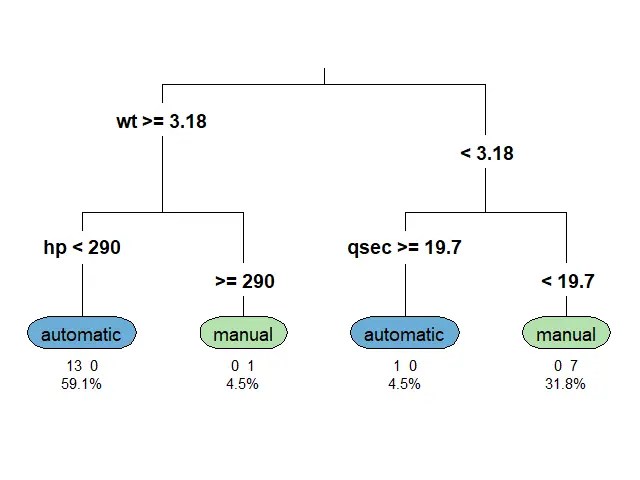
ตอนนี้ เราพร้อมที่จะสร้าง classification tree ด้วย rpart() แล้ว
สำหรับ classification tree ในบทความนี้ เราจะลองตั้งเงื่อนไขในการปลูกต้นไม้ (control) ดังนี้:
Random forest เป็น tree-based algorithm ที่ช่วยเพิ่มความแม่นยำในการทำนาย โดยสุ่มสร้าง decision trees ต้นเล็กขึ้นมาเป็นกลุ่ม (forest) แทนการปลูก decision tree ต้นเดียว
Decision tree แต่ละต้นใน random forest มีความสามารถในการทำนายแตกต่างกัน ซึ่งบางต้นอาจมีความสามารถที่น้อยมาก
แต่จุดแข็งของ random forest อยู่ที่จำนวน โดย random forest ทำนายผลลัพธ์โดยดูจากผลลัพธ์ในภาพรวม ดังนี้:
Task
Predict by
Regression
ค่าเฉลี่ยของผลลัพธ์การทำนายของทุกต้น
Classification
เสียงส่วนมาก (majority vote)
ดังนั้น แม้ว่า decision tree บางต้นอาจทำนายผิดพลาด แต่โดยรวมแล้ว random forest มีโอกาสที่จะทำนายได้ดีกว่า decision tree ต้นเดียว
ในภาษา R เราสามารถสร้าง random forest ได้ด้วย randomForest() จาก randomForest package ซึ่งต้องการ 3 arguments:
randomFrest(formula, data, ntree)
formula = สูตรในการวิเคราะห์ (ตัวแปรตาม ~ ตัวแปรต้น)
data = dataset ที่ใช้สร้าง model
ntree = จำนวน decision trees ที่ต้องการสร้าง
Note:
เราไม่ต้องกำหนดว่า จะทำ classification หรือ regression model เพราะ randomForest() จะเลือก model ให้อัตโนมัติตามข้อมูลที่เราใส่เข้าไป
💪 ผมขอแนะนำ R Book for Psychologists หนังสือสอนใช้ภาษา R เพื่อการวิเคราะห์ข้อมูลทางจิตวิทยา ที่เขียนมาเพื่อนักจิตวิทยาที่ไม่เคยมีประสบการณ์เขียน code มาก่อน
ในหนังสือ เราจะปูพื้นฐานภาษา R และพาไปดูวิธีวิเคราะห์สถิติที่ใช้บ่อยกัน เช่น:
Correlation
t-tests
ANOVA
Reliability
Factor analysis
🚀 เมื่ออ่านและทำตามตัวอย่างใน R Book for Psychologists ทุกคนจะไม่ต้องพึง SPSS และ Excel ในการทำงานอีกต่อไป และสามารถวิเคราะห์ข้อมูลด้วยตัวเองได้ด้วยความมั่นใจ
💪 ผมขอแนะนำ R Book for Psychologists หนังสือสอนใช้ภาษา R เพื่อการวิเคราะห์ข้อมูลทางจิตวิทยา ที่เขียนมาเพื่อนักจิตวิทยาที่ไม่เคยมีประสบการณ์เขียน code มาก่อน
ในหนังสือ เราจะปูพื้นฐานภาษา R และพาไปดูวิธีวิเคราะห์สถิติที่ใช้บ่อยกัน เช่น:
Correlation
t-tests
ANOVA
Reliability
Factor analysis
🚀 เมื่ออ่านและทำตามตัวอย่างใน R Book for Psychologists ทุกคนจะไม่ต้องพึง SPSS และ Excel ในการทำงานอีกต่อไป และสามารถวิเคราะห์ข้อมูลด้วยตัวเองได้ด้วยความมั่นใจ
  Sepal.Length     Sepal.Width
 Min.   :0.0000   Min.   :0.0000
 1st Qu.:0.2222   1st Qu.:0.3333
 Median :0.4167   Median :0.4167
 Mean   :0.4287   Mean   :0.4406
 3rd Qu.:0.5833   3rd Qu.:0.5417
 Max.   :1.0000   Max.   :1.0000
  Petal.Length     Petal.Width
 Min.   :0.0000   Min.   :0.00000
 1st Qu.:0.1017   1st Qu.:0.08333
 Median :0.5678   Median :0.50000
 Mean   :0.4675   Mean   :0.45806
 3rd Qu.:0.6949   3rd Qu.:0.70833
 Max.   :1.0000   Max.   :1.00000
       Species
 setosa    :50
 versicolor:50
 virginica :50
จะเห็นว่า:
Columns ที่เป็นตัวเลข มีช่วงอยู่ระหว่าง 0 และ 1
เรายังมี column Species อยู่
.
🪓 Split Data
ในการสร้าง KNN model เราควรแบ่ง dataset ที่มีเป็น 2 ส่วน คือ:
Training set: ใช้สำหรับสร้าง model
Test set: ใช้สำหรับประเมิน model
เราเริ่มแบ่งข้อมูลด้วยการสุ่ม row index ที่จะอยู่ใน training set:
# Set seed for reproducibility
set.seed(2025)

# Create a training index
train_index <- sample(1:nrow(iris_normalised),
                      0.7 * nrow(iris_normalised))
จากนั้น subset ข้อมูลด้วย row index ที่สุ่มไว้:
# Split the data
train_set <- iris_normalised[train_index, ]
test_set <- iris_normalised[-train_index, ]
.
🏷️ Separate Features From Label
ขั้นตอนสุดท้ายในการเตรียมข้อมูล คือ แยก features หรือ X (columns ที่จะใช้ทำนาย) ออกจาก label หรือ Y (สิ่งที่ต้องการทำนาย):
# Separate features from label

## Training set
train_X <- train_set[, 1:4]
train_Y <- train_set$Species

## Test set
test_X <- test_set[, 1:4]
test_Y <- test_set$Species
4️⃣ Step 4. Train a KNN Model
ขั้นที่สี่เป็นขั้นที่เราสร้าง KNN model ขึ้นมา โดยเรียกใช้ knn() จาก class package
ทั้งนี้ knn() ต้องการ input 3 อย่าง:
train: fatures จาก training set
test: feature จาก test set
cl: label จาก training set
k: จำนวนข้อมูลใกล้เคียงที่จะใช้ทำนายผลลัพธ์
# Train a KNN model
pred <- knn(train = train_X,
            test = test_X,
            cl = train_Y,
            k = 5)
ในตัวอย่าง เรากำหนด k = 5 เพื่อทำนายผลลัพธ์โดยดูจากข้อมูลที่ใกล้เคียง 5 อันดับแรก
5️⃣ Step 5. Evaluate the Model
หลังจากได้ model แล้ว เราประเมินประสิทธิภาพของ model ในการทำนายผลลัพธ์ ซึ่งเราทำได้ง่าย ๆ โดยคำนวณ accuracy หรือสัดส่วนของข้อมูลที่ model ตอบถูกต่อจำนวนข้อมูลทั้งหมด:
Accuracy = Correct predictions / Total predictions
จากผลลัพธ์ เราจะเห็นว่า model มีความแม่นยำสูงถึง 96%
🍩 Bonus: Fine-Tuning
ในบางครั้ง ค่า k ที่เราตั้งไว้ อาจไม่ได้ทำให้เราได้ KNN model ที่ดีที่สุด
แทนที่เราจะแทนค่า k ใหม่ไปเรื่อย ๆ เราสามารถใช้ for loop เพื่อหาค่า k ที่ทำให้เราได้ model ที่ดีที่สุดได้
ให้เราเริ่มจากสร้าง vector ที่มีค่า k ที่ต้องการ:
# Create a set of k values
k_values <- 1:20
และ vector สำหรับเก็บค่า accuracy ของค่า k แต่ละตัว:
# Createa a vector for accuracy results
accuracy_results <- numeric(length(k_values))
แล้วใช้ for loop เพื่อหาค่า accuracy ของค่า k:
# For-loop through the k values
for (i in seq_along(k_values)) {

  ## Set the k value
  k <- k_values[i]

  ## Create a KNN model
  predictions <- knn(train = train_X,
                     test = test_X,
                     cl = train_Y,
                     k = k)

  ## Create a confusion matrix
  cm <- table(Predicted = predictions,
              Actual = test_Y)

  ## Calculate accuracy
  accuracy_results[i] <- sum(diag(cm)) / sum(cm)
}

# Find the best k and the corresponding accuracy
best_k <- k_values[which.max(accuracy_results)]
best_accuracy <- max(accuracy_results)

# Print best k and accuracy
cat(paste("Best k:", best_k),
    paste("Accuracy:", round(best_accuracy, 2)),
    sep = "\n")
ผลลัพธ์:
Best k: 12
Accuracy: 0.98
แสดงว่า ค่า k ที่ดีที่สุด คือ 12 โดยมี accuracy เท่ากับ 98%
นอกจากนี้ เรายังสามารถสร้างกราฟ เพื่อช่วยทำความเข้าใจผลของค่า k ต่อ accuracy:
# Plot the results
plot(k_values,
     accuracy_results,
     type = "b",
     pch = 19,
     col = "blue",
     xlab = "Number of Neighbors (k)",
     ylab = "Accuracy",
     main = "KNN Model Accuracy for Different k Values")
grid()
ผลลัพธ์:
จะเห็นได้ว่า k = 12 ให้ accuracy ที่ดีที่สุด และ k = 20 ให้ accuracy ต่ำที่สุด ส่วนค่า k อื่น ๆ ให้ accuracy ในช่วง 93 ถึง 96%
💪 ผมขอแนะนำ R Book for Psychologists หนังสือสอนใช้ภาษา R เพื่อการวิเคราะห์ข้อมูลทางจิตวิทยา ที่เขียนมาเพื่อนักจิตวิทยาที่ไม่เคยมีประสบการณ์เขียน code มาก่อน
ในหนังสือ เราจะปูพื้นฐานภาษา R และพาไปดูวิธีวิเคราะห์สถิติที่ใช้บ่อยกัน เช่น:
Correlation
t-tests
ANOVA
Reliability
Factor analysis
🚀 เมื่ออ่านและทำตามตัวอย่างใน R Book for Psychologists ทุกคนจะไม่ต้องพึง SPSS และ Excel ในการทำงานอีกต่อไป และสามารถวิเคราะห์ข้อมูลด้วยตัวเองได้ด้วยความมั่นใจ











 Shi no Shigoto