Tag: RMSE

  • สอนปลูกต้นไม้ในภาษา R (ภาค 2): วิธีสร้าง ประเมิน และปรับทูน random forest model ด้วย ranger package – ตัวอย่างการทำนายระดับการกินน้ำมันของรถใน mpg dataset

    สอนปลูกต้นไม้ในภาษา R (ภาค 2): วิธีสร้าง ประเมิน และปรับทูน random forest model ด้วย ranger package – ตัวอย่างการทำนายระดับการกินน้ำมันของรถใน mpg dataset

    ในบทความนี้ เราจะไปทำความรู้จักกับ random forest รวมทั้งการสร้าง ประเมิน และปรับทูน random forest model ด้วย ranger package ในภาษา R

    ถ้าพร้อมแล้ว ไปเริ่มกันเลย


    1. 🌲 Random Forest Model คืออะไร?
    2. 💻 Random Forest Models ในภาษา R
    3. 🚗 mpg Dataset
    4. 🐣 ranger Basics
      1. 1️⃣ ติดตั้งและโหลด ranger
      2. 2️⃣ สร้าง Training และ Test Sets
      3. 3️⃣ สร้าง Random Forest Model
      4. 4️⃣ ทดสอบความสามารถของ Model
    5. ⏲️ Hyperparametre Tuning
    6. 🍩 Bonus: Variable Importance
    7. 😎 Summary
    8. 😺 GitHub
    9. 📃 References
    10. ✅ R Book for Psychologists: หนังสือภาษา R สำหรับนักจิตวิทยา

    🌲 Random Forest Model คืออะไร?

    Random forest model เป็น tree-based model ซึ่งสุ่มสร้าง decision trees ขึ้นมาหลาย ๆ ต้น (forest) และใช้ผลลัพธ์ในภาพรวมเพื่อทำนายข้อมูลสุดท้าย:

    • Regression task: หาค่าเฉลี่ยของผลลัพธ์จากทุกต้น
    • Classification task: ดูผลลัพธ์ที่เป็นเสียงโหวตข้างมาก

    Random forest เป็น model ที่ทรงพลัง เพราะใช้ผลรวมของหลาย ๆ decision trees แม้ว่า decision tree แต่ละต้นจะมีความสามารถในการทำนายนอยก็ตาม


    💻 Random Forest Models ในภาษา R

    ในภาษา R เรามี 2 packages ที่นิยมใช้สร้าง random forest model ได้แก่:

    1. randomForest ซึ่งเป็น package ที่มีลูกเล่น แต่เก่ากว่า
    2. ranger ซึ่งใหม่กว่า ประมวลผลได้เร็วกว่า และใช้งานง่ายกว่า

    ในบทความก่อน เราดูวิธีการใช้ randomForest แล้ว

    ในบทความนี้ เราจะไปดูวิธีใช้ ranger โดยใช้ mpg dataset เป็นตัวอย่างกัน


    🚗 mpg Dataset

    mpg dataset เป็น dataset จาก ggplots2 package และมีข้อมูลของรถ 38 รุ่น จากช่วงปี ช่วง ค.ศ. 1999 ถึง 2008 ทั้งหมด 11 columns ดังนี้:

    No.ColumnDescription
    1manufacturerผู้ผลิต
    2modelรุ่นรถ
    3displขนาดถังน้ำมัน (ลิตร)
    4yearปีที่ผลิต
    5cylจำนวนลูกสูบ
    6transประเภทเกียร์
    7drvประเภทล้อขับเคลื่อน
    8ctyระดับการกินน้ำมันเวลาวิ่งในเมือง
    9hwyระดับการกินน้ำมันเวลาวิ่งบน highway
    10flประเภทน้ำมัน
    11classประเภทรถ

    ในบทความนี้ เราจะลองใช้ ranger เพื่อทำนาย hwy กัน

    เราสามารถเตรียม mpg เพื่อสร้าง random forest model ได้ดังนี้

    โหลด dataset:

    # Install ggplot2
    install.packages("ggplot2")
    
    # Load ggplot2
    library(ggplot2)
    
    # Load the dataset
    data(mpg)
    

    ดูตัวอย่าง dataset:

    # Preview
    head(mpg)
    

    ผลลัพธ์:

    # A tibble: 6 × 11
      manufacturer model displ  year   cyl trans      drv     cty   hwy fl    class  
      <chr>        <chr> <dbl> <int> <int> <chr>      <chr> <int> <int> <chr> <chr>  
    1 audi         a4      1.8  1999     4 auto(l5)   f        18    29 p     compact
    2 audi         a4      1.8  1999     4 manual(m5) f        21    29 p     compact
    3 audi         a4      2    2008     4 manual(m6) f        20    31 p     compact
    4 audi         a4      2    2008     4 auto(av)   f        21    30 p     compact
    5 audi         a4      2.8  1999     6 auto(l5)   f        16    26 p     compact
    6 audi         a4      2.8  1999     6 manual(m5) f        18    26 p     compact
    

    สำรวจโครงสร้าง:

    # View the structure
    str(mpg)
    

    ผลลัพธ์:

    tibble [234 × 11] (S3: tbl_df/tbl/data.frame)
     $ manufacturer: chr [1:234] "audi" "audi" "audi" "audi" ...
     $ model       : chr [1:234] "a4" "a4" "a4" "a4" ...
     $ displ       : num [1:234] 1.8 1.8 2 2 2.8 2.8 3.1 1.8 1.8 2 ...
     $ year        : int [1:234] 1999 1999 2008 2008 1999 1999 2008 1999 1999 2008 ...
     $ cyl         : int [1:234] 4 4 4 4 6 6 6 4 4 4 ...
     $ trans       : chr [1:234] "auto(l5)" "manual(m5)" "manual(m6)" "auto(av)" ...
     $ drv         : chr [1:234] "f" "f" "f" "f" ...
     $ cty         : int [1:234] 18 21 20 21 16 18 18 18 16 20 ...
     $ hwy         : int [1:234] 29 29 31 30 26 26 27 26 25 28 ...
     $ fl          : chr [1:234] "p" "p" "p" "p" ...
     $ class       : chr [1:234] "compact" "compact" "compact" "compact" ...
    

    จากผลลัพธ์จะเห็นว่า บาง columns (เช่น manufacturer, model) มีข้อมูลประเภท character ซึ่งเราควระเปลี่ยนเป็น factor เพื่อช่วยให้การสร้าง model มีประสิทธิภาพมากขึ้น:

    # Convert character columns to factor
    
    ## Get character columns
    chr_cols <- c("manufacturer", "model",
                  "trans", "drv",
                  "fl", "class")
    
    ## For-loop through the character columns
    for (col in chr_cols) {
      mpg[[col]] <- as.factor(mpg[[col]])
    }
    
    ## Check the results
    str(mpg)
    

    ผลลัพธ์:

    tibble [234 × 11] (S3: tbl_df/tbl/data.frame)
     $ manufacturer: Factor w/ 15 levels "audi","chevrolet",..: 1 1 1 1 1 1 1 1 1 1 ...
     $ model       : Factor w/ 38 levels "4runner 4wd",..: 2 2 2 2 2 2 2 3 3 3 ...
     $ displ       : num [1:234] 1.8 1.8 2 2 2.8 2.8 3.1 1.8 1.8 2 ...
     $ year        : int [1:234] 1999 1999 2008 2008 1999 1999 2008 1999 1999 2008 ...
     $ cyl         : int [1:234] 4 4 4 4 6 6 6 4 4 4 ...
     $ trans       : Factor w/ 10 levels "auto(av)","auto(l3)",..: 4 9 10 1 4 9 1 9 4 10 ...
     $ drv         : Factor w/ 3 levels "4","f","r": 2 2 2 2 2 2 2 1 1 1 ...
     $ cty         : int [1:234] 18 21 20 21 16 18 18 18 16 20 ...
     $ hwy         : int [1:234] 29 29 31 30 26 26 27 26 25 28 ...
     $ fl          : Factor w/ 5 levels "c","d","e","p",..: 4 4 4 4 4 4 4 4 4 4 ...
     $ class       : Factor w/ 7 levels "2seater","compact",..: 2 2 2 2 2 2 2 2 2 2 ...
    

    ตอนนี้ เราพร้อมที่จะนำ dataset ไปใช้งานกับ ranger แล้ว


    🐣 ranger Basics

    การใช้งาน ranger มีอยู่ 4 ขั้นตอน:

    1. ติดตั้งและโหลด ranger
    2. สร้าง training และ test sets
    3. สร้าง random forest model
    4. ทดสอบความสามารถของ model

    .

    1️⃣ ติดตั้งและโหลด ranger

    ในครั้งแรกสุด ให้เราติดตั้ง ranger ด้วยคำสั่ง install.packages():

    # Install
    install.packages("ranger")
    

    และทุกครั้งที่เราต้องการใช้งาน ranger ให้เราเรียกใช้งานด้วย library():

    # Load
    library(ranger)
    

    .

    2️⃣ สร้าง Training และ Test Sets

    ในขั้นที่ 2 เราจะแบ่ง dataset เป็น 2 ส่วน ได้แก่:

    1. Training set สำหรับสร้าง model (70% ของ dataset)
    2. Test set สำหรับทดสอบ model (30% ของ dataset)
    # Split the data
    
    ## Set seed for reproducibility
    set.seed(123)
    
    ## Get training rows
    train_rows <- sample(nrow(mpg),
                         nrow(mpg) * 0.7)
    
    ## Create a training set
    train <- mpg[train_rows, ]
    
    ## Create a test set
    test <- mpg[-train_rows, ]
    

    .

    3️⃣ สร้าง Random Forest Model

    ในขั้นที่ 3 เราจะสร้าง random forest ด้วย ranger() ซึ่งต้องการ input หลัก 2 อย่าง ดังนี้:

    ranger(formula, data)
    1. formula: ระบุตัวแปรต้นและตัวแปรตามที่ใช้ในการสร้าง model
    2. data: dataset ที่ใช้สร้าง model (เราจะใช้ training set กัน)

    เราจะเรียกใช้ ranger() ดังนี้:

    # Initial random forest model
    
    ## Set seed for reproducibility
    set.seed(123)
    
    ## Train the model
    rf_model <- ranger(hwy ~ .,
                       data = train)
    

    Note: เราใช้ set.seed() เพื่อให้เราสามารถสร้าง model ซ้ำได้ เพราะ random forest มีการสร้าง decision trees แบบสุ่ม

    เมื่อได้ model มาแล้ว เราสามารถดูรายละเอียดของ model ได้แบบนี้:

    # Print the model
    rf_model
    

    ผลลัพธ์:

    Ranger result
    
    Call:
     ranger(hwy ~ ., data = train) 
    
    Type:                             Regression 
    Number of trees:                  500 
    Sample size:                      163 
    Number of independent variables:  10 
    Mtry:                             3 
    Target node size:                 5 
    Variable importance mode:         none 
    Splitrule:                        variance 
    OOB prediction error (MSE):       1.682456 
    R squared (OOB):                  0.9584596 
    

    ในผลลัพธ์ เราจะเห็นลักษณะต่าง ๆ ของ model เช่น ประเภท model (type) และ จำนวน decision trees ที่ถูกสร้างขึ้นมา (sample size)

    .

    4️⃣ ทดสอบความสามารถของ Model

    สุดท้าย เราจะทดสอบความสามารถของ model ในการทำนายข้อมูล โดยเริ่มจากใช้ model ทำนายข้อมูลใน test set:

    # Make predictions
    preds <- predict(rf_model,
                     data = test)$predictions
    

    จากนั้น คำนวณตัวบ่งชี้ความสามารถ (metric) ซึ่งสำหรับ regression model มีอยู่ 3 ตัว ได้แก่:

    1. MAE (mean absolute error): ค่าเฉลี่ยความคลาดเคลื่อนแบบสัมบูรณ์ (ยิ่งน้อยยิ่งดี)
    2. RMSE (root mean square error): ค่าเฉลี่ยความคาดเคลื่อนแบบยกกำลังสอง (ยิ่งน้อยยิ่งดี)
    3. R squared: สัดส่วนข้อมูลที่อธิบายได้ด้วย model (ยิ่งมากยิ่งดี)
    # Get errors
    errors <- test$hwy - preds
    
    # Calculate MAE
    mae <- mean(abs(errors))
    
    # Calculate RMSE
    rmse <- sqrt(mean(errors^2))
    
    # Calculate R squared
    r_sq <- 1 - (sum((errors)^2) / sum((test$hwy - mean(test$hwy))^2))
    
    # Print the results
    cat("Initial model MAE:", round(mae, 2), "\n")
    cat("Initial model RMSE:", round(rmse, 2), "\n")
    cat("Initial model R squared:", round(r_sq, 2), "\n")
    

    ผลลัพธ์:

    Initial model MAE: 0.79
    Initial model RMSE: 1.07
    Initial model R squared: 0.95
    

    ⏲️ Hyperparametre Tuning

    ranger มี hyperparametre มากมายที่เราสามารถปรับแต่งเพื่อเพิ่มประสิทธิภาพของ random forest model ได้ เช่น:

    1. num.trees: จำนวน decision trees ที่จะสร้าง
    2. mtry: จำนวนตัวแปรต้นที่จะถูกสุ่มไปใช้ในแต่ละ node
    3. min.node.size: จำนวนข้อมูลขั้นต่ำที่แต่ละ node จะต้องมี

    เราสามารถใช้ for loop เพื่อปรับหาค่า hyperparametre ที่ดีที่สุดได้ดังนี้:

    # Define hyperparametres
    ntree_vals <- c(300, 500, 700)
    mtry_vals <- 2:5
    min_node_vals <- c(1, 5, 10)
    
    # Create a hyperparametre grid
    grid <- expand.grid(num.trees = ntree_vals,
                        mtry = mtry_vals,
                        min.node.size = min_node_vals)
    
    # Instantiate an empty data frame
    hpt_results <- data.frame()
    
    # For-loop through the hyperparametre grid
    for (i in 1:nrow(grid)) {
      
      ## Get the combination
      params <- grid[i, ]
      
      ## Set seed for reproducibility
      set.seed(123)
      
      ## Fit the model
      model <- ranger(hwy ~ .,
                      data = train,
                      num.trees = params$num.trees,
                      mtry = params$mtry,
                      min.node.size = params$min.node.size)
      
      ## Make predictions
      preds <- predict(model,
                       data = test)$predictions
      
      ## Get errors
      errors <- test$hwy - preds
      
      ## Calculate MAE
      mae <- mean(abs(errors))
      
      ## Calculate RMSE
      rmse <- sqrt(mean(errors^2))
      
      ## Store the results
      hpt_results <- rbind(hpt_results,
                           cbind(params,
                                 MAE = mae,
                                 RMSE = rmse))
    }
    
    # View the results
    hpt_results
    

    ผลลัพธ์:

       num.trees mtry min.node.size       MAE      RMSE
    1        300    2             1 0.8101026 1.0971836
    2        500    2             1 0.8012484 1.0973957
    3        700    2             1 0.8039271 1.1001252
    4        300    3             1 0.7434543 1.0051344
    5        500    3             1 0.7417985 1.0069989
    6        700    3             1 0.7421666 1.0028184
    7        300    4             1 0.6989314 0.9074216
    8        500    4             1 0.7130704 0.9314843
    9        700    4             1 0.7141147 0.9292718
    10       300    5             1 0.7157657 0.9370918
    11       500    5             1 0.7131899 0.9266787
    12       700    5             1 0.7091556 0.9238312
    13       300    2             5 0.8570125 1.1673637
    14       500    2             5 0.8515116 1.1736009
    15       700    2             5 0.8522571 1.1756648
    16       300    3             5 0.7885005 1.0654548
    17       500    3             5 0.7872713 1.0664734
    18       700    3             5 0.7859149 1.0581331
    19       300    4             5 0.7561500 0.9790160
    20       500    4             5 0.7623437 0.9869463
    21       700    4             5 0.7611660 0.9813048
    22       300    5             5 0.7615190 0.9777769
    23       500    5             5 0.7615861 0.9804616
    24       700    5             5 0.7613151 0.9788333
    25       300    2            10 0.9257704 1.2391377
    26       500    2            10 0.9292344 1.2611164
    27       700    2            10 0.9258555 1.2635794
    28       300    3            10 0.8790601 1.1635695
    29       500    3            10 0.8704461 1.1594165
    30       700    3            10 0.8704562 1.1507016
    31       300    4            10 0.8609516 1.0887466
    32       500    4            10 0.8672105 1.0962367
    33       700    4            10 0.8624934 1.0875710
    34       300    5            10 0.8558867 1.0811168
    35       500    5            10 0.8567463 1.0783473
    36       700    5            10 0.8536824 1.0751511
    

    จะเห็นว่า เราจะได้ MSE และ RMSE ของส่วนผสมระหว่างแต่ละ hyperparametre มา

    เราสามารถใช้ ggplot() เพื่อช่วยเลือก hyperparametres ที่ดีที่สุดได้ดังนี้:

    # Visualise the results
    ggplot(hpt_results,
           aes(x = mtry,
               y = RMSE,
               color = factor(num.trees))) +
      
      ## Use scatter plot
      geom_point(aes(size = min.node.size)) +
      
      ## Set theme to minimal
      theme_minimal() +
      
      ## Add title, labels, and legends
      labs(title = "Hyperparametre Tuning Results",
           x = "mtry",
           y = "RMSE",
           color = "num.trees",
           size = "min.node.size")
    

    ผลลัพธ์:
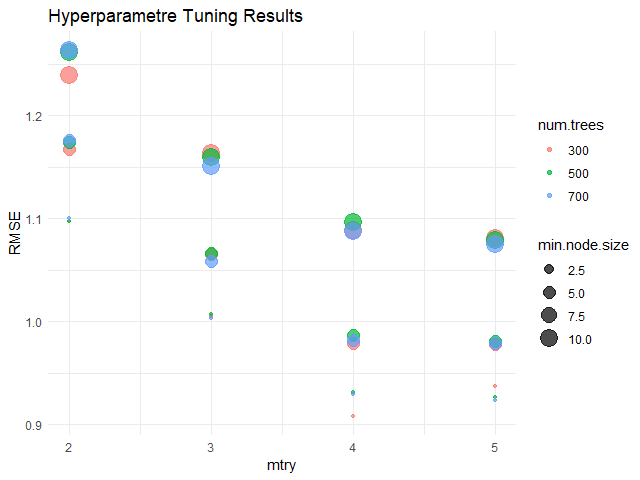
    จากกราฟ จะเห็นได้ว่า hyperparametres ที่ดีที่สุด (มี RMSE น้อยที่สุด) คือ:

    1. num.trees = 300
    2. mtry = 4
    3. min.node.size = 2.5

    เมื่อได้ค่า hyperparametres แล้ว เราสามารถใส่ค่าเหล่านี้กลับเข้าไปใน model และทดสอบความสามารถได้เลย

    สร้าง model:

    # Define the best hyperparametres
    best_num.tree <- 300
    best_mtry <- 4
    best_min.node.size <- 2.5
    
    # Fit the model
    rf_model_new <- ranger(hwy ~ .,
                           data = train,
                           num.tree = best_num.tree,
                           mtry = best_mtry,
                           min.node.size = best_min.node.size)
    

    ทดสอบความสามารถ:

    # Evaluate the model
    
    ## Make predictions
    preds_new <- predict(rf_model_new,
                         data = test)$predictions
    
    ## Get errors
    errors_new <- test$hwy - preds_new
    
    ## Calculate MAE
    mae_new <- mean(abs(errors_new))
    
    ## Calculate RMSE
    rmse_new <- sqrt(mean(errors_new^2))
    
    ## Calculate R squared
    r_sq_new <- 1 - (sum((errors_new)^2) / sum((test$hwy - mean(test$hwy))^2))
    
    ## Print the results
    cat("Final model MAE:", round(mae_new, 2), "\n")
    cat("Final model RMSE:", round(rmse_new, 2), "\n")
    cat("Final model R squared:", round(r_sq_new, 2), "\n")
    

    ผลลัพธ์:

    Final model MAE: 0.71
    Final model RMSE: 0.93
    Final model R squared: 0.96
    

    เราสามารถเปรียบเทียบความสามารถของ model ล่าสุด (final model) กับ model ก่อนหน้านี้ (initial model) ได้:

    # Compare the two models
    model_comp <- data.frame(Model = c("Initial", "Final"),
                             MAE = c(round(mae, 2), round(mae_new, 2)),
                             RMSE = c(round(rmse, 2), round(rmse_new, 2)),
                             R_Squared = c(round(r_sq, 2), round(r_sq_new, 2)))
    
    # Print
    model_comp
    

    ผลลัพธ์:

        Model  MAE RMSE R_Squared
    1 Initial 0.85 1.08      0.95
    2   Final 0.71 0.93      0.96
    

    ซึ่งจะเห็นว่า model ใหม่สามารถทำนายข้อมูลได้ดีขึ้น เพราะมี MAE และ RMSE ที่ลดลง รวมทั้ง R squared ที่เพิ่มขึ้น


    🍩 Bonus: Variable Importance

    ส่งท้าย ในกรณีที่เราต้องการดูว่า ตัวแปรต้นไหนมีความสำคัญต่อการทำนายมากที่สุด เราสามารถใช้ importance argument ใน ranger() คู่กับ vip() จาก vip package ได้แบบนี้:

    # Fit the model with importance
    rf_model_new <- ranger(hwy ~ .,
                           data = train,
                           num.tree = best_num.tree,
                           mtry = best_mtry,
                           min.node.size = best_min.node.size,
                           importance = "permutation") # Add importance
    
    # Install vip package
    install.packages("vip")
    
    # Load vip package
    library(vip)
    
    # Get variabe importance
    vip(rf_model_new)  +
      
      ## Add title and labels
      labs(title = "Variable Importance - Final Random Forest Model",
           x = "Variables",
           y = "Importance") +
      
      ## Set theme to minimal
      theme_minimal()
    

    ผลลัพธ์:
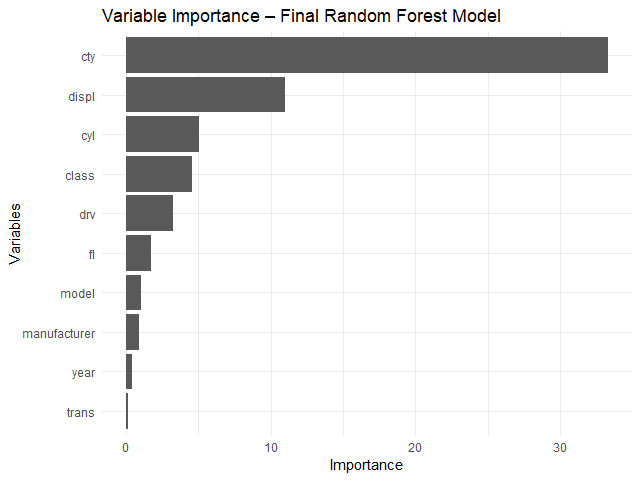
    จากกราฟ จะเห็นได้ว่า ตัวแปรต้นที่สำคัญที่สุด 3 ตัว ได้แก่:

    1. cty: ระดับการกินน้ำมันเวลาวิ่งในเมือง
    2. displ: ขนาดถังน้ำมัน (ลิตร)
    3. cyl: จำนวนลูกสูบ

    😎 Summary

    ในบทความนี้ เราได้ดูวิธีการใช้ ranger package เพื่อ:

    1. สร้าง random forest model
    2. ปรับทูน model

    พร้อมวิธีการประเมิน model ด้วย predict() และการคำนวณ MAE, RMSE, และ R squared รวมทั้งดูความสำคัญของตัวแปรต้นด้วย vip package


    😺 GitHub

    ดู code ทั้งหมดในบทความนี้ได้ที่ GitHub


    📃 References


    ✅ R Book for Psychologists: หนังสือภาษา R สำหรับนักจิตวิทยา

    📕 ขอฝากหนังสือเล่มแรกในชีวิตด้วยนะครับ 😆

    🙋 ใครที่กำลังเรียนจิตวิทยาหรือทำงานสายจิตวิทยา และเบื่อที่ต้องใช้ software ราคาแพงอย่าง SPSS และ Excel เพื่อทำข้อมูล

    💪 ผมขอแนะนำ R Book for Psychologists หนังสือสอนใช้ภาษา R เพื่อการวิเคราะห์ข้อมูลทางจิตวิทยา ที่เขียนมาเพื่อนักจิตวิทยาที่ไม่เคยมีประสบการณ์เขียน code มาก่อน

    ในหนังสือ เราจะปูพื้นฐานภาษา R และพาไปดูวิธีวิเคราะห์สถิติที่ใช้บ่อยกัน เช่น:

    • Correlation
    • t-tests
    • ANOVA
    • Reliability
    • Factor analysis

    🚀 เมื่ออ่านและทำตามตัวอย่างใน R Book for Psychologists ทุกคนจะไม่ต้องพึง SPSS และ Excel ในการทำงานอีกต่อไป และสามารถวิเคราะห์ข้อมูลด้วยตัวเองได้ด้วยความมั่นใจ

    แล้วทุกคนจะแปลกใจว่า ทำไมภาษา R ง่ายขนาดนี้ 🙂‍↕️

    👉 สนใจดูรายละเอียดหนังสือได้ที่ meb:

  • วิธีสร้าง linear regression ด้วย lm() ในภาษา R — ตัวอย่างการทำนายราคาเพชรใน diamonds dataset

    วิธีสร้าง linear regression ด้วย lm() ในภาษา R — ตัวอย่างการทำนายราคาเพชรใน diamonds dataset

    Linear regression เป็นวิธีการทำนายข้อมูลด้วยสมการเส้นตรง:

    y = a + bx
    • y = ตัวแปรตาม หรือข้อมูลที่ต้องการทำนาย
    • a = จุดตัดระหว่าง x และ y (intercept)
    • b = ค่าความชัด (slope)
    • x = ตัวแปรต้น

    เนื่องจากเป็นเทคนิคที่ใช้งานและทำความเข้าใจได้ง่าย linear regression จึงเป็นวิธีที่นิยมใช้ในการทำนายข้อมูลในบริบทต่าง ๆ เช่น:

    ทำนายจาก
    กำไรค่าโฆษณา
    ความสามารถของนักกีฬาชั่วโมงฝึกซ้อม
    ความดันเลือดปริมาณยา + อายุ
    ผลลิตทางการเกษตรปริมาณน้ำ + ปุ๋ย

    ในบทความนี้ เราจะมาดูวิธีใช้ linear regression ในภาษา R กัน

    ถ้าพร้อมแล้ว ไปเริ่มกันเลย


    1. 💎 Example Dataset: diamonds
    2. ⬇️ Load diamonds
    3. 🍳 Prepare the Dataset
      1. 🪆 Step 1. One-Hot Encoding
      2. 📈 Step 2. Log Transformation
      3. 🚄 Step 3. Split the Data
    4. 🏷️ Linear Regression Modelling
      1. 💪 Step 1. Fit the Model
      2. 🔮 Step 2. Make Predictions
      3. 🎯 Step 3. Evaluate the Model Performance
    5. 😎 Summary
    6. 😺 GitHub
    7. 📃 References
    8. ✅ R Book for Psychologists: หนังสือภาษา R สำหรับนักจิตวิทยา

    💎 Example Dataset: diamonds

    ในบทความนี้ เราจะใช้ diamonds dataset เป็นตัวอย่างในการใช้ linear regression กัน

    diamonds dataset เป็น built-in dataset จาก ggplot2 package ซึ่งมีข้อมูลเพชรมากกว่า 50,000 ตัวอย่าง และประกอบด้วย 10 columns ดังนี้:

    No.ColumnDescription
    1priceราคา (ดอลล่าร์สหรัฐฯ)
    2caretน้ำหนัก
    3cutคุณภาพ
    4colorสี
    5clarityความใสของเพชร
    6xความยาว
    7yความกว้าง
    8zความลึก
    9depthสัดส่วนความลึก
    10tableสัดส่วนความกว้างของยอดเพชรต่อส่วนที่กว้างที่สุด

    เป้าหมายของเรา คือ ทำนายราคาเพชร (price)


    ⬇️ Load diamonds

    ในการใช้งาน diamonds เราสามารถเรียกใช้งาน dataset ได้ดังนี้:

    ขั้นที่ 1. ติดตั้งและโหลด ggplot2:

    # Install
    install.packages("ggplot2")
    
    # Load
    library(ggplot2)
    

    ขั้นที่ 2. โหลด diamonds dataset:

    # Load dataset
    data(diamonds)
    

    ขั้นที่ 3. ดูตัวอย่างข้อมูล 10 rows แรกใน dataset:

    # Preview the dataset
    head(diamonds, 10)
    

    ผลลัพธ์:

    # A tibble: 10 × 10
       carat cut       color clarity depth table price     x     y     z
       <dbl> <ord>     <ord> <ord>   <dbl> <dbl> <int> <dbl> <dbl> <dbl>
     1  0.23 Ideal     E     SI2      61.5    55   326  3.95  3.98  2.43
     2  0.21 Premium   E     SI1      59.8    61   326  3.89  3.84  2.31
     3  0.23 Good      E     VS1      56.9    65   327  4.05  4.07  2.31
     4  0.29 Premium   I     VS2      62.4    58   334  4.2   4.23  2.63
     5  0.31 Good      J     SI2      63.3    58   335  4.34  4.35  2.75
     6  0.24 Very Good J     VVS2     62.8    57   336  3.94  3.96  2.48
     7  0.24 Very Good I     VVS1     62.3    57   336  3.95  3.98  2.47
     8  0.26 Very Good H     SI1      61.9    55   337  4.07  4.11  2.53
     9  0.22 Fair      E     VS2      65.1    61   337  3.87  3.78  2.49
    10  0.23 Very Good H     VS1      59.4    61   338  4     4.05  2.39
    

    🍳 Prepare the Dataset

    ก่อนจะทำนายราคาเพชรด้วย linear regression เราจะเตรียม diamonds dataset ใน 3 ขั้นตอนก่อน ได้แก่:

    1. One-hot encoding
    2. Log transformation
    3. Split data

    .

    🪆 Step 1. One-Hot Encoding

    ในกรณีที่ตัวแปรต้นที่เป็น categorical เราจะต้องแปลงตัวแปรเหล่านี้ให้เป็น numeric ก่อน ซึ่งเราสามารถทำได้ด้วย one-hot encoding ดังตัวอย่าง:

    ก่อน one-hot encoding:

    DataCut
    1Ideal
    2Good
    3Fair

    หลัง one-hot encoding:

    DataCut_IdealCut_GoodCut_Fair
    1100
    2010
    3001

    ในภาษา R เราสามารถทำ one-hot encoding ได้ด้วย model.matrix() ดังนี้:

    # Set option for one-hot encoding
    options(contrasts = c("contr.treatment",
                          "contr.treatment"))
    
    # One-hot encode
    cat_dum <- model.matrix(~ cut + color + clarity - 1,
                            data = diamonds)
    

    จากนั้น เราจะนำผลลัพธ์ที่ได้ไปรวมกับตัวแปรตามและตัวแปรต้นที่เป็น numeric:

    # Combine one-hot-encoded categorical and numeric variables
    dm <- cbind(diamonds[, c("carat",
                             "depth",
                             "table",
                             "x",
                             "y",
                             "z")],
                cat_dum,
                price = diamonds$price)
    

    เราสามารถเช็กผลลัพธ์ของ one-hot encoding ได้ด้วย str():

    # Check the results
    str(dm)
    

    ผลลัพธ์:

    'data.frame':	53940 obs. of  25 variables:
     $ carat       : num  0.23 0.21 0.23 0.29 0.31 0.24 0.24 0.26 0.22 0.23 ...
     $ depth       : num  61.5 59.8 56.9 62.4 63.3 62.8 62.3 61.9 65.1 59.4 ...
     $ table       : num  55 61 65 58 58 57 57 55 61 61 ...
     $ x           : num  3.95 3.89 4.05 4.2 4.34 3.94 3.95 4.07 3.87 4 ...
     $ y           : num  3.98 3.84 4.07 4.23 4.35 3.96 3.98 4.11 3.78 4.05 ...
     $ z           : num  2.43 2.31 2.31 2.63 2.75 2.48 2.47 2.53 2.49 2.39 ...
     $ cutFair     : num  0 0 0 0 0 0 0 0 1 0 ...
     $ cutGood     : num  0 0 1 0 1 0 0 0 0 0 ...
     $ cutVery Good: num  0 0 0 0 0 1 1 1 0 1 ...
     $ cutPremium  : num  0 1 0 1 0 0 0 0 0 0 ...
     $ cutIdeal    : num  1 0 0 0 0 0 0 0 0 0 ...
     $ colorE      : num  1 1 1 0 0 0 0 0 1 0 ...
     $ colorF      : num  0 0 0 0 0 0 0 0 0 0 ...
     $ colorG      : num  0 0 0 0 0 0 0 0 0 0 ...
     $ colorH      : num  0 0 0 0 0 0 0 1 0 1 ...
     $ colorI      : num  0 0 0 1 0 0 1 0 0 0 ...
     $ colorJ      : num  0 0 0 0 1 1 0 0 0 0 ...
     $ claritySI2  : num  1 0 0 0 1 0 0 0 0 0 ...
     $ claritySI1  : num  0 1 0 0 0 0 0 1 0 0 ...
     $ clarityVS2  : num  0 0 0 1 0 0 0 0 1 0 ...
     $ clarityVS1  : num  0 0 1 0 0 0 0 0 0 1 ...
     $ clarityVVS2 : num  0 0 0 0 0 1 0 0 0 0 ...
     $ clarityVVS1 : num  0 0 0 0 0 0 1 0 0 0 ...
     $ clarityIF   : num  0 0 0 0 0 0 0 0 0 0 ...
     $ price_log   : num  5.79 5.79 5.79 5.81 5.81 ...
    

    ตอนนี้ ตัวแปรต้นที่เป็น categorical ถูกแปลงเป็น numeric ทั้งหมดแล้ว

    .

    📈 Step 2. Log Transformation

    ในกรณีที่ตัวแปรตามมีการกระจายตัว (distribution) ไม่ปกติ linear regression ทำนายข้อมูลได้ไม่เต็มประสิทธิภาพนัก

    เราสามารถตรวจสอบการกระจายตัวของตัวแปรตามได้ด้วย ggplot():

    # Check the distribution of `price`
    ggplot(dm,
           aes(x = price)) +
      
      ## Instantiate a histogram
      geom_histogram(binwidth = 100,
                     fill = "skyblue3") +
      
      ## Add text elements
      labs(title = "Distribution of Price",
           x = "Price",
           y = "Count") +
      
      ## Set theme to minimal
      theme_minimal()
    

    ผลลัพธ์:

    จากกราฟ เราจะเห็นได้ว่า ตัวแปรตามมีการกระจายตัวแบบเบ้ขวา (right-skewed)

    ดังนั้น ก่อนจะใช้ linear regression เราจะต้องแปรตัวแปรตามให้มีการกระจายตัวแบบปกติ (normal distribution) ก่อน ซึ่งเราสามารถทำได้ด้วย log transformation ดังนี้:

    # Log-transform `price`
    dm$price_log <- log(dm$price)
    
    # Drop `price`
    dm$price <- NULL
    

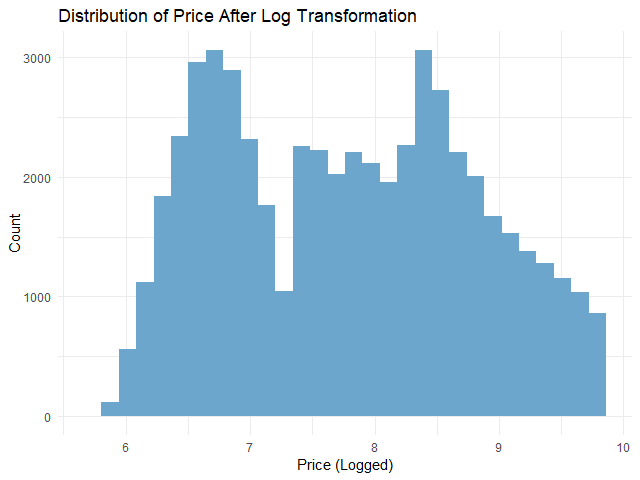
    หลัง log transformation เราสามารถเช็กการกระจายตัวด้วย ggplot() อีกครั้ง:

    # Check the distribution of logged `price`
    ggplot(dm,
           aes(x = price_log)) +
      
      ## Instantiate a histogram
      geom_histogram(fill = "skyblue3") +
      
      ## Add text elements
      labs(title = "Distribution of Price After Log Transformation",
           x = "Price (Logged)",
           y = "Count") +
      
      ## Set theme to minimal
      theme_minimal() 
    

    ผลลัพธ์:

    จะเห็นได้ว่า การกระจายตัวของตัวแปรตามใกล้เคียงกับการกระจายตัวแบบปกติมากขึ้นแล้ว

    .

    🚄 Step 3. Split the Data

    ในขั้นสุดท้ายก่อนใช้ linear regression เราจะแบ่งข้อมูลออกเป็น 2 ชุด:

    1. Training set สำหรับสร้าง linear regression model
    2. Test set สำหรับประเมินความสามารถของ linear regression model

    ในบทความนี้ เราจะแบ่ง 80% ของ dataset เป็น training set และ 20% เป็น test set:

    # Split the data
    
    ## Set seed for reproducibility
    set.seed(181)
    
    ## Training index
    train_index <- sample(nrow(dm),
                          0.8 * nrow(dm))
    
    ## Create training set
    train_set <- dm[train_index, ]
    
    ## Create test set
    test_set <- dm[-train_index, ]
    

    ตอนนี้ เราพร้อมที่จะสร้าง linear regression model กันแล้ว


    🏷️ Linear Regression Modelling

    การสร้าง linear regression model มีอยู่ 3 ขั้นตอน ได้แก่:

    1. Fit the model
    2. Make predictions
    3. Evaluate the model performance

    .

    💪 Step 1. Fit the Model

    ในขั้นแรก เราจะสร้าง model ด้วย lm() ซึ่งต้องการ input 2 อย่าง:

    lm(formula, data)
    1. formula = สูตรการทำนาย โดยเราต้องกำหนดตัวแปรต้นและตัวแปรตาม
    2. data = ชุดข้อมูลที่ใช้สร้าง model

    ในการทำนายราคาเพชร เราจะใช้ lm() แบบนี้:

    # Fit the model
    linear_reg <- lm(price_log ~ .,
                     data = train_set)
    

    อธิบาย code:

    • price_log ~ . หมายถึง ทำนายราคา (price_log) ด้วยตัวแปรต้นทั้งหมด (.)
    • data = train_set หมายถึง เรากำหนดชุดข้อมูลที่ใช้เป็น training set

    เราสามารถดูข้อมูลของ model ได้ด้วย summary():

    # View the model
    summary(linear_reg)
    

    ผลลัพธ์:

    Call:
    lm(formula = price_log ~ ., data = train_set)
    
    Residuals:
        Min      1Q  Median      3Q     Max 
    -2.2093 -0.0930  0.0019  0.0916  9.8935 
    
    Coefficients: (1 not defined because of singularities)
                     Estimate Std. Error  t value Pr(>|t|)    
    (Intercept)    -2.7959573  0.0705854  -39.611  < 2e-16 ***
    carat          -0.5270039  0.0086582  -60.867  < 2e-16 ***
    depth           0.0512357  0.0008077   63.437  < 2e-16 ***
    table           0.0090154  0.0005249   17.175  < 2e-16 ***
    x               1.1374016  0.0055578  204.651  < 2e-16 ***
    y               0.0290584  0.0031345    9.271  < 2e-16 ***
    z               0.0340298  0.0054896    6.199 5.73e-10 ***
    cutFair        -0.1528658  0.0060005  -25.476  < 2e-16 ***
    cutGood        -0.0639105  0.0036547  -17.487  < 2e-16 ***
    `cutVery Good` -0.0313800  0.0025724  -12.199  < 2e-16 ***
    cutPremium     -0.0451760  0.0026362  -17.137  < 2e-16 ***
    cutIdeal               NA         NA       NA       NA    
    colorE         -0.0573940  0.0032281  -17.779  < 2e-16 ***
    colorF         -0.0892633  0.0032654  -27.336  < 2e-16 ***
    colorG         -0.1573861  0.0032031  -49.136  < 2e-16 ***
    colorH         -0.2592763  0.0034037  -76.175  < 2e-16 ***
    colorI         -0.3864526  0.0038360 -100.742  < 2e-16 ***
    colorJ         -0.5258789  0.0047183 -111.455  < 2e-16 ***
    claritySI2      0.4431577  0.0079170   55.976  < 2e-16 ***
    claritySI1      0.6087513  0.0078819   77.234  < 2e-16 ***
    clarityVS2      0.7523161  0.0079211   94.976  < 2e-16 ***
    clarityVS1      0.8200656  0.0080463  101.918  < 2e-16 ***
    clarityVVS2     0.9381319  0.0082836  113.252  < 2e-16 ***
    clarityVVS1     1.0033931  0.0085098  117.910  < 2e-16 ***
    clarityIF       1.0898015  0.0092139  118.277  < 2e-16 ***
    ---
    Signif. codes:  0 ‘***’ 0.001 ‘**’ 0.01 ‘*’ 0.05 ‘.’ 0.1 ‘ ’ 1
    
    Residual standard error: 0.1825 on 43128 degrees of freedom
    Multiple R-squared:  0.9677,	Adjusted R-squared:  0.9676 
    F-statistic: 5.611e+04 on 23 and 43128 DF,  p-value: < 2.2e-16
    

    Note: ดูวิธีการอ่านผลลัพธ์ได้ที่ Explaining the lm() Summary in R และ Understanding Linear Regression Output in R

    .

    🔮 Step 2. Make Predictions

    ในขั้นที่สอง เราจะใช้ model เพื่อทำนายราคาด้วย predict():

    # Predict in the outcome space
    pred <- exp(pred_log)
    
    # Preview predictions
    head(pred_log)
    

    ผลลัพธ์:

           2        5        9       16       19       22 
    5.828071 5.816460 6.111859 5.777434 5.865820 6.088356
    

    จะเห็นว่า ราคาที่ทำนายยังอยู่ในรูป log ซึ่งเราต้องแปลงกลับเป็นราคาปกติด้วย exp():

    # Predict in the outcome space
    pred <- exp(pred_log)
    
    # Preview predictions
    head(pred)
    

    ผลลัพธ์:

           2        5        9       16       19       22 
    339.7028 335.7812 451.1766 322.9295 352.7713 440.6961 
    

    เราสามารถเปรียบเทียบราคาจริงกับราคาที่ทำนาย พร้อมความคลาดเคลื่อน ได้ดังนี้:

    # Compare predictions to actual
    results <- data.frame(actual = round(exp(test_set$price_log), 2),
                          predicted = round(pred, 2),
                          diff = round(exp(test_set$price_log) - pred, 2))
    
    # Print results
    head(results)
    

    ผลลัพธ์:

       actual predicted    diff
    2     326    339.70  -13.70
    5     335    335.78   -0.78
    9     337    451.18 -114.18
    16    345    322.93   22.07
    19    351    352.77   -1.77
    22    352    440.70  -88.70
    

    .

    🎯 Step 3. Evaluate the Model Performance

    ในขั้นสุดท้าย เราจะประเมิน model โดยใช้ 2 ตัวชี้วัด ได้แก่:

    1. Mean absolute error (MAE): ค่าเฉลี่ยความคลาดเคลื่อนโดยสัมบูรณ์
    2. Root mean squared error (RMSE): ค่าเฉลี่ยความคลาดเคลื่อนแบบยกกำลังสอง

    ทั้งสองตัวคำนวณความแตกต่างระหว่างสิ่งที่ทำนายและข้อมูลจริง ยิ่ง MAE และ RMSE สูง ก็หมายความว่า การทำนายมีความคาดเคลื่อนมาก แสดงว่า model ทำงานได้ไม่ดีนัก

    ในทางกลับกัน ถ้า MAE และ RMSE น้อย ก็แสดงว่า การทำนายใกล้เคียงกับข้อมูลจริง และ model มีความแม่นยำสูง

    (Note: เรียนรู้ความแตกต่างระหว่าง MAE และ RMSE ได้ที่ Loss Functions in Machine Learning Explained)

    เราสามารถคำนวณ MAE และ RMSE ได้ดังนี้:

    # Calculate MAE
    mae <- mean(abs(results$diff))
    
    # Calculate RMSE
    rmse <- sqrt(mean((results$diff)^2))
    
    # Print the results
    cat("MAE:", round(mae, 2), "\n")
    cat("RMSE:", round(rmse, 2))
    

    ผลลัพธ์:

    MAE: 491.71
    RMSE: 1123.68
    

    จากผลลัพธ์ เราจะเห็นว่า โดยเฉลี่ย model ทำนายราคาคลาดเคลื่อนไปประมาณ 492 ดอลล่าร์ (MAE)


    😎 Summary

    ในบทความนี้ เราได้ดูวิธีการทำ linear regression ในภาษา R กัน

    เราดูวิธีการเตรียมข้อมูลสำหรับ linear regression:

    1. One-hot encoding ด้วย model.matrix()
    2. Log transformation ด้วย log()
    3. Split data ด้วย sample()

    สร้าง linear regression model ด้วย lm() พร้อมประเมิน model ด้วย predict() และการคำนวณค่า MAE และ RMSE


    😺 GitHub

    ดู code ทั้งหมดในบทความนี้ได้ที่ GitHub


    📃 References


    ✅ R Book for Psychologists: หนังสือภาษา R สำหรับนักจิตวิทยา

    📕 ขอฝากหนังสือเล่มแรกในชีวิตด้วยนะครับ 😆

    🙋 ใครที่กำลังเรียนจิตวิทยาหรือทำงานสายจิตวิทยา และเบื่อที่ต้องใช้ software ราคาแพงอย่าง SPSS และ Excel เพื่อทำข้อมูล

    💪 ผมขอแนะนำ R Book for Psychologists หนังสือสอนใช้ภาษา R เพื่อการวิเคราะห์ข้อมูลทางจิตวิทยา ที่เขียนมาเพื่อนักจิตวิทยาที่ไม่เคยมีประสบการณ์เขียน code มาก่อน

    ในหนังสือ เราจะปูพื้นฐานภาษา R และพาไปดูวิธีวิเคราะห์สถิติที่ใช้บ่อยกัน เช่น:

    • Correlation
    • t-tests
    • ANOVA
    • Reliability
    • Factor analysis

    🚀 เมื่ออ่านและทำตามตัวอย่างใน R Book for Psychologists ทุกคนจะไม่ต้องพึง SPSS และ Excel ในการทำงานอีกต่อไป และสามารถวิเคราะห์ข้อมูลด้วยตัวเองได้ด้วยความมั่นใจ

    แล้วทุกคนจะแปลกใจว่า ทำไมภาษา R ง่ายขนาดนี้ 🙂‍↕️

    👉 สนใจดูรายละเอียดหนังสือได้ที่ meb: