Tag: ggplot2

  • สอนปลูกต้นไม้ในภาษา R (ภาค 2): วิธีสร้าง ประเมิน และปรับทูน random forest model ด้วย ranger package – ตัวอย่างการทำนายระดับการกินน้ำมันของรถใน mpg dataset

    สอนปลูกต้นไม้ในภาษา R (ภาค 2): วิธีสร้าง ประเมิน และปรับทูน random forest model ด้วย ranger package – ตัวอย่างการทำนายระดับการกินน้ำมันของรถใน mpg dataset

    ในบทความนี้ เราจะไปทำความรู้จักกับ random forest รวมทั้งการสร้าง ประเมิน และปรับทูน random forest model ด้วย ranger package ในภาษา R

    ถ้าพร้อมแล้ว ไปเริ่มกันเลย


    1. 🌲 Random Forest Model คืออะไร?
    2. 💻 Random Forest Models ในภาษา R
    3. 🚗 mpg Dataset
    4. 🐣 ranger Basics
      1. 1️⃣ ติดตั้งและโหลด ranger
      2. 2️⃣ สร้าง Training และ Test Sets
      3. 3️⃣ สร้าง Random Forest Model
      4. 4️⃣ ทดสอบความสามารถของ Model
    5. ⏲️ Hyperparametre Tuning
    6. 🍩 Bonus: Variable Importance
    7. 😎 Summary
    8. 😺 GitHub
    9. 📃 References
    10. ✅ R Book for Psychologists: หนังสือภาษา R สำหรับนักจิตวิทยา

    🌲 Random Forest Model คืออะไร?

    Random forest model เป็น tree-based model ซึ่งสุ่มสร้าง decision trees ขึ้นมาหลาย ๆ ต้น (forest) และใช้ผลลัพธ์ในภาพรวมเพื่อทำนายข้อมูลสุดท้าย:

    • Regression task: หาค่าเฉลี่ยของผลลัพธ์จากทุกต้น
    • Classification task: ดูผลลัพธ์ที่เป็นเสียงโหวตข้างมาก

    Random forest เป็น model ที่ทรงพลัง เพราะใช้ผลรวมของหลาย ๆ decision trees แม้ว่า decision tree แต่ละต้นจะมีความสามารถในการทำนายนอยก็ตาม


    💻 Random Forest Models ในภาษา R

    ในภาษา R เรามี 2 packages ที่นิยมใช้สร้าง random forest model ได้แก่:

    1. randomForest ซึ่งเป็น package ที่มีลูกเล่น แต่เก่ากว่า
    2. ranger ซึ่งใหม่กว่า ประมวลผลได้เร็วกว่า และใช้งานง่ายกว่า

    ในบทความก่อน เราดูวิธีการใช้ randomForest แล้ว

    ในบทความนี้ เราจะไปดูวิธีใช้ ranger โดยใช้ mpg dataset เป็นตัวอย่างกัน


    🚗 mpg Dataset

    mpg dataset เป็น dataset จาก ggplots2 package และมีข้อมูลของรถ 38 รุ่น จากช่วงปี ช่วง ค.ศ. 1999 ถึง 2008 ทั้งหมด 11 columns ดังนี้:

    No.ColumnDescription
    1manufacturerผู้ผลิต
    2modelรุ่นรถ
    3displขนาดถังน้ำมัน (ลิตร)
    4yearปีที่ผลิต
    5cylจำนวนลูกสูบ
    6transประเภทเกียร์
    7drvประเภทล้อขับเคลื่อน
    8ctyระดับการกินน้ำมันเวลาวิ่งในเมือง
    9hwyระดับการกินน้ำมันเวลาวิ่งบน highway
    10flประเภทน้ำมัน
    11classประเภทรถ

    ในบทความนี้ เราจะลองใช้ ranger เพื่อทำนาย hwy กัน

    เราสามารถเตรียม mpg เพื่อสร้าง random forest model ได้ดังนี้

    โหลด dataset:

    # Install ggplot2
    install.packages("ggplot2")
    
    # Load ggplot2
    library(ggplot2)
    
    # Load the dataset
    data(mpg)
    

    ดูตัวอย่าง dataset:

    # Preview
    head(mpg)
    

    ผลลัพธ์:

    # A tibble: 6 × 11
      manufacturer model displ  year   cyl trans      drv     cty   hwy fl    class  
      <chr>        <chr> <dbl> <int> <int> <chr>      <chr> <int> <int> <chr> <chr>  
    1 audi         a4      1.8  1999     4 auto(l5)   f        18    29 p     compact
    2 audi         a4      1.8  1999     4 manual(m5) f        21    29 p     compact
    3 audi         a4      2    2008     4 manual(m6) f        20    31 p     compact
    4 audi         a4      2    2008     4 auto(av)   f        21    30 p     compact
    5 audi         a4      2.8  1999     6 auto(l5)   f        16    26 p     compact
    6 audi         a4      2.8  1999     6 manual(m5) f        18    26 p     compact
    

    สำรวจโครงสร้าง:

    # View the structure
    str(mpg)
    

    ผลลัพธ์:

    tibble [234 × 11] (S3: tbl_df/tbl/data.frame)
     $ manufacturer: chr [1:234] "audi" "audi" "audi" "audi" ...
     $ model       : chr [1:234] "a4" "a4" "a4" "a4" ...
     $ displ       : num [1:234] 1.8 1.8 2 2 2.8 2.8 3.1 1.8 1.8 2 ...
     $ year        : int [1:234] 1999 1999 2008 2008 1999 1999 2008 1999 1999 2008 ...
     $ cyl         : int [1:234] 4 4 4 4 6 6 6 4 4 4 ...
     $ trans       : chr [1:234] "auto(l5)" "manual(m5)" "manual(m6)" "auto(av)" ...
     $ drv         : chr [1:234] "f" "f" "f" "f" ...
     $ cty         : int [1:234] 18 21 20 21 16 18 18 18 16 20 ...
     $ hwy         : int [1:234] 29 29 31 30 26 26 27 26 25 28 ...
     $ fl          : chr [1:234] "p" "p" "p" "p" ...
     $ class       : chr [1:234] "compact" "compact" "compact" "compact" ...
    

    จากผลลัพธ์จะเห็นว่า บาง columns (เช่น manufacturer, model) มีข้อมูลประเภท character ซึ่งเราควระเปลี่ยนเป็น factor เพื่อช่วยให้การสร้าง model มีประสิทธิภาพมากขึ้น:

    # Convert character columns to factor
    
    ## Get character columns
    chr_cols <- c("manufacturer", "model",
                  "trans", "drv",
                  "fl", "class")
    
    ## For-loop through the character columns
    for (col in chr_cols) {
      mpg[[col]] <- as.factor(mpg[[col]])
    }
    
    ## Check the results
    str(mpg)
    

    ผลลัพธ์:

    tibble [234 × 11] (S3: tbl_df/tbl/data.frame)
     $ manufacturer: Factor w/ 15 levels "audi","chevrolet",..: 1 1 1 1 1 1 1 1 1 1 ...
     $ model       : Factor w/ 38 levels "4runner 4wd",..: 2 2 2 2 2 2 2 3 3 3 ...
     $ displ       : num [1:234] 1.8 1.8 2 2 2.8 2.8 3.1 1.8 1.8 2 ...
     $ year        : int [1:234] 1999 1999 2008 2008 1999 1999 2008 1999 1999 2008 ...
     $ cyl         : int [1:234] 4 4 4 4 6 6 6 4 4 4 ...
     $ trans       : Factor w/ 10 levels "auto(av)","auto(l3)",..: 4 9 10 1 4 9 1 9 4 10 ...
     $ drv         : Factor w/ 3 levels "4","f","r": 2 2 2 2 2 2 2 1 1 1 ...
     $ cty         : int [1:234] 18 21 20 21 16 18 18 18 16 20 ...
     $ hwy         : int [1:234] 29 29 31 30 26 26 27 26 25 28 ...
     $ fl          : Factor w/ 5 levels "c","d","e","p",..: 4 4 4 4 4 4 4 4 4 4 ...
     $ class       : Factor w/ 7 levels "2seater","compact",..: 2 2 2 2 2 2 2 2 2 2 ...
    

    ตอนนี้ เราพร้อมที่จะนำ dataset ไปใช้งานกับ ranger แล้ว


    🐣 ranger Basics

    การใช้งาน ranger มีอยู่ 4 ขั้นตอน:

    1. ติดตั้งและโหลด ranger
    2. สร้าง training และ test sets
    3. สร้าง random forest model
    4. ทดสอบความสามารถของ model

    .

    1️⃣ ติดตั้งและโหลด ranger

    ในครั้งแรกสุด ให้เราติดตั้ง ranger ด้วยคำสั่ง install.packages():

    # Install
    install.packages("ranger")
    

    และทุกครั้งที่เราต้องการใช้งาน ranger ให้เราเรียกใช้งานด้วย library():

    # Load
    library(ranger)
    

    .

    2️⃣ สร้าง Training และ Test Sets

    ในขั้นที่ 2 เราจะแบ่ง dataset เป็น 2 ส่วน ได้แก่:

    1. Training set สำหรับสร้าง model (70% ของ dataset)
    2. Test set สำหรับทดสอบ model (30% ของ dataset)
    # Split the data
    
    ## Set seed for reproducibility
    set.seed(123)
    
    ## Get training rows
    train_rows <- sample(nrow(mpg),
                         nrow(mpg) * 0.7)
    
    ## Create a training set
    train <- mpg[train_rows, ]
    
    ## Create a test set
    test <- mpg[-train_rows, ]
    

    .

    3️⃣ สร้าง Random Forest Model

    ในขั้นที่ 3 เราจะสร้าง random forest ด้วย ranger() ซึ่งต้องการ input หลัก 2 อย่าง ดังนี้:

    ranger(formula, data)
    1. formula: ระบุตัวแปรต้นและตัวแปรตามที่ใช้ในการสร้าง model
    2. data: dataset ที่ใช้สร้าง model (เราจะใช้ training set กัน)

    เราจะเรียกใช้ ranger() ดังนี้:

    # Initial random forest model
    
    ## Set seed for reproducibility
    set.seed(123)
    
    ## Train the model
    rf_model <- ranger(hwy ~ .,
                       data = train)
    

    Note: เราใช้ set.seed() เพื่อให้เราสามารถสร้าง model ซ้ำได้ เพราะ random forest มีการสร้าง decision trees แบบสุ่ม

    เมื่อได้ model มาแล้ว เราสามารถดูรายละเอียดของ model ได้แบบนี้:

    # Print the model
    rf_model
    

    ผลลัพธ์:

    Ranger result
    
    Call:
     ranger(hwy ~ ., data = train) 
    
    Type:                             Regression 
    Number of trees:                  500 
    Sample size:                      163 
    Number of independent variables:  10 
    Mtry:                             3 
    Target node size:                 5 
    Variable importance mode:         none 
    Splitrule:                        variance 
    OOB prediction error (MSE):       1.682456 
    R squared (OOB):                  0.9584596 
    

    ในผลลัพธ์ เราจะเห็นลักษณะต่าง ๆ ของ model เช่น ประเภท model (type) และ จำนวน decision trees ที่ถูกสร้างขึ้นมา (sample size)

    .

    4️⃣ ทดสอบความสามารถของ Model

    สุดท้าย เราจะทดสอบความสามารถของ model ในการทำนายข้อมูล โดยเริ่มจากใช้ model ทำนายข้อมูลใน test set:

    # Make predictions
    preds <- predict(rf_model,
                     data = test)$predictions
    

    จากนั้น คำนวณตัวบ่งชี้ความสามารถ (metric) ซึ่งสำหรับ regression model มีอยู่ 3 ตัว ได้แก่:

    1. MAE (mean absolute error): ค่าเฉลี่ยความคลาดเคลื่อนแบบสัมบูรณ์ (ยิ่งน้อยยิ่งดี)
    2. RMSE (root mean square error): ค่าเฉลี่ยความคาดเคลื่อนแบบยกกำลังสอง (ยิ่งน้อยยิ่งดี)
    3. R squared: สัดส่วนข้อมูลที่อธิบายได้ด้วย model (ยิ่งมากยิ่งดี)
    # Get errors
    errors <- test$hwy - preds
    
    # Calculate MAE
    mae <- mean(abs(errors))
    
    # Calculate RMSE
    rmse <- sqrt(mean(errors^2))
    
    # Calculate R squared
    r_sq <- 1 - (sum((errors)^2) / sum((test$hwy - mean(test$hwy))^2))
    
    # Print the results
    cat("Initial model MAE:", round(mae, 2), "\n")
    cat("Initial model RMSE:", round(rmse, 2), "\n")
    cat("Initial model R squared:", round(r_sq, 2), "\n")
    

    ผลลัพธ์:

    Initial model MAE: 0.79
    Initial model RMSE: 1.07
    Initial model R squared: 0.95
    

    ⏲️ Hyperparametre Tuning

    ranger มี hyperparametre มากมายที่เราสามารถปรับแต่งเพื่อเพิ่มประสิทธิภาพของ random forest model ได้ เช่น:

    1. num.trees: จำนวน decision trees ที่จะสร้าง
    2. mtry: จำนวนตัวแปรต้นที่จะถูกสุ่มไปใช้ในแต่ละ node
    3. min.node.size: จำนวนข้อมูลขั้นต่ำที่แต่ละ node จะต้องมี

    เราสามารถใช้ for loop เพื่อปรับหาค่า hyperparametre ที่ดีที่สุดได้ดังนี้:

    # Define hyperparametres
    ntree_vals <- c(300, 500, 700)
    mtry_vals <- 2:5
    min_node_vals <- c(1, 5, 10)
    
    # Create a hyperparametre grid
    grid <- expand.grid(num.trees = ntree_vals,
                        mtry = mtry_vals,
                        min.node.size = min_node_vals)
    
    # Instantiate an empty data frame
    hpt_results <- data.frame()
    
    # For-loop through the hyperparametre grid
    for (i in 1:nrow(grid)) {
      
      ## Get the combination
      params <- grid[i, ]
      
      ## Set seed for reproducibility
      set.seed(123)
      
      ## Fit the model
      model <- ranger(hwy ~ .,
                      data = train,
                      num.trees = params$num.trees,
                      mtry = params$mtry,
                      min.node.size = params$min.node.size)
      
      ## Make predictions
      preds <- predict(model,
                       data = test)$predictions
      
      ## Get errors
      errors <- test$hwy - preds
      
      ## Calculate MAE
      mae <- mean(abs(errors))
      
      ## Calculate RMSE
      rmse <- sqrt(mean(errors^2))
      
      ## Store the results
      hpt_results <- rbind(hpt_results,
                           cbind(params,
                                 MAE = mae,
                                 RMSE = rmse))
    }
    
    # View the results
    hpt_results
    

    ผลลัพธ์:

       num.trees mtry min.node.size       MAE      RMSE
    1        300    2             1 0.8101026 1.0971836
    2        500    2             1 0.8012484 1.0973957
    3        700    2             1 0.8039271 1.1001252
    4        300    3             1 0.7434543 1.0051344
    5        500    3             1 0.7417985 1.0069989
    6        700    3             1 0.7421666 1.0028184
    7        300    4             1 0.6989314 0.9074216
    8        500    4             1 0.7130704 0.9314843
    9        700    4             1 0.7141147 0.9292718
    10       300    5             1 0.7157657 0.9370918
    11       500    5             1 0.7131899 0.9266787
    12       700    5             1 0.7091556 0.9238312
    13       300    2             5 0.8570125 1.1673637
    14       500    2             5 0.8515116 1.1736009
    15       700    2             5 0.8522571 1.1756648
    16       300    3             5 0.7885005 1.0654548
    17       500    3             5 0.7872713 1.0664734
    18       700    3             5 0.7859149 1.0581331
    19       300    4             5 0.7561500 0.9790160
    20       500    4             5 0.7623437 0.9869463
    21       700    4             5 0.7611660 0.9813048
    22       300    5             5 0.7615190 0.9777769
    23       500    5             5 0.7615861 0.9804616
    24       700    5             5 0.7613151 0.9788333
    25       300    2            10 0.9257704 1.2391377
    26       500    2            10 0.9292344 1.2611164
    27       700    2            10 0.9258555 1.2635794
    28       300    3            10 0.8790601 1.1635695
    29       500    3            10 0.8704461 1.1594165
    30       700    3            10 0.8704562 1.1507016
    31       300    4            10 0.8609516 1.0887466
    32       500    4            10 0.8672105 1.0962367
    33       700    4            10 0.8624934 1.0875710
    34       300    5            10 0.8558867 1.0811168
    35       500    5            10 0.8567463 1.0783473
    36       700    5            10 0.8536824 1.0751511
    

    จะเห็นว่า เราจะได้ MSE และ RMSE ของส่วนผสมระหว่างแต่ละ hyperparametre มา

    เราสามารถใช้ ggplot() เพื่อช่วยเลือก hyperparametres ที่ดีที่สุดได้ดังนี้:

    # Visualise the results
    ggplot(hpt_results,
           aes(x = mtry,
               y = RMSE,
               color = factor(num.trees))) +
      
      ## Use scatter plot
      geom_point(aes(size = min.node.size)) +
      
      ## Set theme to minimal
      theme_minimal() +
      
      ## Add title, labels, and legends
      labs(title = "Hyperparametre Tuning Results",
           x = "mtry",
           y = "RMSE",
           color = "num.trees",
           size = "min.node.size")
    

    ผลลัพธ์:
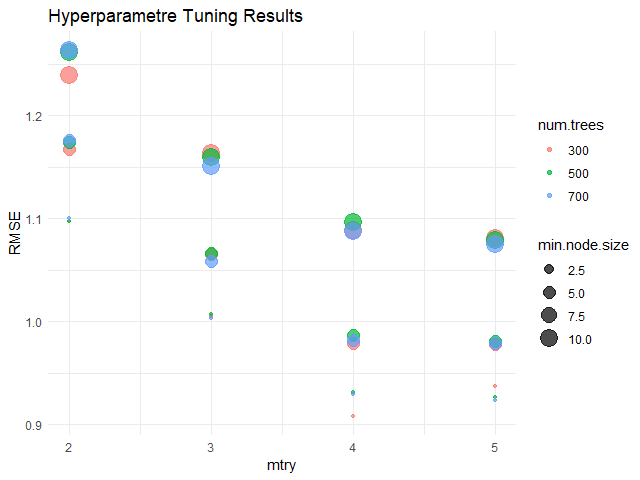
    จากกราฟ จะเห็นได้ว่า hyperparametres ที่ดีที่สุด (มี RMSE น้อยที่สุด) คือ:

    1. num.trees = 300
    2. mtry = 4
    3. min.node.size = 2.5

    เมื่อได้ค่า hyperparametres แล้ว เราสามารถใส่ค่าเหล่านี้กลับเข้าไปใน model และทดสอบความสามารถได้เลย

    สร้าง model:

    # Define the best hyperparametres
    best_num.tree <- 300
    best_mtry <- 4
    best_min.node.size <- 2.5
    
    # Fit the model
    rf_model_new <- ranger(hwy ~ .,
                           data = train,
                           num.tree = best_num.tree,
                           mtry = best_mtry,
                           min.node.size = best_min.node.size)
    

    ทดสอบความสามารถ:

    # Evaluate the model
    
    ## Make predictions
    preds_new <- predict(rf_model_new,
                         data = test)$predictions
    
    ## Get errors
    errors_new <- test$hwy - preds_new
    
    ## Calculate MAE
    mae_new <- mean(abs(errors_new))
    
    ## Calculate RMSE
    rmse_new <- sqrt(mean(errors_new^2))
    
    ## Calculate R squared
    r_sq_new <- 1 - (sum((errors_new)^2) / sum((test$hwy - mean(test$hwy))^2))
    
    ## Print the results
    cat("Final model MAE:", round(mae_new, 2), "\n")
    cat("Final model RMSE:", round(rmse_new, 2), "\n")
    cat("Final model R squared:", round(r_sq_new, 2), "\n")
    

    ผลลัพธ์:

    Final model MAE: 0.71
    Final model RMSE: 0.93
    Final model R squared: 0.96
    

    เราสามารถเปรียบเทียบความสามารถของ model ล่าสุด (final model) กับ model ก่อนหน้านี้ (initial model) ได้:

    # Compare the two models
    model_comp <- data.frame(Model = c("Initial", "Final"),
                             MAE = c(round(mae, 2), round(mae_new, 2)),
                             RMSE = c(round(rmse, 2), round(rmse_new, 2)),
                             R_Squared = c(round(r_sq, 2), round(r_sq_new, 2)))
    
    # Print
    model_comp
    

    ผลลัพธ์:

        Model  MAE RMSE R_Squared
    1 Initial 0.85 1.08      0.95
    2   Final 0.71 0.93      0.96
    

    ซึ่งจะเห็นว่า model ใหม่สามารถทำนายข้อมูลได้ดีขึ้น เพราะมี MAE และ RMSE ที่ลดลง รวมทั้ง R squared ที่เพิ่มขึ้น


    🍩 Bonus: Variable Importance

    ส่งท้าย ในกรณีที่เราต้องการดูว่า ตัวแปรต้นไหนมีความสำคัญต่อการทำนายมากที่สุด เราสามารถใช้ importance argument ใน ranger() คู่กับ vip() จาก vip package ได้แบบนี้:

    # Fit the model with importance
    rf_model_new <- ranger(hwy ~ .,
                           data = train,
                           num.tree = best_num.tree,
                           mtry = best_mtry,
                           min.node.size = best_min.node.size,
                           importance = "permutation") # Add importance
    
    # Install vip package
    install.packages("vip")
    
    # Load vip package
    library(vip)
    
    # Get variabe importance
    vip(rf_model_new)  +
      
      ## Add title and labels
      labs(title = "Variable Importance - Final Random Forest Model",
           x = "Variables",
           y = "Importance") +
      
      ## Set theme to minimal
      theme_minimal()
    

    ผลลัพธ์:
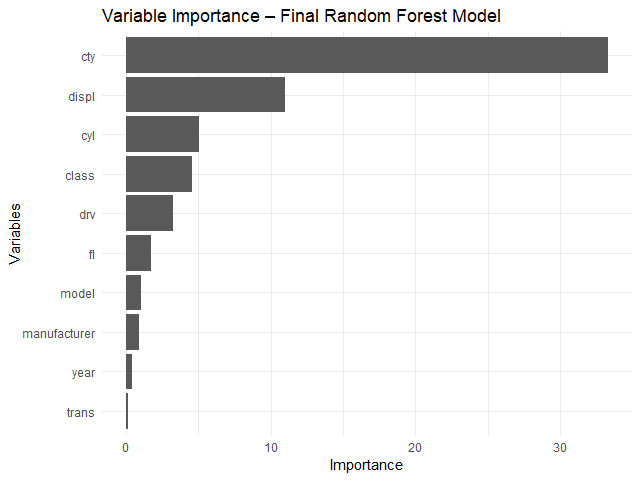
    จากกราฟ จะเห็นได้ว่า ตัวแปรต้นที่สำคัญที่สุด 3 ตัว ได้แก่:

    1. cty: ระดับการกินน้ำมันเวลาวิ่งในเมือง
    2. displ: ขนาดถังน้ำมัน (ลิตร)
    3. cyl: จำนวนลูกสูบ

    😎 Summary

    ในบทความนี้ เราได้ดูวิธีการใช้ ranger package เพื่อ:

    1. สร้าง random forest model
    2. ปรับทูน model

    พร้อมวิธีการประเมิน model ด้วย predict() และการคำนวณ MAE, RMSE, และ R squared รวมทั้งดูความสำคัญของตัวแปรต้นด้วย vip package


    😺 GitHub

    ดู code ทั้งหมดในบทความนี้ได้ที่ GitHub


    📃 References


    ✅ R Book for Psychologists: หนังสือภาษา R สำหรับนักจิตวิทยา

    📕 ขอฝากหนังสือเล่มแรกในชีวิตด้วยนะครับ 😆

    🙋 ใครที่กำลังเรียนจิตวิทยาหรือทำงานสายจิตวิทยา และเบื่อที่ต้องใช้ software ราคาแพงอย่าง SPSS และ Excel เพื่อทำข้อมูล

    💪 ผมขอแนะนำ R Book for Psychologists หนังสือสอนใช้ภาษา R เพื่อการวิเคราะห์ข้อมูลทางจิตวิทยา ที่เขียนมาเพื่อนักจิตวิทยาที่ไม่เคยมีประสบการณ์เขียน code มาก่อน

    ในหนังสือ เราจะปูพื้นฐานภาษา R และพาไปดูวิธีวิเคราะห์สถิติที่ใช้บ่อยกัน เช่น:

    • Correlation
    • t-tests
    • ANOVA
    • Reliability
    • Factor analysis

    🚀 เมื่ออ่านและทำตามตัวอย่างใน R Book for Psychologists ทุกคนจะไม่ต้องพึง SPSS และ Excel ในการทำงานอีกต่อไป และสามารถวิเคราะห์ข้อมูลด้วยตัวเองได้ด้วยความมั่นใจ

    แล้วทุกคนจะแปลกใจว่า ทำไมภาษา R ง่ายขนาดนี้ 🙂‍↕️

    👉 สนใจดูรายละเอียดหนังสือได้ที่ meb:

  • วิธีสร้าง linear regression ด้วย lm() ในภาษา R — ตัวอย่างการทำนายราคาเพชรใน diamonds dataset

    วิธีสร้าง linear regression ด้วย lm() ในภาษา R — ตัวอย่างการทำนายราคาเพชรใน diamonds dataset

    Linear regression เป็นวิธีการทำนายข้อมูลด้วยสมการเส้นตรง:

    y = a + bx
    • y = ตัวแปรตาม หรือข้อมูลที่ต้องการทำนาย
    • a = จุดตัดระหว่าง x และ y (intercept)
    • b = ค่าความชัด (slope)
    • x = ตัวแปรต้น

    เนื่องจากเป็นเทคนิคที่ใช้งานและทำความเข้าใจได้ง่าย linear regression จึงเป็นวิธีที่นิยมใช้ในการทำนายข้อมูลในบริบทต่าง ๆ เช่น:

    ทำนายจาก
    กำไรค่าโฆษณา
    ความสามารถของนักกีฬาชั่วโมงฝึกซ้อม
    ความดันเลือดปริมาณยา + อายุ
    ผลลิตทางการเกษตรปริมาณน้ำ + ปุ๋ย

    ในบทความนี้ เราจะมาดูวิธีใช้ linear regression ในภาษา R กัน

    ถ้าพร้อมแล้ว ไปเริ่มกันเลย


    1. 💎 Example Dataset: diamonds
    2. ⬇️ Load diamonds
    3. 🍳 Prepare the Dataset
      1. 🪆 Step 1. One-Hot Encoding
      2. 📈 Step 2. Log Transformation
      3. 🚄 Step 3. Split the Data
    4. 🏷️ Linear Regression Modelling
      1. 💪 Step 1. Fit the Model
      2. 🔮 Step 2. Make Predictions
      3. 🎯 Step 3. Evaluate the Model Performance
    5. 😎 Summary
    6. 😺 GitHub
    7. 📃 References
    8. ✅ R Book for Psychologists: หนังสือภาษา R สำหรับนักจิตวิทยา

    💎 Example Dataset: diamonds

    ในบทความนี้ เราจะใช้ diamonds dataset เป็นตัวอย่างในการใช้ linear regression กัน

    diamonds dataset เป็น built-in dataset จาก ggplot2 package ซึ่งมีข้อมูลเพชรมากกว่า 50,000 ตัวอย่าง และประกอบด้วย 10 columns ดังนี้:

    No.ColumnDescription
    1priceราคา (ดอลล่าร์สหรัฐฯ)
    2caretน้ำหนัก
    3cutคุณภาพ
    4colorสี
    5clarityความใสของเพชร
    6xความยาว
    7yความกว้าง
    8zความลึก
    9depthสัดส่วนความลึก
    10tableสัดส่วนความกว้างของยอดเพชรต่อส่วนที่กว้างที่สุด

    เป้าหมายของเรา คือ ทำนายราคาเพชร (price)


    ⬇️ Load diamonds

    ในการใช้งาน diamonds เราสามารถเรียกใช้งาน dataset ได้ดังนี้:

    ขั้นที่ 1. ติดตั้งและโหลด ggplot2:

    # Install
    install.packages("ggplot2")
    
    # Load
    library(ggplot2)
    

    ขั้นที่ 2. โหลด diamonds dataset:

    # Load dataset
    data(diamonds)
    

    ขั้นที่ 3. ดูตัวอย่างข้อมูล 10 rows แรกใน dataset:

    # Preview the dataset
    head(diamonds, 10)
    

    ผลลัพธ์:

    # A tibble: 10 × 10
       carat cut       color clarity depth table price     x     y     z
       <dbl> <ord>     <ord> <ord>   <dbl> <dbl> <int> <dbl> <dbl> <dbl>
     1  0.23 Ideal     E     SI2      61.5    55   326  3.95  3.98  2.43
     2  0.21 Premium   E     SI1      59.8    61   326  3.89  3.84  2.31
     3  0.23 Good      E     VS1      56.9    65   327  4.05  4.07  2.31
     4  0.29 Premium   I     VS2      62.4    58   334  4.2   4.23  2.63
     5  0.31 Good      J     SI2      63.3    58   335  4.34  4.35  2.75
     6  0.24 Very Good J     VVS2     62.8    57   336  3.94  3.96  2.48
     7  0.24 Very Good I     VVS1     62.3    57   336  3.95  3.98  2.47
     8  0.26 Very Good H     SI1      61.9    55   337  4.07  4.11  2.53
     9  0.22 Fair      E     VS2      65.1    61   337  3.87  3.78  2.49
    10  0.23 Very Good H     VS1      59.4    61   338  4     4.05  2.39
    

    🍳 Prepare the Dataset

    ก่อนจะทำนายราคาเพชรด้วย linear regression เราจะเตรียม diamonds dataset ใน 3 ขั้นตอนก่อน ได้แก่:

    1. One-hot encoding
    2. Log transformation
    3. Split data

    .

    🪆 Step 1. One-Hot Encoding

    ในกรณีที่ตัวแปรต้นที่เป็น categorical เราจะต้องแปลงตัวแปรเหล่านี้ให้เป็น numeric ก่อน ซึ่งเราสามารถทำได้ด้วย one-hot encoding ดังตัวอย่าง:

    ก่อน one-hot encoding:

    DataCut
    1Ideal
    2Good
    3Fair

    หลัง one-hot encoding:

    DataCut_IdealCut_GoodCut_Fair
    1100
    2010
    3001

    ในภาษา R เราสามารถทำ one-hot encoding ได้ด้วย model.matrix() ดังนี้:

    # Set option for one-hot encoding
    options(contrasts = c("contr.treatment",
                          "contr.treatment"))
    
    # One-hot encode
    cat_dum <- model.matrix(~ cut + color + clarity - 1,
                            data = diamonds)
    

    จากนั้น เราจะนำผลลัพธ์ที่ได้ไปรวมกับตัวแปรตามและตัวแปรต้นที่เป็น numeric:

    # Combine one-hot-encoded categorical and numeric variables
    dm <- cbind(diamonds[, c("carat",
                             "depth",
                             "table",
                             "x",
                             "y",
                             "z")],
                cat_dum,
                price = diamonds$price)
    

    เราสามารถเช็กผลลัพธ์ของ one-hot encoding ได้ด้วย str():

    # Check the results
    str(dm)
    

    ผลลัพธ์:

    'data.frame':	53940 obs. of  25 variables:
     $ carat       : num  0.23 0.21 0.23 0.29 0.31 0.24 0.24 0.26 0.22 0.23 ...
     $ depth       : num  61.5 59.8 56.9 62.4 63.3 62.8 62.3 61.9 65.1 59.4 ...
     $ table       : num  55 61 65 58 58 57 57 55 61 61 ...
     $ x           : num  3.95 3.89 4.05 4.2 4.34 3.94 3.95 4.07 3.87 4 ...
     $ y           : num  3.98 3.84 4.07 4.23 4.35 3.96 3.98 4.11 3.78 4.05 ...
     $ z           : num  2.43 2.31 2.31 2.63 2.75 2.48 2.47 2.53 2.49 2.39 ...
     $ cutFair     : num  0 0 0 0 0 0 0 0 1 0 ...
     $ cutGood     : num  0 0 1 0 1 0 0 0 0 0 ...
     $ cutVery Good: num  0 0 0 0 0 1 1 1 0 1 ...
     $ cutPremium  : num  0 1 0 1 0 0 0 0 0 0 ...
     $ cutIdeal    : num  1 0 0 0 0 0 0 0 0 0 ...
     $ colorE      : num  1 1 1 0 0 0 0 0 1 0 ...
     $ colorF      : num  0 0 0 0 0 0 0 0 0 0 ...
     $ colorG      : num  0 0 0 0 0 0 0 0 0 0 ...
     $ colorH      : num  0 0 0 0 0 0 0 1 0 1 ...
     $ colorI      : num  0 0 0 1 0 0 1 0 0 0 ...
     $ colorJ      : num  0 0 0 0 1 1 0 0 0 0 ...
     $ claritySI2  : num  1 0 0 0 1 0 0 0 0 0 ...
     $ claritySI1  : num  0 1 0 0 0 0 0 1 0 0 ...
     $ clarityVS2  : num  0 0 0 1 0 0 0 0 1 0 ...
     $ clarityVS1  : num  0 0 1 0 0 0 0 0 0 1 ...
     $ clarityVVS2 : num  0 0 0 0 0 1 0 0 0 0 ...
     $ clarityVVS1 : num  0 0 0 0 0 0 1 0 0 0 ...
     $ clarityIF   : num  0 0 0 0 0 0 0 0 0 0 ...
     $ price_log   : num  5.79 5.79 5.79 5.81 5.81 ...
    

    ตอนนี้ ตัวแปรต้นที่เป็น categorical ถูกแปลงเป็น numeric ทั้งหมดแล้ว

    .

    📈 Step 2. Log Transformation

    ในกรณีที่ตัวแปรตามมีการกระจายตัว (distribution) ไม่ปกติ linear regression ทำนายข้อมูลได้ไม่เต็มประสิทธิภาพนัก

    เราสามารถตรวจสอบการกระจายตัวของตัวแปรตามได้ด้วย ggplot():

    # Check the distribution of `price`
    ggplot(dm,
           aes(x = price)) +
      
      ## Instantiate a histogram
      geom_histogram(binwidth = 100,
                     fill = "skyblue3") +
      
      ## Add text elements
      labs(title = "Distribution of Price",
           x = "Price",
           y = "Count") +
      
      ## Set theme to minimal
      theme_minimal()
    

    ผลลัพธ์:

    จากกราฟ เราจะเห็นได้ว่า ตัวแปรตามมีการกระจายตัวแบบเบ้ขวา (right-skewed)

    ดังนั้น ก่อนจะใช้ linear regression เราจะต้องแปรตัวแปรตามให้มีการกระจายตัวแบบปกติ (normal distribution) ก่อน ซึ่งเราสามารถทำได้ด้วย log transformation ดังนี้:

    # Log-transform `price`
    dm$price_log <- log(dm$price)
    
    # Drop `price`
    dm$price <- NULL
    

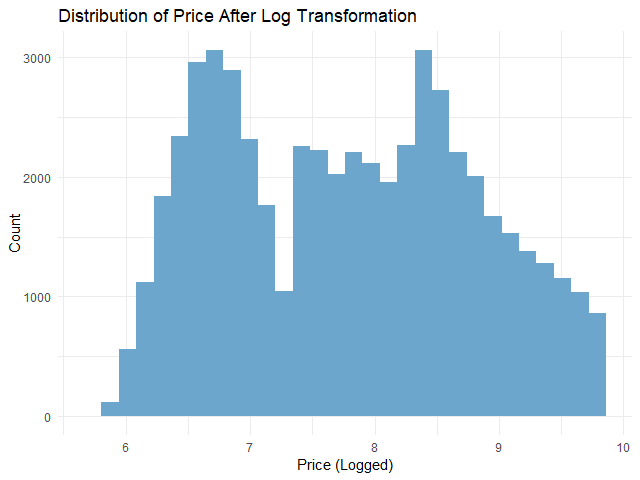
    หลัง log transformation เราสามารถเช็กการกระจายตัวด้วย ggplot() อีกครั้ง:

    # Check the distribution of logged `price`
    ggplot(dm,
           aes(x = price_log)) +
      
      ## Instantiate a histogram
      geom_histogram(fill = "skyblue3") +
      
      ## Add text elements
      labs(title = "Distribution of Price After Log Transformation",
           x = "Price (Logged)",
           y = "Count") +
      
      ## Set theme to minimal
      theme_minimal() 
    

    ผลลัพธ์:

    จะเห็นได้ว่า การกระจายตัวของตัวแปรตามใกล้เคียงกับการกระจายตัวแบบปกติมากขึ้นแล้ว

    .

    🚄 Step 3. Split the Data

    ในขั้นสุดท้ายก่อนใช้ linear regression เราจะแบ่งข้อมูลออกเป็น 2 ชุด:

    1. Training set สำหรับสร้าง linear regression model
    2. Test set สำหรับประเมินความสามารถของ linear regression model

    ในบทความนี้ เราจะแบ่ง 80% ของ dataset เป็น training set และ 20% เป็น test set:

    # Split the data
    
    ## Set seed for reproducibility
    set.seed(181)
    
    ## Training index
    train_index <- sample(nrow(dm),
                          0.8 * nrow(dm))
    
    ## Create training set
    train_set <- dm[train_index, ]
    
    ## Create test set
    test_set <- dm[-train_index, ]
    

    ตอนนี้ เราพร้อมที่จะสร้าง linear regression model กันแล้ว


    🏷️ Linear Regression Modelling

    การสร้าง linear regression model มีอยู่ 3 ขั้นตอน ได้แก่:

    1. Fit the model
    2. Make predictions
    3. Evaluate the model performance

    .

    💪 Step 1. Fit the Model

    ในขั้นแรก เราจะสร้าง model ด้วย lm() ซึ่งต้องการ input 2 อย่าง:

    lm(formula, data)
    1. formula = สูตรการทำนาย โดยเราต้องกำหนดตัวแปรต้นและตัวแปรตาม
    2. data = ชุดข้อมูลที่ใช้สร้าง model

    ในการทำนายราคาเพชร เราจะใช้ lm() แบบนี้:

    # Fit the model
    linear_reg <- lm(price_log ~ .,
                     data = train_set)
    

    อธิบาย code:

    • price_log ~ . หมายถึง ทำนายราคา (price_log) ด้วยตัวแปรต้นทั้งหมด (.)
    • data = train_set หมายถึง เรากำหนดชุดข้อมูลที่ใช้เป็น training set

    เราสามารถดูข้อมูลของ model ได้ด้วย summary():

    # View the model
    summary(linear_reg)
    

    ผลลัพธ์:

    Call:
    lm(formula = price_log ~ ., data = train_set)
    
    Residuals:
        Min      1Q  Median      3Q     Max 
    -2.2093 -0.0930  0.0019  0.0916  9.8935 
    
    Coefficients: (1 not defined because of singularities)
                     Estimate Std. Error  t value Pr(>|t|)    
    (Intercept)    -2.7959573  0.0705854  -39.611  < 2e-16 ***
    carat          -0.5270039  0.0086582  -60.867  < 2e-16 ***
    depth           0.0512357  0.0008077   63.437  < 2e-16 ***
    table           0.0090154  0.0005249   17.175  < 2e-16 ***
    x               1.1374016  0.0055578  204.651  < 2e-16 ***
    y               0.0290584  0.0031345    9.271  < 2e-16 ***
    z               0.0340298  0.0054896    6.199 5.73e-10 ***
    cutFair        -0.1528658  0.0060005  -25.476  < 2e-16 ***
    cutGood        -0.0639105  0.0036547  -17.487  < 2e-16 ***
    `cutVery Good` -0.0313800  0.0025724  -12.199  < 2e-16 ***
    cutPremium     -0.0451760  0.0026362  -17.137  < 2e-16 ***
    cutIdeal               NA         NA       NA       NA    
    colorE         -0.0573940  0.0032281  -17.779  < 2e-16 ***
    colorF         -0.0892633  0.0032654  -27.336  < 2e-16 ***
    colorG         -0.1573861  0.0032031  -49.136  < 2e-16 ***
    colorH         -0.2592763  0.0034037  -76.175  < 2e-16 ***
    colorI         -0.3864526  0.0038360 -100.742  < 2e-16 ***
    colorJ         -0.5258789  0.0047183 -111.455  < 2e-16 ***
    claritySI2      0.4431577  0.0079170   55.976  < 2e-16 ***
    claritySI1      0.6087513  0.0078819   77.234  < 2e-16 ***
    clarityVS2      0.7523161  0.0079211   94.976  < 2e-16 ***
    clarityVS1      0.8200656  0.0080463  101.918  < 2e-16 ***
    clarityVVS2     0.9381319  0.0082836  113.252  < 2e-16 ***
    clarityVVS1     1.0033931  0.0085098  117.910  < 2e-16 ***
    clarityIF       1.0898015  0.0092139  118.277  < 2e-16 ***
    ---
    Signif. codes:  0 ‘***’ 0.001 ‘**’ 0.01 ‘*’ 0.05 ‘.’ 0.1 ‘ ’ 1
    
    Residual standard error: 0.1825 on 43128 degrees of freedom
    Multiple R-squared:  0.9677,	Adjusted R-squared:  0.9676 
    F-statistic: 5.611e+04 on 23 and 43128 DF,  p-value: < 2.2e-16
    

    Note: ดูวิธีการอ่านผลลัพธ์ได้ที่ Explaining the lm() Summary in R และ Understanding Linear Regression Output in R

    .

    🔮 Step 2. Make Predictions

    ในขั้นที่สอง เราจะใช้ model เพื่อทำนายราคาด้วย predict():

    # Predict in the outcome space
    pred <- exp(pred_log)
    
    # Preview predictions
    head(pred_log)
    

    ผลลัพธ์:

           2        5        9       16       19       22 
    5.828071 5.816460 6.111859 5.777434 5.865820 6.088356
    

    จะเห็นว่า ราคาที่ทำนายยังอยู่ในรูป log ซึ่งเราต้องแปลงกลับเป็นราคาปกติด้วย exp():

    # Predict in the outcome space
    pred <- exp(pred_log)
    
    # Preview predictions
    head(pred)
    

    ผลลัพธ์:

           2        5        9       16       19       22 
    339.7028 335.7812 451.1766 322.9295 352.7713 440.6961 
    

    เราสามารถเปรียบเทียบราคาจริงกับราคาที่ทำนาย พร้อมความคลาดเคลื่อน ได้ดังนี้:

    # Compare predictions to actual
    results <- data.frame(actual = round(exp(test_set$price_log), 2),
                          predicted = round(pred, 2),
                          diff = round(exp(test_set$price_log) - pred, 2))
    
    # Print results
    head(results)
    

    ผลลัพธ์:

       actual predicted    diff
    2     326    339.70  -13.70
    5     335    335.78   -0.78
    9     337    451.18 -114.18
    16    345    322.93   22.07
    19    351    352.77   -1.77
    22    352    440.70  -88.70
    

    .

    🎯 Step 3. Evaluate the Model Performance

    ในขั้นสุดท้าย เราจะประเมิน model โดยใช้ 2 ตัวชี้วัด ได้แก่:

    1. Mean absolute error (MAE): ค่าเฉลี่ยความคลาดเคลื่อนโดยสัมบูรณ์
    2. Root mean squared error (RMSE): ค่าเฉลี่ยความคลาดเคลื่อนแบบยกกำลังสอง

    ทั้งสองตัวคำนวณความแตกต่างระหว่างสิ่งที่ทำนายและข้อมูลจริง ยิ่ง MAE และ RMSE สูง ก็หมายความว่า การทำนายมีความคาดเคลื่อนมาก แสดงว่า model ทำงานได้ไม่ดีนัก

    ในทางกลับกัน ถ้า MAE และ RMSE น้อย ก็แสดงว่า การทำนายใกล้เคียงกับข้อมูลจริง และ model มีความแม่นยำสูง

    (Note: เรียนรู้ความแตกต่างระหว่าง MAE และ RMSE ได้ที่ Loss Functions in Machine Learning Explained)

    เราสามารถคำนวณ MAE และ RMSE ได้ดังนี้:

    # Calculate MAE
    mae <- mean(abs(results$diff))
    
    # Calculate RMSE
    rmse <- sqrt(mean((results$diff)^2))
    
    # Print the results
    cat("MAE:", round(mae, 2), "\n")
    cat("RMSE:", round(rmse, 2))
    

    ผลลัพธ์:

    MAE: 491.71
    RMSE: 1123.68
    

    จากผลลัพธ์ เราจะเห็นว่า โดยเฉลี่ย model ทำนายราคาคลาดเคลื่อนไปประมาณ 492 ดอลล่าร์ (MAE)


    😎 Summary

    ในบทความนี้ เราได้ดูวิธีการทำ linear regression ในภาษา R กัน

    เราดูวิธีการเตรียมข้อมูลสำหรับ linear regression:

    1. One-hot encoding ด้วย model.matrix()
    2. Log transformation ด้วย log()
    3. Split data ด้วย sample()

    สร้าง linear regression model ด้วย lm() พร้อมประเมิน model ด้วย predict() และการคำนวณค่า MAE และ RMSE


    😺 GitHub

    ดู code ทั้งหมดในบทความนี้ได้ที่ GitHub


    📃 References


    ✅ R Book for Psychologists: หนังสือภาษา R สำหรับนักจิตวิทยา

    📕 ขอฝากหนังสือเล่มแรกในชีวิตด้วยนะครับ 😆

    🙋 ใครที่กำลังเรียนจิตวิทยาหรือทำงานสายจิตวิทยา และเบื่อที่ต้องใช้ software ราคาแพงอย่าง SPSS และ Excel เพื่อทำข้อมูล

    💪 ผมขอแนะนำ R Book for Psychologists หนังสือสอนใช้ภาษา R เพื่อการวิเคราะห์ข้อมูลทางจิตวิทยา ที่เขียนมาเพื่อนักจิตวิทยาที่ไม่เคยมีประสบการณ์เขียน code มาก่อน

    ในหนังสือ เราจะปูพื้นฐานภาษา R และพาไปดูวิธีวิเคราะห์สถิติที่ใช้บ่อยกัน เช่น:

    • Correlation
    • t-tests
    • ANOVA
    • Reliability
    • Factor analysis

    🚀 เมื่ออ่านและทำตามตัวอย่างใน R Book for Psychologists ทุกคนจะไม่ต้องพึง SPSS และ Excel ในการทำงานอีกต่อไป และสามารถวิเคราะห์ข้อมูลด้วยตัวเองได้ด้วยความมั่นใจ

    แล้วทุกคนจะแปลกใจว่า ทำไมภาษา R ง่ายขนาดนี้ 🙂‍↕️

    👉 สนใจดูรายละเอียดหนังสือได้ที่ meb:

  • วิธีใช้ ggplot2 เพื่อสร้างกราฟอย่างมืออาชีพระดับโลก แบบ BBC และ Financial Times ในภาษา R — ตัวอย่างการสำรวจข้อมูลเพนกวินจาก palmerpenguins

    วิธีใช้ ggplot2 เพื่อสร้างกราฟอย่างมืออาชีพระดับโลก แบบ BBC และ Financial Times ในภาษา R — ตัวอย่างการสำรวจข้อมูลเพนกวินจาก palmerpenguins

    ggplot2 เป็น package สำหรับ data visualisation ในภาษา R และเป็นเครื่องมือสร้างกราฟที่มืออาชีพนิยม ตั้งแต่นักวิจัยในการตีพิมพ์ผลงาน ไปจนถึงสำนักข่าวระดับโลกอย่าง BBC และ Financial Times

    ggplot2 มีจุดเด่น 4 ข้อ:

    1. ใช้งานง่าย
    2. สร้างกราฟได้หลากหลาย
    3. ปรับแต่งกราฟได้ดังใจ
    4. ได้กราฟที่ดูดีและมีคุณภาพ

    .

    ในบทความนี้ เราจะมาดูวิธีใช้ ggplot2 เพื่อสร้างกราฟแบบมืออาชีพกัน:

    • ggplot2 syntax
    • Basic plotting
    • Plot customisations

    .

    ถ้าพร้อมแล้ว ไปเริ่มกันเลย


    1. 🔤 gg for “Grammar of Graphics”
    2. 🏁 Getting Started With ggplot2
    3. ✍️ Basic Syntax
    4. 📊 Basic Plotting: Data, Aesthetics, & Geom
      1. 🎨 Aesthetics
      2. ⏹️ Geom
    5. 🔧 More Customisations
      1. 🖼️ Theme
      2. 🔤 Text
      3. ✌️ Facet
    6. 🔥 Summary
    7. 📚 Learn More About ggplot2
      1. 😺 GitHub
      2. 📖 Read More About ggplot2
      3. 📰 Cheat Sheets
    8. 📃 References
    9. ✅ R Book for Psychologists: หนังสือภาษา R สำหรับนักจิตวิทยา

    🔤 gg for “Grammar of Graphics”

    gg ใน ggplot2 ย่อมาจาก “Grammar of Graphics”

    หนังสือ Grammar of Graphics ของ Leland Wilkinson บน Amazon

    Grammar of Graphics เป็นแนวคิดที่มองกราฟเป็นเหมือนภาษา คือ มีโครงสร้างและองค์ประกอบที่ตายตัว ซึ่งเมื่อเรานำมารวมกัน เราก็จะได้กราฟที่ต้องการขึ้นมา

    โดยกราฟใน ggplot2 ประกอบด้วย 7 ส่วน หรือ layers ได้แก่:

    No.LayerDescription
    1Dataชุดข้อมูลสำหรับสร้างกราฟ
    2Aestheticsจับคู่ข้อมูลกับกราฟ (เช่น แกน x และ y)
    3Geometric objectsประเภทกราฟ (เช่น กราฟเส้น กราฟแท่ง)
    4Facetsสร้างกราฟย่อย
    5Statistical transformationsวิเคราะห์ข้อมูล (เช่น หาค่าเฉลี่ย)
    6Coordinatesแกนในการสร้างกราฟ
    7Themeหน้าตาของกราฟ (เช่น สีพื้นหลัง)

    ในการทำงาน เรามักจะเรียกใช้งาน 3 layers แรกเป็นหลัก ได้แก่:

    1. Data
    2. Aesthetics
    3. Geometric objects

    🏁 Getting Started With ggplot2

    ในการเริ่มต้นใช้งาน ggplot2 เราต้องทำ 3 อย่างก่อน คือ:

    .

    ข้อที่ 1. ติดตั้ง ggplot2 บน environment ของเรา:

    install.packages("ggplot2")
    

    Note: ถ้าใครเคยติดตั้งแล้ว สามารถข้ามไปขั้นถัดไปได้เลย

    .

    ข้อที่ 2. เรียกใช้งาน ggplot2:

    library(ggplot2)
    

    Note: เราต้องเรียกใช้งาน ggplot2 ทุกครั้งที่เริ่ม session ใหม่

    .

    ข้อที่ 3. โหลด dataset ที่เราจะใช้สร้างกราฟ

    สำหรับบทความนี้ เราจะใช้ penguins dataset ที่มีข้อมูลของเพนกวิน 3 สายพันธุ์ (เช่น สปีชีส์ น้ำหนัก ความยาวปีก) กัน

    เราสามารถโหลด dataset ได้ดังนี้:

    install.packages("palmerpenguins")
    library(palmerpenguins)
    

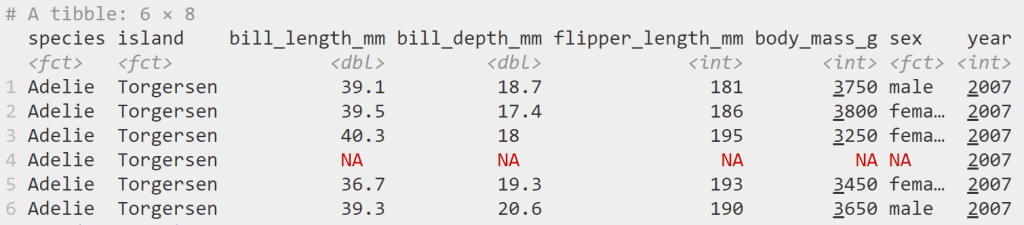
    จากนั้น เราสามารถ preview ข้อมูลได้ด้วย head():

    head(penguins)
    

    ผลลัพธ์:

    Note: เราสามารถอ่านคู่มือ penguins ได้ด้วยคำสั่ง ?penguins

    .

    เมื่อทำครบทั้ง 3 ขั้นตอน เราก็พร้อมที่จะสร้างกราฟใน ggplot2 แล้ว


    ✍️ Basic Syntax

    ก่อนไปดูการสร้างกราฟ เรามาดู syntax ของ ggplot2 กันก่อน:

    ggplot(data, aes(x, y, other)) +
    	geom_*() +
    	...
    • ggplot() คือ การเรียกใช้งาน ggplot2
    • data คือ ชุดข้อมูลในการสร้างกราฟ
    • aes() คือ ส่วนจับคู่ข้อมูลกับลักษณะของกราฟ
      • x, y คือ ข้อมูลที่แสดงบนแกน x และ y
      • other คือ ข้อมูลที่จะแสดงผ่านส่วนอื่น ๆ ของกราฟ เช่น สี ขนาด รูปทรง
    • geom_* คือ ประเภทกราฟ
    • คือ function อื่น ๆ ในการตั้งค่ากราฟ (เช่น theme, facet)

    📊 Basic Plotting: Data, Aesthetics, & Geom

    ในการสร้างกราฟ เรามี 3 input เบื้องต้นที่เราต้องกำหนด ได้แก่:

    No.InputDescription
    1DataDataset ในการสร้างกราฟ
    2Aestheticsลักษณะของกราฟที่ใช้แสดงข้อมูล (เช่น แกน x และ y)
    3Geomประเภทกราฟ (เช่น กราฟเส้น กราฟแท่ง)

    Note: ทั้งสามอย่างสะท้อนถึง 3 layers แรกของ ggplot2

    ยกตัวอย่างเช่น

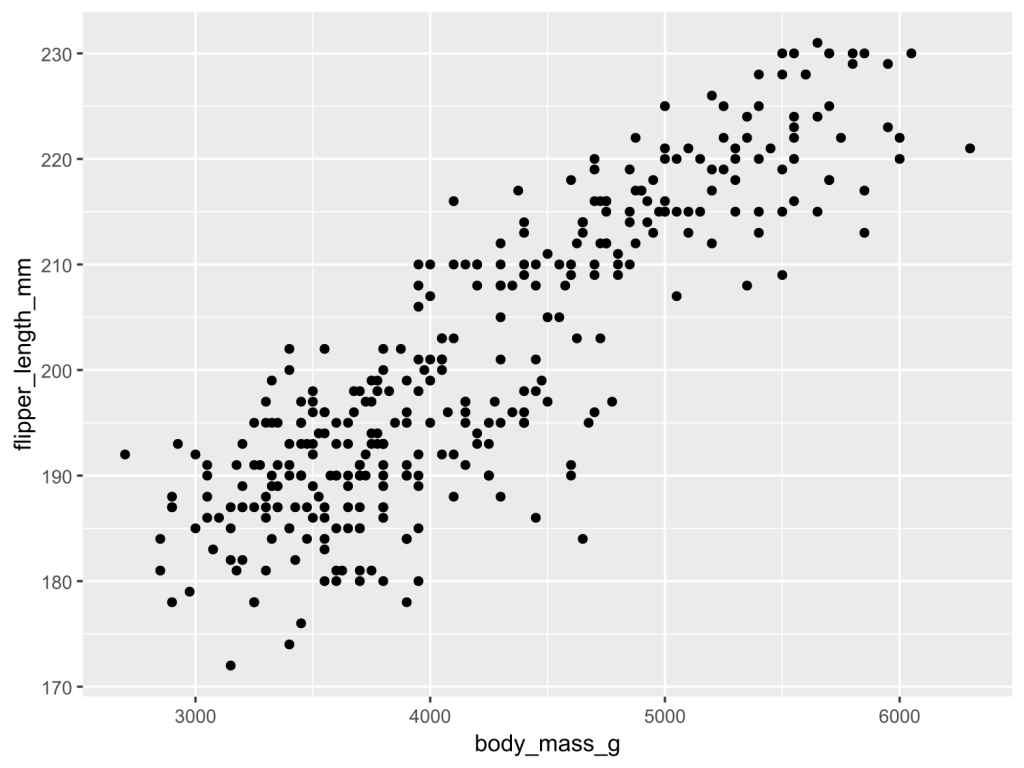
    สร้าง scatter plot ที่แสดงความสัมพันธ์ระหว่างน้ำหนักตัว (body_mass_g) และความยาวปีก (flipper_length_mm) ของเพนกวิน:

    ggplot(penguins, aes(x = body_mass_g,
                         y = flipper_length_mm)) +
      geom_point()
    

    ผลลัพธ์:

    .

    🎨 Aesthetics

    นอกจากแกน x และ y เราแสดงข้อมูลผ่านลักษณะอื่น ๆ ของกราฟได้ เช่น:

    No.ParametreDescription
    1colorสีขอบรูปทรง
    2fillสีในรูปทรง
    3shapeรูปทรง
    4sizeขนาด
    5alphaความโปร่งใส

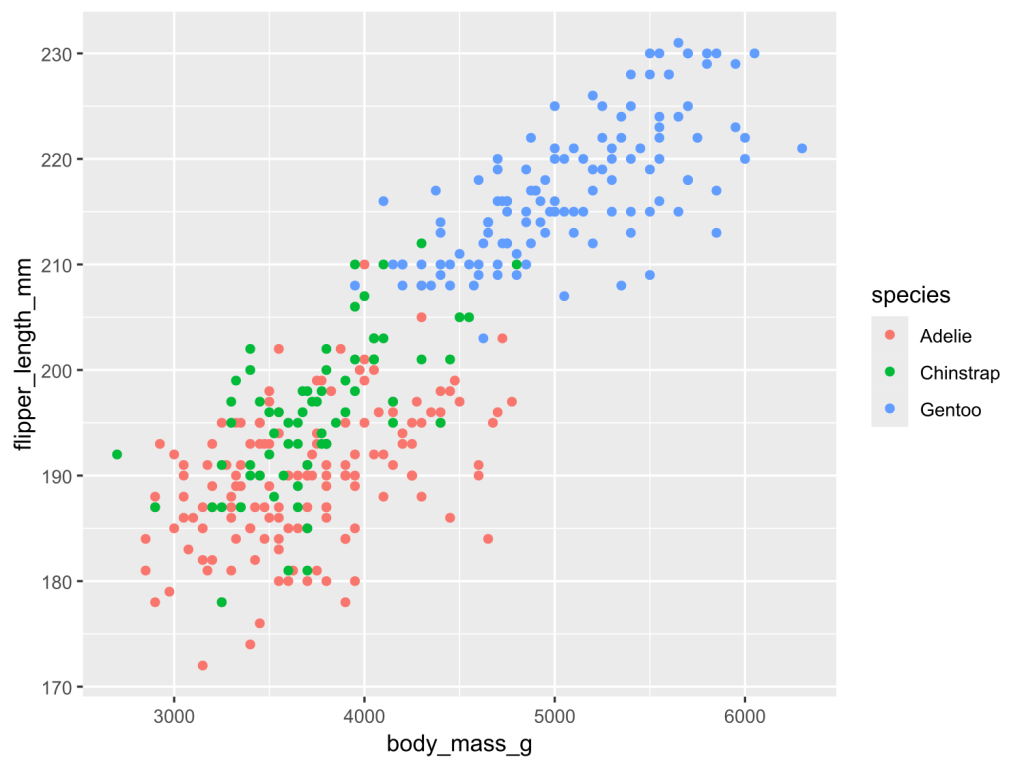
    ยกตัวอย่างเช่น

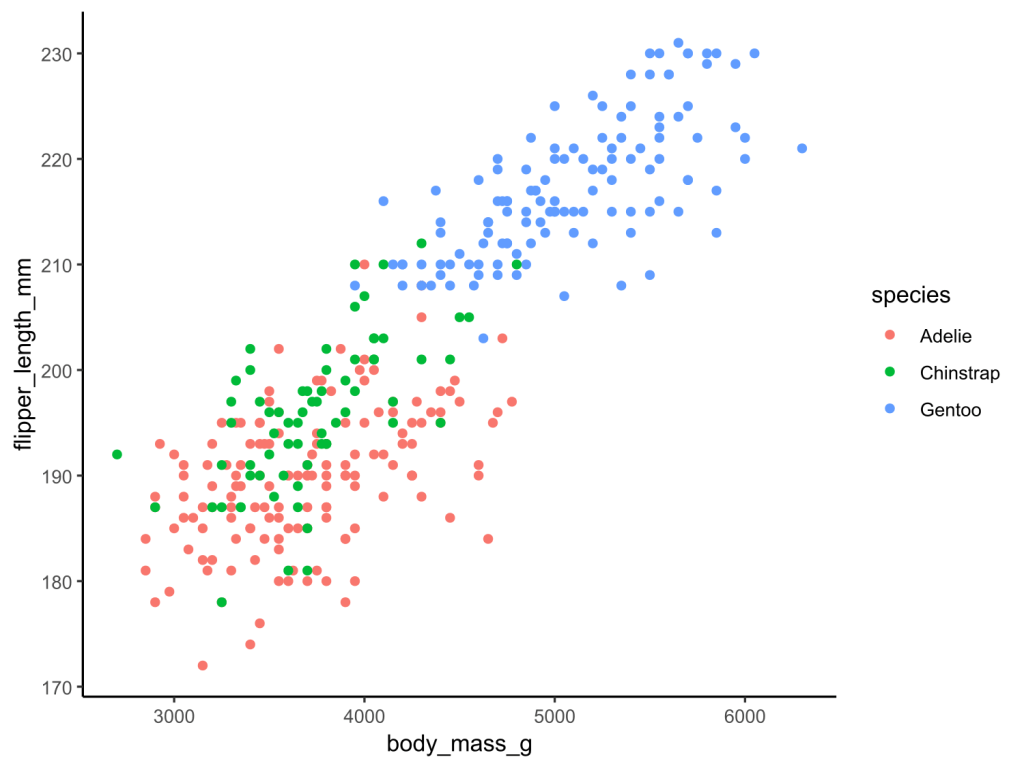
    เพิ่มสปีชีส์เข้าไปใน scatter plot:

    ggplot(penguins, aes(x = body_mass_g,
                         y = flipper_length_mm,
                         color = species)) +
      geom_point()
    

    ผลลัพธ์:

    Note: เราใช้ color แทน fill เพราะ จุด default ของ scatter plot ไม่รองรับการเติมสี

    .

    ⏹️ Geom

    เราสามารถเปลี่ยนประเภทกราฟได้ โดยเปลี่ยน geom_*() เช่น:

    No.GeomGraph
    1geom_histogram()Histogram
    2geom_boxplot()Box plot
    3geom_line()Line plot
    4geom_col()Bar plot
    5geom_density()Density plot

    Note: ggplot2 มีรูปแบบกราฟกว่า 40+ แบบให้เลือก เราสามารถดูรูปแบบกราฟต่าง ๆ ได้ที่ Function reference และดูตัวอย่างกราฟได้ที่ The R Gallery

    .

    นอกจากนี้ เรายังสามารถปรับแต่งหน้าตาของกราฟได้ด้วย parametre ต่าง ๆ ใน geom_*() เช่น:

    No.ParametreDescription
    1colorสีขอบรูปทรง
    2fillสีในรูปทรง
    3shapeรูปทรง
    4sizeขนาด
    5alphaความโปร่งใส

    Note:

    • จะสังเกตว่า parametre เหล่านี้ (เรียกว่า attribute) เหมือนกับ parametres ของ aes()
    • ความแตกต่างอยู่ที่ parametre ใน geom_*() จะคงที่ ในขณะที่ parametre ใน aes() จะเปลี่ยนแปลงตามข้อมูล

    .

    ยกตัวอย่างเช่น

    เปลี่ยนจุดข้อมูลให้เป็นกล่องสี่เหลี่ยมใส:

    ggplot(penguins, aes(x = body_mass_g,
                         y = flipper_length_mm,
                         color = species)) +
      geom_point(shape = 22)
    

    ผลลัพธ์:

    จะเห็นได้ว่า จุดข้อมูลเปลี่ยนเป็นสี่เหลี่ยมเหมือนกันหมด และไม่เปลี่ยนตามประเภทเพนกวิน เพราะเรากำหนด argument ใน geom_*()

    .

    Note: เราสามารถดู argument ของ shape และ parametres อื่น ๆ ได้ที่ Aesthetic specifications


    🔧 More Customisations

    จนถึงตอนนี้ เรารู้วิธีสร้างและปรับแต่งกราฟเบื้องต้นกันแล้ว

    เรามาดู 3 วิธีในการปรับแต่งเพิ่มเติม เพื่อให้กราฟของเราดูเป็นมืออาชีพกัน:

    1. Theme
    2. Text
    3. Facet

    .

    🖼️ Theme

    Theme ใน ggplot2 หมายถึง หน้าตากราฟที่ไม่เกี่ยวข้องกับข้อมูล เช่น สีแกน x และ y และสีพื้นหลัง

    เราสามารถปรับ theme ได้โดยการเรียกใช้ theme_*() เช่น:

    ggplot(penguins, aes(x = body_mass_g,
                         y = flipper_length_mm,
                         color = species)) +
      geom_point() +
      
      # Apply classic theme
      theme_classic()
    

    ผลลัพธ์:

    จะเห็นว่า กราฟของเราดูสะอาดตามากขึ้น เมื่อไม่มี gridline

    .

    Note:

    ggplot2 มี built-in themes ให้เลือกใช้ 5 แบบหลัก ได้แก่:

    No.ThemeBackgroundGridline
    1theme_gray()สีเทาสีขาว
    2theme_classic()สีขาวNone
    3theme_bw()สีขาวสีเทา
    4theme_light()สีขาวสีเทา
    5theme_dark()สีเทาเข้มสีเทาอ่อน
    • theme_gray() เป็น default theme ของ ggplot2
    • ดู built-in themes อื่น ๆ ได้ที่ Complete themes
    • เราสามารถเลือกใช้ themes จาก packages อื่นใน R ได้ เช่น ggthemes และ bbcplot

    .

    🔤 Text

    ข้อความเป็นส่วนสำคัญของกราฟ ซึ่งสามารถช่วยให้คนที่ดูกราฟของเราเข้าใจกราฟได้ง่ายขึ้น

    ใน ggplot2 เราสามารถปรับแต่งข้อความได้ 3 วิธี:

    No.SyntaxDescription
    1theme()กำหนดขนาด และ typeface ของข้อความ
    2labs()เพิ่มชื่อกราฟ ชื่อแกน x, y และ legend
    3annotate()เพิ่มโน้ตในกราฟ

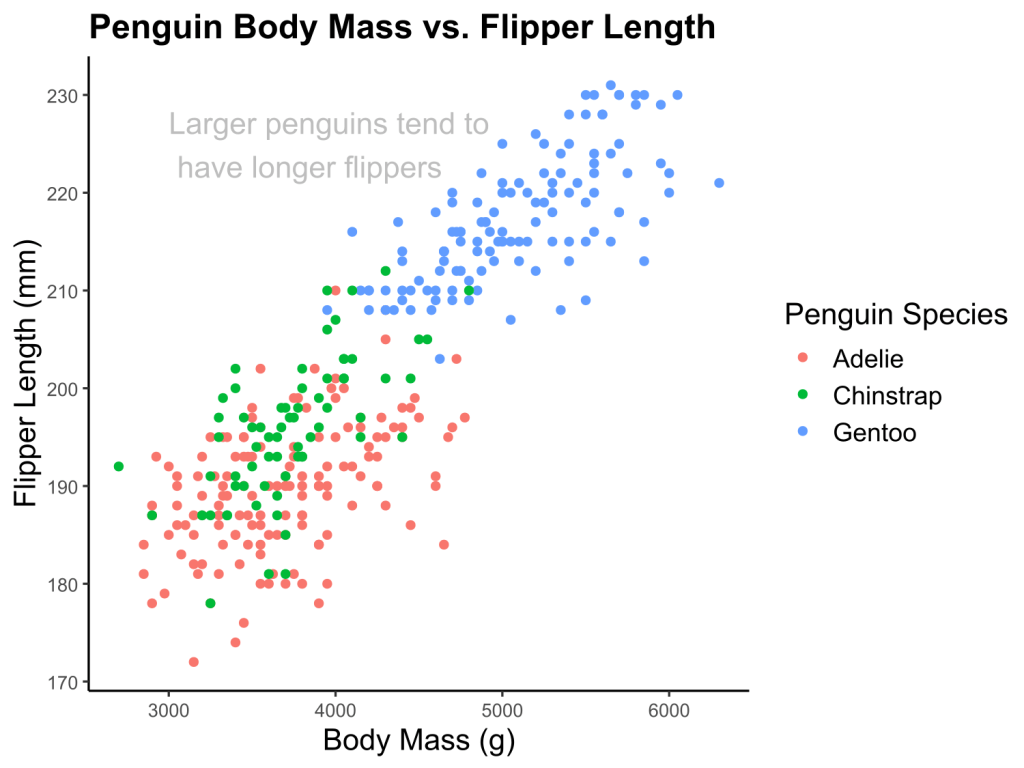
    ตัวอย่างเช่น:

    ggplot(penguins, aes(x = body_mass_g,
                           y = flipper_length_mm,
                           color = species)) +
      geom_point() +
      theme_classic() +
      
      # Adjust text size
      theme(plot.title = element_text(size = 16, face = "bold"),
            axis.title.x = element_text(size = 14),
            axis.title.y = element_text(size = 14),
            legend.title = element_text(size = 14),
            legend.text = element_text(size = 12),
            strip.text = element_text(size = 14, face = "bold")) +
      
      # Add a title, labels, and a legend
      labs(title = "Penguin Body Mass vs. Flipper Length",
           x = "Body Mass (g)",
           y = "Flipper Length (mm)",
           color = "Penguin Species") +
      
      # Add annotation
      annotate("text",
               x = 3000,
               y = 225,
               label = "Larger penguins tend to \\n have longer flippers",
               size = 5,
               color = "gray",
               hjust = 0)
    

    ผลลัพธ์:

    จะเห็นได้ว่า กราฟของเรามีชื่อกราฟ คำประกอบแกน x, y และ legend รวมทั้งโน้ตที่ช่วยในการอ่านกราฟ “Larger penguins tend to have longer flippers” เพิ่มขึ้นมา

    .

    ✌️ Facet

    ในบางครั้ง เราอาจต้องการสร้างกราฟย่อย ซึ่งเราสามารถทำได้ด้วย 2 คำสั่งใน ggplot2:

    No.FunctionDividing Factor
    1facet_wrap()1 categorical variable
    2facet_grid()2 categorical variables

    .

    ตัวอย่างเช่น

    ใช้ facet_wrap() แบ่งกราฟตามชนิดเพนกวิน:

    ggplot(penguins, aes(x = body_mass_g,
                         y = flipper_length_mm,
                         color = species)) +
      geom_point() +
      theme_bw() +
      
      # Use facet_wrap()
      facet_wrap(~species)
    

    ผลลัพธ์:

    .

    ใช้ facet_grid() แบ่งตามเพศและชนิดของเพนกวิน:

    ggplot(penguins, aes(x = body_mass_g,
                         y = flipper_length_mm,
                         color = species)) +
      geom_point() +
      theme_bw() +
      
      # Use facet_grid()
      facet_grid(sex~species)
    

    ผลลัพธ์:

    Note: ในกราฟ เรามี row ที่ 3 (NA) เพราะบาง record ไม่มีข้อมูลเพศของเพนกวิน


    🔥 Summary

    ในบทความนี้ เราได้เรียนรู้วิธีใช้ ggplot2 เพื่อสร้างกราฟอย่างมืออาชีพ

    • Syntax ของ ggplot2
    • การตั้งค่า aesthetics
      • x
      • y
      • Aesthetics อื่น ๆ
    • การตั้งค่า geom
      • geom_*()
      • paramatres ของ geom_*()
    • การปรับแต่งกราฟ
      • Theme
      • Text
      • Facet

    📚 Learn More About ggplot2

    .

    😺 GitHub

    สำหรับผู้ที่สนใจ สามารถดู code ทั้งหมดในบทความนี้ได้ที่ GitHub

    .

    📖 Read More About ggplot2

    .

    📰 Cheat Sheets


    📃 References

    Articles:

    Courses


    ✅ R Book for Psychologists: หนังสือภาษา R สำหรับนักจิตวิทยา

    📕 ขอฝากหนังสือเล่มแรกในชีวิตด้วยนะครับ 😆

    🙋 ใครที่กำลังเรียนจิตวิทยาหรือทำงานสายจิตวิทยา และเบื่อที่ต้องใช้ software ราคาแพงอย่าง SPSS และ Excel เพื่อทำข้อมูล

    💪 ผมขอแนะนำ R Book for Psychologists หนังสือสอนใช้ภาษา R เพื่อการวิเคราะห์ข้อมูลทางจิตวิทยา ที่เขียนมาเพื่อนักจิตวิทยาที่ไม่เคยมีประสบการณ์เขียน code มาก่อน

    ในหนังสือ เราจะปูพื้นฐานภาษา R และพาไปดูวิธีวิเคราะห์สถิติที่ใช้บ่อยกัน เช่น:

    • Correlation
    • t-tests
    • ANOVA
    • Reliability
    • Factor analysis

    🚀 เมื่ออ่านและทำตามตัวอย่างใน R Book for Psychologists ทุกคนจะไม่ต้องพึง SPSS และ Excel ในการทำงานอีกต่อไป และสามารถวิเคราะห์ข้อมูลด้วยตัวเองได้ด้วยความมั่นใจ

    แล้วทุกคนจะแปลกใจว่า ทำไมภาษา R ง่ายขนาดนี้ 🙂‍↕️

    👉 สนใจดูรายละเอียดหนังสือได้ที่ meb: