Tag: AI

  • Python for AI: รวบรวม 8 บทความการทำงานกับ AI ด้วย Python

    Python for AI: รวบรวม 8 บทความการทำงานกับ AI ด้วย Python

    ในช่วงที่ผ่านมา ผมได้มีโอกาสแชร์การใช้ Python เบื้องต้นเพื่อทำงานกับ AI จากการที่ผมได้ทำงานในส่วนที่เกี่ยวข้องกับ AI มากขึ้น

    เพื่อช่วยในการแชร์ความรู้ ผมได้สรุปเนื้อหาไว้เป็นบทความทั้งหมด 8 บทความ ดังนี้:

    Session #1. Intro to Python:

    • Intro to Python: แนะนำการใช้งานและประเภมข้อมูลใน Python

    Session #2. Control flow:

    • Control flow: สอนใช้ statement เช่น if, for, while เพื่อควบคุมการทำงานของ Python

    Session #3. Functions:

    • Functions: สอนการสร้าง function ใน Python

    Session #4. Packages and files:

    • open(): สอนการทำงานกับไฟล์ด้วย base Python
    • json package: สอนการทำงานกับ JSON ด้วย json package
    • pd.read_csv(): สอนการทำงานกับ CSV ด้วย pandas package

    Session #5. AI packages:

    • openai package: สอนการทำงานกับ AI API ผ่าน openai package
    • google-genai package: สอนการใช้ google-genai เพื่อทำงานกับ Gemini API
  • สรุป 7 ประเด็น AI Transformation จาก 7 Speakers ในงาน DigiTech ASEAN Thailand 2025

    สรุป 7 ประเด็น AI Transformation จาก 7 Speakers ในงาน DigiTech ASEAN Thailand 2025

    ในบทความนี้ ผมจะมาสรุป 7 ประเด็น AI transformation จาก 7 speakers บนเวที Global Tech Conference ในงาน DigiTech ASEAN Thailand 2025 เมื่อวันที่ 19 พ.ย. ที่ผ่านมา:

    1. Future trends: แนวโน้ม AI ในโลกอนาคต
    2. How to AI transformation: แนวคิดในการทำ AI transformation ในองค์กร
    3. Factors to consider: ปัจจัยที่ควรพิจารณาในการทำ AI transformation
    4. People management: การบริหารพนักงานในองค์กรในยุคของ AI
    5. Risks to consider: ความเสี่ยงในการทำ AI transformation
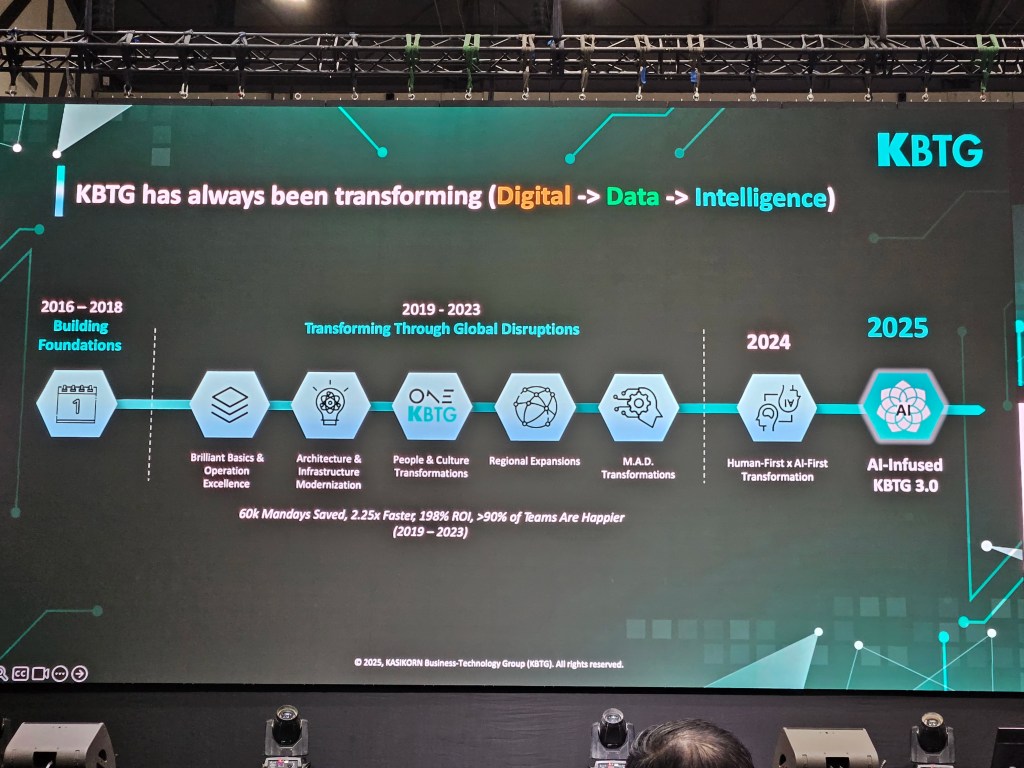
    6. AI solution showcases: ตัวอย่าง AI solutions จาก SCBX และ KBTG
    7. Surviving in the age of AI: แนวคิดในการเอาตัวรอดในยุค AI

    ถ้าพร้อมแล้ว ไปเริ่มกันเลย


    1. 🚀 Topic 1. Future Trends
      1. 🤖 AI Is Here to Stay.
      2. 😎 AI, More Agentic
      3. 🤝 Human-AI Collaboration
    2. 👷 Topic 2. How to AI Transformation
      1. 🫨 Pain Points
      2. 💪 Prioritise, Relentlessly
      3. ⛰️ Set Goal & Plan
      4. 👄 Communicate
      5. 📋 Track Success
    3. ☝️ Topic 3. Factors to Consider
    4. 🤠 Topic 4. People Management
      1. ♥️ Mindset
      2. 😈 Building Culture
      3. 👶 Generation Gap
    5. 🚨 Topic 5. Risks to Consider
    6. 👾 Topic 6. AI Solution Showcases: SCBX & KBTG
      1. 🟣 SCBX
    7. 🟢 KBTG
    8. 💡 Topic 7. Surviving in the Age of AI
    9. 🎤 List of Sessions
    10. 🔗 Related Links

    ประเด็นในเรื่อง future trends มีอยู่ 3 เรื่อง ได้แก่:

    1. AI is here to stay
    2. AI, more agentic
    3. Human-AI collaboration

    .

    🤖 AI Is Here to Stay.

    AI ก็เหมือนกับคอมพิวเตอร์ในยุคก่อน เราไม่มีทางที่จะย้อนกลับไปในยุคที่ไม่มี AI อีกแล้ว และเราต้องเรียนรู้ที่จะอยู่ร่วมกับ AI

    .

    😎 AI, More Agentic

    การใช้งาน AI เปลี่ยนจากการใช้ GenAI มาเป็น agentic AI มากขึ้นเรื่อย ๆ (สอดคล้องกับเวทีในปีก่อนที่บอกว่า การใช้ AI ในปี 2025 จะกลายมาเป็น agentic AI)

    .

    🤝 Human-AI Collaboration

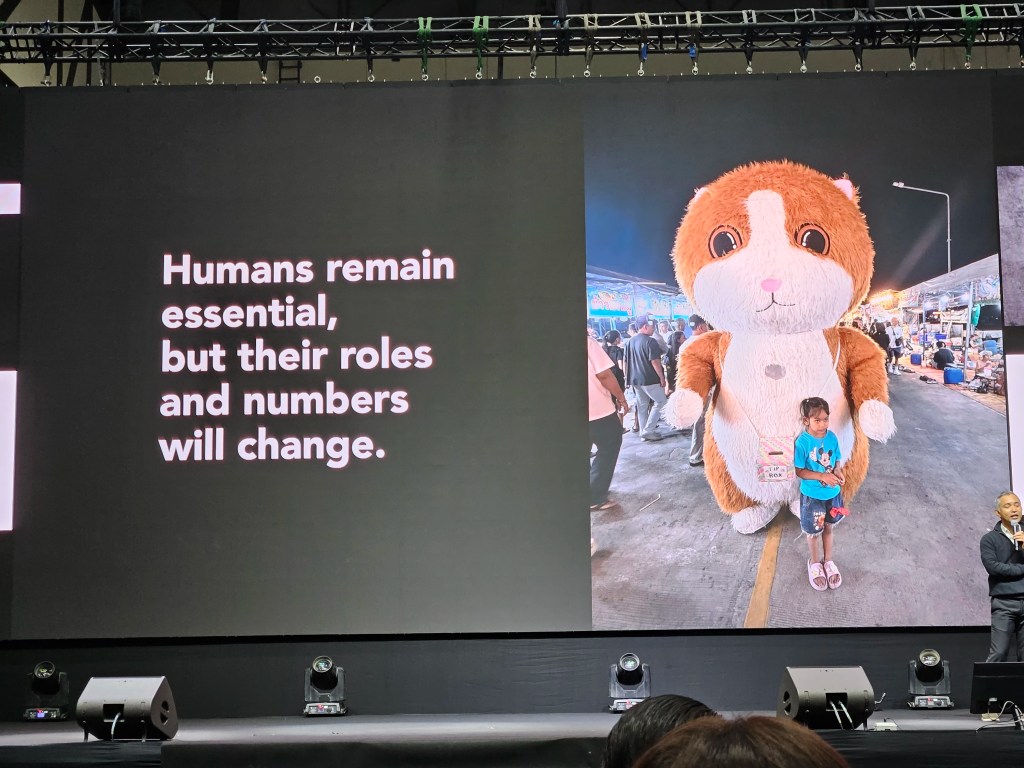
    มนุษย์จะยังคงเป็นส่วนสำคัญในโลก แต่บทบาทของมนุษย์จะเปลี่ยนแปลงไป แต่เปลี่ยนแปลงไปยังไง ยังไม่มีใครรู้แน่ชัด


    👷 Topic 2. How to AI Transformation

    แนวคิดในการทำ AI transformation ในองค์กรมีอยู่ 5 ขั้นตอน ได้แก่:

    1. Pain points
    2. Prioritise, relentlessly
    3. Set goal and plan
    4. Communicate
    5. Track success

    .

    🫨 Pain Points

    เราไม่ควร transform เพียงเพราะองค์กรอื่นทำได้ เพราะแต่ละองค์กรมีบริบทที่แตกต่างกัน การที่ Amazon ทำได้ ไม่ได้หมายความว่า Google หรือเราจะทำได้ด้วยวิธีการเดียวกัน

    AI transformation ไม่มี one-size-fits-all และสิ่งที่เราต้องการหา pain point ให้เจอ: อะไรคือปัญหาที่เราต้องการแก้ในองค์กรของเรา?

    วิธีหนึ่งที่ช่วยให้เรามองเห็นปัญหาได้ คือ การลงไปดูหน้างานจริง

    ยกตัวอย่าง Makro ที่พบว่า พนักงานมีปัญหาในการยกถุงผงซักฟองลงจากชั้นวาง เพราะพนักงานส่วนใหญ่เป็นผู้หญิงและถุงผงซักฟองมีน้ำหนักมาก Makro จะไม่เห็นปัญหานี้เลยถ้าผู้จัดการนั่งอยู่แต่ในออฟฟิศ เพราะบนรายงานการขาย เราจะเห็นแค่ว่าผงซักฟองเป็นสินค้าขายดี

    .

    💪 Prioritise, Relentlessly

    ในองค์กร เราอาจจะมีปัญหามากมายที่เราต้องการแก้ไข:

    • เพิ่ม productivity
    • พัฒนา product ใหม่
    • เพิ่ม engagement กับลูกค้า

    แต่ด้วยเวลาและงบประมาณ เราจะต้องเลือกว่าจะจัดการปัญหาไหนก่อน

    เราจะต้องคอยจัดลำดับความสำคัญอย่างไม่ลดละเพื่อไม่ให้เราหลงทางในยุคที่การเปลี่ยนแปลงและปัญหาเกิดขึ้นอย่างรวดเร็ว

    เรามี 3 frameworks ที่ช่วยเราได้:

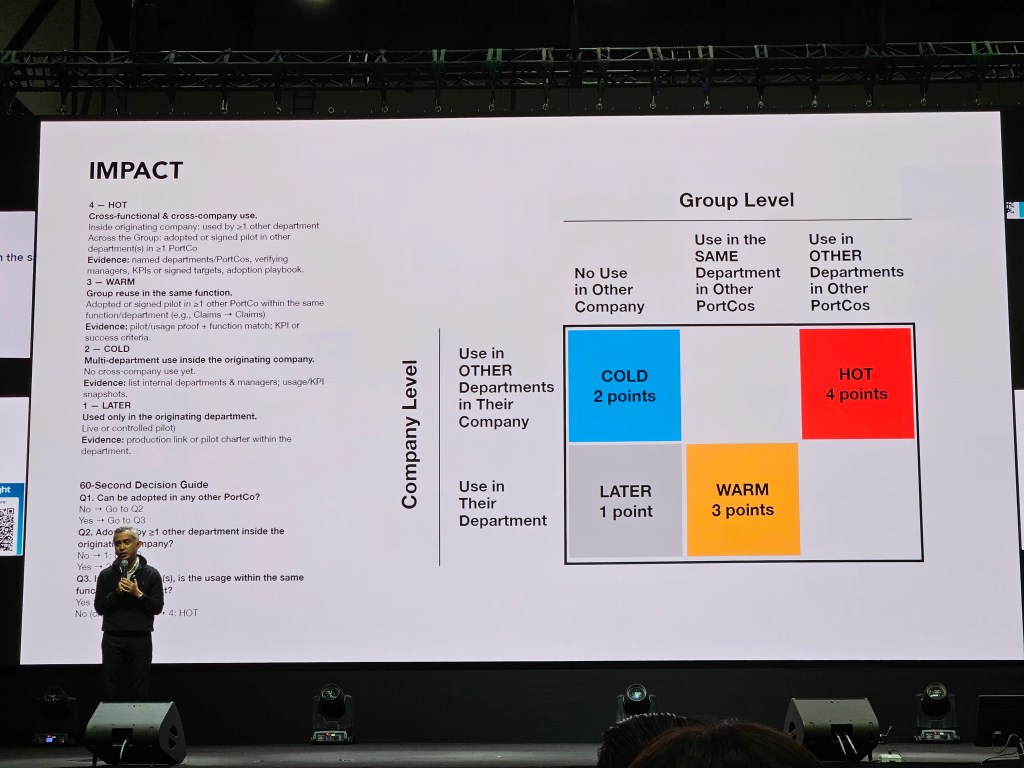
    Framework #1. Impact: ดูว่า AI solution ที่เราจะทำ สามารถใช้ได้ทั้งในระดับกลุ่ม (group level) และบริษัท (company level) ไหม

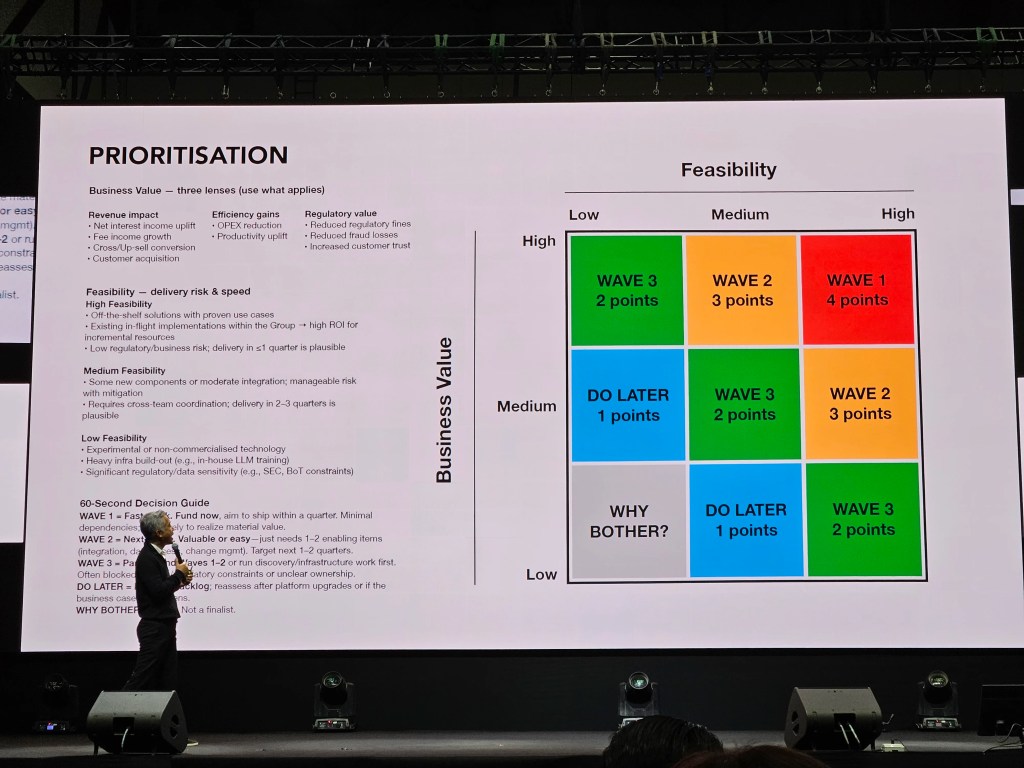
    Framework #2. Priority: ดูความเป็นไปได้ในการประยุกต์ใช้ (feasibility) และคุณค่าทางธุรกิจ (business value) ที่เราจะได้รับ

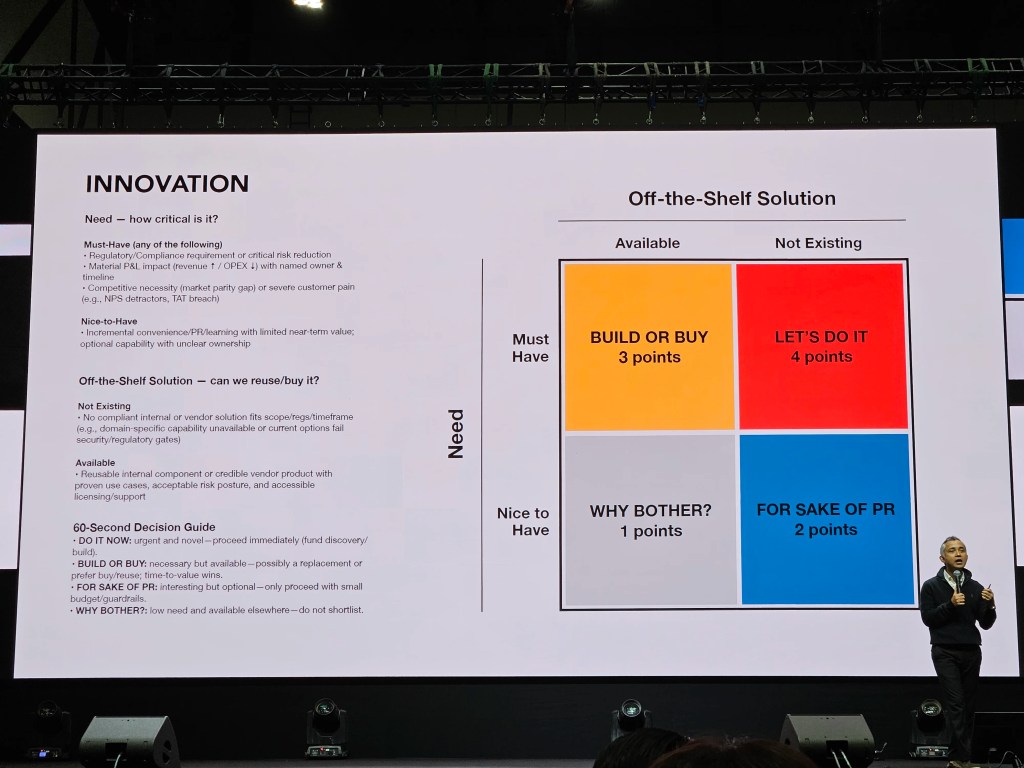
    Framework #3. Innovation: ดูว่า AI solution ที่เราต้องการมีคนทำอยู่แล้วไหม (off-the-shelf solution) และระดับความต้องการของเรา (need)
    .

    ⛰️ Set Goal & Plan

    เมื่อเราได้ปัญหาที่เราต้องการแก้ไขแล้ว สิ่งต่อไปที่เราต้องทำ คือ กำหนดเป้าหมายและวางแผน

    เราอาจจะวางแผน 1 ปี, 3 ปี, 5 ปี ซึ่งยิ่งแผนระยะยาวเท่าไร ก็ยิ่งมีโอกาสจะเปลี่ยนได้ง่าย เพราะเทคโนโลยีมีการเปลี่ยนแปลงอย่างรวดเร็ว อย่างแผน 5 ปีในปีนี้อาจแตกต่างกันอย่างสิ้นเชิงกับแผน 5 ปีในปีหน้า

    แต่มีแผนดีกว่าไม่มีแผน เพราะอย่างน้อย เราจะรู้ว่าเราจะต้องทำอะไร และแม้แผนจะเปลี่ยน แต่เป้าหมายเรายังเหมือนเดิม

    .

    👄 Communicate

    การตั้งเป้าหมายไม่พอ เรายังต้องสื่อสารและทำให้แน่ใจว่า ทุกคนเห็นและเข้าใจเป้าหมายเดียวกัน

    ถ้าเราทำให้ทุกคนเห็นเป้าหมายเดียวกันได้ แม้ต่างคนต่างจะมี job to be done ที่แตกต่างกัน แต่ทุกคนก็จะยังเดินไปในทิศทางเดียวกัน

    .

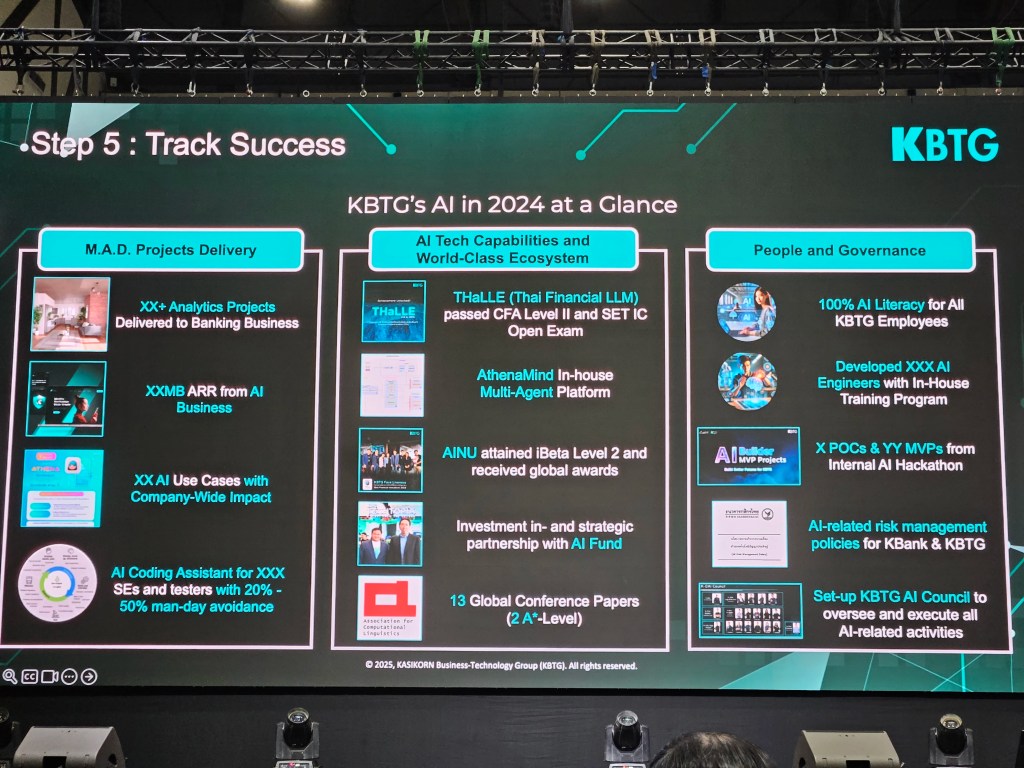
    📋 Track Success

    สุดท้าย เราจะต้องคอยติดตามผลความคืบหน้า เพื่อให้เราปรับเปลี่ยนวิธีการตามหน้างาน และทำให้แน่ใจว่า เรายังมุ่งหน้าไปในทิศที่เราต้องการอยู่


    ☝️ Topic 3. Factors to Consider

    เรามีปัจจัยที่ต้องพิจารณาในการทำ AI transformation มีอยู่ 4 อย่าง ได้แก่:
    1. People: พนักงานและลูกค้าของเรา
    2. Culture: วัฒนธรรมขององค์กร
    3. Systems/tools/tech: ระบบ เครื่องมือ และเทคโนโลยี
    4. Finance: เงิน (เพราะองค์กรอยู่ได้ด้วยเงินทุน)

    People เป็นสิ่งที่เราต้องให้ความสำคัญเป็นอันดับแรก เพราะถ้าเราโฟกัสที่ technology แต่พนักงานหรือลูกค้าไม่พร้อมที่จะใช้เครื่องมือใหม่ เราอาจจะได้ AI solution ที่ไม่มีใครใช้


    🤠 Topic 4. People Management

    การบริหารพนักงานในยุคของ AI มีอยู่ 3 หัวข้อ ได้แก่:

    1. Mindset
    2. Building culture
    3. Generation gap

    .

    ♥️ Mindset

    สิ่งที่เราต้องการในพนักงาน คือ mindset เพราะถ้าขาด mindset ที่เหมาะสม ไม่ว่าเราจะทำ AI transformation ดีขนาดไหน ก็อาจจะไม่สำเร็จ

    Mindset อาจจะเริ่มที่ตัวเราก่อน เช่น ถ้าเราอยากทำ AI transformation แต่เราไม่ชอบ AI เราต้องหันกลับมามองว่า ถ้า AI เป็นสิ่งที่หลีกเลี่ยงไม่ได้ เป็นเราหรือเปล่าที่จะต้องเปลี่ยน

    ถ้าเราไม่เปลี่ยน โลกก็จะเคลื่อนไปข้างหน้าโดยไม่มีเรา

    .

    😈 Building Culture

    สิ่งที่เราต้องการในองค์กร คือ diversity

    เราไม่ต้องการพนักงานที่มีลักษณะนิสัยเหมือนกันหมด เพราะ culture ที่มีคนแบบเดียวกัน คือ culture ที่จะหยุดนิ่ง เปลี่ยนแปลงได้ยาก

    ในการคัดเลือกพนักงาน เราไม่ควรปล่อยให้หัวหน้างานเลือกพนักงานเอง แต่ควรมีกระบวนการที่จะช่วยให้เราคัดเลือกพนักงานอย่างไม่ลำเอียงได้ เช่น มีการสัมภาษณ์หลายครั้งเพื่อให้ได้ความเห็นจากหลายมุมมอง

    นอกจากนี้ เราควรบอกว่า คนที่เป็น “ขบถ” หรือแตกต่าง มากกว่ามองหา “ขนมเปี๊ยะ” หรือคนที่ดูภายนอกหน้าตาเหมือนกันไปหมด

    .

    👶 Generation Gap

    Generation gap เป็นสิ่งที่หลีกเลี่ยงได้ยาก โดยเฉพาะในองค์กรขนาดใหญ่

    แต่ละ generation มีมุมมอง จุดแข็งและจุดอ่อนที่แตกต่างกันไป ซึ่งบางทีก็ทำให้เกิด conflict ระหว่างพนักงานได้

    ถ้าเราอยากทำให้เกิด collaboration แทน เราจะต้องโฟกัสไปที่จุดแข็งของแต่ละ generation เช่น:

    • Generation ที่อายุมากกว่า อาจจะไม่เชี่ยวชาญเทคโนโลยีเท่ากับรุ่นใหม่ แต่มีประสบการณ์และความเชี่ยวชาญมากกว่า
    • Generation ที่อายุน้อยกว่า แม้จะไม่มีประสบการณ์เท่ากับคนรุ่นก่อน แต่ก็มีความเชี่ยวชาญและคุ้นชินกับเทคโนโลยีใหม่ ๆ มากกว่า

    ถ้าเราสามารถดึงจุดแข็งของแต่ละรุ่นขึ้นมา เราก็จะทำให้เกิด collaboration ระหว่างพนักงานในองค์กรได้


    🚨 Topic 5. Risks to Consider

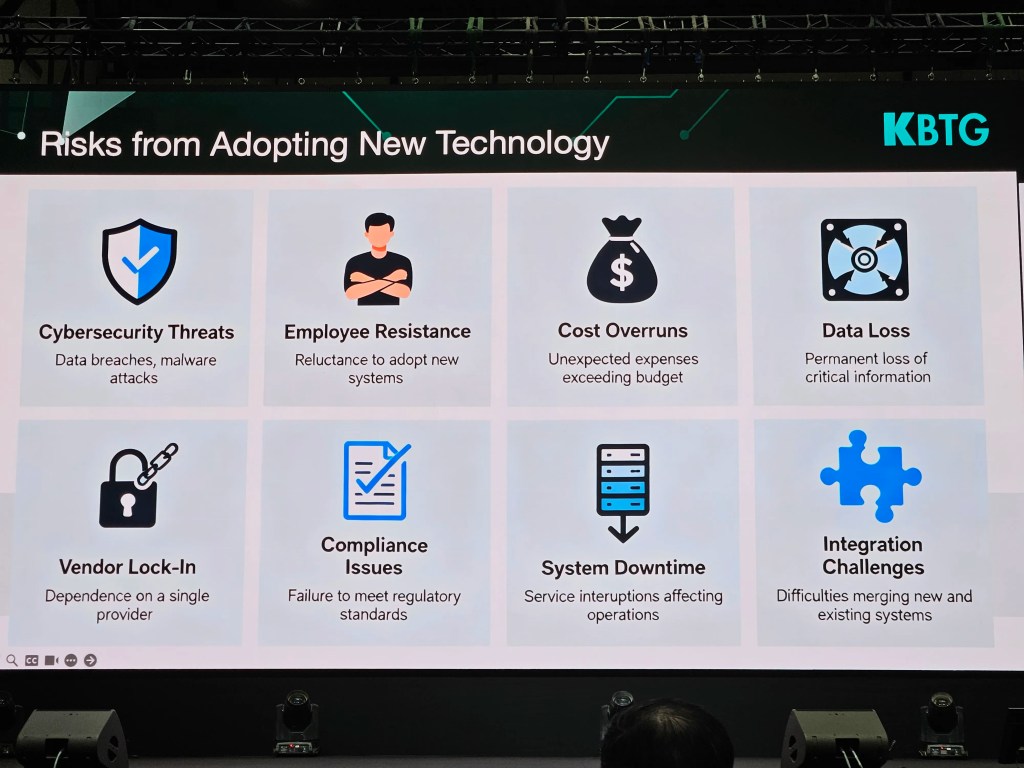
    ความเสี่ยงในการทำ AI transformation มีอยู่ 8 ข้อ ได้แก่:

    1. Cybersecurity threat: ความปลอดภัยของระบบ
    2. Employee resistance: การต่อต้านของพนักงาน
    3. Cost overrun: ใช้งบประมาณเกินกำหนด
    4. Data loss: การสูญเสียข้อมูล โดยเฉพาะข้อมูลที่สำคัญต่อองค์กร
    5. Vendor lock-in: การพึ่งพา vendor แค่เจ้าเดียว
    6. Compliance issues: ปัญหาการปฏิบัติตามกฎ ระเบียบ และข้อบังคับต่าง ๆ
    7. System downtime: ระบบหยุดทำงานและส่งผลต่อการทำงานของพนักงาน
    8. Integration challenges: ความท้าทายในการเชื่อมต่อกับระบบอื่น ๆ

    👾 Topic 6. AI Solution Showcases: SCBX & KBTG

    .

    🟣 SCBX

    SCBX นำเสนอ 2 ตัวอย่างการใช้ AI เพื่อแก้ปัญหาในองค์กร ได้แก่:

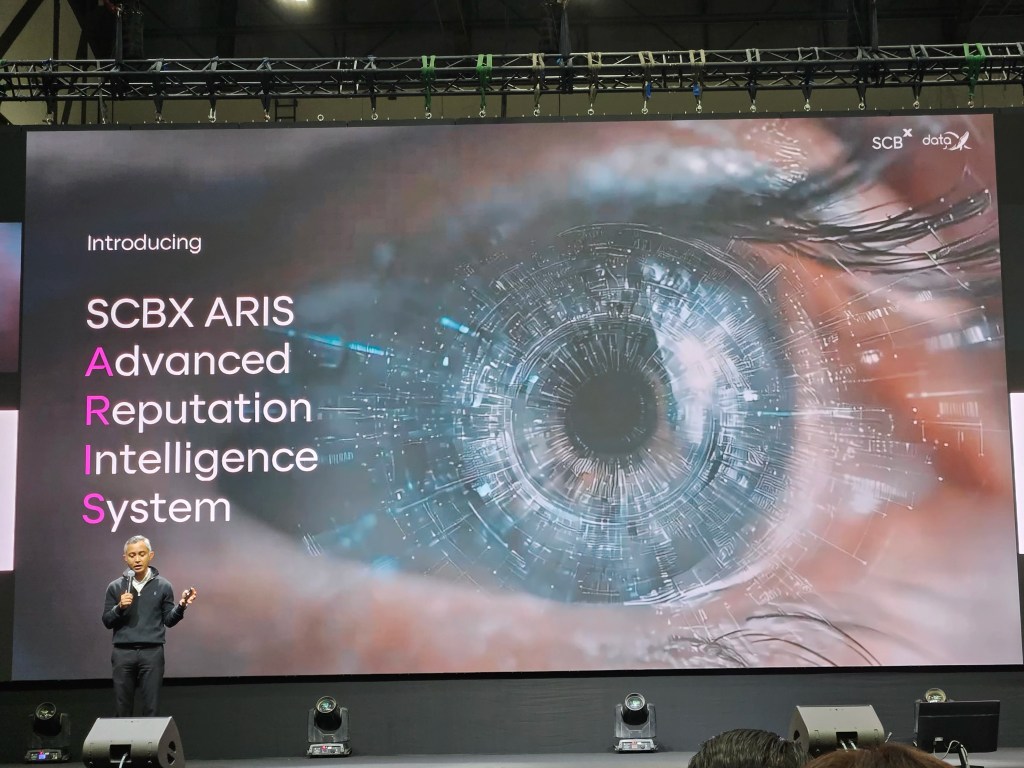
    1. ARIS (Advanced Reputation Intelligence System)
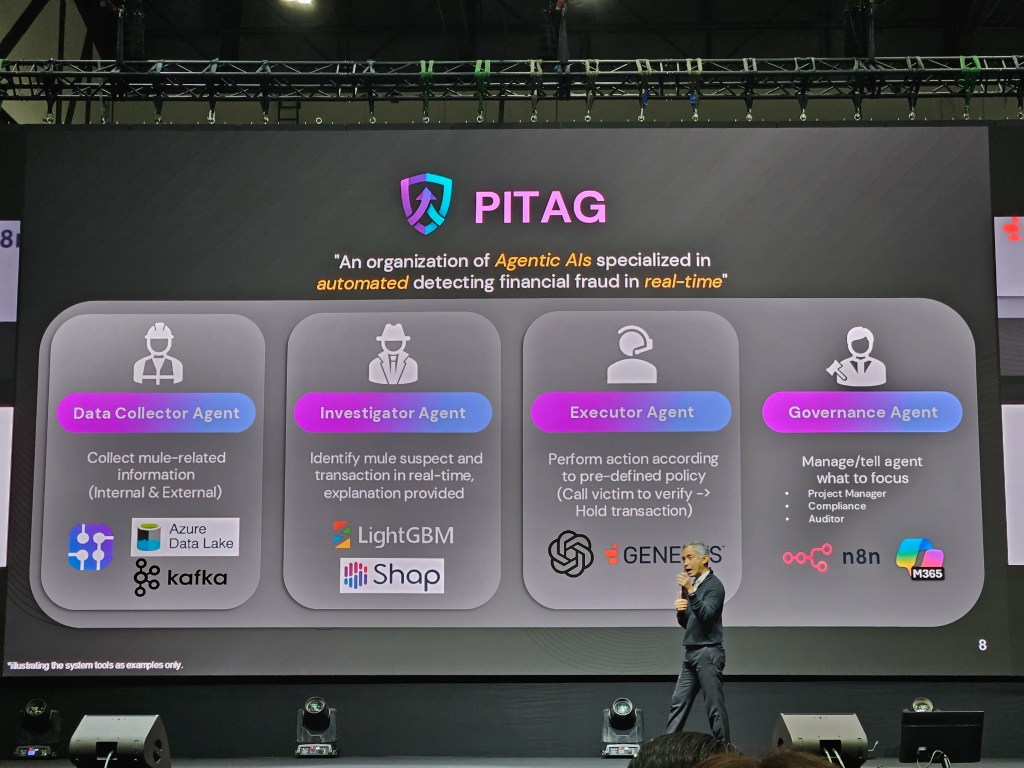
    2. PITAG (Predictive Intelligence for Tactical Anti-fraud Guardian)

    Case 1. ARIS เป็นระบบตรวจจับ incident หรือเหตุการณ์ที่อาจสร้างความเสียหายต่อชื่อเสียงขององค์กร ซึ่งช่วยให้ SCBX สามารถรับรู้และรับมือ incident ต่าง ๆ (เช่น ข่าวว่าแอป SCB ถูกแฮ็ก) ได้อย่างทันท่วงที

    ARIS มีการทำงาน 4 ขั้นตอน:

    1. Data pruning: คัดกรอง content บนอินเทอร์เน็ตที่เกี่ยวข้องกับ SCBX (เช่น แอป SCB)
    2. Sentiment analysis: แยกประเภท content เป็นเขียว เหลือง และแดง พร้อมจับกลุ่ม content ที่อยู่ในหัวข้อเดียวกัน (เช่น แอป SCB ขัดข้อง)
    3. Incident detection: ประเมินว่า แต่ละหัวข้อ (แอป SCB ขัดข้อง) เป็น incident ไหม และถ้าใช่ เป็น incident ระดับไหน
    4. Real-time dashboard: แสดงผลบนหน้าจอ เพื่อให้พนักงานรับรู้ถึง incident ได้แบบ real-time

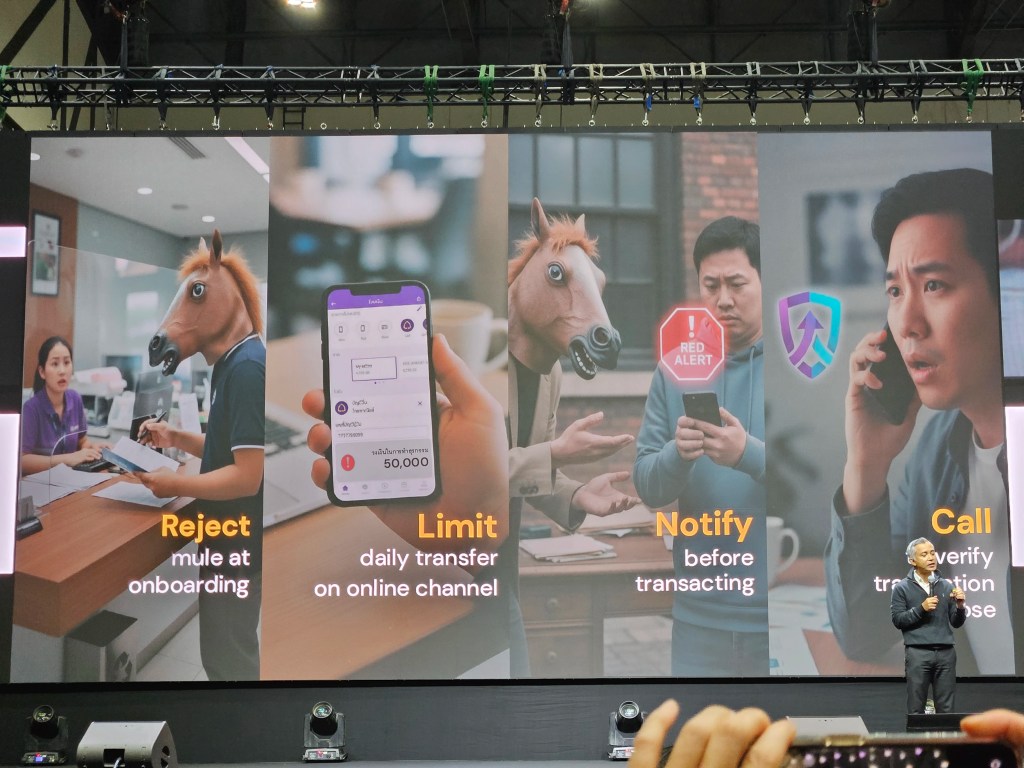
    Case 2. PITAG เป็น agentic AI สำหรับตรวจจับ fraud และแบ่งการทำงานเป็น 4 ขั้นตอน:

    1. Data collector agent: รวบรวมข้อมูลเกี่ยวกับลูกค้า ทั้งข้อมูลบนระบบ และข้อมูลจากแหล่งอื่น ๆ (เช่น หน่วยงานทางการเงินที่เกี่ยวข้อง)
    2. Investigator agent: ตรวจสอบข้อมูลและประเมินแนวโน้มที่จะเป็น fraud
    3. Executor agent: จัดการกับเคสความเสี่ยง (เช่น โทรขอข้อมูลเพิ่มเติมจากลูกค้า หรือจำกัดวงเงินในการใช้งาน)
    4. Governance agent: กำกับการทำงานของ agents ให้เป็นไปตามกฎระเบียบข้อบังคับ

    .

    🟢 KBTG

    KBTG นำเสนอ 6 AI use cases ในองค์กร ได้แก่:

    1. Increase revenue: เพิ่มรายได้ให้กับองค์กร เช่น เพิ่มยอด sales leads, เพิ่มยอด conversion ผ่าน product และ promotion recommendation
    2. Reduce risk: ลดความเสี่ยงในการทำธุรกรรม เช่น การประเมิน credit score
    3. Streamline operation: ลดเวลาในการทำงาน เช่น ใช้ AI ช่วยประเมินความเสียหายของรถยนต์ และปรับแต่งรูปอสังหาริมทรัพย์เพื่อลงประกาศขาย
    4. Protect customers: รักษาความปลอดภัยให้กับลูกค้า เช่น AINU ระบบยืนยันตัวตนด้วย AI
    5. Improve productivity: เพิ่ม productivity เช่น ใช้ AI ช่วยเขียน code ซึ่งลดเวลาจากหลายชั่วโมงเหลือไม่กี่นาที
    6. New products/services: พัฒนา products ใหม่ ๆ เช่น แอปเหมียวจด และ Future You แอปสำหรับพัฒนาตัวเองผ่านการพูดคุยกับตัวเองในอนาคต

    💡 Topic 7. Surviving in the Age of AI

    ผมขอทิ้งท้ายบทความด้วย 10 ข้อคิดดี ๆ ในการเอาตัวรอดในยุค AI:

    1. Focus on one problem at a time. If you focus on many problems, a year from now you’ll still be where you are now.
    2. Break your goal into smaller ones. Get the small wins first.
    3. Don’t be afraid to fail; if you are, you’ve already failed.
    4. ผิดพลาดได้ แต่สิ่งที่สำคัญ คือ จะทำยังไงให้ไม่ผิดซ้ำ
    5. Be resilient, be persistent.
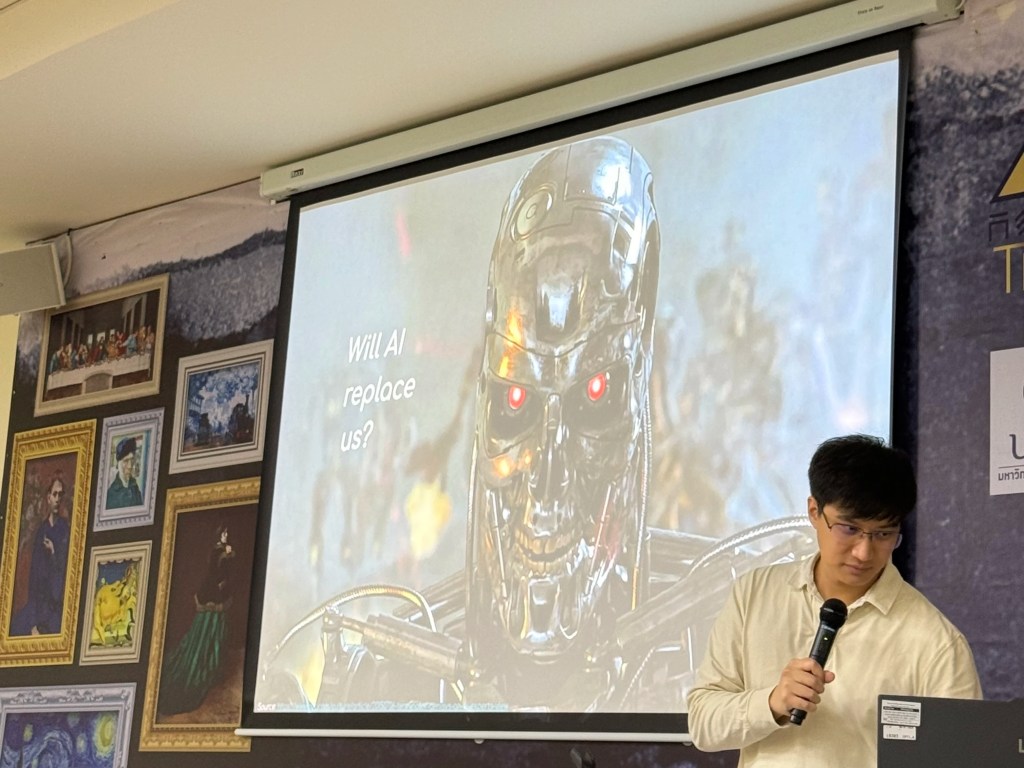
    6. เราไม่ต้องกลัว AI แทนที่เรา ถ้าเรายังพัฒนาตัวเองอยู่เสมอ
    7. คนที่จะมาแทนที่เราไม่ใช่ AI แค่คือคนที่ใช้ AI เก่งกว่าเรา
    8. สร้าง blue ocean ของตัวเอง ด้วยการทำสิ่งที่ไม่เหมือนใคร
    9. ทำงานเร็วจะต้องตั้งอยู่บนความเป็นจริงและตรงเป้าหมาย ไม่อย่างนั้น ก็จะเป็นความเร็วไร้ทิศทางที่ทำให้เราพังเร็วขึ้น
    10. ความเร็วไม่ใช่ทุกอย่าง แต่ละคนเก่งไม่เหมือนกัน เราจะต้องหาให้เจอว่า ใครทำอะไรได้ดีและหางานนั้นให้เขาทำ

    🎤 List of Sessions

    7 หัวข้อบนเวที Global Tech Conference:

    1. ดิจิทัลไม่ใช่แค่ฝ่าย IT แต่คือภารกิจของ CEO ในการขับเคลื่อนองค์กร โดย คุณสุธีรพันธุ์ สักรวัตร, ประธานเจ้าหน้าที่ฝ่ายการตลาด, SCBX
    2. จากวิสัยทัศน์สู่ความเร็ว: คู่มือทรานส์ฟอร์มองค์กรสู่ยุคเรียลไทม์ โดย ดร.ธีรเดช ดำรงค์พลาสิทธิ์, หัวหน้าคณะผู้บริหารด้านกลุ่มธุรกิจองค์กร, True Corporation
    3. Technology & Talent Transformation โดย คุณ Shaun Wong, Chief Corporate Planning Officer, CP Axtra
    4. พลิกมุมคิด ผู้นำ ธุรกิจยุคใหม่: ทรานส์ฟอร์มองค์กรอย่างไรให้รอดในปี 2030 โดย คุณกานติมา เลอเลิศยุติธรรม, รองประธานเจ้าหน้าที่บริหาร ด้านธุรธิจองค์กร, AIS
    5. Smart CEO in AI Era: ผู้นำองค์กรต้องปรับตัวอย่างไรในโลกที่ AI วิ่งเร็วกว่าเรา โดย ดร.ธรรม์ธีร์ สุกโชติรัตน์, CEO, JIB AI
    6. จากดิจิทัลสู่ความอัจฉริยะ: ก้าวต่อไปของเทคโนโลยีธุรกิจยุคใหม่ โดย ดร.ทัดพงศ์ พงศ์ถาวรกมล, กรรมการผู้จัดการ, KBTG
    7. The New Corporate DNA: สร้างองค์กรไว ปรับง่ายโตได้ทุกจังหวะ โดย คุณเปา พีรดนย์ เหมยากร, ประธานเจ้าหน้าที่บริหารและผู้ก่อตั้ง, iHAVECPU

  • สรุป 2 บทเรียนจาก workshop “Compassionate Leadership in the Age of AI” โดยคุณดามพ์ (มงคล หงษ์ชัย) ในงาน PMAT 60th: Compassion และ DEMO — 2 เครื่องมือเพื่อความสำเร็จในการพัฒนา AI solution ในองค์กร

    สรุป 2 บทเรียนจาก workshop “Compassionate Leadership in the Age of AI” โดยคุณดามพ์ (มงคล หงษ์ชัย) ในงาน PMAT 60th: Compassion และ DEMO — 2 เครื่องมือเพื่อความสำเร็จในการพัฒนา AI solution ในองค์กร

    ในบทความนี้ ผมจะมาสรุปเนื้อหาจาก workshop “Compassionate Leadership in the Age of AI” ของคุณดามพ์ (มงคล หงษ์ชัย) ผู้เชี่ยวชาญ agile leadership และ AI for future skills ในงาน PMAT 60th เมื่อวันที่ 12 พ.ย. ที่ผ่านมา

    โดยเนื้อหาจะแบ่งเป็น 3 ส่วน ได้แก่:

    1. Issues with AI adoption: ปัญหาการพัฒนา AI solution
    2. Compassion: เครื่องมือทำความเข้าใจคน
    3. DEMO: เครื่องมือทำความเข้าใจ process

    ถ้าพร้อมแล้ว ไปเริ่มกันเลย


    1. 😭 The Issue With AI Solutions
    2. 🫂 Compassion: Tool for Understanding the People
      1. ❤️ Empathy
      2. 🫂 Compassion
      3. 🧘 How to Develop Compassion
    3. 🦾 DEMO: Tool for Understanding Process
      1. 📊 Why DEMO?
      2. 👷 What Is DEMO?
      3. 🤖 DEMO & AI Solution
      4. 📋 How to DEMO
    4. 💪 Summary
    5. 📚 Further Reading

    😭 The Issue With AI Solutions

    95% ขององค์กรล้มเหลวในการสร้าง AI solution ที่สร้างกำไรได้จริง (The GenAI Divide: State of AI in Business 2025)

    สาเหตุหลักของความล้มเหลวมีอยู่ 2 ข้อ ได้แก่:

    1. People: ขาดความเข้าใจในผู้ที่เกี่ยวข้องกับการเปลี่ยนแปลง (เช่น พนักงานที่ต้องใช้ AI)
    2. Process: ขาดความเข้าใจใน process งานที่นำ AI มาประยุกต์ใช้

    ซึ่งทำให้ AI solution ที่ออกแบบไม่ตอบโจทย์คนใช้งานและไม่สามารถสร้างรายได้ให้กับองค์กรได้

    เราสามารถแก้ทั้ง 2 สาเหตุนี้ได้ด้วย 2 เครื่องมือนี้:

    1. Compassion: ช่วยทำความเข้าใจคน
    2. DEMO: ช่วยทำความเข้าใจ process

    🫂 Compassion: Tool for Understanding the People

    .

    ❤️ Empathy

    ถ้าเราจะเข้าใจคนอื่นได้ เราจะต้องมี empathy

    Empathy เป็นคำที่มีคนพูดถึงอยู่บ่อย ๆ โดยเฉพาะในองค์กรที่ทำงานกับ design thinking ซึ่งใช้ empathy เป็นเครื่องมือหลักในการทำความเข้าใจปัญหาของ user เพื่อออกแบบ solution ที่ตอบโจทย์ user อย่างแท้จริง

    Empathy ยังเป็น 1 ใน 4 ลักษณะสำคัญของ leader ในยุค VUCA (volatile, uncertain, complex, ambiguous) เคียงข้างกับ problem solving, relationship management, และ motivation อีกด้วย

    Empathy เป็นสิ่งจำเป็น เพราะทำให้เราเข้าใจความรู้สึกและมุมมองของคนอื่นได้ เพราะ leader ที่ไม่มี empathy จะไม่สามารถ engage คนอื่นได้ เพราะไม่สามารถสร้าง motivation ให้กับคนอื่นได้ (Connect with Empathy, But Lead with Compassion)

    แต่ empathy อย่างเดียวอาจไม่พอ และสิ่งที่เราต้องการจริง ๆ คือ compassion

    .

    🫂 Compassion

    ในขณะที่ empathy ช่วยให้เรารับรู้ความรู้สึกและมุมมองของคนอื่น compassion ไม่เพียงแต่ช่วยให้เราเข้าถึงความรู้สึกของคนอื่น แต่ยังรวมไปถึงความต้องการที่จะช่วยคนอื่นอีกด้วย

    Compassion แปลไทยได้ว่า “กรุณา” ซึ่งหมายถึง การช่วยให้คนอื่นพ้นทุกข์ และคำที่มักมาคู่กัน คือ “เมตตา” ซึ่งแปลว่า การทำให้คนอื่นมีความสุข (Buddhist beliefs – Edexcel)

    Empathy เป็นสิ่งจำเป็นที่จะช่วยให้เรา connect กับคนอื่นได้ แต่ถ้าเราจะเป็น leader ที่ดี เราจะต้องมี compassion ด้วย เพราะ empathy อย่างเดียวอาจทำให้เราตัดสินใจผิดพลาดได้ ตามคำของ Paul Polman อดีต CEO ของ Unilever:

    If I led with empathy, I would never be able to make a single decision. Why? Because with empathy, I mirror the emotions of others, which makes it impossible to consider the greater good.”

    แปล:

    ถ้าผมนำด้วย empathy ผมจะตัดสินใจไม่ได้สักอย่าง ทำไมหรอ? เพราะ empathy ทำให้ผมรู้สึกความรู้สึกของคนอื่น ซึ่งทำให้ผมคิดถึงประโยชน์ของส่วนรวมไม่ได้

    มีงานวิจัยที่แสดงให้เห็นถึงข้อเสียของ empathy

    ในงานวิจัย ผู้เข้าร่วมถูกขอให้เลือกว่า จะลัดคิวเด็กที่ป่วยหนักคนหนึ่งเพื่อให้ได้รับการรักษาก่อนคิวไหม โดยกลุ่มหนึ่งถูกขอให้ฟังและมีความรู้สึกร่วมในขณะที่เด็กเล่าถึงความเจ็บปวดจากโรค และอีกกลุ่มถูกขอให้ฟังโดยไม่ตัดสิน

    ผู้เข้าร่วมกลุ่มแรกเลือกที่จะลัดคิวให้เด็กมากกว่าผู้เข้าร่วมในกลุ่มหลัง แม้ว่าผู้เชี่ยวชาญด้านการแพทย์จะคัดค้าน แม้ว่าการตัดสินใจลัดคิวจะเป็นผลดีต่อเด็ก แต่ทำให้ผู้ป่วยอื่น ๆ ที่อาจต้องการการรักษามากกว่าอยู่ในอันตรายได้ (Connect with Empathy, But Lead with Compassion)

    ดังนั้น เราไม่ควรมีแต่ empathy แต่ควรมี compassion ด้วย

    .

    🧘 How to Develop Compassion

    เราสามารถพัฒนา compassion ได้ 2 วิธี:

    วิธีที่ 1. ฝึกอยู่กับปัจจุบันทั้งกายและใจ

    แม้ว่าเวลาคุยกับคนอื่น เราอาจจะคิดว่าเราฟังอยู่ แต่จริง ๆ แล้วใจเราอาจไปอยู่ที่อื่น หรือเสียงในหัวเราอาจจะดังกลบเสียงคนที่กำลังพูด

    เราสามารถฝึก compassion ได้โดยกลับมาอยู่กับสิ่งที่เกิดขึ้นในปัจจุบัน ซึ่งจะช่วยให้เราอยู่กับสิ่งที่คนอื่นกำลังพูดได้มากขึ้น

    เราสามารถฝึกอยู่กับปัจจุบันได้ผ่านการนั่งสมาธิ หรือง่ายกว่านั้น คือ การสังเกตสิ่งที่กำลังเกิดขึ้นรอบตัวเรา เช่น:

    • ลมหายใจเข้าออกของเรา
    • ผิวของเนื้อผ้าที่เราสวมใส่
    • แอร์หรือลมที่ตกกระทบผิวของเรา

    แค่เราฝึกสังเกตสิ่งที่เกิดขึ้นในแต่ละช่วงขณะ เราก็จะค่อย ๆ พัฒนา compassion ของเราขึ้นทีละนิด เพราะเราสามารถอยู่กับคนที่ต้องการความช่วยเหลือจากทั้งกายและใจ

    วิธีที่ 2. ให้ AI ช่วย

    เราสามารถให้ AI ช่วยพัฒนา compassion ได้ เช่น:

    • เล่าสถานการณ์ที่เราพูดคุยกับคนอื่นให้ AI ฟัง เพื่อให้ AI ให้มุมมองใหม่ ๆ กับเรา พร้อมแนะนำวิธีแสดง compassion เพิ่มเติมได้ (Using AI to Make You a More Compassionate Leader)
    • ให้ AI ช่วย role-play กับเรา ให้เราได้ฝึก compassion เหมือนในหน้างานจริง

    🦾 DEMO: Tool for Understanding Process

    .

    📊 Why DEMO?

    ทุกองค์กรมี chart มากมายสำหรับแสดงข้อมูลต่าง ๆ เช่น flow chart สำหรับแสดงขั้นตอนการทำงานในองค์กร และ organisation chart ที่แสดงผังองค์กร

    Chart เหล่านี้ล้วนแสดงข้อมูลเป็นท่อน ๆ นั่นคือ แสดงรายละเอียดภาพย่อย แต่ขาดความเชื่อมโยงระหว่างข้อมูลที่สำคัญต่อการตัดสินใจในระดับบริหาร

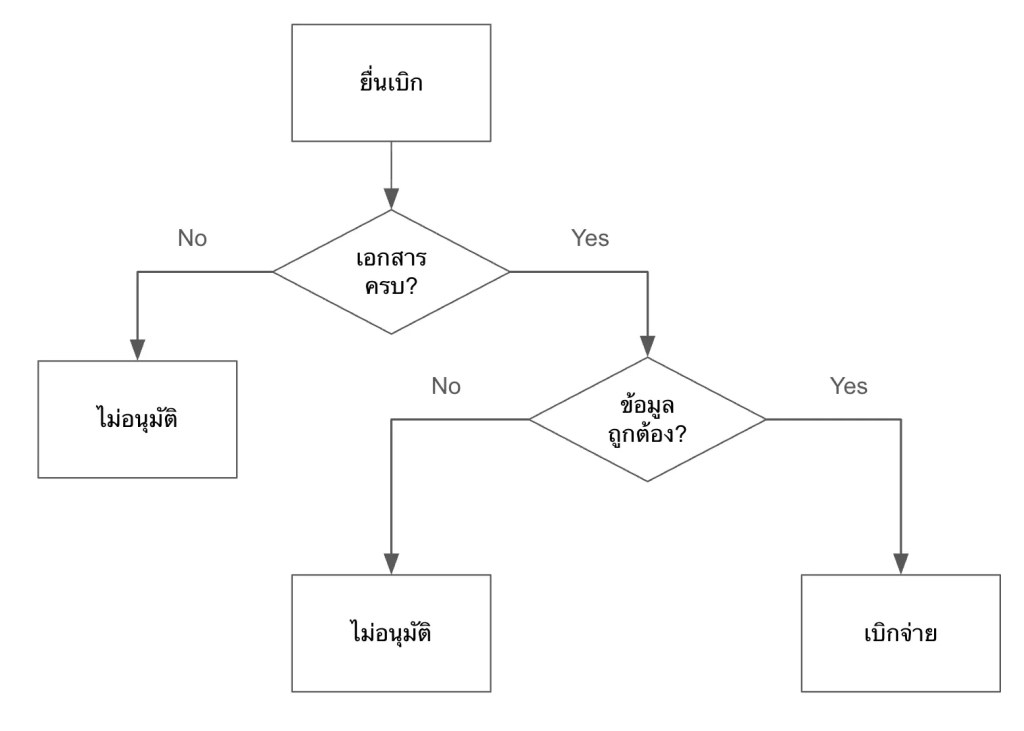
    ยกตัวอย่างเช่น flow chart แสดงการเบิกจ่ายค่าเดินทางให้พนักงาน:

    ในรูป เราจะรู้ว่ามีขั้นตอนอะไรบ้างที่จะเกิดขึ้นก่อนพนักงานจะได้รับเงินค่าเดินทาง แต่เราไม่รู้ว่าขั้นตอนเหล่านี้เกี่ยวข้องกับส่วนอื่น ๆ ขององค์กรยังไงบ้าง เช่น:

    • แต่ละขั้นตอนมีใครเกี่ยวข้องบ้าง
    • มีเอกสารอะไรที่ต้องการใช้บ้าง
    • แต่ละขั้นตอนใช้เวลาเท่าไร

    ถ้าเราต้องการเห็นภาพรวมของการทำงานในองค์กร เราจะใช้ DEMO

    .

    👷 What Is DEMO?

    DEMO (ย่อมาจาก Design & Engineering Methodology for Organisations) เป็นหลักการในการออกแบบองค์กร ซึ่งมีวิธีการเขียน process ในระดับ high level ที่ช่วยให้ทำความเข้าใจและตัดสินใจได้ง่าย

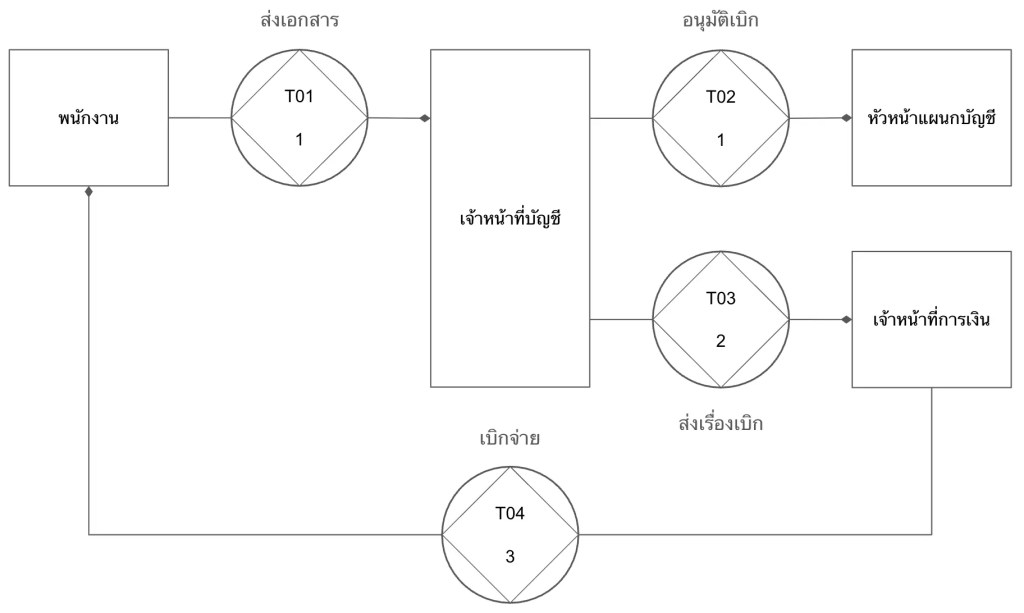
    ยกตัวอย่างการเขียน process การเบิกค่าเดินทางแบบ DEMO:

    DEMO แสดง process ในรูปแบบของ transaction หรือการแลกเปลี่ยนระหว่าง 2 ฝ่าย ได้แก่:

    1. Initiator: คนที่เริ่มการแลกเปลี่ยน (เช่น พนักงานที่ขอเบิกค่าเดินทาง)
    2. Executor: คนที่ทำให้เกิดผลลัพธ์บางอย่างในระบบ (เช่น ฝ่ายบัญชีที่อนุมัติจ่าย)

    ในแผนภาพแบบ DEMO (เรียกว่า OCD หรือ Organisation Construction Diagram) เราจะเห็นว่า:

    1. การเบิกจ่ายเงินมีกี่ transaction (ดูจาก T01, T02, …)
    2. แต่ละ transaction มีใครที่เกี่ยวข้องบ้าง
    3. แต่ละ transaction ใช้เวลาเท่าไร (ตัวเลขใต้ T0x เช่น T01 ใช้เวลา 1 วัน)

    OCD มาพร้อมกับตารางที่ให้ข้อมูลเพิ่มเติมเกี่ยวกับ transaction เช่น:

    TransactionDurationDocuments
    T01. ส่งเอกสาร1 วันฟอร์มเบิกค่าเดินทาง, หลักฐานการเดินทาง, สำเนาบัตรประชาชน
    T02. อนุมัติเบิก1 วันฟอร์มเบิกค่าเดินทาง, หลักฐานการเดินทาง
    T03. ส่งเรื่องเบิก2 วันฟอร์มเบิกค่าเดินทาง, หลักฐานการเดินทาง
    T04. เบิกจ่าย3 วันอีเมลแจ้งการเบิกจ่าย

    เมื่อเราดู OCD และตารางประกอบกัน เราจะสามารถระบุปัญหาและจุดที่ควรแก้ไขได้ในทันที เช่น:

    1. เราตัดขั้นตอน T03 ออกได้ไหม? ให้ฝ่ายบัญชีจ่ายตรงให้พนักงานเลย
    2. ทำไม T03 ใช้เวลานาน? ลดเหลือ 1 วันได้ไหม?
    3. T01 ต้องใช้เอกสาร 3 อย่างเลยหรอ? ตัดสำเนาบัตรประชาชนออกได้หรือเปล่า?

    ถ้าเรามองย้อนกลับไปที่ flow chart ก่อนหน้านี้ เราจะเห็นความแตกต่างอย่างชัดเจนว่า เราไม่สามารถตั้งคำถามเหล่านี้ได้ในทันที เพราะ flow chart ไม่ได้ให้ข้อมูลที่เพียงพอหรือจำเป็นต่อการตัดสินใจในการเปลี่ยนแปลง process งาน

    ในทางตรงกันข้าม OCD สามารถให้ข้อมูลที่ช่วยให้เราทำความเข้าใจ process และระบุปัญหาที่ควรแก้ไขได้ในทันที

    .

    🤖 DEMO & AI Solution

    เราสามารถนำ DEMO มาประยุกต์ใช้ในการออกแบบ AI solution ให้เหมาะกับองค์กรได้

    ยกตัวอย่างเช่น สำหรับการเบิกค่าเดินทาง เราอาจจะอยากพัฒนา AI ขึ้นมาช่วยพนักงานยื่นเอกสารเบิกจ่าย (T01) แต่จะเห็นได้ว่า ถ้าเราทุ่มงบประมาณไปกับการพัฒนา AI ในส่วนนี้ เราจะลดภาระงานไปเพียง 1 วันเท่านั้น

    แต่ถ้าเราพัฒนา AI เพื่อมาช่วยฝ่ายบัญชีส่งต่อเอกสารให้กับฝ่ายการเงิน (T03) หรือช่วยฝ่ายการเงินตั้งจ่ายและส่งอีเมลยืนยันการจ่าย (T04) เราจะสามารถลดเวลาได้มากขึ้น เพราะทั้ง 2 จุดนี้ใช้เวลามากที่สุดในขั้นตอนทั้งหมด ถ้าเราพัฒนา AI เพื่อช่วย T03 และ T04 แล้ว เราจะลดเวลาในการทำงานลงไปกว่าครึ่งของ process ทั้งหมด (5 จาก 7 วัน)

    .

    📋 How to DEMO

    การเขียน OCD มีอยู่ 3 ขั้นตอน ได้แก่:

    1. Gather data: เก็บข้อมูล process งานจากฝ่ายที่เกี่ยวข้อง (เช่น ฝ่ายบัญชี) โดยใช้ empathy และ compassion เพื่อช่วยให้เราเข้าใจและอยากช่วยเหลือ
    2. Categorise data: จัดกลุ่มข้อมูลได้เป็น 3 ส่วน ได้แก่:
      1. Forma: วิธีการสื่อสาร (เช่น อีเมล, แบบฟอร์ม)
      2. Informa: สิ่งที่ต้องการสื่อสาร (เช่น คำขออนุมัติเบิกค่าเดินทาง)
      3. Performa: สิ่งที่ทำให้เกิดผลลัพธ์ (เช่น การอนุมัติเบิก)
    3. Convert to transaction: เปลี่ยนข้อมูลให้เป็น transaction ที่มี 3 องค์ประกอบ ได้แก่:
      1. Actors: initiator และ executor
      2. Documents: เอกสารที่เกี่ยวข้อง (เช่น ฟอร์มเบิกค่าเดินทาง, ใบเสร็จ)
      3. Duration: ระยะเวลาที่ใช้สำหรับ transaction นั้น ๆ (เช่น 1 วัน)

    💪 Summary

    องค์กรส่วนใหญ่ล้มเหลวในการพัฒนา AI solution ให้ตอบโจทย์ เพราะขาดความเข้าใจ 2 อย่าง ได้แก่:

    1. People: ความเข้าใจในคนที่เกี่ยวข้อง
    2. Process: ความเข้าใจในกระบวนการทำงานที่จะเอา AI solution เข้าไปช่วย

    เราสามารถแก้ทั้ง 2 สาเหตุนี้ได้ โดยใช้:

    1. Compassion เพื่อทำความเข้าใจคน
    2. DEMO เพื่อทำความเข้าใจกระบวนการทำงาน

    📚 Further Reading

    สำหรับคนที่สนใจศึกษาเชิงลึกเกี่ยวกับหัวข้อในบทความนี้ สามารถอ่านเพิ่มเติมได้ตามนี้

    Compassion:

    DEMO:

    Bonus — สรุปงาน PMAT 60th:

  • วิเคราะห์ resumes ใน 3 ขั้นตอน ด้วย Gemini ผ่าน OpenAI library ใน Python — ตัวอย่างการทำงานใน Google Colab

    วิเคราะห์ resumes ใน 3 ขั้นตอน ด้วย Gemini ผ่าน OpenAI library ใน Python — ตัวอย่างการทำงานใน Google Colab

    บทความนี้เหมาะสำหรับบริษัทหรือ HR ที่ต้องการใช้ AI ช่วยลดเวลาในการคัดกรองผู้สมัคร เพราะเราจะมาดูวิธีวิเคราะห์ resumes ด้วย Gemini ผ่าน OpenAI library ใน Python กัน

    บทความนี้แบ่งเป็น 3 ส่วนตามขั้นตอนการวิเคราะห์ ได้แก่:

    1. Install and load libraries
    2. Set input
    3. Analyse resumes

    โดยเราจะไปดูตัวอย่างโดยใช้ Google Colab กัน (ดู code ทั้งหมดได้ที่นี่)

    ถ้าพร้อมแล้ว ไปเริ่มกันเลย


    1. ⬇️ 1. Install & Load Libraries
    2. 🔧 2. Set the Input
      1. 🧑‍💻 (1) Client
      2. 💼 (2) JD
      3. 📄 (3) Resumes
    3. ⚡ 3. Analyse the Resumes
      1. 🤖 (1) Function เรียกใช้งาน Gemini
      2. ➕ (2) Function ใส่ Input ใน Prompt
      3. 🤔 (3) วิเคราะห์ Resumes
      4. 👀 (4) Print ผลลัพธ์
    4. 😺 Code & Input Examples
    5. 📃 References

    ⬇️ 1. Install & Load Libraries

    ในขั้นแรก เราจะเรียกติดตั้งและโหลด libraries ที่จำเป็นดังนี้:

    • openai: สำหรับเรียกใช้ AI ผ่าน API
    • drive จาก google.colab: สำหรับเชื่อมต่อกับไฟล์ใน Google Drive
    • PyPDF2: สำหรับดึง text ออกจากไฟล์ PDF
    • textwrap: สำหรับลบย่อหน้าออกจาก string
    • Console จาก rich.console และ Markdown จาก rich.markdown: สำหรับ render การแสดงผล string ให้อ่านง่ายขึ้น

    ติดตั้ง:

    # Install libraries
    !pip install PyPDF2
    

    Note: Google Colab มี libraries อื่น ๆ อยู่แล้ว ทำให้เราแค่ต้องติดตั้ง PyPDF2 อย่างเดียว

    โหลด:

    # Load libraries
    
    # Connect to Gemini
    from openai import OpenAI
    
    # Connect to Google Drive
    from google.colab import drive
    
    # Extract text from PDF
    import PyPDF2
    
    # Dedent text
    import textwrap
    
    # Render markdown text
    from rich.console import Console
    from rich.markdown import Markdown
    

    🔧 2. Set the Input

    สำหรับการวิเคราะห์ resumes เราต้องการ input 3 อย่าง ได้แก่:

    1. Client: สำหรับเรียกใช้ Gemini API
    2. Job description (JD): รายละเอียดตำแหน่งงานที่กำลังต้องการพนักงาน
    3. Resumes: ข้อมูล resume ที่เราต้องการวิเคราะห์

    เราไปดูวิธีกำหนด input แต่ละตัวกัน

    .

    🧑‍💻 (1) Client

    เราสามารถกำหนด client ได้ด้วย OpenAI() ซึ่งต้องการ 2 arguments:

    1. api_key: API key สำหรับเชื่อมต่อ API
    2. base_url: base URL สำหรับเรียกใช้ AI service ซึ่งสำหรับ Gemini เราต้องกำหนดเป็น "<https://generativelanguage.googleapis.com/v1beta/openai/>"

    ในตัวอย่าง เราจะเรียกใช้ OpenAI() แบบนี้:

    # Create a client
    client = OpenAI(api_key="YOUR_API_KEY", base_url="<https://generativelanguage.googleapis.com/v1beta/openai/>")
    

    Note: ในกรณีใช้งานจริง ให้แทนที่ "YOUR_API_KEY" ด้วย API key จริง (ดูวิธีสร้าง API key ฟรีได้ที่ Using Gemini API keys)

    .

    💼 (2) JD

    Input ที่ 2 สำหรับการวิเคราะห์ คือ JD ซึ่งเราสามารถกำหนดเป็น string ได้แบบนี้:

    # Set the job description (JD)
    web_dev_jd = """
    Senior Web Developer
    
    We're looking for a Senior Web Developer with a strong background in front-end development and a passion for creating dynamic, intuitive web experiences. The ideal candidate will have extensive experience with the entire development lifecycle, from project conception to final deployment and quality assurance. This role requires a blend of technical skill, creative collaboration, and a commitment to solving complex programming challenges.
    
    Responsibilities
    * Cooperate with designers to create clean, responsive interfaces and intuitive user experiences.
    * Develop and maintain project concepts, ensuring an optimal workflow throughout the development cycle.
    * Work with a team to manage large, complex design projects for corporate clients.
    * Complete detailed programming tasks for both front-end and back-end server code.
    * Conduct quality assurance tests to discover errors and optimize usability for all projects.
    
    Qualifications
    * Bachelor's degree in Computer Information Systems or a related field.
    * Proven experience in all stages of the development cycle for dynamic web projects.
    * Expertise in programming languages including PHP OOP, HTML5, JavaScript, CSS, and MySQL.
    * Familiarity with various PHP frameworks such as Zend, Codeigniter, and Symfony.
    * A strong background in project management and customer relations.
    """
    

    Note: ในกรณีที่ JD เป็นไฟล์ PDF เราสามารถใช้วิธีดึงข้อมูลแบบเดียวกันกับ resumes ได้

    .

    📄 (3) Resumes

    Input สุดท้าย คือ resumes ที่เราต้องการวิเคราะห์

    ในตัวอย่าง เราจะดึงข้อมูล resumes จากไฟล์ PDF ใน Google Drive ใน 3 ขั้นตอน ได้แก่:

    ขั้นที่ 1. เชื่อมต่อ Google Drive ด้วย drive.mount():

    # Connect to Google Drive
    drive.mount("/content/drive")
    

    Note: Google จะถามยืนยันการให้สิทธิ์เข้าถึงไฟล์ใน Drive ให้เรากดยืนยันเพื่อไปต่อ

    ขั้นที่ 2. กำหนด file path ของไฟล์ PDF ใน Google Drive:

    # Set resume file paths
    rs_file_paths = {
        "George Evans": "/content/drive/My Drive/Resumes/cv_george_evans.pdf",
        "Robert Richardson": "/content/drive/My Drive/Resumes/cv_robert_richardson.pdf",
        "Christine Smith": "/content/drive/My Drive/Resumes/cv_christine_smith.pdf"
    }
    

    Note: ในตัวอย่าง จะเห็นว่า เรามี resumes 3 ใบ (ดาวน์โหลด resumes ฟรีได้ที่ www.coolfreecv.com)

    ขั้นที่ 3. ดึง text ออกจาก resumes ด้วย for loop และ PyPDF2:

    # Extract resume texts
    
    # Instantiate a collector
    rs_texts = {}
    
    # Loop through resume files to get text
    for key in rs_file_paths:
    
        # Instantiate an empty string to store the extracted text
        rs_text = ""
    
        # Open the PDF file
        reader = PyPDF2.PdfReader(rs_file_paths[key])
    
        # Loop through the pages
        for i in range(len(reader.pages)):
    
            # Extract the text from the page
            text = reader.pages[i].extract_text()
    
            # Append the text to the string
            rs_text += text
    
        # Collect the extracted text
        rs_texts[key] = rs_text
    

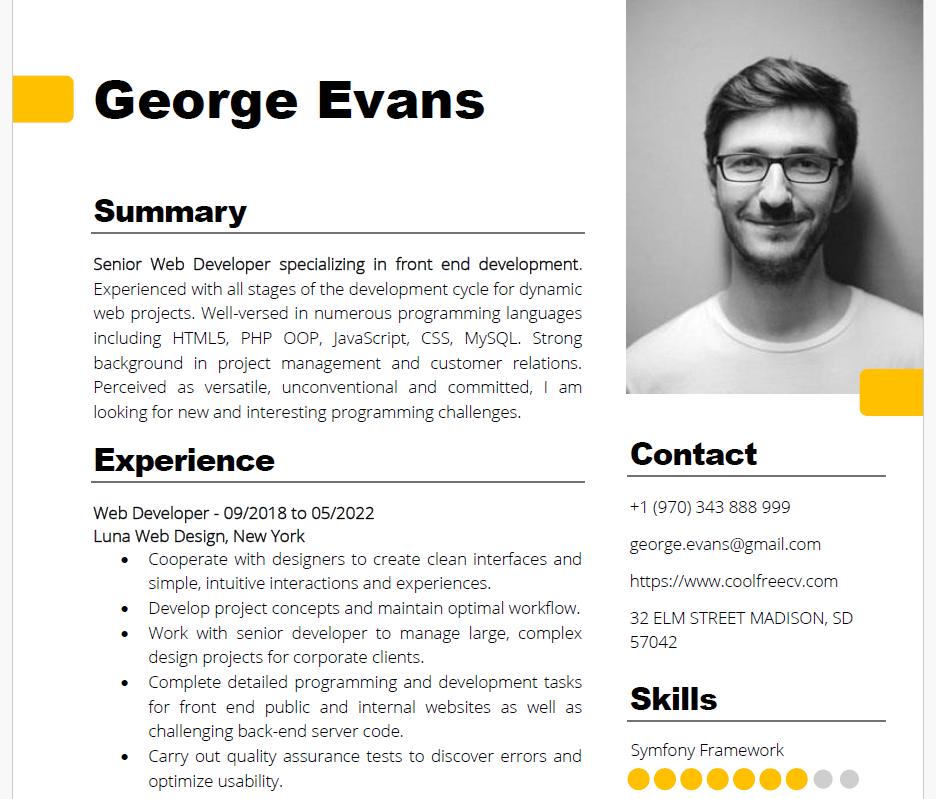
    ตัวอย่าง PDF และข้อมูลที่ดึงจาก PDF:

    Source: www.coolfreecv.com
    Contact  
    +1 (970) 343  888 999 
    george.evans@gmail.com  
    <https://www.coolfreecv.com>  
    32 ELM STREET MADISON, SD 
    57042  
     George  Evans  
    PHP / OOP   
    Zend Framework  Summary  
    Senior Web Developer specializing in front end development . 
    Experienced with all stages of the development cycle for dynamic 
    web projects. Well -versed in numerous programming languages 
    including HTML5, PHP OOP, JavaScript, CSS, MySQL. Strong 
    background in project management and customer relations. 
    Perceived as versatile, unconventional and committed, I am 
    looking for new and interesting programming challenges.  
    Experience  
    Web Developer - 09/201 8 to 05/20 22 
    Luna Web Design, New York  
    • Cooperate with designers to create clean interfaces and 
    simple, intuitive interactions and experiences.  
    • Develop project concepts and maintain optimal workflow.  
    • Work with senior developer to manage large, complex 
    design projects for corporate clients.  
    • Complete detailed programming and development tasks 
    for front end public and internal websites as well as 
    challenging back -end server code.  
    • Carry out quality assurance tests to discover errors and 
    optimize usability.  
    Education  
    Bachelor of Science: Computer Information Systems  - 2018  
    Columbia University, NY  
     
    Certifications  
    PHP Framework (certificate): Zend, Codeigniter, Symfony. 
    Programming Languages: JavaScript, HTML5, PHP OOP, CSS, SQL, 
    MySQL.  
    Reference  
    Adam Smith - Luna Web Design  
    adam.smith@luna.com  +1(970 )555 555  Skills   
    JavaScript   Symfony Framework
    

    ⚡ 3. Analyse the Resumes

    ในขั้นสุดท้าย เราจะเปรียบเทียบความเหมาะสมของ resumes กับตำแหน่งงาน (JD) ใน 4 ขั้นตอน ดังนี้:

    1. สร้าง function เพื่อเรียกใช้ Gemini
    2. สร้าง function เพื่อใส่ input ใน prompt
    3. วิเคราะห์ resumes โดยใช้ for loop และ functions จากข้อ 1, 2
    4. Print ผลการวิเคราะห์

    .

    🤖 (1) Function เรียกใช้งาน Gemini

    ในขั้นแรก เราจะสร้าง function สำหรับเรียกใช้ Gemini เพื่อให้ง่ายในการใช้งาน AI

    ในตัวอย่าง เราจะกำหนด 3 arguments สำหรับ function:

    1. prompts: list เก็บ system prompt และ user prompt
    2. model: model ของ Gemini ที่เราจะเรียกใช้ (เช่น Gemini 2.5 Flash)
    3. temp: ระดับความคิดสร้างสรรค์ของ model โดยมีค่าระหว่าง 0 และ 2 โดย 0 จะทำให้ model ให้คำตอบเหมือนกันทุกครั้ง และ 2 คำตอบจะแตกต่างกันทุกครั้ง
    # Create a function to get a Gemini response
    def get_gemini_response(prompts, model, temp):
    
        # Generate a response
        response = client.chat.completions.create(
    
            # Set the prompts
            messages=prompts,
    
            # Set the model
            model=model,
    
            # Set the temperature
            temperature=temp
        )
    
        # Return the response
        return response.choices[0].message.content
    

    .

    ➕ (2) Function ใส่ Input ใน Prompt

    ในขั้นที่ 2 เราจะสร้าง function เพื่อประกอบ input เข้ากับ prompt เพื่อพร้อมที่จะนำไปใช้ใน function ในขั้นที่ 1

    ในตัวอย่างเราจะสร้าง function แบบนี้:

    # Create a function to concatenate prompt + JD + resume
    def concat_input(jd_text, rs_text):
    
        # Set the system prompt
        system_prompt = """
        # 1. Your Role
        You are an expert technical recruiter and resume analyst.
        """
    
        # Set the user prompt
        user_prompt = f"""
        # 2. Your Task
        Your task is to meticulously evaluate a candidate's resume against a specific job description (JD) and provide a detailed pre-screening report.
    
        Your analysis must be structured with the following sections and include specific, data-driven insights.
    
        ## 1. Strengths
        - Identify and elaborate on top three key strengths.
        - For each strength, briefly provide specific evidence from the resume (e.g., "The candidate's experience with Python and Django, as shown in their role at Acme Corp, directly addresses the JD's requirement for...") and explain how it directly fulfills a requirement in the JD.
    
        ## 2. Weaknesses
        - Identify top three areas where the candidate's experience or skills may not fully align with the JD's requirements.
        - For each point, briefly explain the potential concern and why it might be a risk for the role (e.g., "The JD requires experience with AWS, but the resume only mentions exposure to Azure. This could indicate a gap in cloud infrastructure expertise.").
    
        ## 3. Candidate Summary
        - Draft a concise summary of the candidate's professional background.
        - Emphasise their JD-relevant core responsibilities, key achievements, and career progression as evidenced in the resume.
    
        ## 4. Overall Fit Score
        - Provide a numerical score from 1 to 100, representing the overall alignment of the candidate's profile with the JD.
        - A higher score indicates a stronger match: 80-100 = best match; 60-80 = strong match; 0-40 = weak match.
    
        ## 5. Hiring Recommendation
        - Conclude with a clear, binary hiring recommendation: "🟢 Proceed to interview", "🟡 Add to waitlist", or "🔴 Do not proceed".
        - Justify this recommendation with a brief, objective explanation based on the analysis above.
    
        ---
    
        # 3. Your Output
        - Use a professional and objective tone.
        - Base your analysis solely on the provided resume and JD. Do not make assumptions.
        - Be concise and to the point; no more than 30 words per sentence; the hiring manager needs to quickly grasp the key findings.
        - Format your final report using markdown headings and bullet points for readability.
    
        Output template:
        '''
        # [candidate's name (Title Case)] ([fit score]/100)
    
        [recommendation]: [justification]
    
        ## Profile Summary:
        [summary]
    
        ## Strengths:
        - [strength 1]
        - [strength 2]
        - [strength 3]
    
        ## Weaknesses:
        - [weakness 1]
        - [weakness 2]
        - [weakness 3]
        '''
    
        ---
    
        # 4. Your Input
        **1. JD:**
        {jd_text}
    
        **2. Resume:**
        {rs_text}
    
        ---
    
        Generate the report.
        """
    
        # Collect prompts
        prompts = [
            {
                "role": "system",
                "content": textwrap.dedent(system_prompt)
            },
            {
                "role": "user",
                "content": textwrap.dedent(user_prompt)
            }
        ]
    
        # Return the prompts
        return prompts
    

    Note: เราใช้ textwrap.dedent() เพื่อลบย่อหน้าที่เกิดจาก indent ใน function ออกจาก prompt เพื่อป้องกันความผิดพลาดในการประมวลผลของ AI และประหยัด input token

    .

    🤔 (3) วิเคราะห์ Resumes

    ในขั้นที่ 3 ซึ่งเป็นขั้นที่สำคัญที่สุด เราจะวิเคราะห์ resumes โดย:

    • ใช้ functions จากขั้นที่ 1 และ 2 เพื่อสร้าง prompt และส่ง prompt ให้กับ Gemini
    • ใช้ for loop เพื่อส่ง resumes ให้กับ Gemini จนครบทุกใบ
    # Instantiate a response collector
    results = {}
    
    # Loop through the resumes
    for rs_name, rs_text in rs_texts.items():
    
        # Create the prompts
        prompts = concat_input(web_dev_jd, rs_text)
    
        # Get the Gemini response
        response = get_gemini_response(prompts=prompts, model="gemini-2.5-flash", temp=0.5)
    
        # Collect the response
        results[rs_name] = response
    

    เมื่อรัน code นี้แล้ว เราจะได้ผลลัพธ์เก็บไว้ใน results

    .

    👀 (4) Print ผลลัพธ์

    สุดท้าย เราจะ print ผลการวิเคราะห์ออกมา โดย:

    • ใช้ for loop ช่วย print ผลจนครบ
    • ใช้ Console กับ Markdown เพื่อทำให้ข้อความอ่านง่ายขึ้น:
    # Instantiate a console
    console = Console()
    
    # Instantiate a counter
    i = 1
    
    # Print the results
    for rs_name, analysis_result in results.items():
    
        # Print the resume name
        print(f"👇 {i}. {rs_name}:")
    
        # Print the response
        console.print(Markdown(analysis_result))
    
        # Add spacers and divider
        print("\\n")
        print("-----------------------------------------------------------")
        print("\\n")
    
        # Add a counter
        i += 1
    

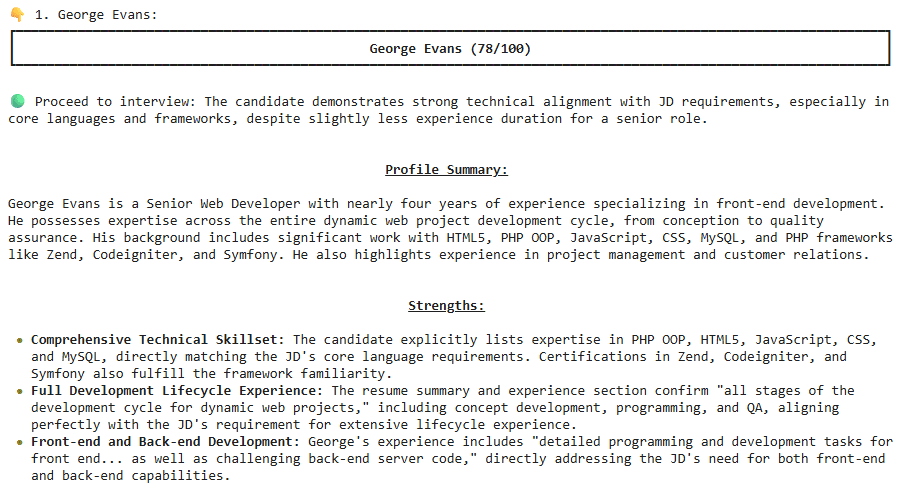
    ตัวอย่างผลลัพธ์:

    ในตัวอย่าง จะเห็นได้ว่า George Evans เหมาะที่จะเป็น Senior Web Developer


    😺 Code & Input Examples

    • ดูตัวอย่าง code ได้ที่ Google Colab
    • ดูตัวอย่าง JD และ resumes ได้ที่ JD & Resumes

    📃 References

  • 4 ขั้นตอนในการใช้ google-genai library เพื่อทำงานกับ Gemini API — ตัวอย่างการสร้างสูตรอาหารที่ไม่เหมือนใคร

    4 ขั้นตอนในการใช้ google-genai library เพื่อทำงานกับ Gemini API — ตัวอย่างการสร้างสูตรอาหารที่ไม่เหมือนใคร

    ในบทความนี้ เราจะมาดู 4 ขั้นตอนในการใช้งาน google-genai ซึ่งเป็น official library สำหรับทำงานกับ Gemini API ผ่านตัวอย่างการสร้างสูตรอาหารใน Google Colab กัน:

    1. Import packages
    2. Create client
    3. Create function
    4. Generate response

    ถ้าพร้อมแล้ว ไปเริ่มกันเลย


    1. 📦 Import Packages
    2. 🧑‍💼 Create Client
    3. 📲 Create Function
    4. 📬 Generate Response
      1. 🤖 Set Model
      2. 🧑‍💻 Set User Prompt
      3. 🛠️ Set Configuration
      4. 📖 Generate Response
      5. 🖨️ Print Response
    5. 😺 Google Colab
    6. 📃 References

    📦 Import Packages

    เริ่มแรก เราจะ import 4 packages ที่จำเป็น ได้แก่:

    FromFunction/ClassFor
    googlegenaiทำงานกับ Gemini API
    google.genai.typesGenerateContentConfigตั้งค่า Gemini
    google.colabuserdataเรียก API key จากเมนู Secrets ใน Google Colab
    pydanticBaseModelกำหนดโครงสร้างของ response จาก Gemini
    # Import packages
    
    # google-genai library
    from google import genai
    from google.genai.types import GenerateContentConfig
    
    # Secret key
    from google.colab import userdata
    
    # pydantic
    from pydantic import BaseModel
    

    🧑‍💼 Create Client

    ในขั้นที่ 2 เราจะสร้าง client สำหรับทำงานกับ Gemini API

    เพื่อความปลอดภัย เราจะเก็บ API key ไว้ในเมนู Secrets ของ Google Colab

    เราสามารถเพิ่ม API key ด้วยการ import ผ่านปุ่ม “Gemini API keys” หรือผ่านการเพิ่ม API key เองด้วยปุ่ม “Add new secret”:

    หลังสร้าง API key ใน Secrets แล้ว เราสามารถเรียกใช้ API key ได้ด้วย userdata.get() ซึ่งต้องการ 1 argument คือ ชื่อ secret:

    # Get API key
    my_api = userdata.get("GOOGLE_API_KEY")
    

    จากนั้น เราจะสร้าง client ด้วย genai.Client() ซึ่งต้องการ 1 argument คือ API key:

    # Create client
    client = genai.Client(api_key=my_api)
    

    Note:

    • ในกรณีที่เราไม่ห่วงความปลอดภัยของ API key เราสามารถใส่ API key ใน genai.Client() ได้โดยตรง เช่น genai.Client(api_key="g04821...")
    • เราสามารถสร้าง API key ได้ฟรี โดยไปที่ Google AI Studio และกด “Create API key”

    📲 Create Function

    ในขั้นที่ 3 เราจะสร้าง function สำหรับเรียกใช้ Gemini ซึ่งต้องการ 3 arguments:

    1. model: Gemini model ที่เราจะเรียกใช้
    2. user_prompt: กำหนด user prompt
    3. config: กำหนดการตั้งค่าต่าง ๆ ของ model

    โดยทั้ง 3 arguments จะอยู่ใน client.models.generate_content():

    # Create a function to get Gemini response
    def get_response(model, user_prompt, config):
    
        # Get response
        response = client.models.generate_content(
    
            # Set model
            model=model,
    
            # Set user prompt
            contents=user_prompt,
    
            # Set config
            config=config
        )
    
        # Return response
        return response.text
    

    📬 Generate Response

    ในขั้นที่ 4 เราจะ get response จาก Gemini โดยใช้ function ที่เราสร้างในขั้นที่ 3

    เนื่องจาก function ต้องการ 3 arguments เราจะต้องกำหนด 3 สิ่งนี้ก่อนที่จะสร้าง response ได้:

    1. Model
    2. User prompt
    3. Configuration

    .

    🤖 Set Model

    ในตัวอย่างนี้ เราจะใช้ model เป็น Gemini 2.5 Flash ซึ่งเราสามารถกำหนดได้ดังนี้:

    # Set model
    gemini_model = "gemini-2.5-flash"
    

    Note: ดูชื่อ model อื่น ๆ ได้ที่ Gemini Models

    .

    🧑‍💻 Set User Prompt

    สำหรับ user prompt เราสามารถกำหนดเป็น string ได้แบบนี้:

    # Set user prompt
    gemini_user_prompt = """
    Create a healthy Thai-inspired burger for one person.
    
    Protein: chicken or tofu
    Bun: whole-wheat if possible (or lettuce wrap)
    
    Deliver (match field names exactly):
    - `menu` (string)
    - `ingredient` (list of items with name, description, amount, unit)
    - `steps` (30-word strings)
    - `calorie_kcal` (float, total for the dish)
    """
    

    .

    🛠️ Set Configuration

    สำหรับ configuration เราสามารถตั้งค่า model ได้หลายค่า

    ในตัวอย่างนี้ เราจะเลือกกำหนด 3 ค่า ได้แก่:

    1. System prompt
    2. Temperature
    3. Output type and structure

    ค่าที่ 1. System prompt คือ prompt ที่กำหนดพฤติกรรมของ Gemini ในการตอบสนองต่อ user prompt ของเรา

    เราสามารถกำหนด system prompt เป็น string ได้แบบนี้:

    # Set system prompt
    system_prompt = """
    You are a highly experienced home cook specialising in healthy Thai-style food.
    
    Constraints:
    - Single-serving
    - Favour grilling/pan-searing over deep-frying
    - Keep ingredients common in Thai kitchens
    - Keep steps <=7
    - Include an approximate total calories for the whole dish
    - Keep language simple
    - Return JSON only that matches the given schema exactly (no extra fields)
    """
    

    ค่าที่ 2. Temperature มีค่าระหว่าง 0 และ 2 โดย:

    • 0 จะทำให้ response ตายตัว (deterministic) มากขึ้น
    • 2 จะทำให้ response สร้างสรรค์ (creative) มากขึ้น

    Note: ค่า default ของ temperature อยู่ที่ 1 (Generate content with the Gemini API in Vertex AI)

    ในตัวอย่าง เราจะกำหนด temperature เป็น 2 เพื่อให้ response มีความสร้างสรรค์สูงสุด:

    # Set temperature
    temp = 2
    

    ค่าที่ 3. สำหรับ output type และ structure เราจะกำหนดดังนี้:

    กำหนด type เป็น "application/json" เพื่อให้ response อยู่ในรูป JSON object:

    # Set output type
    output_type = "application/json"
    

    Note: ดู type อื่น ๆ ได้ที่ Structured output

    กำหนดโครงสร้างของ JSON object ด้วย class และ BaseModel:

    # Set output structure
    class Ingredient(BaseModel):
        name: str
        description: str
        amount: float
        unit: str
    
    class OutputStructure(BaseModel):
        menu: str
        ingredient: list[Ingredient]
        steps: list[str]
        calorie_kcal: float
    

    Note: ดูวิธีใช้ BaseModel ได้ที่ JSON Schema

    หลังกำหนด system prompt, temperature, และ output type กับ structure แล้ว ให้เรารวมค่าทั้งหมดไว้ใน GenerateContentConfig() แบบนี้:

    # Set configuration
    gemini_config = GenerateContentConfig(
    
        # Set system prompt
        system_instruction=system_prompt,
    
        # Set temperature
        temperature=temp,
    
        # Set response type
        response_mime_type=output_type,
    
        # Set response structure
        response_schema=OutputStructure
    )
    

    Note: ดูค่าอื่น ๆ ที่เรากำหนดใน GenerateContentConfig() ได้ที่ Content generation parameters

    .

    📖 Generate Response

    หลังจากกำหนด arguments แล้ว เราจะเรียกใช้ function เพื่อ get response แบบนี้:

    # Generate a recipe
    recipe = get_response(
    
        # Set model
        model=gemini_model,
    
        # Set user prompt
        user_prompt=gemini_user_prompt,
    
        # Set configuration
        config=gemini_config
    )
    

    .

    สุดท้าย เราจะดู response ด้วย print():

    # Print response
    print(recipe)
    

    ผลลัพธ์:

    {
      "menu": "Thai Chicken Burger",
      "ingredient": [
        {
          "name": "Ground Chicken",
          "description": "Lean ground chicken",
          "amount": 150.0,
          "unit": "g"
        },
        {
          "name": "Whole-wheat Burger Bun",
          "description": "Standard size",
          "amount": 1.0,
          "unit": "unit"
        },
        {
          "name": "Lime Juice",
          "description": "Freshly squeezed",
          "amount": 1.0,
          "unit": "tablespoon"
        },
        {
          "name": "Fish Sauce",
          "description": "Thai fish sauce",
          "amount": 1.0,
          "unit": "tablespoon"
        },
        {
          "name": "Fresh Ginger",
          "description": "Grated",
          "amount": 1.0,
          "unit": "teaspoon"
        },
        {
          "name": "Garlic",
          "description": "Minced",
          "amount": 1.0,
          "unit": "clove"
        },
        {
          "name": "Cilantro",
          "description": "Fresh, chopped",
          "amount": 2.0,
          "unit": "tablespoons"
        },
        {
          "name": "Green Onion",
          "description": "Chopped",
          "amount": 1.0,
          "unit": "tablespoon"
        },
        {
          "name": "Red Chilli",
          "description": "Finely minced (optional)",
          "amount": 0.5,
          "unit": "teaspoon"
        },
        {
          "name": "Lettuce Leaf",
          "description": "Fresh, crisp",
          "amount": 1.0,
          "unit": "large"
        },
        {
          "name": "Cucumber",
          "description": "Sliced thinly",
          "amount": 3.0,
          "unit": "slices"
        },
        {
          "name": "Cooking Oil",
          "description": "Any neutral oil",
          "amount": 1.0,
          "unit": "teaspoon"
        }
      ],
      "steps": [
        "Combine ground chicken with fish sauce, lime juice, grated ginger, minced garlic, chopped cilantro, and green onion in a bowl. Mix thoroughly.",
        "Form the seasoned chicken mixture into a single, uniform burger patty. If using chilli, incorporate it now.",
        "Heat cooking oil in a non-stick pan over medium heat. Cook the chicken patty for 5-7 minutes per side, or until it is thoroughly cooked through.",
        "While the patty cooks, lightly toast the whole-wheat burger bun in a dry pan or toaster until golden brown.",
        "Assemble your burger: Place the cooked chicken patty on the bottom half of the toasted bun. Top with fresh lettuce and cucumber slices.",
        "Complete the burger with the top bun. Serve immediately and enjoy your healthy Thai-inspired meal."
      ],
      "calorie_kcal": 450.0
    }
    

    เท่านี้ก็จบ flow การทำงานกับ Gemini API ด้วย google-genai library แล้ว


    😺 Google Colab

    ดูตัวอย่าง code ทั้งหมดได้ที่ Google Colab


    📃 References

  • สรุปแนวทางการทำงานกับ AI: Mindset และเทคนิคการเขียน Prompt เพื่อการทำงานร่วมกับ AI อย่างมีประสิทธิภาพ

    สรุปแนวทางการทำงานกับ AI: Mindset และเทคนิคการเขียน Prompt เพื่อการทำงานร่วมกับ AI อย่างมีประสิทธิภาพ

    ในช่วงต้นปีที่ผ่านมา ผมได้มีโอกาสแชร์วิธีการทำงานกับ AI ให้กับคนในบริษัท โดยเนื้อหาส่วนใหญ่ไปที่การใช้ prompt เป็นหลัก และเป็นการตกตะกอนความรู้ AI ที่สะสมจากแหล่งต่าง ๆ

    เช่น:

    รวมไปถึงการใช้งาน AI ในการทำงานด้วยตัวเอง .

    ในบทความนี้ ผมจะชวนไปดูแนวทางการทำงานกับ AI ซึ่งเป็นเนื้อหาต่อยอดจากสิ่งที่ผมได้แชร์ไปเมื่อต้นปี

    โดยบทความจะแบ่งเป็น 5 ส่วน:

    1. What is AI?
    2. Mindset ในการทำงานกับ AI
    3. Prompting frameworks: โครงการเขียน prompt ง่าย ๆ
    4. Prompting techniques: เทคนิคการช่วย AI คิดให้ตอบโจทย์
    5. Tips: เคล็ดลับเพิ่มเติม

    ถ้าพร้อมแล้วไปเริ่มกันเลย


    1. 1️⃣ What Is AI?
    2. 2️⃣ Mindset ในการทำงานกับ AI
      1. 👌 ข้อที่ 1. AI Is Okay
      2. 🙆 ข้อที่ 2. AI as a Colleague
      3. ➿ ข้อ 3. Human in the Loop
      4. 🗝️ สรุป Mindset การทำงานกับ AI
    3. 3️⃣ Prompting Frameworks
      1. 🍚 RICE: Input Structure
      2. 🧂 SALT: Output Structure
      3. 🗝️ สรุป Prompting Frameworks
    4. 4️⃣ Prompting Techniques
      1. 🥃 n-Shot
      2. 💭 COT
      3. 🗝️ สรุป Prompting Techniques
    5. 5️⃣ Tips
      1. #️⃣ Annotation
      2. 😡 EmotionPrompt
      3. 🗑️ GIGO
      4. 🗝️ สรุป Tips ในการทำงานกับ AI

    1️⃣ What Is AI?

    AI หรือ artificial intelligence หมายถึง โปรแกรมคอมพิวเตอร์ที่สามารถทำงานได้เหมือนมนุษย์ เช่น:

    • คิดวิเคราะห์
    • ใช้เหตุผล
    • โต้ตอบด้วยภาษาธรรมชาติ
    • สร้างงานศิลป์

    เมื่อพูดถึง AI อีกคำที่มักจะได้ยิน คือ machine learning

    แม้จะมีความหมายคล้ายกัน แต่ machine learning เป็น subset และเป็นมันสมองของ AI

    โดยนิยามของ machine learning คือ การเขียนโปรแกรมที่ทำให้คอมพิวเตอร์เรียนรู้จากข้อมูลได้ด้วยตัวเอง โดยไม่ต้องมีมนุษย์คอยกำกับ (Arthur Samuel)


    2️⃣ Mindset ในการทำงานกับ AI

    ในการจะเริ่มทำอะไร เราควรเริ่มจากตัวเราก่อน โดย mindset ที่ควรมีในการทำงานกับ AI มีอยู่ 3 ข้อ

    .

    👌 ข้อที่ 1. AI Is Okay

    ก่อนอื่น เราควรจะเปิดใจยอมรับ AI

    AI เป็นสิ่งใหม่ที่หลายคนอาจยังไม่มีความเข้าใจอย่างลึกซึ้ง แต่ยังไง AI ก็เป็นเพียงเครื่องมืออย่างหนี่งในการทำงาน

    เมื่อเราเปิดใจยอมรับ และทำความเข้าใจจุดแข็งและข้อจำกัดของ AI เราก็จะสามารถใช้งาน AI ได้อย่างมีประสิทธิภาพ และตอบโจทย์การทำงานของเรา

    Note: ผมหยิบคำว่า “AI is okay” มาจากผู้บริหารในบริษัทอีกที 🙏

    .

    🙆 ข้อที่ 2. AI as a Colleague

    ข้อนี้อาจจะฟังดูขัดกับข้อแรกที่มองว่า AI เป็นเครื่องมือ

    AI เป็นเทคโนโลยีปฏิวัติโลก เช่นเดียวกับไฟ เครื่องจักรไอน้ำ และอินเทอร์เน็ต

    แต่ AI มีความแตกต่างคือ เป็นเครื่องมือที่มีความ “ฉลาด” ใกล้เคียงกับมนุษย์

    และด้วยความฉลาดนี้ ทำให้เราสามารถมองว่า AI เป็นมากกว่าเครื่องมือ หรือเป็นเพื่อนร่วมงานของเราได้

    การมอง AI แบบนี้ ไม่ได้มีผลต่อแค่ความคิด แต่ส่งผลในทางปฏิบัติด้วย

    เช่น ถ้าเราคิดไม่ออกว่าจะสั่งงาน AI ยังไง ให้ลองนึกว่า ถ้า AI เป็นคน เรากำลังจะพูดยังไง

    เราอาจจะพูดว่า:

    ช่วยทำรายงานให้หน่อย

    เช่นเดียวกับคน ถ้าเราไม่มีข้อมูล การเขียนรายงานจะเริ่มไม่ได้ ซึ่งเราก็อาจจะเห็น AI ตอบกลับเหมือนกับเพื่อนร่วมงานของเรา:

    อยากให้ช่วยเขียนรายงานเรื่องอะไร? ต้องเขียนเกี่ยวกับอะไรบ้าง? ขอข้อมูลหน่อย

    แล้วเราก็จะต้องส่งข้อมูลเพิ่มให้ก่อน AI จะทำงานได้

    จากตัวอย่าง เราจะเห็นว่า การทำงานกับ AI มีความเหมือนกันกับการทำงานกับคน ดังนั้น การมองว่า AI เป็นเพื่อนร่วมงานจะช่วยเป็นแนวทางในการทำงานกับ AI ให้เราได้

    .

    ➿ ข้อ 3. Human in the Loop

    สุดท้ายและเป็นข้อที่สำคัญ คือ เราควรทำงาน “ร่วม” กับ AI

    อย่างที่เราเห็นว่า AI เป็นเหมือนเพื่อนร่วมงาน และเช่นเดียวกับเพื่อนร่วมงานที่ทำงานผิดพลาดได้ AI ก็เช่นกัน

    ถ้าเราทำงานกับเพื่อน แล้วนำงานของเพื่อนไปใช้ แล้วเกิดข้อผิดพลาด เราอาจจะชี้นิ้วไปที่เพื่อนได้ แต่เราในฐานะเจ้าของงาน ก็ต้องรับผิดชอบในผลที่เกิดขึ้นด้วย

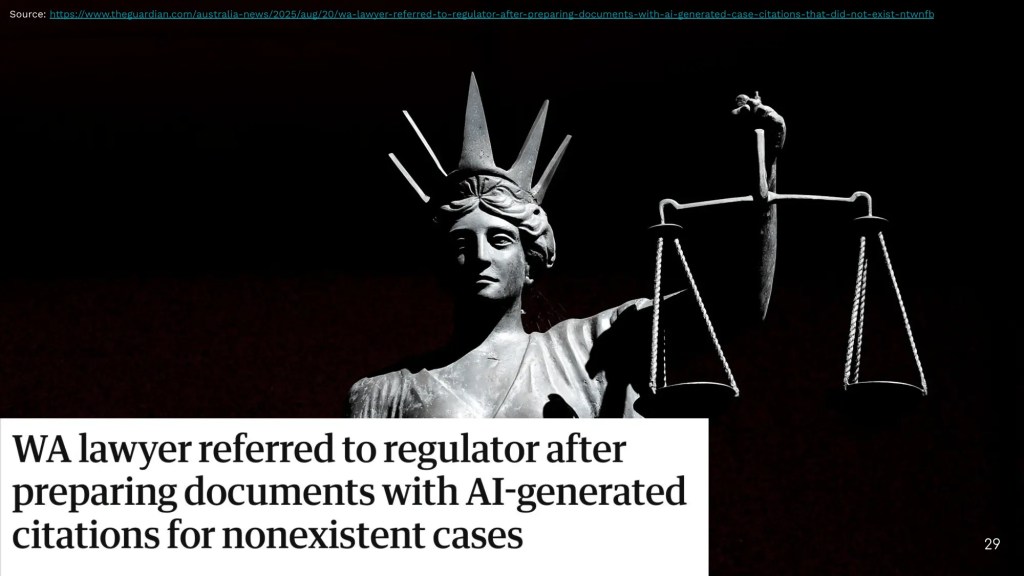
    ดูตัวอย่างจากกรณีของทนายความในออสเตรเลีย ที่นำเอกสารจาก AI ไปใช้ในชั้นศาล และถูกเรียกตรวจสอบวินัย เพราะศาลพบว่าข้อมูลในเอกสารไม่เป็นความจริง

    แม้ว่าทนายความจะยืนยันว่า ทำไปเพราะรู้เท่าไม่ถึงการณ์เกี่ยวกับการทำงานของ AI แต่ต้องรับผิดชอบผลกระทบที่ตามมาอยู่ดี

    ดังนั้น เพื่อแสดงออกถึงความรับผิดชอบในงาน และป้องกันผลกระทบจากความผิดพลาดของ AI เราควรทำงานร่วมกับ AI โดยคอยตรวจสอบและกำกับงานของ AI ก่อนนำไปใช้งานต่อ

    .

    🗝️ สรุป Mindset การทำงานกับ AI

    1. AI is okay: เปิดใจยอมรับ AI และทำความเข้าใจ AI ในฐานะเครื่องมือตัวหนึ่ง
    2. AI as a colleague: มองและทำงานกับ AI เหมือนเป็นเพื่อนร่วมงานคนหนึ่ง
    3. Human in the loop: ทำงานร่วมกับ AI โดยคอยตรวจสอบและกำกับการทำงานของ AI ก่อนนำงานไปใช้ต่อ

    3️⃣ Prompting Frameworks

    เราดู mindset ที่ควรมีในการทำงานกับ AI กันมาแล้ว ใน section นี้ เรามาดู prompting framework หรือแนวทางในการจัดโครงสร้าง prompt กัน

    เพื่อให้เข้าใจตรงกัน prompt หมายถึง คำสั่งที่เราให้กับ AI เพื่อให้ AI ทำงานบางอย่างให้กับเรา (W3Schools)

    Prompt มีหลากหลายรูปแบบ เช่น ข้อความ รูปภาพ วิดีโอ แต่แบบที่เราใช้กันบ่อยที่สุด คือ ข้อความ

    ทั้งนี้ frameworks ในการขึ้นโครง prompt มีมากมาย อย่างที่เห็นได้ในเว็บไซต์ของ Juuzt AI ที่ระบุไว้มากถึง 57 frameworks

    แต่ละ frameworks มีข้อดีและข้อเสียแตกต่างกันไป รวมทั้งมีการใช้งานที่ไม่เหมือนกัน เราควรศึกษาและเลือก framework ที่เหมาะกับเป้าหมายของงานของเรา

    สำหรับบทความนี้ ผมจะแนะนำ 2 frameworks ที่สามารถใช้กับหลากหลายหน้างาน:

    1. RICE
    2. SALT

    เหตุผลหนึ่งที่ผมเลือกนำเสนอ RICE และ SALT ก็เพราะ:

    1. RICE ใช้กำกับ input
    2. SALT ใช้กำกับ output

    ทำให้เมื่อใช้ทั้ง 2 frameworks ร่วมกัน เราก็จะได้ prompt ที่ครอบคลุมทั้งต้นทางและปลายทาง

    .

    🍚 RICE: Input Structure

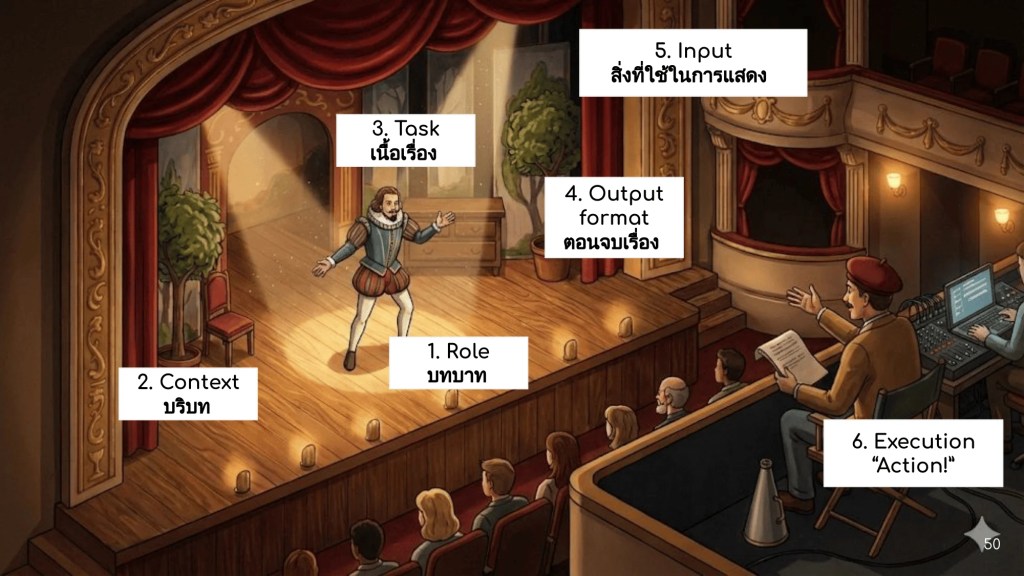
    RICE เป็น framework ที่ระบุว่า เราควรกำหนด input ให้กับ 4 อย่าง:

    1. Role: บทบาทของ AI ในการทำงาน เพื่อให้ AI นึกข้อมูลที่เกี่ยวข้องมาใช้งาน
    2. Instruction: คำชี้แจงในการทำงาน เพื่อให้ AI รู้ว่าต้องทำอะไร
    3. Context: บริบทของงาน เพื่อให้เป็นข้อมูลเพิ่มเติมในการทำงาน
    4. Example: ตัวอย่างงาน เพื่อเป็นแนวทางในการทำงานให้ตรงกับภาพที่เราคาดหวัง

    เรามาดูตัวอย่างการใช้ RICE กัน โดยเปรียบเทียบกับการ prompt อย่างง่าย ๆ

    เช่น เราอยากให้ AI ช่วยวางแผนเที่ยวปีใหม่ให้กับเรา:

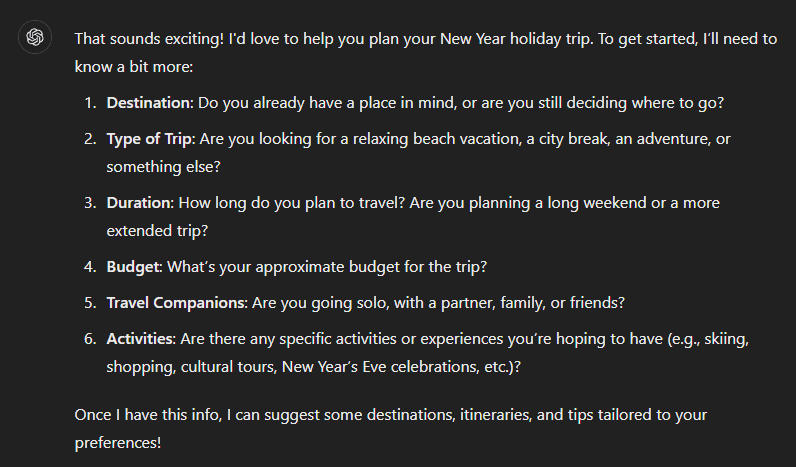
    ถ้าไม่ใช้ RICE:

    Help me plan for a New Year holiday trip.

    ผลลัพธ์จาก ChatGPT:

    จะเห็นว่า ChatGPT ต้องการข้อมูลเพิ่มเติม และเรายังไม่ได้คำตอบที่ต้องการ

    ถ้าใช้ RICE:

    [ROLE] You are a travel planner helping me organise a New Year holiday trip. [INSTRUCTION] Suggest a affordable 3-day itinerary for a relaxing vacation.

    [CONTEXT] I enjoy nature and fresh air, and I like to avoid crowded tourist spots. [EXAMPLE] Examples of places I like are Chiang Mai and Nan.

    ผลลัพธ์ จาก ChatGPT:

    จะเห็นว่า เมื่อใช้ RICE เราจะได้ผลลัพธ์ที่ละเอียด อ่านง่าย ตอบโจทย์ และลงมือทำได้ทันที

    Note: ในการเขียน prompt เราสามารถจัดลำดับ RICE ได้เอง (เช่น example มาก่อน instruction) แต่ขอให้อ่านแล้วฟังดูสมเหตุสมผลกัน

    .

    🧂 SALT: Output Structure

    SALT ช่วยเรากำหนดลักษณะ 4 อย่างของ output:

    1. Style: รูปแบบคำตอบที่ต้องการ เช่น เขียนเป็น paragraph หรือ bullet point
    2. Audience: ผู้รับสาร เพื่อให้ AI ปรับการใช้คำและประโยคให้เหมาะสม
    3. Length: ความยาวของคำตอบ
    4. Tone: การใช้ภาษา เช่น เป็นทางการ หรือเป็นกันเอง

    เรามาดูตัวอย่างกัน เช่น เราอยากเข้าใจคำว่า API (application programming interface):

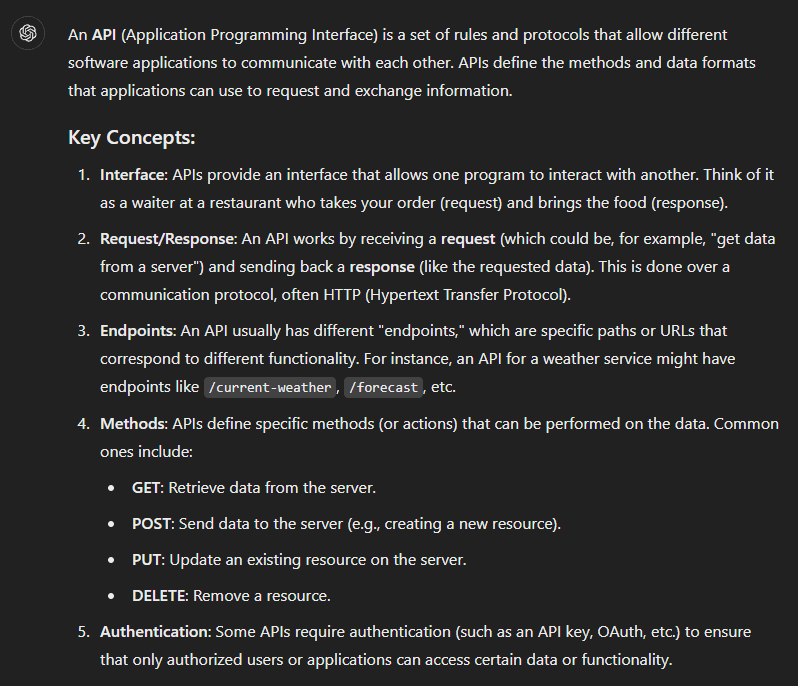
    ไม่ใช้ SALT:

    Explain API

    ผลลัพธ์จาก ChatGPT:

    จะเห็นว่า ผลลัพธ์มีเนื้อหาที่อ่านง่าย แต่อาจต้องใช้เวลาในการทำความเข้าใจ

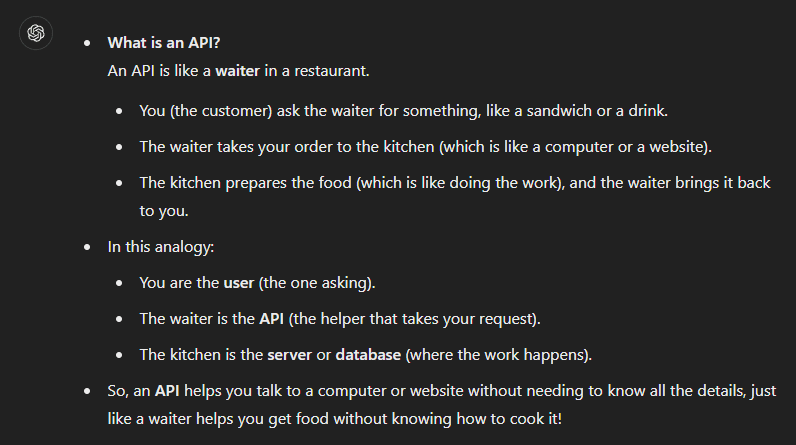
    เราสามารถใช้ SALT เพื่อช่วยได้:

    Explain API in a [STYLE] bullet-point format for [AUDIENCE] a 10-year-old, using an analogy. Length [LENGTH] around 100-150 words. Use [TONE] friendly tone.

    ผลลัพธ์จาก ChatGPT:

    จะเห็นว่า เราจะได้ผลลัพธ์ในแบบที่เรากำหนด ซึ่งช่วยให้อ่านและทำความเข้าใจได้ง่ายขึ้นกว่าก่อนหน้านี้

    .

    🗝️ สรุป Prompting Frameworks

    เราทำความรู้จัก 2 prompting frameworks ที่ใช้ทำงานทั่วไปได้:

    1. RICE: กำหนด input ด้วย role, instruction, context, example
    2. SALT: กำหนด output ด้วย style, audience, length, tone

    4️⃣ Prompting Techniques

    Prompting techniques เป็นกลยุทธ์ในการช่วย AI กำหนดขั้นตอนการคิดและการทำงาน และสามารถใช้ควบคู่กับ prompting framework เพื่อทำให้งานออกมามีคุณภาพภาพมากขึ้นได้

    ในบทความนี้ เราจะมาทำความรู้จักกับ 2 techniques พื้นฐานกัน ได้แก่:

    1. n-shot technique
    2. Chain-of-thought (COT) technique

    .

    🥃 n-Shot

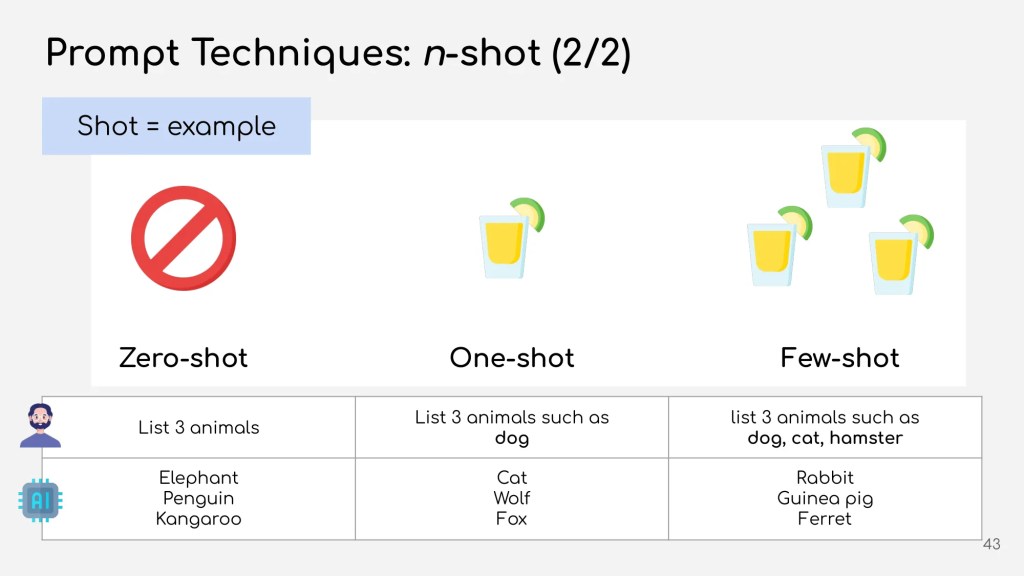
    Shot ในการเขียน prompt หมายถึง ตัวอย่าง

    n-shot เป็นการเขียน prompt โดยเปลี่ยนจำนวนตัวอย่าง:

    N-ShotNumber of Shots
    Zero-shot0
    One-shot1
    Few-shot≥2

    เรามาลองดูผลของจำนวนตัวอย่างต่อผลลัพธ์กัน:

    n-ShotPromptChatGPT
    Zero-shotList 3 animals– Elephant
    – Penguin
    – Kangaroo
    One-shotList 3 animals such as dog– Cat
    – Wolf
    – Fox
    Few-shotList 3 animals such as dog, cat, hamster– Rabbit
    – Guinea pig
    – Ferret

    จะเห็นได้ว่า คำตอบของ ChatGPT จะเปลี่ยนไปเรื่อย ๆ โดยยิ่ง shot มากขึ้น ผลลัพธ์ก็จะยิ่งเหมือนกับ shot มากขึ้น:

    • Zero-shot: เป็นสัตว์ป่าทั้งหมด
    • One-shot: มีทั้งสัตว์ป่าและสัตว์เลี้ยง
    • Few-shot: สัตว์เลี้ยงทั้งหมด

    ดังนั้น เราสามารถใช้ n-shot ในการกำหนดผลลัพธ์ได้ โดย:

    • ต้องการผลลัพธ์ที่สร้างสรรค์หรือแปลกใหม่: ใช้ shot น้อย
    • ต้องการผลลัพธ์ที่ตรงกับสิ่งที่เรามีอยู่แล้ว: ใช้ shot เยอะ

    .

    💭 COT

    COT เป็น technique ที่บอกขั้นตอนในการคิดของ AI เพื่อให้มั่นใจว่า AI จะทำงานออกมาถูกต้อง

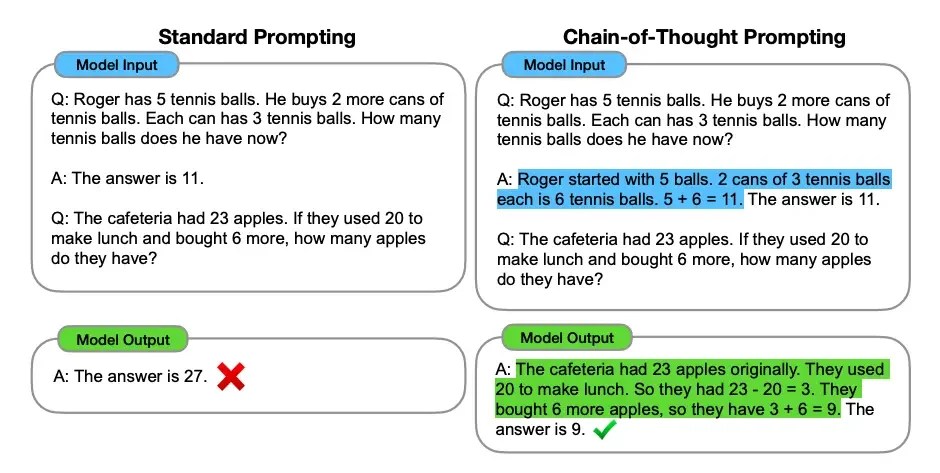
    ยกตัวอย่างจากงานต้นฉบับของ Wei et al. (2022):

    Standard vs CoT prompt from Wei et al. (2022) (CC BY 4.0)

    จากรูป จะเห็นว่า AI ในด้านซ้ายตอบผิด เพราะมีเพียงตัวอย่างโจทย์และคำตอบให้

    ในทางตรงกันข้าม prompt ในด้านขวามือ ซึ่งใช้ COT technique คือ ให้ตัวโจทย์ อธิบายการคิดเลข และเฉลยคำตอบ ช่วยให้ ChatGPT ตอบคำถามได้ถูกต้อง

    COT เหมาะกับงานที่มีความซับซ้อน (มีกระบวนการทำงานหลายขั้นตอน) ส่วนในงานง่าย ๆ (เช่น ถามว่าเมืองหลวงของไทยคืออะไร) เราสามารถใช้ prompt ทั่วไปได้

    .

    🗝️ สรุป Prompting Techniques

    ใน section นี้ เราทำความรู้จัก 2 prompting techniques ในการกำกับกระบวนการทำงานของ AI:

    1. n-shot technique: กำกับผ่านตัวอย่าง
    2. COT technique: กำกับผ่านขั้นตอนการคิด

    Note: ดู techniques อื่น ๆ เพิ่มเติมได้ที่ Prompting Techniques


    5️⃣ Tips

    สำหรับส่งท้ายบทความนี้ เรามาดู 3 เคล็ดลับเพิ่มเติมในการทำงานกับ AI กัน:

    1. Annotation
    2. EmotionPrompt
    3. Garbage in, garbage out (GIGO)

    .

    #️⃣ Annotation

    Prompt ของเราเป็นเหมือนเอกสารที่ AI อ่านก่อนไปทำงานให้เรา

    ถ้าเอกสารของเราอ่านไม่รู้เรื่อง AI ก็อาจจะทำงานผิดพลาดได้

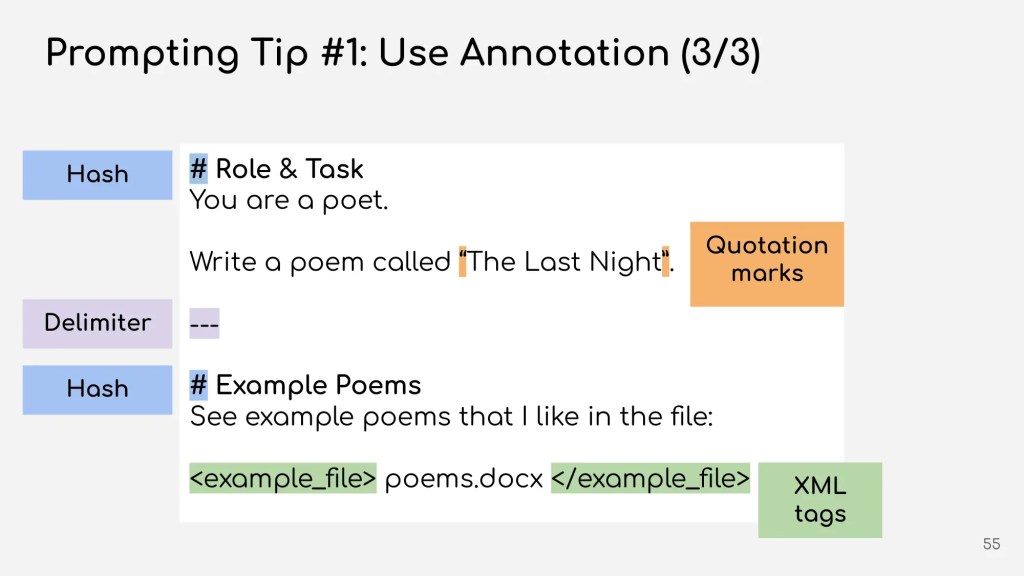
    เพื่อช่วยให้ AI เข้าใจ เราสามารถใช้ annotation หรือเครื่องหมายต่าง ๆ กำกับ prompt ของเราได้

    ถ้านึกภาพไม่ออก ให้มองว่า annotation เป็นเหมือนการจัดหน้าเอกสารของเรา ซึ่งเราสามารถทำได้ดังนี้:

    NameUsageExample
    Markdownระบุหัวข้อ# Header 1
    ## Header 2
    ### Header 3
    Quotation marksเน้นข้อความ“n-shot technique”
    Delimiterแบ่งตอนSection 1

    Section 2
    XML tagติดแท็กข้อความ<file>example.docx</file>

    มาดูตัวอย่างการใช้งานกัน เช่น เราต้องการให้ ChatGPT เขียนกลอนให้

    เราอาจเขียน prompt ได้แบบนี้:

    You are a poet. Write a poem called The Last Night. See example poems that I like in the file: poems.docx

    เราสามารถใช้ annotation ได้แบบนี้ เพื่อให้ AI อ่าน prompt ได้ง่ายขึ้น:

    # Role & Task You are a poet.

    Write a poem called “The Last Night”.


    # Example Poems See example poems that I like in the file:

    <example_file>poems.docx</example_file>

    • ใช้ # เพื่อกำหนดหัวข้อ
    • ใช้ "" เพื่อเน้นชื่อเฉพาะของบทกลอน
    • ใช้ --- เพื่อแบ่ง prompt เป็น 2 sections (ตามหัวข้อ)
    • ใช้ <></> เพื่อระบุว่า poems.doc เป็นไฟล์ตัวอย่าง

    .

    😡 EmotionPrompt

    เพราะ AI เรียนรู้การทำงานจากมนุษย์ เราสามารถใส่คำแสดงอารมณ์เข้าไปใน prompt เพื่อส่งสารบางอย่างให้กับ AI ได้

    ถ้าเปรียบเทียบกับคน คือ แทนที่จะบอกว่า:

    ช่วยทำรายงานให้หน่อย

    เป็น

    รีบทำรายงานตอนนี้ให้หน่อย ด่วนที่สุด

    ตัวอย่างเช่น:

    ใส่ความเร่งด่วน:

    This is extremely urgent! Summarise this article as quickly as possible, focusing only on the key points.

    ใส่ความตื่นเต้น:

    Write an exciting social media post that builds anticipation for our upcoming event! Make readers feel thrilled and eager to attend.

    ใส่ความสำคัญ:

    Write an important and professional email explaining the new company policy. Emphasise its significance and ensure employees understand its impact on their roles.

    อ่านเพิ่มเติมเกี่ยวกับ EmotionPrompt ได้ที่ Large Language Models Understand and Can be Enhanced by Emotional Stimuli

    .

    🗑️ GIGO

    สุดท้าย จำไว้ว่า AI เป็นสิ่งที่ทำงานกับข้อมูล ดังนั้น เพื่อให้ผลลัพธ์ออกมาดี เราควรให้ข้อมูลที่ถูกต้องและมีคุณภาพกับ AI

    ถ้าเราให้ข้อมูลที่ไม่ดีแล้ว AI ก็จะทำงานผิดพลาด หรือให้ผลลัพธ์ที่ใช้ไม่ได้ออกมา (ขยะ)

    เหมือนคำที่ว่า garbage in, garbage out

    .

    🗝️ สรุป Tips ในการทำงานกับ AI

    ใน section สุดท้าย เราได้เรียนรู้ 3 เคล็ดลับเพิ่มเติมในการทำงานกับ AI:

    1. Annotation: จัด prompt ให้อ่านง่ายด้วยเครื่องหมายต่าง ๆ
    2. EmotionPrompt: ใส่อารมณ์ลงใน prompt
    3. GIGO: AI ทำงานด้วยข้อมูล คุณภาพของผลลัพธ์ขึ้นอยู่กับข้อมูลที่เราให้กับ AI